

HBase-1.0.1学习笔记(二)HBase Shell工具使用
admin
2023-02-08 01:00:03
0次
鲁春利的工作笔记,好记性不如烂笔头
hbase(main):017:0> create 't_domain', 'c_domain'
0 row(s) in 0.4520 seconds

=> Hbase::Table - t_domain
通过HDFS查看
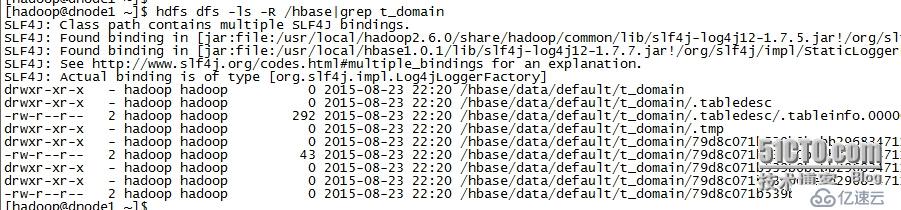
HBase中行键(RowKey)是表中唯一的,并且按照字典排序由低到高存储在表中的。
hbase(main):018:0> put 't_domain', 'row1', 'c_domain:name', 'baidu.com'
0 row(s) in 0.6830 seconds

hbase(main):019:0> put 't_domain', 'row2', 'c_domain:name', 'sina.com'
0 row(s) in 0.0870 seconds

hbase(main):020:0> put 't_domain', 'row3', 'c_domain:name', 'mycms.com'
0 row(s) in 0.0100 seconds

hbase(main):021:0> put 't_domain', 'row10', 'c_domain:name', 'www.163.com'
0 row(s) in 0.0280 seconds

hbase(main):022:0> put 't_domain', 'row21', 'c_domain:name', 'www.51cto.com'
0 row(s) in 0.0240 seconds

hbase(main):023:0> scan 't_domain'
ROW                            COLUMN+CELL
 row1                          column=c_domain:name, timestamp=1440340474441, value=baidu.com
 row10                         column=c_domain:name, timestamp=1440340536382, value=www.163.com
 row2                          column=c_domain:name, timestamp=1440340492582, value=sina.com
 row21                         column=c_domain:name, timestamp=1440340550534, value=www.51cto.com
 row3                          column=c_domain:name, timestamp=1440340518003, value=mycms.com
5 row(s) in 0.1350 seconds
HBase Shell工具:
选择一台HBase集群的节点(建议选择客户端节点),执行命令bin/hbase shell
看到如下命令说明已进入hbase shell环境,执行help命令可以查看帮助信息:
[hadoop@dnode1 bin]$ hbase shell HBase Shell; enter 'help' for list of supported commands. Type "exit " to leave the HBase Shell Version 0.98.1-hadoop2, r1583035, Sat Mar 29 17:19:25 PDT 2014 hbase(main):001:0> help HBase Shell, version 0.98.1-hadoop2, r1583035, Sat Mar 29 17:19:25 PDT 2014 Type 'help "COMMAND"', (e.g. 'help "get"' -- the quotes are necessary) for help on a specific command. Commands are grouped. Type 'help "COMMAND_GROUP"', (e.g. 'help "general"') for help on a command group. COMMAND GROUPS: Group name: general Commands: status, table_help, version, whoami Group name: ddl Commands: alter, alter_async, alter_status, create, describe, disable, disable_all, drop, drop_all, enable, enable_all, exists, get_table, is_disabled, is_enabled, list, show_filters Group name: namespace Commands: alter_namespace, create_namespace, describe_namespace, drop_namespace, list_namespace, list_namespace_tables Group name: dml Commands: append, count, delete, deleteall, get, get_counter, incr, put, scan, truncate, truncate_preserve Group name: tools Commands: assign, balance_switch, balancer, catalogjanitor_enabled, catalogjanitor_run, catalogjanitor_switch, close_region, compact, flush, hlog_roll, major_compact, merge_region, move, split, trace, unassign, zk_dump Group name: replication Commands: add_peer, disable_peer, enable_peer, list_peers, list_replicated_tables, remove_peer, set_peer_tableCFs, show_peer_tableCFs Group name: snapshot Commands: clone_snapshot, delete_snapshot, list_snapshots, rename_snapshot, restore_snapshot, snapshot Group name: security Commands: grant, revoke, user_permission Group name: visibility labels Commands: add_labels, clear_auths, get_auths, set_auths # 查看集群状态 hbase(main):002:0> status 3 servers, 0 dead, 3.0000 average load # 该集群有3台RegionServer,没有”死掉“的RegionServer中,平均每台有3个Region。 # HBase版本命令 hbase(main):003:0> version 0.98.1-hadoop2, r1583035, Sat Mar 29 17:19:25 PDT 2014 # 返回值为由逗号分割的三个部分,0.98.1-hadoop2表示HBase版本号,r1583035表示修订版本,第三部分为编译HBase的时间。 # 查看ddl命令组的帮助 hbase(main):006:0> help 'ddl' Command: alter Alter a table. Depending on the HBase setting ("hbase.online.schema.update.enable"), the table must be disabled or not to be altered (see help 'disable'). You can add/modify/delete column families, as well as change table configuration. Column families work similarly to create; column family spec can either be a name string, or a dictionary with NAME attribute. Dictionaries are described on the main help command output. For example, to change or add the 'f1' column family in table 't1' from current value to keep a maximum of 5 cell VERSIONS, do: hbase> alter 't1', NAME => 'f1', VERSIONS => 5 You can operate on several column families: hbase> alter 't1', 'f1', {NAME => 'f2', IN_MEMORY => true}, {NAME => 'f3', VERSIONS => 5} // 略 # 示例: hbase(main):033:0> create 'tb1', {NAME => 'cf1', VERSIONS => 5} 0 row(s) in 20.1040 seconds => Hbase::Table - tb1 hbase(main):035:0> create 'tb2', {NAME => 'cf1'}, {NAME => 'cf2'}, {NAME => 'cf3'} 0 row(s) in 19.1130 seconds => Hbase::Table - tb2 # 上述命令的简化版本如下 hbase(main):036:0> create 'tb3', 'cf1' 0 row(s) in 6.8610 seconds => Hbase::Table - tb3 hbase(main):037:0> create 'tb4', 'cf1', 'cf2', 'cf3' # 三个列族 0 row(s) in 6.2010 seconds hbase(main):045:0> list TABLE httptable tb1 tb2 tb3 tb4 testtable 6 row(s) in 2.3430 seconds => ["httptable", "tb1", "tb2", "tb3", "tb4", "testtable"] hbase(main):046:0> # 说明: # => 表示赋值,如{NAME = 'cf1'}; # 字符串必须使用单引号引起来,如'cf2'; # 如果创建表时需要指定列族的特定属性,需要花括号括起来,如{NAME='cf1', VERSIONS=5} hbase(main):025:0> help 'namespace' Command: alter_namespace Alter namespace properties. To add/modify a property: hbase> alter_namespace 'ns1', {METHOD => 'set', 'PROERTY_NAME' => 'PROPERTY_VALUE'} To delete a property: hbase> alter_namespace 'ns1', {METHOD => 'unset', NAME=>'PROERTY_NAME'} // 略 hbase(main):048:0> create_namespace 'ns1' 0 row(s) in 4.7320 seconds hbase(main):049:0> list_namespace NAMESPACE default hbase ns1 3 row(s) in 11.0490 seconds hbase(main):050:0> create 'ns1:tb5', 'cf' # 列族cf 0 row(s) in 12.0680 seconds => Hbase::Table - ns1:tb5 hbase(main):051:0> list_namespace_tables 'ns1' TABLE tb5 1 row(s) in 2.1220 seconds hbase(main):052:0> # 查看DML命令的帮助 hbase(main):026:0> help 'dml' hbase(main):052:0> put 'ns1:tb5', 'baidu.com', 'cf:owner', 'BeiJingBaiduCo.' 0 row(s) in 0.4400 seconds hbase(main):053:0> put 'ns1:tb5', 'baidu.com', 'cf:ipstr', '61.135.169.121' 0 row(s) in 1.1640 seconds hbase(main):054:0> put 'ns1:tb5', 'baidu.com', 'cf:reg_date', '19990415' 0 row(s) in 0.3530 seconds hbase(main):055:0> put 'ns1:tb5', 'baidu.com', 'cf:address', '北京' 0 row(s) in 2.7540 seconds hbase(main):056:0> put 'ns1:tb5', 'alibaba.com', 'cf:ipstr', '205.204.101.42' 0 row(s) in 1.2040 seconds # 统计表的行数 hbase(main):064:0> count 'tb5' ERROR: Unknown table tb5! hbase(main):066:0> count 'ns1:tb5' 2 row(s) in 0.3110 seconds => 2 hbase(main):067:0> count 'ns1:tb5', INTERVAL => 100000 2 row(s) in 0.0170 seconds => 2 # 单行读 hbase(main):068:0> get 'ns1:tb5', 'baidu.com' COLUMN CELL cf:address timestamp=1441006344446, value=\xE5\x8C\x97\xE4\xBA\xAC cf:ipstr timestamp=1441006329572, value=61.135.169.121 cf:owner timestamp=1441006321284, value=BeiJingBaiduCo. cf:reg_date timestamp=1441006335701, value=19990415 4 row(s) in 0.1150 seconds hbase(main):074:0> get 'ns1:tb5', 'baidu.com', 'cf:ipstr' COLUMN CELL cf:ipstr timestamp=1441006329572, value=61.135.169.121 1 row(s) in 0.0200 seconds hbase(main):075:0> # 如果COLUMN未指定column family则会提示错误 # ERROR: Unknown column family! Valid column names: cf:* hbase(main):076:0> get 'ns1:tb5', 'baidu.com', {COLUMN => 'cf:reg_date'} COLUMN CELL cf:reg_date timestamp=1441006335701, value=19990415 1 row(s) in 0.0170 seconds hbase(main):077:0> # 扫描表 scan 'hbase:meta' scan 'hbase:meta', {COLUMNS => 'info:regioninfo'} # 删除列 hbase(main):004:0> delete 'ns1:tb5', 'baidu.com', 'cf:address' 0 row(s) in 0.2260 seconds hbase(main):005:0> get 'ns1:tb5', 'baidu.com' COLUMN CELL cf:ipstr timestamp=1441006329572, value=61.135.169.121 cf:owner timestamp=1441006321284, value=BeiJingBaiduCo. cf:reg_date timestamp=1441006335701, value=19990415 3 row(s) in 0.0210 seconds # 清空表 hbase(main):006:0> truncate 'ns1:tb5' Truncating 'ns1:tb5' table (it may take a while): - Disabling table... - Dropping table... - Creating table... 0 row(s) in 76.4690 seconds hbase(main):007:0> get 'ns1:tb5', 'baidu.com' COLUMN CELL 0 row(s) in 0.0480 seconds 其他操作略。
Thrift客户端:
略
MapReduce批量操作HBase
见http://luchunli.blog.51cto.com/2368057/1691298
上一篇:HBase如何启动脚本
下一篇:HBase安装配置
相关内容
热门资讯
空调连续工作多久需要停机休息
空调连续工作的时间取决于多个因素,包括空调的型号、功率、使用环境和维护情况等。一般来说,空调可以连续...
空调哪个符号是除湿的
空调除湿功能通常用一个水滴形状的符号表示。不同品牌和型号的空调遥控器可能会有所差异,但一般来说,除湿...
格力空调多长时间加一次氟利昂
1、一般情况下,空调对氟利昂的使用量是非常小的,所以在空调使用了四年左右的时候再考虑加也没问题。2、...
空调用多长时间需要加氟一次
一般情况下是五年。当出现以下这几种情况时,空调才需要加氟。1、空调的室内机和室外机各有两个接口,当接...
格调生活·C标思享荟:卡萨帝在...
9月12日的郑州龙湖金融岛,夜风轻拂,灯光璀璨。“C标时刻共传奇——卡萨帝思享荟暨20周年品牌盛典郑...
品牌价值破千亿、高端份额持续领...
9月12日,“C标时刻共传奇——卡萨帝思享荟暨20周年品牌盛典郑州站”在郑州龙湖金融岛举办。2026...
空调主板坏了修800还是换新的
空调主板坏了是修还是换新,需要考虑多个因素,以下是一些建议:1. 维修成本:如果维修费用较低,比如 ...
空调开多久需要休息多长时间
问题:空调开多久需要休息多长时间回答:1、在使用空调的过程中,一般空调开7~8个小时左右需要休息2~...
中央空调多长时间清洗一次
1、一般空调开机前清洗一次即可,空调开机中间时段再清洗一次,空调关机时清洗一次,这样比较合理。2、空...
中央空调氟利昂多久加一次
看空调制热和制冷程度,很多人的观点认为氟利昂必须一年放一次,其实这个观点是错误的,理解上面有点偏差,...