

SQL语句之DWL、DCL语句
SQL语句之DWL、DCL语句
===============================================================================
概述:
本章将主要介绍SQL语句中的DWL和DCL简单语句的使用方法,具体内容如下:
DWL语句的INSERT(增),DELETE(删),UPDATE(改),SELECT(查)
SELECT单表查询语句详解;
·SELECT语句的执行流程:
·字段可以使用别名
·WHERE子句:
·GROUP BY,分组
·聚合函数
·HAVING,对分组聚合后的结果进行条件过滤
DCL语句的简单使用;
·GRANT(授权), REVOKE(回收权限)
===============================================================================
SQL语句之DWL语句
---INSERT,SELECT,DELETE,UPDATE
1.INSERT 增加插入数据
★语法:
INSERT [INTO] tbl_name [(col_name,...)] {VALUES | VALUE} ({expr | DEFAULT},...),(...),...
演示:
MariaDB [mydb]> desc  tbl1;
+---------+----------------------+------+-----+---------+----------------+
| Field   | Type                 | Null | Key | Default | Extra          |
+---------+----------------------+------+-----+---------+----------------+
| id      | smallint(5) unsigned | NO   | PRI | NULL    | auto_increment |
| name    | char(30)             | NO   | MUL | NULL    |                |
| age     | tinyint(3) unsigned  | YES  |     | NULL    |                |
| ClassID | tinyint(3) unsigned  | NO   |     | NULL    |                |
| gender  | enum('F','M')        | YES  |     | M       |                |
+---------+----------------------+------+-----+---------+----------------+
5 rows in set (0.01 sec)

MariaDB [mydb]> insert into tbl1 (name,ClassID) value ('tom',1); # 新增一个叫tom在1
班的同学
Query OK, 1 row affected (0.02 sec)

MariaDB [mydb]> select * from tbl1; # 查看如下:
+----+------+------+---------+--------+
| id | name | age  | ClassID | gender |
+----+------+------+---------+--------+
|  1 | tom  | NULL |       1 | M      |
+----+------+------+---------+--------+
1 row in set (0.00 sec)

MariaDB [mydb]> insert into tbl1 (name,ClassID) value ('tao',1),('xiu',2); # 可以一次增加多个
Query OK, 2 rows affected (0.04 sec)
Records: 2  Duplicates: 0  Warnings: 0

MariaDB [mydb]> select * from tbl1;
+----+------+------+---------+--------+
| id | name | age  | ClassID | gender |
+----+------+------+---------+--------+
|  1 | tom  | NULL |       1 | M      |
|  2 | tao  | NULL |       1 | M      |
|  3 | xiu  | NULL |       2 | M      |
+----+------+------+---------+--------+
3 rows in set (0.00 sec)

MariaDB [mydb]> insert into tbl1 value (4,'wang',25,5,default); # 直接指定值增加,但是每个字段都必须有值
Query OK, 1 row affected (0.02 sec)

MariaDB [mydb]> select * from tbl1;
+----+------+------+---------+--------+
| id | name | age  | ClassID | gender |
+----+------+------+---------+--------+
|  1 | tom  | NULL |       1 | M      |
|  2 | tao  | NULL |       1 | M      |
|  3 | xiu  | NULL |       2 | M      |
|  4 | wang |   25 |       5 | M      |
+----+------+------+---------+--------+
4 rows in set (0.00 sec)
2.DELETE 删除数据
★语法:
☉DELETE FROM tbl_name
[WHERE where_condition]
演示:
MariaDB [mydb]> select * from tbl1;
+----+------+------+---------+--------+
| id | name | age  | ClassID | gender |
+----+------+------+---------+--------+
|  1 | tom  | NULL |       1 | M      |
|  2 | tao  | NULL |       1 | M      |
|  3 | xiu  | NULL |       2 | M      |
|  4 | wang |   25 |       5 | M      |
+----+------+------+---------+--------+
4 rows in set (0.00 sec)

MariaDB [mydb]> delete from tbl1 where ClassID = 5; # 删除ClassID为5的行
Query OK, 1 row affected (0.00 sec)

MariaDB [mydb]> select * from tbl1;
+----+------+------+---------+--------+
| id | name | age  | ClassID | gender |
+----+------+------+---------+--------+
|  1 | tom  | NULL |       1 | M      |
|  2 | tao  | NULL |       1 | M      |
|  3 | xiu  | NULL |       2 | M      |
+----+------+------+---------+--------+
3 rows in set (0.00 sec)
3.UPDATE 修改数据
★语法:
☉UPDATE table_reference SET col_name1={expr1|DEFAULT} [, col_name2={expr2|DEFAULT}] ...
[WHERE where_condition]
演示:
MariaDB [mydb]> update tbl1 set age=18 where id=2; # 修改id=2的行age=18
Query OK, 1 row affected (0.00 sec)
Rows matched: 1  Changed: 1  Warnings: 0

MariaDB [mydb]> select * from tbl1;
+----+------+------+---------+--------+
| id | name | age  | ClassID | gender |
+----+------+------+---------+--------+
|  1 | tom  | NULL |       1 | M      |
|  2 | tao  |   18 |       1 | M      |
|  3 | xiu  | NULL |       2 | M      |
+----+------+------+---------+--------+
3 rows in set (0.00 sec)

MariaDB [mydb]> update tbl1 set age=18,ClassID=3 where id=1; #修改id=2的行age=18,ClassID=3
Query OK, 1 row affected (0.05 sec)
Rows matched: 1  Changed: 1  Warnings: 0

MariaDB [mydb]> select * from tbl1;
+----+------+------+---------+--------+
| id | name | age  | ClassID | gender |
+----+------+------+---------+--------+
|  1 | tom  |   18 |       3 | M      |
|  2 | tao  |   18 |       1 | M      |
|  3 | xiu  | NULL |       2 | M      |
+----+------+------+---------+--------+
3 rows in set (0.00 sec)
4.SELECT:查询
★Query Cache:缓存查询的执行结果;
☉key:查询语句的hash值;
☉value:查询语句的执行结果;
☉SQL语句的编写方式:
要养成同一种风格书写方式,要大写都大写,要小写都小写,方便查询缓存;
★查询执行路径:
请求-->查询缓存
请求-->查询缓存-->解析器-->预处理器-->优化器-->查询执行引擎-->存储引擎-->缓存-->响应
★SELECT语句的执行流程:
FROM --> WHERE(条件过滤)--> Group By(分组聚合)--> Having(对分组统计再加限制条件)--> Order BY(排序)--> SELECT --> Limit(限定数据处理后显示的行数)
select是用来挑选字段的,而where是用来挑选行的;mysql关系型数据库为一个行级数据库,所有数据先取行,然后对行过滤之后保留关键字段,
★单表查询:
☉SELECT
☉语句用法:
◆SELECT * FROM tbl_name;
查询一个指定表的所有行(生产环境中一定不可用);
◆SELECT col1, col2, ... FROM tble_name;
查询指定表符合条件的字段,(字段为所有行的字段)
字段别名:col1 AS ALIAS
◆SELECT col1, col2, ... FROM tble_name WHERE clause;
以指定条件过滤行之后再挑选字段
◆SELECT col1, col2, ... FROM tble_name [WHERE clause] GROUP BY col_name [HAVING clause];
以指定的字段进行分组,分完组之后聚合,然后对聚合后的结果使用having子句进行过滤;
◆SELECT col1, ... FROM tbl1_name [WEHRE CLAUSE] ORDER BY col1, col2, ... [ASC|DESC]
查询后以指定字段排序(默认为升序)
★选项:
☉DISTINCT:数据去重;
☉SQL_CACHE:显式指定缓存查询语句的结果;
☉SQL_NO_CACHE:显式指定不缓存查询语句的结果;
☉query_cache_type服务器变量有三个值:
ON:启用;
SQL_NO_CACHE:不缓存;默认符合缓存条件都缓存;
OFF:关闭;
DEMAND:按需缓存;
SQL_CACHE:缓存;默认不缓存;
☉字段可以使用别名 :
col1 AS alias1, col2 AS alias2, ...
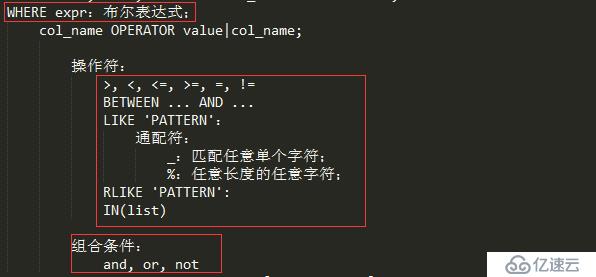
☉WHERE子句:指明过滤条件以实现“选择”功能;
◆过滤条件:布尔型表达式;
◆[WHERE where_condition]
算术操作符:+, -, *, /, %
比较操作符:=, <>, !=, <=>, >, >=, <, <=
·IS NULL, IS NOT NULL
·区间:BETWEEN min AND max
·IN(list):列表;
·LIKE 'PATTERN':模糊比较
通配符:
%:任意长度的任意字符;
_;匹配任意单个字符;
·RLIKE或REGEXP
逻辑操作符:AND, OR, NOT, XOR
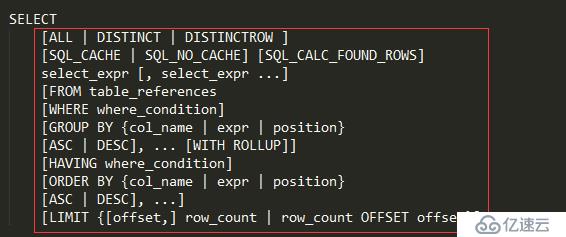
☉GROUP BY:
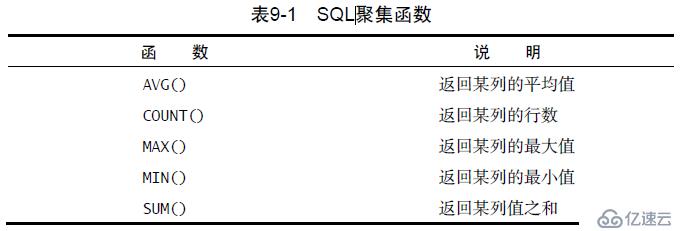
根据指定的字段把查询的结果进行“分组”以用于“聚合”运算;
avg(), max(), min(), sum(), count()
☉HAVING:
对分组聚合后的结果进行条件过滤;
☉ORDER BY:根据指定的字段把查询的结果进行排序;
升序:ASC
降序:DESC
☉LIMIT:对输出结果进行数量限制
[LIMIT {[offset,] row_count | row_count OFFSET offset}]
演示:
1.select查询指定的字段和行
MariaDB [mydb]> select * from tbl1; # 查询指定表的所有行
+----+------+------+---------+--------+
| id | name | age  | ClassID | gender |
+----+------+------+---------+--------+
|  1 | tom  | NULL |       1 | M      |
|  2 | tao  | NULL |       1 | M      |
|  3 | xiu  | NULL |       2 | M      |
|  4 | wang |   25 |       5 | M      |
+----+------+------+---------+--------+
4 rows in set (0.00 sec)

MariaDB [mydb]> select name,gender from tbl1; # 查询指定表符合条件的字段
+------+--------+
| name | gender |
+------+--------+
| tom  | M      |
| tao  | M      |
| xiu  | M      |
| wang | M      |
+------+--------+
4 rows in set (0.00 sec)

MariaDB [mydb]> select name AS StuName,gender from tbl1; # 定义字段别名
+---------+--------+
| StuName | gender |
+---------+--------+
| tom     | M      |
| tao     | M      |
| xiu     | M      |
| wang    | M      |
+---------+--------+
4 rows in set (0.00 sec)

MariaDB [mydb]>
2.where 子句演示:Classe
MariaDB [mydb]> select * from tbl1;
+----+------+------+---------+--------+
| id | name | age  | ClassID | gender |
+----+------+------+---------+--------+
|  1 | tom  | NULL |       1 | M      |
|  2 | tao  | NULL |       1 | M      |
|  3 | xiu  | NULL |       2 | M      |
|  4 | wang |   25 |       5 | M      |
+----+------+------+---------+--------+
4 rows in set (0.00 sec)

MariaDB [mydb]> select * from tbl1 where ClassID > 2; # 查询ClassID大于2的
+----+------+------+---------+--------+
| id | name | age  | ClassID | gender |
+----+------+------+---------+--------+
|  4 | wang |   25 |       5 | M      |
+----+------+------+---------+--------+
1 row in set (0.00 sec)

MariaDB [mydb]> select * from tbl1 where ClassID >= 2 and ClassID <=5; # 组合条件查询班号大于2小于5的
+----+------+------+---------+--------+
| id | name | age  | ClassID | gender |
+----+------+------+---------+--------+
|  3 | xiu  | NULL |       2 | M      |
|  4 | wang |   25 |       5 | M      |
+----+------+------+---------+--------+
2 rows in set (0.00 sec)

MariaDB [mydb]> select * from tbl1 where ClassID between 2 and 5; # 同上,另一种写法between...and..
+----+------+------+---------+--------+
| id | name | age  | ClassID | gender |
+----+------+------+---------+--------+
|  3 | xiu  | NULL |       2 | M      |
|  4 | wang |   25 |       5 | M      |
+----+------+------+---------+--------+
2 rows in set (0.00 sec)

MariaDB [mydb]> select name from tbl1 where name like '%o%'; # 匹配name中带o的名字
+------+
| name |
+------+
| tom  |
| tao  |
+------+
2 rows in set (0.01 sec)

MariaDB [mydb]> select name from tbl1 where name like '%u'; # 匹配name中以u结尾的名字
+------+
| name |
+------+
| xiu  |
+------+
1 row in set (0.00 sec)

MariaDB [mydb]> select name from tbl1 where name rlike '^.*o.*$';# 正则表达式匹配名字中带o的
+------+
| name |
+------+
| tom  |
| tao  |
+------+
2 rows in set (0.00 sec)

MariaDB [mydb]> select name,ClassID from tbl1 where ClassID in (1,2);  # 在给定列表元素中查找
+------+---------+
| name | ClassID |
+------+---------+
| tom  |       1 |
| tao  |       1 |
| xiu  |       2 |
+------+---------+
3 rows in set (0.00 sec)
3.排序
MariaDB [mydb]> select * from tbl1;
+----+------+------+---------+--------+
| id | name | age  | ClassID | gender |
+----+------+------+---------+--------+
|  1 | tom  | NULL |       1 | M      |
|  2 | tao  | NULL |       1 | M      |
|  3 | xiu  | NULL |       2 | M      |
|  4 | wang |   25 |       5 | M      |
+----+------+------+---------+--------+
4 rows in set (0.00 sec)

MariaDB [mydb]> select * from tbl1 order by ClassID; # 按 ClassID 升序排序
+----+------+------+---------+--------+
| id | name | age  | ClassID | gender |
+----+------+------+---------+--------+
|  1 | tom  | NULL |       1 | M      |
|  2 | tao  | NULL |       1 | M      |
|  3 | xiu  | NULL |       2 | M      |
|  4 | wang |   25 |       5 | M      |
+----+------+------+---------+--------+
4 rows in set (0.01 sec)

MariaDB [mydb]> select * from tbl1 order by ClassID,name; # 如果ClassID相同就按name升序排列
+----+------+------+---------+--------+
| id | name | age  | ClassID | gender |
+----+------+------+---------+--------+
|  2 | tao  | NULL |       1 | M      |
|  1 | tom  | NULL |       1 | M      |
|  3 | xiu  | NULL |       2 | M      |
|  4 | wang |   25 |       5 | M      |
+----+------+------+---------+--------+
4 rows in set (0.03 sec)

MariaDB [mydb]> select * from tbl1 order by ClassID,name DESC;# 如果ClassID相同就按name降序排列
+----+------+------+---------+--------+
| id | name | age  | ClassID | gender |
+----+------+------+---------+--------+
|  1 | tom  | NULL |       1 | M      |
|  2 | tao  | NULL |       1 | M      |
|  3 | xiu  | NULL |       2 | M      |
|  4 | wang |   25 |       5 | M      |
+----+------+------+---------+--------+
4 rows in set (0.02 sec)

MariaDB [mydb]> select * from tbl1 order by ClassID  DESC; # 按ClassID降序排列
+----+------+------+---------+--------+
| id | name | age  | ClassID | gender |
+----+------+------+---------+--------+
|  4 | wang |   25 |       5 | M      |
|  3 | xiu  | NULL |       2 | M      |
|  1 | tom  | NULL |       1 | M      |
|  2 | tao  | NULL |       1 | M      |
+----+------+------+---------+--------+
4 rows in set (0.00 sec)
                            # 按ClassID降序排列,如果相同就按name降序排列
MariaDB [mydb]> select * from tbl1 order by ClassID DESC,name DESC;
+----+------+------+---------+--------+
| id | name | age  | ClassID | gender |
+----+------+------+---------+--------+
|  4 | wang |   25 |       5 | M      |
|  3 | xiu  | NULL |       2 | M      |
|  2 | tao  | NULL |       1 | M      |
|  1 | tom  | NULL |       1 | M      |
+----+------+------+---------+--------+
4 rows in set (0.00 sec)
--------------------------------------------------------------------------------
1.select挑选字段和where挑选行
MariaDB [testdb]> show tables;
+------------------+
| Tables_in_testdb |
+------------------+
| tbl1             |
| tbl2             |
+------------------+
2 rows in set (0.00 sec)

MariaDB [testdb]> select id from tbl2;   # select仅挑选字段
+------+
| id   |
+------+
|    1 |
|    2 |
|    3 |
+------+
3 rows in set (0.00 sec)

MariaDB [testdb]> select * from tbl2;   # 显示所有的字段
+------+------+------+
| id   | name | age  |
+------+------+------+
|    1 | tom  |   21 |
|    2 | tao  |   15 |
|    3 | jing |   22 |
+------+------+------+
3 rows in set (0.00 sec)

MariaDB [testdb]> select * from tbl2 where age>=20;  # where挑选行
+------+------+------+
| id   | name | age  |
+------+------+------+
|    1 | tom  |   21 |
|    3 | jing |   22 |
+------+------+------+
2 rows in set (0.00 sec)

MariaDB [testdb]> select name,age from tbl2 where age>=20;  # 即挑选字段又挑选行
+------+------+
| name | age  |
+------+------+
| tom  |   21 |
| jing |   22 |
+------+------+
2.对挑选出的数据分组 Group By,分组的目的在于聚合
MariaDB [testdb]> alter table tbl2 add gender enum('F','M');  #增加一个gender字段
Query OK, 3 rows affected (0.03 sec)
Records: 3  Duplicates: 0  Warnings: 0

MariaDB [testdb]> select * from tbl2;
+------+------+------+--------+
| id   | name | age  | gender |
+------+------+------+--------+
|    1 | tom  |   21 | NULL   |
|    2 | tao  |   15 | NULL   |
|    3 | jing |   22 | NULL   |
+------+------+------+--------+
3 rows in set (0.00 sec)

MariaDB [testdb]> update tbl2 set gender='M' where id=1;  # 设定其值
Query OK, 1 row affected (0.00 sec)
Rows matched: 1  Changed: 1  Warnings: 0

MariaDB [testdb]> update tbl2 set gender='M' where id=2;
Query OK, 1 row affected (0.00 sec)
Rows matched: 1  Changed: 1  Warnings: 0

MariaDB [testdb]> update tbl2 set gender='F' where id=3;
Query OK, 1 row affected (0.00 sec)
Rows matched: 1  Changed: 1  Warnings: 0

MariaDB [testdb]> select * from tbl2;
+------+------+------+--------+
| id   | name | age  | gender |
+------+------+------+--------+
|    1 | tom  |   21 | M      |
|    2 | tao  |   15 | M      |
|    3 | jing |   22 | F      |
+------+------+------+--------+
3 rows in set (0.00 sec)

MariaDB [testdb]> select * from tbl2 group by gender;  # 按性别对tbl2进行分组(有几个值就分多少组)
+------+------+------+--------+
| id   | name | age  | gender |
+------+------+------+--------+
|    3 | jing |   22 | F      |
|    1 | tom  |   21 | M      |
+------+------+------+--------+
2 rows in set (0.01 sec)

MariaDB [testdb]> select avg(age),gender  from tbl2 group by gender;  # 对各分组求其平均值
+----------+--------+
| avg(age) | gender |
+----------+--------+
|  22.0000 | F      |
|  18.0000 | M      |
+----------+--------+
2 rows in set (0.00 sec)

MariaDB [testdb]> select sum(age),gender  from tbl2 group by gender;  # 对各分组求和
+----------+--------+
| sum(age) | gender |
+----------+--------+
|       22 | F      |
|       36 | M      |
+----------+--------+
2 rows in set (0.00 sec)

MariaDB [testdb]> select avg(age) as avg_age,gender  from tbl2 group by gender; #对avg_age定义别名
+---------+--------+
| avg_age | gender |
+---------+--------+
| 22.0000 | F      |
| 18.0000 | M      |
+---------+--------+
2 rows in set (0.01 sec)
3.对聚合后的结果指明过滤条件HAVING
MariaDB [testdb]> select avg(age) as avg_age,gender  from tbl2 group by gender having avg_age >= 20;
+---------+--------+
| avg_age | gender |
+---------+--------+
| 22.0000 | F      |
+---------+--------+
1 row in set (0.01 sec)
4.数据去重
MariaDB [testdb]> select gender from tbl2;
+--------+
| gender |
+--------+
| M      |
| M      |
| F      |
+--------+
3 rows in set (0.00 sec)

MariaDB [testdb]> select distinct gender from tbl2; # 去重
+--------+
| gender |
+--------+
| M      |
| F      |
+--------+
2 rows in set (0.00 sec)

MariaDB [testdb]> SHOW VARIABLES LIKE '%cache%'; # 和缓存cache相关的参数
+-------------------------------+----------------------+
| Variable_name                 | Value                |
+-------------------------------+----------------------+
| aria_pagecache_age_threshold  | 300                  |
| aria_pagecache_buffer_size    | 134217728            |
| aria_pagecache_division_limit | 100                  |
| binlog_cache_size             | 32768                |
| binlog_stmt_cache_size        | 32768                |
| have_query_cache              | YES                  |
| join_cache_level              | 2                    |
| key_cache_age_threshold       | 300                  |
| key_cache_block_size          | 1024                 |
| key_cache_division_limit      | 100                  |
| key_cache_segments            | 0                    |
| max_binlog_cache_size         | 18446744073709547520 |
| max_binlog_stmt_cache_size    | 18446744073709547520 |
| metadata_locks_cache_size     | 1024                 |
| query_cache_limit             | 1048576              |
| query_cache_min_res_unit      | 4096                 |
| query_cache_size              | 0                    |  # 为0,没有缓存空间
| query_cache_strip_comments    | OFF                  |
| query_cache_type              | ON                   |  # 缓存为开启状态
| query_cache_wlock_invalidate  | OFF                  |
| stored_program_cache          | 256                  |
| table_definition_cache        | 400                  |
| table_open_cache              | 400                  |
| thread_cache_size             | 0                    |
+-------------------------------+----------------------+
24 rows in set (0.00 sec)
=============================================================================
SQL语句之DCL语句
GRANT(授权), REVOKE(回收权限)

命令演示:
1.授权一个用户仅允许本地登录
[root@centos7 bbs]# mysql -p134296 # 不指定用户,默认就是使用root用户登录mysql
Welcome to the MariaDB monitor.  Commands end with ; or \g.
Your MariaDB connection id is 6
Server version: 5.5.44-MariaDB MariaDB Server

Copyright (c) 2000, 2015, Oracle, MariaDB Corporation Ab and others.

Type 'help;' or '\h' for help. Type '\c' to clear the current input statement.

MariaDB [(none)]> CREATE DATABASE ultrax; # 创建数据库
Query OK, 1 row affected (0.00 sec)
# 授权用户名为ultraxuser,仅允许本地登录访问ultrax数据库,密码为134296
MariaDB [(none)]> GRANT ALL ON ultrax.* TO 'ultraxuser'@'localhost' IDENTIFIED BY '134296';
Query OK, 0 rows affected (0.00 sec)
MariaDB [(none)]> FLUSH PRIVILEGES; # 重载权限表
Query OK, 0 rows affected (0.00 sec)

MariaDB [(none)]>
2.授权一个可远程登录的用户和主机
[root@centos7 ~]# mysql
Welcome to the MariaDB monitor.  Commands end with ; or \g.
Your MariaDB connection id is 2
Server version: 5.5.44-MariaDB MariaDB Server

Copyright (c) 2000, 2015, Oracle, MariaDB Corporation Ab and others.

Type 'help;' or '\h' for help. Type '\c' to clear the current input statement.

# 授权的用户为test,主机为10.1网段中的任何主机,允许访问所有的数据库和表,密码为testpass
MariaDB [(none)]> GRANT all ON *.* TO 'test'@'10.1.%.%' IDENTIFIED BY 'testpass';
Query OK, 0 rows affected (0.01 sec)

MariaDB [(none)]> FLUSH PRIVILEGES;
Query OK, 0 rows affected (0.00 sec)

mysql> create database mydb; # 创建一个数据库
Query OK, 1 row affected (0.00 sec)

mysql> show databases;
+--------------------+
| Database           |
+--------------------+
| information_schema |
| mydb               |
| mysql              |
| performance_schema |
| test               |
+--------------------+
5 rows in set (0.01 sec)
MariaDB [(none)]> exit
Bye