

使用vue插件怎么样实现一个MessageBox功能
创始人
2024-11-20 04:22:49
0次
1、实现toast插件封装(类似简易版的elementUi的message)
先书写一个toast组件
{{ message }}
然后书写对应的toast.ts
import Vue from 'vue';
// toast组件
import toastComponent from '@/components/toast/index.vue'

// 返回一个 扩展实例构造器
const ToastConstructor = Vue.extend(toastComponent)

// 定义弹出组件的函数 接收2个参数, 要显示的文本 和 显示时间
function showToast(data: { message: any, type: string, duration?: number }) {

  // 实例化一个 toast.vue
  const toastDom: any = new ToastConstructor({
    el: document.createElement('div'),
    data() {
      return {
        message: data.message,
        type: data.type,
      }
    }
  });

  // 把 实例化的 toast.vue 添加到 body 里
  document.body.appendChild(toastDom.$el);
  setTimeout(() => { toastDom.showToast(); })

  // 过了 duration 时间后隐藏
  let duration = data.duration ? data.duration : 2000
  setTimeout(() => {
    toastDom.hideToast();
    setTimeout(() => {
      document.body.removeChild(toastDom.$el)
    }, 500)
  }, duration)
}
// 注册为全局组件的函数
function registryToast() {
  // 将组件注册到 vue 的 原型链里去,
  // 这样就可以在所有 vue 的实例里面使用 this.$toast()
  Vue.prototype.$toast = showToast
}
export default registryToast;
然后在main.ts中注册
// 自定义toast插件
import toastMessage from '@/utils/toast.ts';
Vue.use(toastMessage)
然后就可以在全局地方使用
this.$toast({message:"成功",type:'success'})效果如下:

2、实现$confirm插件封装(类似简易版的elementUi的messageBox)
主要用于操作的二次确定
还是一样,首先书写confirm组件
这里按钮点击事件我设置了一个callback回调,用于方便后面的操作交互
{{ title }}
{{ contentText }}
对应的书写confirm.ts
这里使用Promise来为用户点击确定或者取消做对应的交互触发
import Vue from 'vue';
import confirm from '@/components/confirm/index.vue';
const confirmConstructor = Vue.extend(confirm);

const showConfirm = (contentText: string) => {
  return new Promise((reslove, reject) => {
    const confirmDom: any = new confirmConstructor({
      el: document.createElement('template'),
      data() {
        return {
          contentText,
        }
      },
    })
    confirmDom.callback = (action: string) => {
      if (action === 'confirm') {
        reslove()
      } else if (action === 'cancel') {
        reject()
      }
    }
    document.body.appendChild(confirmDom.$el);
  })
}

function registryConfirm() {
  // 将组件注册到 vue 的 原型链里去,
  // 这样就可以在所有 vue 的实例里面使用 this.$toast()
  Vue.prototype.$confirm = showConfirm
}
export default registryConfirm;
接下来在main.ts中
import registryConfirm from '@/utils/confirm.ts';
Vue.use(registryConfirm)
然后就可以在全局使用
this.$confirm('是否确认删除')
  .then(() => {
    this.$toast({
      message: '删除成功',
      type: 'success',
    });
  })
  .catch(() => {});
效果如下
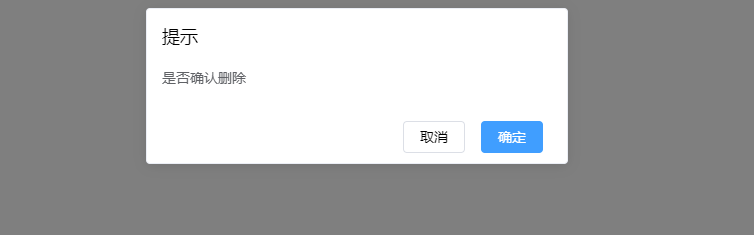
这时,点击确定按钮就会触发 .then里的事件,点击取消则触发 .catch里的事件
typescript对应的声明文件
typescript书写自定义插件对应的声明文件,避免编辑报错
import Vue from "vue";
declare module "vue/types/vue" {
  interface Vue {
    $toast: any,
    $confirm: any
  }
}
相关内容
热门资讯
空调连续工作多久需要停机休息
空调连续工作的时间取决于多个因素,包括空调的型号、功率、使用环境和维护情况等。一般来说,空调可以连续...
空调哪个符号是除湿的
空调除湿功能通常用一个水滴形状的符号表示。不同品牌和型号的空调遥控器可能会有所差异,但一般来说,除湿...
格力空调多长时间加一次氟利昂
1、一般情况下,空调对氟利昂的使用量是非常小的,所以在空调使用了四年左右的时候再考虑加也没问题。2、...
空调用多长时间需要加氟一次
一般情况下是五年。当出现以下这几种情况时,空调才需要加氟。1、空调的室内机和室外机各有两个接口,当接...
格调生活·C标思享荟:卡萨帝在...
9月12日的郑州龙湖金融岛,夜风轻拂,灯光璀璨。“C标时刻共传奇——卡萨帝思享荟暨20周年品牌盛典郑...
品牌价值破千亿、高端份额持续领...
9月12日,“C标时刻共传奇——卡萨帝思享荟暨20周年品牌盛典郑州站”在郑州龙湖金融岛举办。2026...
空调主板坏了修800还是换新的
空调主板坏了是修还是换新,需要考虑多个因素,以下是一些建议:1. 维修成本:如果维修费用较低,比如 ...
空调开多久需要休息多长时间
问题:空调开多久需要休息多长时间回答:1、在使用空调的过程中,一般空调开7~8个小时左右需要休息2~...
中央空调多长时间清洗一次
1、一般空调开机前清洗一次即可,空调开机中间时段再清洗一次,空调关机时清洗一次,这样比较合理。2、空...
中央空调氟利昂多久加一次
看空调制热和制冷程度,很多人的观点认为氟利昂必须一年放一次,其实这个观点是错误的,理解上面有点偏差,...