

rsync远程同步——(实战!)
admin
2023-02-23 17:40:06
0次
关于rsync
一款快速增量备份工具
Remote Sync,远程同步
支持本地复制,或者与其他SSH,rsync主机同步
配置rsync源服务器
rsync同步源
指备份操作的远程服务器,也称为备份源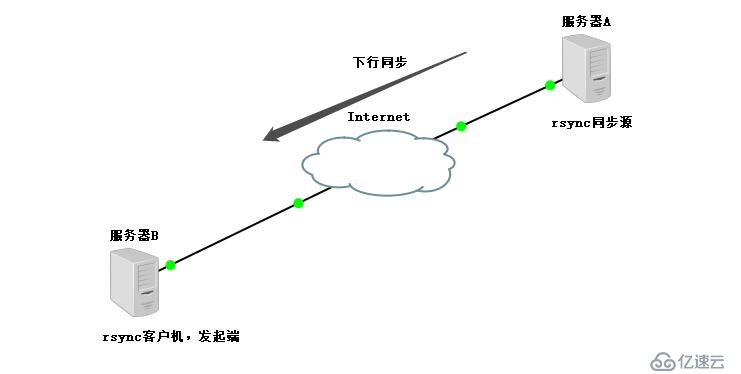
配置rsync源
基本思路
建立rsync.conf配置文件,独立的账号文件
启用rsync的--daemon模式
应用示例
用户backuper,允许下行同步
操作的目录为/var/www/html
配置文件rsyncd.conf
需手动建立,语法类似于Samba配置
认证配置auth users,secrets file,不加则为匿名
rsync账号文件
采用“用户名:密码”的记录格式,每行一个用户记录
独立的账号数据,不依赖于系统账号
启用rsync服务
通过--daemon独自提供服务
执行kill $(cat /var/run/rsync.pid)关闭rsync服务
使用rsync备份工具
rsync命令的用法
rsync [选项] 原始位置 目标位置常用选项
-a:归档模式,递归并保留对象属性,等用于-rlptgoD
-v:显示同步过程的详细信息
-z:在传输文件时进行压缩
-H:保留硬连接文件
-A:保留ACL属性信息
--delete:删除目标位置有而原始位置没有的文件
--checksum:根据对象的校验和来决定是否跳过文件
配置源的两种表示方法
格式1:用户名@主机地址::共享模块名
格式2:rsync://用户名@主机地址/共享模块名
rsync实时同步
定期同步的不足
执行备份的时间固定,延迟明显,实时性差
当同步源长期不变化时,密集的定期任务是不必要的
实时同步的优点
一旦同步源出现变化,立即启动备份
只要同步源无变化,则不执行备份
关于 inotify(安装在发起端的)
Inotify 是一个 Linux特性,它监控文件系统操作,比如读取、写入和创建。Inotify 反应灵敏,用法非常简单,并且比 cron 任务的繁忙轮询高效得多。
可以监控文件系统的变化情况,并作出通知响应;
辅助软件:inotify-tools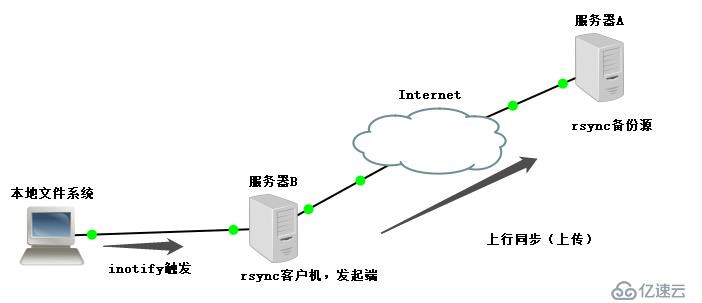
实验环境
rsyncd服务器 192.168.13.128
client服务器   192.168.13.129
1,在rsyncd服务器上修改配置文件
[root@rsyncd ~]# rpm -q rsync
rsync-3.0.9-18.el7.x86_64
[root@rsyncd ~]# vim /etc/rsyncd.conf

uid = nobody     ##匿名用户
gid = nobody
use chroot = yes   ##禁锢家目录
pid file = /var/run/rsyncd.pid  ##pid文件
address = 192.168.13.128    ##监听地址
port = 873    ##端口号
log file = /var/log/rsyncd.log   ##日志文件路径
hosts allow = 192.168.13.0/24   ##允许地址段访问
dont compress   = *.gz *.tgz *.zip *.z *.Z *.rpm *.deb *.bz2   ##不需要压缩的类型

[wwwroot]      ##共享模块名
path = /var/www/html    ##路径
comment = www.kgc.com  ##定义名称
read only = yes    ##只读
auth users = backuper   ##身份验证用户名
secrets file = /etc/rsyncd_users.db    ##密码文件

[root@rsyncd ~]# vim /etc/rsyncd_users.db  ##创建密码文件
backuper:123123  ##用户名:密码
[root@rsyncd ~]# chmod 600 /etc/rsyncd_users.db   ##给root用户读写权限
[root@rsyncd ~]# rsync --daemon   ##开启rsync服务
[root@rsyncd ~]# netstat -ntap | grep rsync   ##查看端口
tcp     0     0 192.168.13.128:873      0.0.0.0:*    LISTEN    36346/rsync
[root@rsyncd ~]# systemctl stop firewalld.service   ##关闭防火墙
[root@rsyncd ~]# setenforce 0
[root@rsyncd ~]# yum install httpd -y   ##安装httpd服务
[root@rsyncd ~]# cd /var/www/html/
[root@rsyncd html]# echo "this is test web" > index.html   ##创建网页信息
[root@rsyncd html]# cd ../
[root@rsyncd www]# chmod 777 html/   ##给最大权限,方便任意用户操作
2,在客户端服务器上,拉取同步源rsyncd
[root@client ~]# systemctl stop firewalld.service  ##关闭防火墙
[root@client ~]# setenforce 0
[root@client ~]# rpm -q rsync  ##检查是否安装rsync服务
rsync-3.0.9-18.el7.x86_64
[root@client ~]# yum install httpd -y  ##安装httpd服务
[root@client ~]# cd /var/www/
[root@client www]# chmod 777 html/  ##给最大权限
[root@client www]# rsync -avz backuper@192.168.13.128::wwwroot /var/www/html/
##拉取共享模块
Password:   ##输入密码
[root@client www]# cat html/index.html    ##查看同步情况
this is test web
[root@client www]# rm -rf html/index.html
[root@client www]# vim /etc/server.pass  ##创建本地的密码文件
123123
[root@client www]# chmod 600 /etc/server.pass   ##给权限
[root@client www]# rsync -avz --delete --password-file=/etc/server.pass backuper@192.168.13.128::wwwroot /var/www/html/
##指定本地密码文件,删除目标位置有而原始位置没有的文件,实现免交互
3,在客户机上安装inotify监控
[root@client www]# vim /etc/sysctl.conf   ##修改内核参数文件
fs.inotify.max_queued_events = 16384   ##队列
fs.inotify.max_user_instances = 1024     ##每个队列中的实例数
fs.inotify.max_user_watches = 1048576  ##每个实例中的文件数
[root@client www]# sysctl -p  ##加载
[root@client www]# mount.cifs //192.168.100.3/LNMP-C7 /mnt/   ##挂载
Password for root@//192.168.100.3/LNMP-C7:
[root@client www]# cd /mnt/
[root@client mnt]# tar zxvf inotify-tools-3.14.tar.gz -C /opt/   ##解压inotify到/opt下
[root@client mnt]# cd /opt/
[root@client opt]# cd inotify-tools-3.14/
[root@client inotify-tools-3.14]# yum install gcc gcc-c++ make -y   ##安装环境必要的组件
[root@client inotify-tools-3.14]# ./configure    ##配置
[root@client inotify-tools-3.14]# make && make install  ##编译安装
[root@client inotify-tools-3.14]# inotifywait -mrq -e modify,create,move,delete /var/www/html/
##进行监控
##重启开启一个客户机的终端
[root@client ~]# cd /var/www/html/
[root@client html]# touch abc
[root@client html]# rm -rf abc
##在监控上的客户机上查看
/var/www/html/ CREATE abc
/var/www/html/ DELETE abc
4,在客户机创建脚本,通过inotifywait触发rsync同步操作脚本
[root@client inotify-tools-3.14]# cd /opt/
[root@client opt]# vim inotify.sh
#!/bin/bash
INOTIFY_CMD="inotifywait -mrq -e modify,create,move,delete /var/www/html/"
RSYNC_CMD="rsync -avz --delete --password-file=/etc/server.pass /var/www/html/ backuper@192.168.13.128::wwwroot/"
$INOTIFY_CMD | while read DIRECTORY EVENT FILE
 do
     if [ $(pgrep rsync | wc -l) -le 0 ]; then
            $RSYNC_CMD
     fi
done
[root@client opt]# chmod +x inotify.sh  ##给执行权限

##确保服务端和客户端的权限都为最大
5,在rsyncd服务器上修改配置文件
[root@rsyncd www]# vim /etc/rsyncd.conf
read only = no  ##关闭只读
[root@rsyncd www]# netstat -natp | grep rsync
tcp     0    0 192.168.13.128:873    0.0.0.0:*      LISTEN      36346/rsync
[root@rsyncd www]# kill -9 36346   ##关闭
[root@rsyncd www]# netstat -natp | grep rsync
[root@rsyncd www]# rm -rf /var/run/rsyncd.pid   ##删除pid文件
[root@rsyncd www]# rsync --daemon    ##开启rsync服务
6,在客户机上执行inotify脚本文件
[root@client opt]# ./inotify.sh
##重新开启一个客户机终端
[root@client html]# echo "this is test" > test.txt  ##添加文本
##查看监控服务信息
[root@client opt]# ./inotify.sh
sending incremental file list
./
rsync: failed to set times on "/." (in wwwroot): Operation not permitted (1)
test.txt

sent 121 bytes  received 30 bytes  302.00 bytes/sec
total size is 30  speedup is 0.20
rsync error: some files/attrs were not transferred (see previous errors) (code 23) at main.c(1052) [sender=3.0.9]
sending incremental file list

sent 66 bytes  received 8 bytes  148.00 bytes/sec
total size is 30  speedup is 0.41
7,在rsync服务器上查看
[root@rsyncd www]# cd html/
[root@rsyncd html]# ls
index.html  test.txt   ##同步完成
##删除也是同步的
谢谢阅读!
相关内容
热门资讯
空调连续工作多久需要停机休息
空调连续工作的时间取决于多个因素,包括空调的型号、功率、使用环境和维护情况等。一般来说,空调可以连续...
空调哪个符号是除湿的
空调除湿功能通常用一个水滴形状的符号表示。不同品牌和型号的空调遥控器可能会有所差异,但一般来说,除湿...
格力空调多长时间加一次氟利昂
1、一般情况下,空调对氟利昂的使用量是非常小的,所以在空调使用了四年左右的时候再考虑加也没问题。2、...
空调用多长时间需要加氟一次
一般情况下是五年。当出现以下这几种情况时,空调才需要加氟。1、空调的室内机和室外机各有两个接口,当接...
格调生活·C标思享荟:卡萨帝在...
9月12日的郑州龙湖金融岛,夜风轻拂,灯光璀璨。“C标时刻共传奇——卡萨帝思享荟暨20周年品牌盛典郑...
品牌价值破千亿、高端份额持续领...
9月12日,“C标时刻共传奇——卡萨帝思享荟暨20周年品牌盛典郑州站”在郑州龙湖金融岛举办。2026...
空调主板坏了修800还是换新的
空调主板坏了是修还是换新,需要考虑多个因素,以下是一些建议:1. 维修成本:如果维修费用较低,比如 ...
空调开多久需要休息多长时间
问题:空调开多久需要休息多长时间回答:1、在使用空调的过程中,一般空调开7~8个小时左右需要休息2~...
中央空调多长时间清洗一次
1、一般空调开机前清洗一次即可,空调开机中间时段再清洗一次,空调关机时清洗一次,这样比较合理。2、空...
中央空调氟利昂多久加一次
看空调制热和制冷程度,很多人的观点认为氟利昂必须一年放一次,其实这个观点是错误的,理解上面有点偏差,...