

记录-Kaa测试程序
有感于一天的折腾,总的留个纪念。
以下的内容不是我的原创,只是自己的一个记录。
Kaa是什么?去官网看看就知道了 ,我也没咋细看,哈哈。
一、测试环境准备
Host OS:WIN7
Vbox:版本 5.1.14 r112924 (Qt5.6.2)
Sandbox:一个Kaa配置好的测试用虚拟机镜像。这个只是用来测试或者小范围应用的,官方也提供在AWS上直接部署,方便测试。如果是要配置集群,you can download ready-to-use Debian or RPM packages for various Linux flavors, or build Kaa from source code.
一台安装了Linux的设备,我用的是Raspberry Pi 3 Model B,安装的是Raspbian Jessie系统。毕竟要做IoT的么。
二、安装配置
将下载的Sandbox用虚拟机直接导入,就是这样。启动虚拟机。哈哈,好简单不是。启动后的界面是正样子的
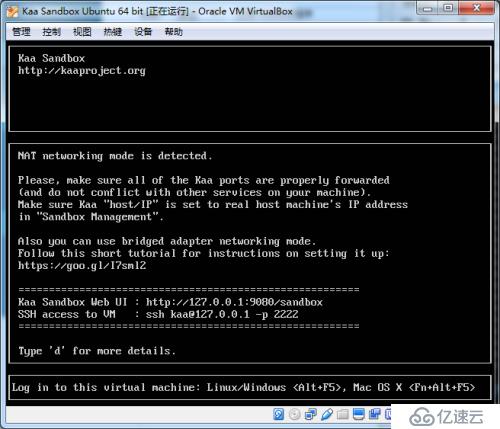
做的很贴心的哦。端口映射什么的都给你配置好了。

正常启动后,直接在浏览器里访问对应的地址就可以看到管理界面了。
记录两组初始的账户和密码。admin/admin123,devuser/devuser123.这123的风格不错。。
三、测试程序
测试程序我是根据官网的Guide做的,地址在这里。
To achieve this, two Kaa features will be used:
Data collection feature allows sending data from endpoints to the Kaa server. In this example, the Data collection feature will be used to transmit temperature values at a configured sample period.
Configuration feature allows broadcasting configuration parameters from the Kaa server to Kaa endpoints. In this example, the Configuration feature will be used to send the sampling period values from Kaa server to the temperature sensors.
这两个features,一个是数据模型,一个是控制模型,目前是这么理解的。
创建一个Application。
步骤我就不写了。忘记了可以参考官网的例子。大致是用admin登录,在applications里面创建一个新的程序。也就是测试程序,名字随便。
创建两个JSON文件。
data-schema.json
 {
     "type": "record",
     "name": "DataCollection",
     "namespace": "org.kaaproject.kaa.schema.sample",
     "fields": [
         {"name": "temperature",
             "type": "int"
         }
     ]
 }
configuration-schema.json
{
     "type": "record",
     "name": "Configuration",
     "namespace": "org.kaaproject.kaa.schema.sample",
     "fields": [
         {"name": "samplePeriod",
             "type": "int",
             "by_default": 1
         }
     ]
}干啥用的?其实就是To create a new CT。具体操作在Tenant CTL这个菜单里面。如果提示重名了,记得修改一下,这里重点说一下,对一次接触的人这个有点坑,我折腾的大部分时间也是在这。下面是我建好的data schema,对应的,在文章最后的main.c的第21行kaa_logging_data_collection_create();就要换成kaa_logging_data_collection_demo_create();
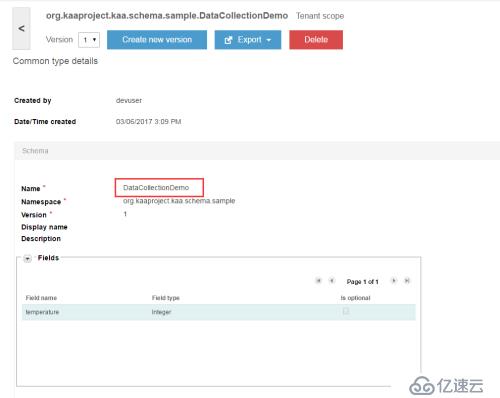
这个驼峰式的名字,要和后面的代码匹配上。如果你名字随意了。后面的code编译一定是过不去的。
换devuser用户登录,配置程序,生成SDK.
给程序配置log和configuration:
Click the Applications arrow to unfold the list and click the arrow of the application you created in Add application, then click Schemas > Log and click the Add schema button.添加一个log schema,然后,去configuration菜单里配置一个configuration schema.
记得别选错对应的schema,错了也没事,我一开始也错了。记得配置SDK的时候把版本号对应上就可以。
创建log appender:
To use the data collection feature, you need to set up a Log appender. In this example, the MongoDB log appender is used. For more information, see MongoDB log appender. 创建一个log appender,可能是版本不对,发现官网例子里的界面,和实际的不太一样。不过影响不大。其实,这就是最后数据存储的地方。还有其他的类型,不过没时间搞了。
创建SDK:
在创建的程序的SDK Profiles里面,点击添加按钮,默认选择各种参数的版本号,这里可以调整版本号,如果之前你的schema错了,可以在这里调整。完成后,点击那个下载图标,会提示选择Target Platform。我选择的是C ,然后下载sdk.
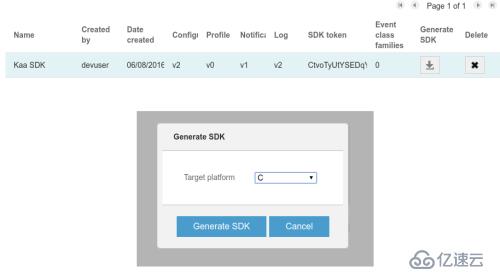
到这里,sandbox服务的配置基本就OK.下面开始在客户端操作了。
Raspberry Pi上的操作。
Pi怎么玩,这里就不说了。哈。
安装cmake,
sudo apt-get install cmake
创建一个文件夹。就叫my_app吧。然后在my_app下面创建一个文件夹koa,一个CMakeLists.txt文件,一个main.c文件,目录结构如下。
-my_app
--koa
--CMakeLists.txt
--main.c
在CMakeLists.txt里面写入如下内容
cmake_minimum_required(VERSION 2.8.12)
 project(kaa-application C)

 set(CMAKE_C_FLAGS "${CMAKE_C_FLAGS} -std=gnu99 -g -Wall -Wextra")

 add_subdirectory(kaa)	add_executable(kaa-app main.c)

 target_link_libraries(kaa-app kaac)
在main.c里面创建一个空的主函数
int main(void)
 {

 }
命令行切换到my_app下,执行如下命令
mkdir build
 cd build
 cmake ..
 make
如果一切正常,编译过后,你会看到kaa_app。这个名称是在CMakeLists.txt里面配置的。
替换main.c的内容为下面的代码。声明:此处的代码来自Kaa网站的例子。
#include#include #include #include #include #include #include #include #include #include #include #include #include static int32_t sample_period;static time_t last_sample_time;extern kaa_error_t ext_unlimited_log_storage_create(void **log_storage_context_p, kaa_logger_t *logger);/* Retrieves current temperature. */static int32_t get_temperature_sample(void){ /* For the sake of example, random data is used */ return rand() % 10 + 25;}/* Periodically called by Kaa SDK. */static void example_callback(void *context){ time_t current_time = time(NULL); /* Respect sample period */ if (difftime(current_time, last_sample_time) >= sample_period) { int32_t temperature = get_temperature_sample(); printf("Sampled temperature: %i\n", temperature); last_sample_time = current_time; kaa_user_log_record_t *log_record = kaa_logging_data_collection_create(); log_record->temperature = temperature; kaa_logging_add_record(kaa_client_get_context(context)->log_collector, log_record, NULL); }}/* Receives new configuration data. */static kaa_error_t on_configuration_updated(void *context, const kaa_root_configuration_t *conf){ (void) context; printf("Received configuration data. New sample period: %i seconds\n", conf->sample_period); sample_period = conf->sample_period; return KAA_ERR_NONE;}int main(void){ /* Init random generator used to generate temperature */ srand(time(NULL)); /* Prepare Kaa client. */ kaa_client_t *kaa_client = NULL; kaa_error_t error = kaa_client_create(&kaa_client, NULL); if (error) { return EXIT_FAILURE; } /* Configure notification manager. */ kaa_configuration_root_receiver_t receiver = { .context = NULL, .on_configuration_updated = on_configuration_updated }; error = kaa_configuration_manager_set_root_receiver( kaa_client_get_context(kaa_client)->configuration_manager, &receiver); if (error) { return EXIT_FAILURE; } /* Obtain default configuration shipped within SDK. */ const kaa_root_configuration_t *dflt = kaa_configuration_manager_get_configuration( kaa_client_get_context(kaa_client)->configuration_manager); printf("Default sample period: %i seconds\n", dflt->sample_period); sample_period = dflt->sample_period; /* Configure data collection. */ void *log_storage_context = NULL; void *log_upload_strategy_context = NULL; /* The internal memory log storage distributed with Kaa SDK. */ error = ext_unlimited_log_storage_create(&log_storage_context, kaa_client_get_context(kaa_client)->logger); if (error) { return EXIT_FAILURE; } /* Create a strategy based on timeout. */ error = ext_log_upload_strategy_create( kaa_client_get_context(kaa_client), &log_upload_strategy_context, KAA_LOG_UPLOAD_BY_TIMEOUT_STRATEGY); if (error) { return EXIT_FAILURE; } /* Strategy will upload logs every 5 seconds. */ error = ext_log_upload_strategy_set_upload_timeout(log_upload_strategy_context, 5); if (error) { return EXIT_FAILURE; } /* Specify log bucket size constraints. */ kaa_log_bucket_constraints_t bucket_sizes = { .max_bucket_size = 32, /* Bucket size in bytes. */ .max_bucket_log_count = 2, /* Maximum log count in one bucket. */ }; /* Initialize the log storage and strategy (by default, they are not set). */ error = kaa_logging_init(kaa_client_get_context(kaa_client)->log_collector, log_storage_context, log_upload_strategy_context, &bucket_sizes); if (error) { return EXIT_FAILURE; } /* Start Kaa SDK's main loop. example_callback is called once per second. */ error = kaa_client_start(kaa_client, example_callback, kaa_client, 1); /* Should get here only after Kaa stops. */ kaa_client_destroy(kaa_client); if (error) { return EXIT_FAILURE; } return EXIT_SUCCESS;}
执行如下命令,重新编译程序
 cd build
 cmake -DKAA_MAX_LOG_LEVEL=3 ..
 make
运行,如果提示权限加sudo
./kaa-app
成功运行!
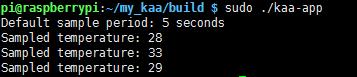
在sandbox里查看数据
1、记录下创建app的token。
2、ssh登录,或者直接在虚拟机登录,初始帐号密码kaa/kaa
3、开启mongodb,这个和你配置的log appender是对应的。
mongo kaa
db.logs_$your_application_token$.find()
通过调整configuration schema,控制data schema的采集周期。
用devuser登录。在程序的Endpoint groups里选择All那条记录。在详细页面中configuration里选择Draft标签,看到了吧,哈,设置新的周期数值-Save-Activate.
四、总结
。。。