

mongodb复制集+分片生产环境实践
三台机器操作系统环境如下:
[mongodb@node1 ~]$ cat /etc/issue
Red Hat Enterprise Linux Server release 6.6 (Santiago)
Kernel \r on an \m
[mongodb@node1 ~]$ uname -r
2.6.32-504.el6.x86_64
[mongodb@node1 ~]$ uname -m
x86_64
架构如下图:
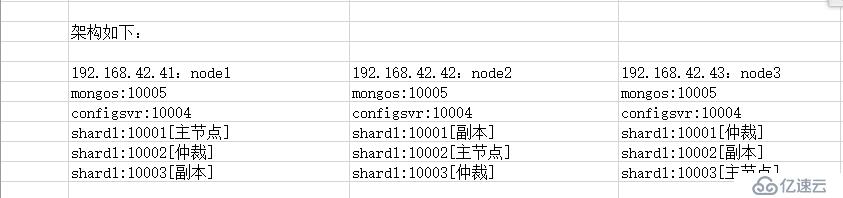
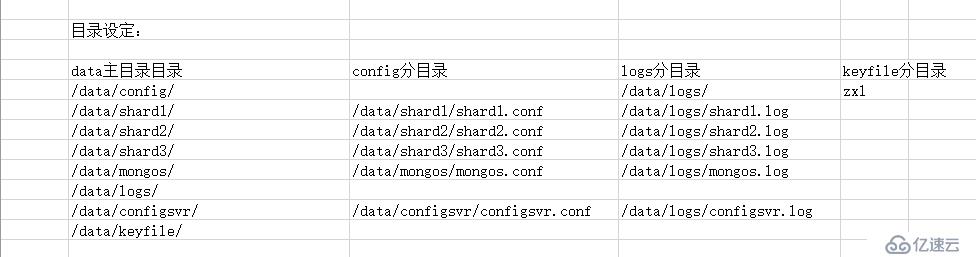
文字描述: 1
192.168.42.41、shard1:10001、shard2:10002、shard3:10003、configsvr:10004、mongos:10005
注:shard1主节点,shard2仲裁,shard3副本

192.168.42.42、shard1:10001、shard2:10002、shard3:10003、configsvr:10004、mongos:10005
注:shard1副本,shard2主节点,shard3仲裁

192.168.42.43、shard1:10001、shard2:10002、shard3:10003、configsvr:10004、mongos:10005
注:shard1仲裁,shard2副本,shard3主节点

node1:192.168.42.41
node2:192.168.42.42
node3:192.168.42.43
创建mongodb用户
[root@node1 ~]# groupadd  mongodb
[root@node1 ~]# useradd  -g mongodb mongodb
[root@node1 ~]# mkdir /data
[root@node1 ~]# chown mongodb.mongodb /data -R
[root@node1 ~]# su - mongodb
创建目录和文件
[mongodb@node1 ~]$ mkdir /data/{config,shard1,shard2,shard3,mongos,logs,configsvr,keyfile} -pv
[mongodb@node1 ~]$ touch /data/keyfile/zxl
[mongodb@node1 ~]$ touch /data/logs/shard{1..3}.log
[mongodb@node1 ~]$ touch /data/logs/{configsvr,mongos}.log
[mongodb@node1 ~]$ touch /data/config/shard{1..3}.conf
[mongodb@node1 ~]$ touch /data/config/{configsvr,mongos}.conf
下载mongodb
[mongodb@node1 ~]$ wget https://fastdl.mongodb.org/linux/mongodb-linux-x86_64-rhel62-3.2.3.tgz
[mongodb@node3 ~]$ tar fxz mongodb-linux-x86_64-rhel62-3.2.3.tgz -C /data
[mongodb@node3 ~]$ ln -s /data/mongodb-linux-x86_64-rhel62-3.2.3 /data/mongodb
配置mongodb环境变量
[mongodb@node1 ~]$ echo "export PATH=$PATH:/data/mongodb/bin" >> ~/.bash_profile
[mongodb@node1 data]$ source ~/.bash_profile
shard1.conf配置文件内容如下:
[mongodb@node1 ~]$ cat /data/config/shard1.conf
systemLog:
  destination: file
  path: /data/logs/shard1.log
  logAppend: true
processManagement:
  fork: true
  pidFilePath: "/data/shard1/shard1.pid"
net:
  port: 10001
storage:
  dbPath: "/data/shard1"
  engine: wiredTiger
  journal:
    enabled: true
  directoryPerDB: true
operationProfiling:
  slowOpThresholdMs: 10
  mode: "slowOp"
#security:
#  keyFile: "/data/keyfile/zxl"
#  clusterAuthMode: "keyFile"
replication:
  oplogSizeMB: 50
  replSetName: "shard1_zxl"
  secondaryIndexPrefetch: "all"
shard2.conf配置文件内容如下:
[mongodb@node1 ~]$ cat /data/config/shard2.conf
systemLog:
  destination: file
  path: /data/logs/shard2.log
  logAppend: true
processManagement:
  fork: true
  pidFilePath: "/data/shard2/shard2.pid"
net:
  port: 10002
storage:
  dbPath: "/data/shard2"
  engine: wiredTiger
  journal:
    enabled: true
  directoryPerDB: true
operationProfiling:
  slowOpThresholdMs: 10
  mode: "slowOp"
#security:
#  keyFile: "/data/keyfile/zxl"
#  clusterAuthMode: "keyFile"
replication:
  oplogSizeMB: 50
  replSetName: "shard2_zxl"
  secondaryIndexPrefetch: "all"
shard3.conf配置文件内容如下:
[mongodb@node1 ~]$ cat /data/config/shard3.conf
systemLog:
  destination: file
  path: /data/logs/shard3.log
  logAppend: true
processManagement:
  fork: true
  pidFilePath: "/data/shard3/shard3.pid"
net:
  port: 10003
storage:
  dbPath: "/data/shard3"
  engine: wiredTiger
  journal:
    enabled: true
  directoryPerDB: true
operationProfiling:
  slowOpThresholdMs: 10
  mode: "slowOp"
#security:
#  keyFile: "/data/keyfile/zxl"
#  clusterAuthMode: "keyFile"
replication:
  oplogSizeMB: 50
  replSetName: "shard3_zxl"
  secondaryIndexPrefetch: "all"
configsvr.conf配置文件内容如下:
[mongodb@node1 ~]$ cat /data/config/configsvr.conf
systemLog:
  destination: file
  path: /data/logs/configsvr.log
  logAppend: true
processManagement:
  fork: true
  pidFilePath: "/data/configsvr/configsvr.pid"
net:
  port: 10004
storage:
  dbPath: "/data/configsvr"
  engine: wiredTiger
  journal:
    enabled: true
#security:
#  keyFile: "/data/keyfile/zxl"
#  clusterAuthMode: "keyFile"
sharding:
  clusterRole: configsvr
mongos.conf配置文件内容如下:
[mongodb@node3 ~]$ cat /data/config/mongos.conf
systemLog:
  destination: file
  path: /data/logs/mongos.log
  logAppend: true
processManagement:
  fork: true
  pidFilePath: /data/mongos/mongos.pid
net:
  port: 10005
sharding:
  configDB: 192.168.42.41:10004,192.168.42.42:10004,192.168.42.43:10004
#security:
#  keyFile: "/data/keyfile/zxl"
#  clusterAuthMode: "keyFile"
注:以上操作只是在node1机器上操作,请把上面这些操作步骤在另外2台机器操作一下,包括创建用户创建目录文件以及安装mongodb等,以及文件拷贝到node2、node3对应的目录下,拷贝之后查看一下文件的属主属组是否为mongodb。
启动各个机器节点的mongod,shard1、shard2、shard3
[mongodb@node1 ~]$ mongod -f /data/config/shard1.conf
mongod: /usr/lib64/libcrypto.so.10: no version information available (required by m
mongod: /usr/lib64/libcrypto.so.10: no version information available (required by m
mongod: /usr/lib64/libssl.so.10: no version information available (required by mong
mongod: relocation error: mongod: symbol TLSv1_1_client_method, version libssl.so.1n file libssl.so.10 with link time reference
注:无法启动,看到相应的提示后
解决:安装openssl即可,三台机器均安装openssl-devel,redhat6.6基本不存在这种情况,centos可能会遇到。
[mongodb@node1 ~]$ su - root
Password:
[root@node1 ~]# yum install openssl-devel -y
再次切换mongodb用户启动三台机器上的mongod,shard1、shard2、shard3
[mongodb@node1 ~]$ mongod -f /data/config/shard1.conf
about to fork child process, waiting until server is ready for connections.
forked process: 1737
child process started successfully, parent exiting
[mongodb@node1 ~]$ mongod -f /data/config/shard2.conf
about to fork child process, waiting until server is ready for connections.
forked process: 1760
child process started successfully, parent exiting
[mongodb@node1 ~]$ mongod -f /data/config/shard3.conf
about to fork child process, waiting until server is ready for connections.
forked process: 1783
child process started successfully, parent exiting
注意:如果这一步报错,可以看他的提示信息,或者/data/logs/shard{1..3}.log的日志。
进入node1机器上的mongod:10001登录
[mongodb@node1 ~]$ mongo --port 10001
MongoDB shell version: 3.2.3
connecting to: 127.0.0.1:10001/test
Welcome to the MongoDB shell.
For interactive help, type "help".
For more comprehensive documentation, see
http://docs.mongodb.org/
Questions? Try the support group
http://groups.google.com/group/mongodb-user
Server has startup warnings:
2016-03-08T13:28:18.508+0800 I CONTROL  [initandlisten]
2016-03-08T13:28:18.508+0800 I CONTROL  [initandlisten] ** WARNING: /sys/kernel/mm/epage/enabled is 'always'.
2016-03-08T13:28:18.508+0800 I CONTROL  [initandlisten] **        We suggest settin
2016-03-08T13:28:18.508+0800 I CONTROL  [initandlisten]
2016-03-08T13:28:18.508+0800 I CONTROL  [initandlisten] ** WARNING: /sys/kernel/mm/epage/defrag is 'always'.
2016-03-08T13:28:18.508+0800 I CONTROL  [initandlisten] **        We suggest settin
2016-03-08T13:28:18.508+0800 I CONTROL  [initandlisten]
注:提示warning......
解决:在三台机器上均操作一下内容即可
[mongodb@node2 config]$ su - root
Password
[root@node1 ~]# echo never > /sys/kernel/mm/transparent_hugepage/enabled
[root@node1 ~]# echo never > /sys/kernel/mm/transparent_hugepage/defrag
一定要关闭三台机器上的mongod实例,然后再次启动三台机器上mongod实例,否则不生效。
[mongodb@node1 ~]$ netstat -ntpl|grep mongo|awk '{print $NF}'|awk -F'/' '{print $1}'|xargs kill
[mongodb@node1 ~]$ mongod -f /data/config/shard1.conf
[mongodb@node1 ~]$ mongod -f /data/config/shard2.conf
[mongodb@node1 ~]$ mongod -f /data/config/shard3.conf
看端口是否存在:
[mongodb@elk_node1 ~]$ ss -atunlp|grep mong
tcp LISTEN 0 128 *:10001 *:* users:(("mongod",2630,6))
tcp LISTEN 0 128 *:10002 *:* users:(("mongod",2654,6))
tcp LISTEN 0 128 *:10003 *:* users:(("mongod",2678,6))配置复制集
node1机器上操作配置复制集
[mongodb@node1 config]$ mongo --port 10001
MongoDB shell version: 3.2.3
connecting to: 127.0.0.1:10001/test
> use admin
switched to db admin
> config = { _id:"shard1_zxl", members:[
... ... {_id:0,host:"192.168.42.41:10001"},
... ... {_id:1,host:"192.168.42.42:10001"},
... ... {_id:2,host:"192.168.42.43:10001",arbiterOnly:true}
... ... ]
... ... }
{
"_id" : "shard1_zxl",
"members" : [
{
"_id" : 0,
"host" : "192.168.42.41:10001"
},
{
"_id" : 1,
"host" : "192.168.42.42:10001"
},
{
"_id" : 2,
"host" : "192.168.42.43:10001",
"arbiterOnly" : true
}
]
}> rs.initiate(con
config connect( connectionURLTheSame( constructor
> rs.initiate(config)
{ "ok" : 1 }node2机器上操作配置复制集
[mongodb@node2 config]$ mongo --port 10002
MongoDB shell version: 3.2.3
connecting to: 127.0.0.1:10002/test
Welcome to the MongoDB shell.
For interactive help, type "help".
For more comprehensive documentation, see
http://docs.mongodb.org/
Questions? Try the support group
http://groups.google.com/group/mongodb-user
> use admin
switched to db admin
> config = { _id:"shard2_zxl", members:[
... ... {_id:0,host:"192.168.42.42:10002"},
... ... {_id:1,host:"192.168.42.43:10002"},
... ... {_id:2,host:"192.168.42.41:10002",arbiterOnly:true}
... ... ]
... ... }
{
"_id" : "shard2_zxl",
"members" : [
{
"_id" : 0,
"host" : "192.168.42.42:10002"
},
{
"_id" : 1,
"host" : "192.168.42.43:10002"
},
{
"_id" : 2,
"host" : "192.168.42.41:10002",
"arbiterOnly" : true
}
]
}
> rs.initiate(config)
{ "ok" : 1 }node3机器上操作配置复制集
[mongodb@node3 config]$ mongo --port 10003
MongoDB shell version: 3.2.3
connecting to: 127.0.0.1:10003/test
Welcome to the MongoDB shell.
For interactive help, type "help".
For more comprehensive documentation, see
http://docs.mongodb.org/
Questions? Try the support group
http://groups.google.com/group/mongodb-user
> use admin
switched to db admin
>  config = {_id:"shard3_zxl", members:[
... ... {_id:0,host:"192.168.42.43:10003"},
... ... {_id:1,host:"192.168.42.41:10003"},
... ... {_id:2,host:"192.168.42.42:10003",arbiterOnly:true}
... ... ]
... ... }
{
"_id" : "shard3_zxl",
"members" : [
{
"_id" : 0,
"host" : "192.168.42.43:10003"
},
{
"_id" : 1,
"host" : "192.168.42.41:10003"
},
{
"_id" : 2,
"host" : "192.168.42.42:10003",
"arbiterOnly" : true
}
]
}
> rs.initiate(config)
{ "ok" : 1 }注:以上是配置rs复制集,相关命令如:rs.status(),查看各个复制集的状况
启动三台机器上的configsvr和mongos节点
[mongodb@node1 logs]$ mongod -f /data/config/configsvr.conf
about to fork child process, waiting until server is ready for connections.
forked process: 6317
child process started successfully, parent exiting
[mongodb@node1 logs]$ mongos -f /data/config/mongos.conf
about to fork child process, waiting until server is ready for connections.
forked process: 6345
child process started successfully, parent exiting
查看端口是否启动:
[mongodb@elk_node1 ~]$ ss -atunlp|grep mong
tcp    LISTEN     0      128                    *:10001                 *:*      users:(("mongod",2630,6))
tcp    LISTEN     0      128                    *:10002                 *:*      users:(("mongod",2654,6))
tcp    LISTEN     0      128                    *:10003                 *:*      users:(("mongod",2678,6))
tcp    LISTEN     0      128                    *:10004                 *:*      users:(("mongod",3053,6))
tcp    LISTEN     0      128                    *:10005                 *:*      users:(("mongos",3157,21))
配置shard分片
在node1机器上配置shard分片
[mongodb@node1 config]$ mongo --port 10005
MongoDB shell version: 3.2.3
connecting to: 127.0.0.1:10005/test
mongos> use admin
switched to db admin
mongos> db.runCommand({addshard:"shard1_zxl/192.168.42.41:10001,192.168.42.42:10001,192.168.42.43:10001"});
{ "shardAdded" : "shard1_zxl", "ok" : 1 }
mongos> db.runCommand({addshard:"shard2_zxl/192.168.42.41:10002,192.168.42.42:10002,192.168.42.43:10002"});
{ "shardAdded" : "shard2_zxl", "ok" : 1 }mongos> db.runCommand({addshard:"shard3_zxl/192.168.42.41:10003,192.168.42.42:10003,192.168.42.43:10003"});
{ "shardAdded" : "shard3_zxl", "ok" : 1 }查看shard信息
mongos> sh.status()
--- Sharding Status ---
  sharding version: {
"_id" : 1,
"minCompatibleVersion" : 5,
"currentVersion" : 6,
"clusterId" : ObjectId("56de6f4176b47beaa9c75e9d")
}
  shards:
{  "_id" : "shard1_zxl",  "host" : "shard1_zxl/192.168.42.41:10001,192.168.42.42:10001" }
{  "_id" : "shard2_zxl",  "host" : "shard2_zxl/192.168.42.42:10002,192.168.42.43:10002" }
{  "_id" : "shard3_zxl",  "host" : "shard3_zxl/192.168.42.41:10003,192.168.42.43:10003" }
  active mongoses:
"3.2.3" : 3
  balancer:
Currently enabled:  yes
Currently running:  no
Failed balancer rounds in last 5 attempts:  0
Migration Results for the last 24 hours:
No recent migrations
  databases:
查看分片状态
mongos> db.runCommand( {listshards : 1 } )
{
"shards" : [
{
"_id" : "shard1_zxl",
"host" : "shard1_zxl/192.168.42.41:10001,192.168.42.42:10001"
},
{
"_id" : "shard2_zxl",
"host" : "shard2_zxl/192.168.42.42:10002,192.168.42.43:10002"
},
{
"_id" : "shard3_zxl",
"host" : "shard3_zxl/192.168.42.41:10003,192.168.42.43:10003"
}
],
"ok" : 1
}
启用shard分片的库名字为'zxl',即为库
mongos> sh.enableSharding("zxl")
{ "ok" : 1 }
设置集合的名字以及字段,默认自动建立索引,zxl库,haha集合
mongos> sh.shardCollection("zxl.haha",{age: 1, name: 1})
{ "collectionsharded" : "zxl.haha", "ok" : 1 }
模拟在haha集合中插入10000数据
mongos> for (i=1;i<=10000;i++) db.haha.insert({name: "user"+i, age: (i%150)})
WriteResult({ "nInserted" : 1 })
可以使用上面mongos> sh.status()命令查看各个shard分片情况,以上就是复制集和shard分片搭建完成。
结果如下:
mongos> sh.status()
--- Sharding Status ---
  sharding version: {
"_id" : 1,
"minCompatibleVersion" : 5,
"currentVersion" : 6,
"clusterId" : ObjectId("56de6f4176b47beaa9c75e9d")
}
  shards:
{  "_id" : "shard1_zxl",  "host" : "shard1_zxl/192.168.42.41:10001,192.168.42.42:10001" }
{  "_id" : "shard2_zxl",  "host" : "shard2_zxl/192.168.42.42:10002,192.168.42.43:10002" }
{  "_id" : "shard3_zxl",  "host" : "shard3_zxl/192.168.42.41:10003,192.168.42.43:10003" }
  active mongoses:
"3.2.3" : 3
  balancer:
Currently enabled:  yes
Currently running:  no
Failed balancer rounds in last 5 attempts:  0
Migration Results for the last 24 hours:
2 : Success
  databases:
{  "_id" : "zxl",  "primary" : "shard3_zxl",  "partitioned" : true }
zxl.haha
shard key: { "age" : 1, "name" : 1 }
unique: false
balancing: true
chunks:
shard1_zxl1
shard2_zxl1
shard3_zxl1
{ "age" : { "$minKey" : 1 }, "name" : { "$minKey" : 1 } } -->> { "age" : 2, "name" : "user2" } on : shard1_zxl Timestamp(2, 0)
{ "age" : 2, "name" : "user2" } -->> { "age" : 22, "name" : "user22" } on : shard2_zxl Timestamp(3, 0)
{ "age" : 22, "name" : "user22" } -->> { "age" : { "$maxKey" : 1 }, "name" : { "$maxKey" : 1 } } on : shard3_zxl Timestamp(3, 1)以上就是mongodb3.2复制集和shard分片搭建就此完成.有什么疑问可以给我留言,看到第一时间解决。
下一篇:win7下配置mongodb服务