

一、Git的入门与基本使用(1)
admin
2023-07-25 22:00:06
0次
基于苏玲老师<玩转 Git 三剑客>视频学习的一点总结。——极客时间
1、版本控制系统的演变
VCS 出现前
用目录拷贝区别不同版本
公共文件容易被覆盖
成员沟通成本很高,代码集成效率低下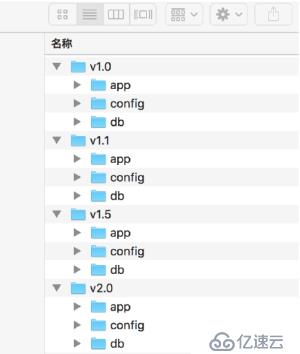
集中式 VCS
有集中的版本管理服务器器
具备文件版本管理理和分支管理理能力
集成效率有明显地提高
客户端必须时刻和服务器相连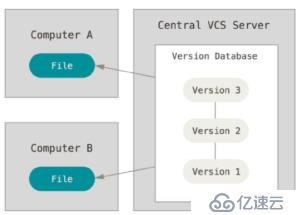
分布式 VCS
服务端和客户端都有完整的版本库
脱离服务端,客户端照样可以管理理版本
查看历史和版本比较等多数操作,都不需要访问服务器器,比集中式 VCS 更能提高版本管理理效率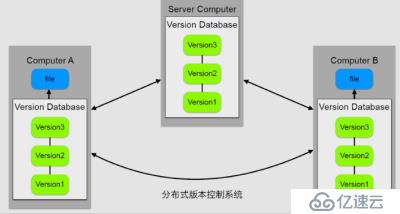
Git的特点
最优的存储能力、非凡的性能、开源的、很容易做备份、支持离线操作、很容易定制工作流程
2、安装Git
Git官网:https://git-scm.com/
参考文档:https://git-scm.com/book/en/v2
3、最小配置
配置user.name和user.email
$ git config --global user.name ‘your_name’
$ git config --global user.email ‘your_email@domain.com’
config 的三个作用域
$ git config --local       #local只对仓库有效,缺省等同于 local
$ git config --global     #global对登录用户所有仓库有效
$ git config --system   #system对系统的所有用户有效
显示 config 的配置,加 --list
$ git config --list --local
$ git config --list --global
$ git config --list --system
清除,--unset
$ git config --unset --local user.name
$ git config --unset --global user.name
$ git config --unset --system user.name
实例:
$ git config  --global user.name "Jone"
$ git config  --global user.email "764651475@qq.com"
$ git config  --global --list
sendpack.sideband=false
user.name=Jone
user.email=764651475@qq.com
4、创建第一个仓库
两种方式:
- 用 Git 之前已经有项目代码
$ git init $ cd 某个⽂文件夹 - 用 Git 之前还没有项目代码
$ cd 项目代码所在的文件夹
$ git init your_project      #会在当前路径下创建和项目名称同名的文件夹
$ cd your_project
实例
$ git init git_learning
Initialized empty Git repository in D:/git_learning/.git/
$ cd git_learning/
$ git status
On branch master

No commits yet

nothing to commit (create/copy files and use "git add" to track)

$ echo "hello world!" > first.txt            #添加第一个文件

$ git status                             #显示当前git状态
On branch master
No commits yet
Untracked files:
  (use "git add ..." to include in what will be committed)
        first.txt
nothing added to commit but untracked files present (use "git add" to track)

$ git add first.txt            #添加到暂存区
warning: LF will be replaced by CRLF in first.txt.
The file will have its original line endings in your working directory.

$ git commit -m"Add first file"    #提交
[master (root-commit) c8588e4] Add first file
 1 file changed, 1 insertion(+)
 create mode 100644 first.txt

$ git status
On branch master
nothing to commit, working tree clean
5、通过几次commit来认识工作区和暂存区
在上面添加文件到暂存区时,出现警告信息,是由于Git的换行符检查功能。Windows使用回车和换行两个字符来结束一行,而Mac和Linux只使用换行一个字符。Git可以在提交时自动地把行结束符CRLF转换成LF,而在读取代码时把LF转换成CRLF。如果该项目仅运行在Windows上的项目,可以设置false取消此功能。
$ echo "second file" > second.txt       #创建几个文件
$ echo "third file" > third.txt
$ echo "fourth file" > fourth.txt

$ git status                  #查看git当前状态
On branch master
Untracked files:
  (use "git add ..." to include in what will be committed)

        fourth.txt
        second.txt
        third.txt

nothing added to commit but untracked files present (use "git add" to track)

$ git add second.txt     #添加第二个文件到暂存区
warning: LF will be replaced by CRLF in second.txt.
The file will have its original line endings in your working directory.

$ git config --global core.autocrlf false    #关闭换行符检查功能

$ git status
On branch master
Changes to be committed:
  (use "git reset HEAD ..." to unstage)

        new file:   second.txt

Untracked files:
  (use "git add ..." to include in what will be committed)

        fourth.txt
        third.txt

$ git commit -m"Add second file"#提交第二个文件
[master 0bd98cb] Add second file
 1 file changed, 1 insertion(+)
 create mode 100644 second.txt

$ git log
commit 0bd98cb5d0d969cfc35d8c5a16d33b5924cbc6b0 (HEAD -> master)
Author: Jone <764651475@qq.com>
Date:   Thu Mar 14 16:59:25 2019 +0800

    Add second file

commit c8588e43dd1053684632871fb8aec1945ee6a6ab
Author: Jone <764651475@qq.com>
Date:   Thu Mar 14 16:36:00 2019 +0800

    Add first file

$ git add third.txt
$ git commit -m"Add third file"   #提交第三个文件
[master b843c28] Add third file
 1 file changed, 1 insertion(+)
 create mode 100644 third.txt

$ git status
On branch master
Untracked files:
  (use "git add ..." to include in what will be committed)

        fourth.txt

nothing added to commit but untracked files present (use "git add" to track)

$ git add fourth.txt
$ git commit -m"Add fouth file"   #提交第四个文件
[master 1d63ec8] Add fouth file
 1 file changed, 1 insertion(+)
 create mode 100644 fourth.txt

$ echo "Update the file" >> fourth.txt   #修改第四个文件
$ git status
On branch master
Changes not staged for commit:
  (use "git add ..." to update what will be committed)
  (use "git checkout -- ..." to discard changes in working directory)

        modified:   fourth.txt

no changes added to commit (use "git add" and/or "git commit -a")

$ git add fourth.txt
$ git commit -m"Update fourth file"     #提交修改后的文件
[master 7376bc5] Update fourth file
 1 file changed, 1 insertion(+)

$ git log
commit 7376bc5b2ebc3e13d4c4552ebdef348a17cd4eef (HEAD -> master)
Author: Jone <764651475@qq.com>
Date:   Thu Mar 14 17:03:07 2019 +0800

    Update fourth file

commit 1d63ec82259b237f58e7525ccf856a03fb880fcd
Author: Jone <764651475@qq.com>
Date:   Thu Mar 14 17:01:46 2019 +0800

    Add fouth file

commit b843c287804d2b5886167740f9e6c0d327540ee1
Author: Jone <764651475@qq.com>
Date:   Thu Mar 14 17:00:21 2019 +0800

    Add third file

commit 0bd98cb5d0d969cfc35d8c5a16d33b5924cbc6b0
Author: Jone <764651475@qq.com>
Date:   Thu Mar 14 16:59:25 2019 +0800

    Add second file
...
通过几次提交文件,可以总结git工作区、暂存区与历史版本之间的关系: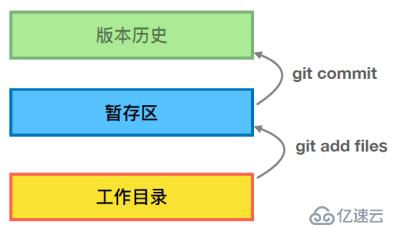
相关内容
热门资讯
空调连续工作多久需要停机休息
空调连续工作的时间取决于多个因素,包括空调的型号、功率、使用环境和维护情况等。一般来说,空调可以连续...
空调哪个符号是除湿的
空调除湿功能通常用一个水滴形状的符号表示。不同品牌和型号的空调遥控器可能会有所差异,但一般来说,除湿...
格力空调多长时间加一次氟利昂
1、一般情况下,空调对氟利昂的使用量是非常小的,所以在空调使用了四年左右的时候再考虑加也没问题。2、...
空调用多长时间需要加氟一次
一般情况下是五年。当出现以下这几种情况时,空调才需要加氟。1、空调的室内机和室外机各有两个接口,当接...
格调生活·C标思享荟:卡萨帝在...
9月12日的郑州龙湖金融岛,夜风轻拂,灯光璀璨。“C标时刻共传奇——卡萨帝思享荟暨20周年品牌盛典郑...
品牌价值破千亿、高端份额持续领...
9月12日,“C标时刻共传奇——卡萨帝思享荟暨20周年品牌盛典郑州站”在郑州龙湖金融岛举办。2026...
空调主板坏了修800还是换新的
空调主板坏了是修还是换新,需要考虑多个因素,以下是一些建议:1. 维修成本:如果维修费用较低,比如 ...
空调开多久需要休息多长时间
问题:空调开多久需要休息多长时间回答:1、在使用空调的过程中,一般空调开7~8个小时左右需要休息2~...
中央空调多长时间清洗一次
1、一般空调开机前清洗一次即可,空调开机中间时段再清洗一次,空调关机时清洗一次,这样比较合理。2、空...
中央空调氟利昂多久加一次
看空调制热和制冷程度,很多人的观点认为氟利昂必须一年放一次,其实这个观点是错误的,理解上面有点偏差,...