爬虫流程及Python第三方库用法
requests pymongo bs4等用法
from future import print_function
#python2.X中print不需要括号,而在python3.X中则需要。在开头加上这句之后,即使在
python2.X,使用print就得像python3.X那样加括号使用
import requests
导入requests 要是没有requests的话在https://pip.pypa.io/en/stable/×××talling/
         这个网址的前两句下载pip  用  pip ×××tall  requests   下载requests
                     requests是发起请求获取网页源代码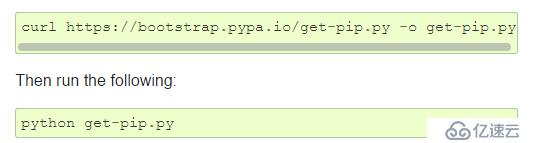
from bs4 import BeautifulSoup
pip ×××tall bs4 下载bs4 BeautifulSoup 是Python一个第三方库bs4中有一个
BeautifulSoup库,是用于解析html代码的,可以帮助你更方便的通过标签定位你需要的信息import pymongo
#源码安装mongodb数据库 pip安装pymongo 是python链接mongodb的第三方库是驱动程
序,使python程序能够使用Mongodb数据库,使用python编写而成.
import json
#json 是轻量级的文本数据交换格式。是用来存储和交换文本信息的语法。
安装数据库
1.源码安装mongodb https://fastdl.mongodb.org/linux/mongodb-linux-x86_64-rhel70-3.2.5.tgz 解压mongodb 源码包, 放在 /usr/local
2 mkdir -p /data/db
3.cd /usr/local/mongodb/bin
./mongod &
./mongo
exit退出
查看数据库内容:
cd/usr/local/mongodb/bin
./mongo
show dbs
数据库 : iaaf
use iaaf
show collections
db.athletes.find()
爬虫的流程
第一步:提取网站HTML信息
    #需要的网址

url = 'https://www.iaaf.org/records/toplists/jumps/long-jump/outdoor/men/senior/2018?regionType=world&windReading=regular&page={}&bestResultsOnly=true'

    #使用headers设置请求头,将代码伪装成浏览器

headers = {  'User-Agent': 'Mozilla/5.0 (Macintosh; Intel Mac OS X 10_14) AppleWebKit/605.1.15 (KHTML, like Gecko) Version/12.0 Safari/605.1.15', }

for i in range(1,23):
    res = requests.get(url.format(i), headers=headers)
    html = res.text
    print(i)
    soup = BeautifulSoup(html, 'html.parser')       #使用BeautifulSoup解析这段代码
    #tbody_l = soup.find_all('tbody')
    record_table = soup.find_all('table', class_='records-table')
    list_re = record_table[2]
    tr_l = list_re.find_all('tr')
    for i in tr_l:    # 针对每一个tr  也就是一行
        td_l = i.find_all('td')    # td的列表 第三项是 带href
       # 只要把td_l里面的每一项赋值就好了  组成json数据  {}  插入到mongo
        # 再从mongo里面取href  访问  得到 生涯数据  再存回这个表
        # 再 把所有数据 存到 excel

        j_data = {}
        try:
            j_data['Rank'] = td_l[0].get_text().strip()
            j_data['Mark'] = td_l[1].get_text().strip()
            j_data['WIND'] = td_l[2].get_text().strip()
            j_data['Competitior'] = td_l[3].get_text().strip()
            j_data['DOB'] = td_l[4].get_text().strip()
            j_data['Nat'] = td_l[5].get_text().strip()
            j_data['Pos'] = td_l[6].get_text().strip()
            j_data['Venue'] = td_l[8].get_text().strip()
            j_data['Date'] = td_l[9].get_text().strip()
            j_data['href'] = td_l[3].find('a')['href']
            #把想要的数据存到字典里
第二步:从HTML中提取我们想要的信息
#!/usr/bin/env python
#encoding=utf-8
from future import print_function
import requests
from bs4 import BeautifulSoup as bs
def long_jump(url):
url = 'https://www.iaaf.org/athletes/cuba/juan-miguel-echevarria-294120'
headers = {'User-Agent':'Mozilla/5.0 (Macintosh; Intel Mac OS X 10_14) AppleWebKit/605.1.15 (KHTML, like Gecko) Version/12.0 Safari/605.1.15'}
res = requests.get(url, headers=headers)
html = res.text
soup = bs(html,'html.parser')
div = soup.find('div', id='progression')

h3_l = []
if div != None:
    h3_l = div.find_all('h3')

tbody_l = []
outdoor = []
indoor = []
for i in h3_l:    # 得到h3 标签
    text = str(i.get_text().strip())
    if "Long Jump" in text and "View Graph" in text:
        tbody = i.parent.parent.table.tbody
        #print(tbody) # 可以拿到里面的数据
        # 两份 一份是室外 一份是室内
        tbody_l.append(tbody)
# 拿到两个元素的tbody  一个为室外 一个室内  用try except
# 组两个json数据  outdoor={}    indoor={}
# db.×××ert()  先打印
try:
    tbody_out = tbody_l[0]
    tbody_in  = tbody_l[1]
    tr_l = tbody_out.find_all('tr')
    for i in tr_l:
        # print(i)
        # print('+++++++++++++')
        td_l = i.find_all('td')
        td_dict = {}
        td_dict['Year'] = str(td_l[0].get_text().strip())
        td_dict['Performance'] = str(td_l[1].get_text().strip())
        td_dict['Wind'] = str(td_l[2].get_text().strip())
        td_dict['Place'] = str(td_l[3].get_text().strip())
        td_dict['Date'] = str(td_l[4].get_text().strip())
        outdoor.append(td_dict)

    # print(outdoor)
    # print('+++++++++++++++')
    tr_lin = tbody_in.find_all('tr')
    for i in tr_lin:
        td_l = i.find_all('td')
        td_dict = {}
        td_dict['Year'] = str(td_l[0].get_text().strip())
        td_dict['Performance'] = str(td_l[1].get_text().strip())
        td_dict['Place'] = str(td_l[2].get_text().strip())
        td_dict['Date'] = str(td_l[3].get_text().strip())
        indoor.append(td_dict)
    # print(indoor)
except:
    pass
return outdoor, indoor
if __name__ == '__main__':
long_jump(url'https://www.iaaf.org/athletes/cuba/juan-miguel-echevarria-294120')
在获取到整个页面的HTML代码后,我们需要从整个网页中提取运动员跳远的数据
第三步: 把提取的数据储存到数据库里
#!/usr/bin/env python
#coding=utf-8
from future import print_function
import pymongo
import requests
from bs4 import BeautifulSoup
import json
from long_jump import *
db = pymongo.MongoClient().iaaf
headers = {'User-Agent':'Mozilla/5.0 (Macintosh; Intel Mac OS X 10_14) AppleWebKit/605.1.15 (KHTML, like Gecko) Version/12.0 Safari/605.1.15'}
def get_href():
负责去mongo中取 href 取到了 然后访问 得到的数据 存到原来的 表中
href_list = db.athletes.find()
# 794
count = 0
for i in href_list:
    # 取id  根据id把爬来的生涯数据插回去
    print(count)
    href = i.get('href')
    outdoor = []
    indoor = []
    if href == None:
        pass
    else:
        url = 'https://www.iaaf.org'+ str(href)
        outdoor, indoor = long_jump(url)

    db.athletes.update({'_id':i.get('_id')},{"$set":{"outdoor":outdoor,"indoor":indoor}})
    count += 1
def get_progression():
pass
if name == 'main':
get_href()
第四步:将数据库内容写到 excel 按照国家划分
#!/usr/bin/env python
#coding=utf-8
from future import print_function
import xlwt
import pymongo
def write_into_xls(cursor):
title = ['Rank','Mark','age','Competitior','DOB','Nat','country','Venue','Date','out_year','out_performance','out_wind','out_place','out_date','in_year','in_performance','in_place','in_date']
book = xlwt.Workbook(encoding='utf-8',style_compression=0)
sheet = book.add_sheet('iaaf',cell_overwrite_ok=True)

for i in range(len(title)):
    sheet.write(0, i, title[i])

# db = pymongo.MongoClient().iaaf
# cursor = db.athletes.find()

flag = 1
db = pymongo.MongoClient().iaaf
country_l = ['CUB', 'RSA', 'CHN', 'USA', 'RUS', 'AUS', 'CZE', 'URU', 'GRE', 'JAM', 'TTO', 'UKR', 'GER', 'IND', 'BRA', 'GBR', 'CAN', 'SRI', 'FRA', 'NGR', 'POL', 'SWE', 'JPN', 'INA', 'GUY', 'TKS', 'KOR', 'TPE', 'BER', 'MAR', 'ALG', 'ESP', 'SUI', 'EST', 'SRB', 'BEL', 'ITA', 'NED', 'FIN', 'CHI', 'BUL', 'CRO', 'ALB', 'KEN', 'POR', 'BAR', 'DEN', 'PER', 'ROU', 'MAS', 'CMR', 'TUR', 'PHI', 'HUN', 'VEN', 'HKG', 'PAN', 'BLR', 'MEX', 'LAT', 'GHA', 'MRI', 'IRL', 'ISV', 'BAH', 'KUW', 'NOR', 'SKN', 'UZB', 'BOT', 'AUT', 'PUR', 'DMA', 'KAZ', 'ARM', 'BEN', 'DOM', 'CIV', 'LUX', 'COL', 'ANA', 'MLT', 'SVK', 'THA', 'MNT', 'ISR', 'LTU', 'VIE', 'IRQ', 'NCA', 'ARU', 'KSA', 'ZIM', 'SLO', 'ECU', 'SYR', 'TUN', 'ARG', 'ZAM', 'SLE', 'BUR', 'NZL', 'AZE', 'GRN', 'OMA', 'CYP', 'GUA', 'ISL', 'SUR', 'TAN', 'GEO', 'BOL', 'ANG', 'QAT', 'TJK', 'MDA', 'MAC']
for i in country_l:
    cursor = db.athletes.find({'Nat':i})
    for i in cursor:
        print(i)
        count_out = len(i['outdoor'])
        count_in = len(i['indoor'])
        count = 1
        if count_out >= count_in:
            count = count_out
        else:
            count = count_in
        if count == 0:
            count = 1

        # count 为这条数据占的行数
# title = ['Rank','Mark','Wind','Competitior','DOB','Nat','Pos','Venue',
# 'Date','out_year','out_performance','out_wind','out_place','out_date',
# 'in_year','in_performance','in_place','in_date']

        sheet.write(flag, 0, i.get('Rank'))
        sheet.write(flag, 1, i.get('Mark'))
        sheet.write(flag, 2, i.get('age'))
        sheet.write(flag, 3, i.get('Competitior'))
        sheet.write(flag, 4, i.get('DOB'))
        sheet.write(flag, 5, i.get('Nat'))
        sheet.write(flag, 6, i.get('country'))
        sheet.write(flag, 7, i.get('Venue'))
        sheet.write(flag, 8, i.get('Date'))

        if count_out > 0:
            for j in range(count_out):
                sheet.write(flag+j, 9, i['outdoor'][j]['Year'])
                sheet.write(flag+j, 10, i['outdoor'][j]['Performance'])
                sheet.write(flag+j, 11, i['outdoor'][j]['Wind'])
                sheet.write(flag+j, 12, i['outdoor'][j]['Place'])
                sheet.write(flag+j, 13, i['outdoor'][j]['Date'])

        if count_in > 0:
            for k in range(count_in):
                sheet.write(flag+k, 14, i['indoor'][k]['Year'])
                sheet.write(flag+k, 15, i['indoor'][k]['Performance'])
                sheet.write(flag+k, 16, i['indoor'][k]['Place'])
                sheet.write(flag+k, 17, i['indoor'][k]['Date'])

        flag = flag + count

book.save(r'iaaf.xls')

# 开始从第一行 输入数据    从数据库取
if name == 'main':
write_into_xls(cursor=None)
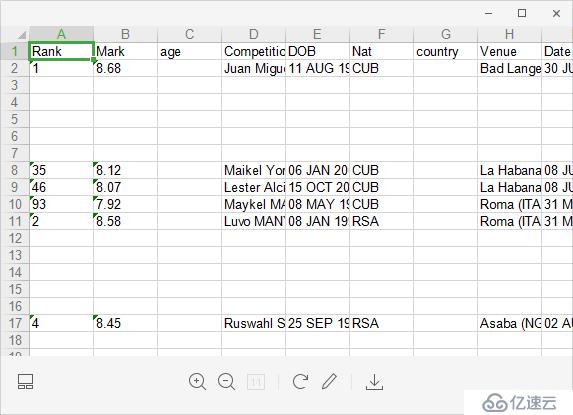
运行完上述代码后,我们得到的结果是