

rhel6上搭建lnmp架构以及遇到的一些错误并排除方法
先装好rhel6.5 配置好实验环境
关掉NetworkManager,并停止掉开机自启动
[root@duwensql ~]# service NetworkManager stop
[root@duwensql ~]# chkconfig -- list NetworkManager
[root@duwensql ~]# chkconfig NetworkManager off
关掉iptables
[root@duwensql ~]# iptables -F
[root@duwensql ~]# service iptables save
iptables£o·àe1ò±£′μ /etc/sysconfig/iptables£o     [è·¨]
[root@duwensql ~]# chkconfig iptables off
关掉selinux
[root@duwensql ~]# getenforce
Enforcing
[root@duwensql ~]# setenforce
usage:  setenforce [ Enforcing | Permissive | 1 | 0 ]
[root@duwensql ~]# setenforce 0
[root@duwensql ~]#
[root@duwensql ~]# vim /etc/selinux/config
打开这个档案以后你可以看到如下的内容,把SELINUX的值改成disabled就好
# This file controls the state of SELinux on the system.
# SELINUX= can take one of these three values:
#     enforcing - SELinux security policy is enforced.
#     permissive - SELinux prints warnings instead of enforcing.
#     disabled - No SELinux policy is loaded.
SELINUX=disabled
# SELINUXTYPE= can take one of these two values:
#     targeted - Targeted processes are protected,
#     mls - Multi Level Security protection.
SELINUXTYPE=targeted
修改主机名映射,可以不改,但是为了方便还是改下吧
[root@duwensql ~]# cat /etc/hosts
127.0.0.1   localhost localhost.localdomain localhost4 localhost4.localdomain4
::1         localhost localhost.localdomain localhost6 localhost6.localdomain6
[root@duwensql ~]# echo "192.168.20.253 duwensql.cn MySQL" >> /etc/hosts
[root@duwensql ~]# cat /etc/hosts
127.0.0.1   localhost localhost.localdomain localhost4 localhost4.localdomain4
::1         localhost localhost.localdomain localhost6 localhost6.localdomain6
192.168.20.253 duwensql.cn MySQL
[root@duwensql ~]#
修改主机名,就是编辑下面的这个档案,这里只贴上修改后的内容
[root@duwensql ~]# cat /etc/sysconfig/network
NETWORKING=yes
HOSTNAME=duwensql.cn
GATEWAY=192.168.20.2
NTPSERVERARGS=iburst
[root@duwensql ~]#
配置本地yum源
[root@duwensql ~]# [root@duwensql ~]# mount /dev/sr0 /mnt/ mount: block device /dev/sr0 is write-protected, mounting read-only [root@duwensql ~]# df -h | tail -1 /dev/sr0 3.6G 3.6G 0 100% /mnt [root@duwensql ~]# echo "/dev/sr0 /mnt/ iso9660 defaults 0 0" >> /etc/fstab [root@duwensql ~]# rm -rf /etc/yum.repos.d/* [root@duwensql ~]# cat > /etc/yum.repos.d/rhel6.repo <[rhel6-source] > name=rhel6-source > baseurl=file:///mnt > enabled=1 > gpgcheck=0 > EOF [root@duwensql ~]# yum clean all Loaded plugins: product-id, refresh-packagekit, security, subscription-manager This system is not registered to Red Hat Subscription Management. You can use subscription-manager to register. Cleaning repos: rhel6-source Cleaning up Everything [root@duwensql ~]# yum list
检测依赖环境,包括gcc,gcc-c++,autoconf,automake,zlib ,zlib-devel, openssl ,openssl-devel ,pcre-devel,
[root@duwensql ~]#
[root@duwensql ~]# yum install -y gcc gcc-c++ autoconf automake
[root@duwensql ~]# yum install -y zlib zlib-devel openssl openssl-devel pcre-devel
为了方便从xshell上传软件包,这里安装一个工具
[root@duwensql ~]#  rpm /mnt/Packages/lrzsz-0.12.20-27.1.el6.x86_64.rpm  -ih
warning: /mnt/Packages/lrzsz-0.12.20-27.1.el6.x86_64.rpm: Header V3 RSA/SHA256 Signature, key ID fd431d51: NOKEY
########################################### [100%]
########################################### [100%]
[root@duwensql ~]#
//上传软件包:nginx-1.6.0.tar.gz mysql-5.5.30.tar.gz php-5.4.14.tar.bz2
[root@duwensql ~]# rz
z waiting to receive.**B0100000023be50
[root@duwensql ~]# ls
anaconda-ks.cfg  install.log.syslog   nginx-1.6.0.tar.gz  公共的  视频  文档  音乐
install.log      mysql-5.5.30.tar.gz  php-5.4.14.tar.bz2  模板    图片  下载  桌面
正式开始安装MySQL了
解压到指定目录/usr/local/src/
[root@duwensql ~]#
[root@duwensql ~]# tar -zxf mysql-5.5.30.tar.gz -C /usr/local/src/
建一个mysql用户,这里把这个用户显示出来
[root@duwensql ~]# tail -1 /etc/passwd
mysql:x:500:500::/home/mysql:/sbin/nologin
[root@duwensql ~]#
//安装cmake
[root@duwensql ~]# yum install -y cmake
建立mysql的目录
[root@duwensql /]# mkdir /server
[root@duwensql ~]#  cd /usr/local/src/mysql-5.5.30/
[root@duwensql mysql-5.5.30]# cmake -DCMAKE_INSTALL_PREFIX=/server/mysql-5.5 -DMYSQL_UNIX_ADDR=/tmp/mysql.sock -DDEFAULT_CHARSET=utf8 -DDEFAULT_COLLATION=utf8_general_ci -DWITH_EXTRA_CHARSERS=all -DWITH_MYISAM_STORAGE_ENGINE=1 -DWITH_INNOBASE_STORAGE_ENGINE=1 -DWITH_MEMORY_STORAGE_ENGINE=1 -DWITH_READLINT=1 -DENABLED_LOCAL_INFILE=1 -DMYSQL_DATADIR=/server/mysql/data -DMYSQL_USER=mysql
//报错啦啦啦啦
CMake Error at cmake/readline.cmake:83 (MESSAGE):
  Curses library not found.  Please install appropriate package,
      remove CMakeCache.txt and rerun cmake.On Debian/Ubuntu, package name is libncurses5-dev, on Redhat and derivates it is ncurses-devel.
Call Stack (most recent call first):
  cmake/readline.cmake:127 (FIND_CURSES)
  cmake/readline.cmake:217 (MYSQL_USE_BUNDLED_LIBEDIT)
  CMakeLists.txt:269 (MYSQL_CHECK_READLINE)
-- Configuring incomplete, errors occurred!
//这个错误就是ncurses这个依赖没有装,yum安装一下
[root@duwensql ncurses-5.9]# yum -y install ncurses-devel
//装了那个ncurses依赖,还是报错,就只好把这个CMakeCache.txt找出来干掉了
[root@duwensql mysql-5.5.30]# find / -name CMakeCache.txt
/usr/local/src/mysql-5.5.30/CMakeCache.txt
[root@duwensql mysql-5.5.30]# rm -rf /usr/local/src/mysql-5.5.30/CMakeCache.txt
//OK,现在重新cmake
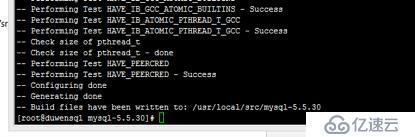
//呐开心不,没有报错了呢!!!
现在make &&make install,过程就不写了
配置运行环境
[root@duwensql mysql-5.5.30]# cd /server/
[root@duwensql server]# ls
mysql-5.5
[root@duwensql server]# chown -R mysql:mysql /server/mysql-5.5/
复制mysql配置文件
[root@duwensql server]# cd /etc/
[root@duwensql etc]# ll my.cnf
-rw-r--r--. 1 root root 251 8月   9 2013 my.cnf
[root@duwensql etc]# mv ./my.cnf ./my.cnf.back
[root@duwensql etc]# cp /usr/local/src/mysql-5.5.30/support-files/my-large.cnf /etc/my.cnf
[root@duwensql etc]#
这个步骤是加入开机启动项
[root@duwensql init.d]# cp /usr/local/src/mysql-5.5.30/support-files/mysql.server /etc/init.d/mysqld5.5
[root@duwensql init.d]# chmod +x ./mysqld5.5
[root@duwensql init.d]# pwd
/etc/init.d
[root@duwensql init.d]#
//这里要改下,大概在第70行
[root@duwensql init.d]# vim /etc/init.d/mysqld5.5
[root@duwensql init.d]# head -71  /etc/init.d/mysqld5.5 |tail -7
then
  basedir=/server/mysql-5.5
  bindir=/server/mysql-5.5/bin
  if test -z "$datadir"
  then
    datadir=/server/mysql-5.5/data
  fi
[root@duwensql init.d]#
//加入开机启动项
[root@duwensql init.d]# chkconfig mysqld5.5 on
[root@duwensql init.d]# chkconfig --list mysqld5.5
mysqld5.5      0:关闭1:关闭2:启用3:启用4:启用5:启用6:关闭
[root@duwensql init.d]#
初始化mysql
[root@duwensql init.d]#  cd /usr/local/src/mysql-5.5.30/scripts/
[root@duwensql scripts]# chmod +x mysql_install_db
[root@duwensql scripts]# ./mysql_install_db --defaults-file=/etc/my.cnf --basedir=/server/mysql-5.5 --datadir=/server/mysql-5.5/data --user=mysql
Installing MySQL system tables...
OK
Filling help tables...
OK
To start mysqld at boot time you have to copy
support-files/mysql.server to the right place for your system
PLEASE REMEMBER TO SET A PASSWORD FOR THE MySQL root USER !
To do so, start the server, then issue the following commands:
/server/mysql-5.5/bin/mysqladmin -u root password 'new-password'
/server/mysql-5.5/bin/mysqladmin -u root -h duwensql password 'new-password'
Alternatively you can run:
/server/mysql-5.5/bin/mysql_secure_installation
which will also give you the option of removing the test
databases and anonymous user created by default.  This is
strongly recommended for production servers.
See the manual for more instructions.
You can start the MySQL daemon with:
cd /server/mysql-5.5 ; /server/mysql-5.5/bin/mysqld_safe &
You can test the MySQL daemon with mysql-test-run.pl
cd /server/mysql-5.5/mysql-test ; perl mysql-test-run.pl
Please report any problems with the /server/mysql-5.5/scripts/mysqlbug script!
[root@duwensql scripts]#
开启mysql
[root@duwensql scripts]# /etc/init.d/mysqld5.5 start
Starting MySQL...                                          [确定]
[root@duwensql scripts]#
测试MySQL
//我这里最开始在家目录输入mysql显示没有命令,是因为没有加入环境变量的缘故啦,这里就不写出来了,直接到绝对路径去测试
root@duwensql mysql-test]# cd /server
[root@duwensql server]# ls
mysql-5.5
[root@duwensql server]# cd mysql-5.5/
[root@duwensql mysql-5.5]# ls
bin  COPYING  data  docs  include  INSTALL-BINARY  lib  man  mysql-test  README  scripts  share  sql-bench  support-files
[root@duwensql mysql-5.5]# cd bin/
[root@duwensql bin]# ./mysql
Welcome to the MySQL monitor.  Commands end with ; or \g.
Your MySQL connection id is 1
Server version: 5.5.30-log Source distribution
Copyright (c) 2000, 2013, Oracle and/or its affiliates. All rights reserved.
Oracle is a registered trademark of Oracle Corporation and/or its
affiliates. Other names may be trademarks of their respective
owners.
Type 'help;' or '\h' for help. Type '\c' to clear the current input statement.
mysql> show databases;
+--------------------+
| Database           |
+--------------------+
| information_schema |
| mysql              |
| performance_schema |
| test               |
+--------------------+
4 rows in set (0.04 sec)
mysql>
ctrl + c 退出
给他加个环境变量吧
[root@duwensql ~]# echo $PATH
/usr/lib64/qt-3.3/bin:/usr/local/sbin:/usr/local/bin:/sbin:/bin:/usr/sbin:/usr/bin:/root/bin
[root@duwensql ~]# PATH="$PATH":/server/mysql-5.5/bin/
设置mysql的root账户密码,并测试登陆
[root@duwensql ~]# mysqladmin -uroot password '123456'
[root@duwensql ~]# mysql -u root -p123456
Welcome to the MySQL monitor.  Commands end with ; or \g.
Your MySQL connection id is 4
Server version: 5.5.30-log Source distribution
Copyright (c) 2000, 2013, Oracle and/or its affiliates. All rights reserved.
Oracle is a registered trademark of Oracle Corporation and/or its
affiliates. Other names may be trademarks of their respective
owners.
Type 'help;' or '\h' for help. Type '\c' to clear the current input statement.
mysql>
ctrl + c 退出
MySQL安装完了
来安装nginx吧
解压
[root@duwensql ~]# tar -zxf nginx-1.6.0.tar.gz
编译
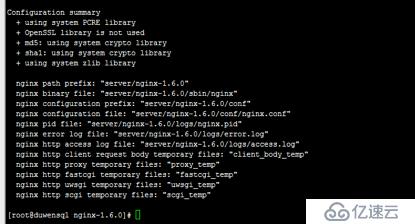
[root@duwensql nginx-1.6.0]# ./configure --prefix=server/nginx-1.6.0 --user=nginx --group=nginx --with-http_dav_module --with-http_stub_status_module --with-http_addition_module --with-http_sub_module --with-http_flv_module --with-http_mp4_module
结果太多就不写了,放一个图
make&&make install
[root@duwensql nginx-1.6.0]# make -j 4 && make install
开始配置
[root@duwensql nginx-1.2.8]# pwd
/server/nginx-1.2.8
[root@duwensql nginx-1.2.8]# vim conf/nginx.conf
第二行加
user nginx nginx;
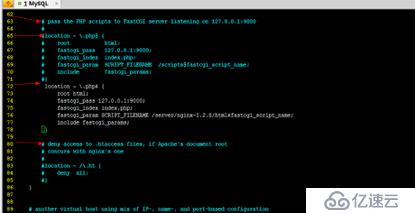
然后加下面的内容,括号{前面有空格
location ~ \.php$ {
root html;
fastcgi_pass 127.0.0.1:9000;
fastcgi_index index.php;
fastcgi_param SCRIPT_FILENAME /server/nginx-1.2.8/html$fastcgi_script_name;
include fastcgi_params;
}
大概的位置如下图
启动服务
[root@duwensql nginx-1.2.8]# /server/nginx-1.2.8/sbin/nginx
把服务加入开机启动
[root@duwensql nginx-1.2.8]# echo '/server/nginx-1.2.8/sbin/nginx & ' >> /etc/rc.local
[root@duwensql nginx-1.2.8]#
测试下
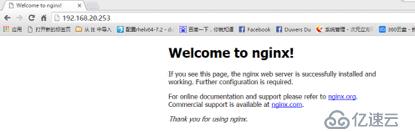
测试配置文件和重新加载配置文件
[root@duwensql nginx-1.2.8]# /server/nginx-1.2.8/sbin/nginx -t
nginx: the configuration file /server/nginx-1.2.8/conf/nginx.conf syntax is ok
nginx: configuration file /server/nginx-1.2.8/conf/nginx.conf test is successful
[root@duwensql nginx-1.2.8]# /server/nginx-1.2.8/sbin/nginx -s reload
来安装PHP
给PHP添加扩展模块:libmcrypt-2.5.8.tar.gz
1、 让 PHP 编译支持这个功能
2、 生成扩展模块
3、 --with-mcrypt=/usr/local/
安装libmcrypt库
[root@duwensql ~]# tar -zxf libmcrypt-2.5.8.tar.gz
[root@duwensql ~]# cd libmcrypt-2.5.8
[root@duwensql libmcrypt-2.5.8]# ./configure --prefix=/usr/local/
[root@duwensql libmcrypt-2.5.8]# echo $?
0
[root@duwensql libmcrypt-2.5.8]# make -j 4 && make install
加个环境
[root@duwensql libmcrypt-2.5.8]# yum -y install php-pear
解压以及编译
//在这一步出了好多好多错误,始料不及啊,本文把错误和解决贴上,如果还是不明白的话可以直接搜索错误,这里就不写了
[root@duwensql ~]# tar jxf php-5.4.14.tar.bz2 -C /usr/local/src/
[root@duwensql ~]# cd /usr/local/src/php-5.4.14/
[root@duwensql php-5.4.14]# ./configure --prefix=/server/php-5.4-nginx --with-config-file-path=/server/php-5.4-nginx --with-mysql=/server-5.5/ --with-mysqli=/server/mysql-5.5/bin/mysql_config --with-iconv-dir --with-freetype-dir --with-jpeg-dir --with-png-dir --with-zlib --with-libxml-dir=/usr --enable-xml --disable-rpath --enable-bcmath --enable-shmop --enable-sysvsem --enable-inline-optimization --with-curl --with-curlwrappers --enable-mbregex --enable-fpm --enable-mbstring --with-gd --enable-gd-native-ttf --with-openssl --with-mhash --enable-pcntl --enable-sockets --with-xmlrpc --enable-zip --enable-soap --with-mcrypt=/usr/local/
报错1
#######
configure: error: xml2-config not found. Please check your libxml2 installation.
[root@duwensql php-5.4.14]#
解决1
[root@duwensql php-5.4.14]# yum -y install libxml2*
重新编译
[root@duwensql php-5.4.14]# ./configure --prefix=/server/php-5.4-nginx --with-config-file-path=/server/php-5.4-nginx --with-mysql=/server/mysql-5.5/ --with-mysqli=/server/mysql-5.5/bin/mysql_config --with-iconv-dir --with-freetype-dir --with-jpeg-dir --with-png-dir --with-zlib --with-libxml-dir=/usr --enable-xml --disable-rpath --enable-bcmath --enable-shmop --enable-sysvsem --enable-inline-optimization --with-curl --with-curlwrappers --enable-mbregex --enable-fpm --enable-mbstring --with-gd --enable-gd-native-ttf --with-openssl --with-mhash --enable-pcntl --enable-sockets --with-xmlrpc --enable-zip --enable-soap --with-mcrypt=/usr/local/
报错2
checking if we should use cURL for url streams... yes checking for cURL in default path... not found configure: error: Please reinstall the libcurl distribution - easy.h should be in/include/curl/ [root@duwensql php-5.4.14]#
解决2:
[root@duwensql php-5.4.14]# yum -y install curl-devel
重新编译
[root@duwensql php-5.4.14]#./configure --prefix=/server/php-5.4-nginx --with-config-file-path=/server/php-5.4-nginx --with-mysql=/server/mysql-5.5/ --with-mysqli=/server/mysql-5.5/bin/mysql_config --with-iconv-dir --with-freetype-dir --with-jpeg-dir --with-png-dir --with-zlib --with-libxml-dir=/usr --enable-xml --disable-rpath --enable-bcmath --enable-shmop --enable-sysvsem --enable-inline-optimization --with-curl --with-curlwrappers --enable-mbregex --enable-fpm --enable-mbstring --with-gd --enable-gd-native-ttf --with-openssl --with-mhash --enable-pcntl --enable-sockets --with-xmlrpc --enable-zip --enable-soap --with-mcrypt=/usr/local/
报错3
checking whether to enable JIS-mapped Japanese font support in GD... no
checking for fabsf... yes
checking for floorf... yes
configure: error: jpeglib.h not found
解决3:*不要丢了
[root@duwensql php-5.4.14]# yum -y install libjpeg*
再次编译
[root@duwensql php-5.4.14]./configure --prefix=/server/php-5.4-nginx --with-config-file-path=/server/php-5.4-nginx --with-mysql=/server/mysql-5.5/ --with-mysqli=/server/mysql-5.5/bin/mysql_config --with-iconv-dir --with-freetype-dir --with-jpeg-dir --with-png-dir --with-zlib --with-libxml-dir=/usr --enable-xml --disable-rpath --enable-bcmath --enable-shmop --enable-sysvsem --enable-inline-optimization --with-curl --with-curlwrappers --enable-mbregex --enable-fpm --enable-mbstring --with-gd --enable-gd-native-ttf --with-openssl --with-mhash --enable-pcntl --enable-sockets --with-xmlrpc --enable-zip --enable-soap --with-mcrypt=/usr/local/
报错4:
checking for jpeg_read_header in -ljpeg... yes If configure fails try --with-vpx-dir=configure: error: png.h not found. [root@duwensql php-5.4.14]#
解决4:*不要丢了
[root@duwensql php-5.4.14]# yum -y install libpng*
再次编译
[root@duwensql php-5.4.14]#./configure --prefix=/server/php-5.4-nginx --with-config-file-path=/server/php-5.4-nginx --with-mysql=/server/mysql-5.5/ --with-mysqli=/server/mysql-5.5/bin/mysql_config --with-iconv-dir --with-freetype-dir --with-jpeg-dir --with-png-dir --with-zlib --with-libxml-dir=/usr --enable-xml --disable-rpath --enable-bcmath --enable-shmop --enable-sysvsem --enable-inline-optimization --with-curl --with-curlwrappers --enable-mbregex --enable-fpm --enable-mbstring --with-gd --enable-gd-native-ttf --with-openssl --with-mhash --enable-pcntl --enable-sockets --with-xmlrpc --enable-zip --enable-soap --with-mcrypt=/usr/local/
报错5:
configure: error: freetype.h not found.
解决5:*不要丢掉了
[root@duwensql php-5.4.14]# yum -y install freetype*
再次编译
[root@duwensql php-5.4.14]#./configure --prefix=/server/php-5.4-nginx --with-config-file-path=/server/php-5.4-nginx --with-mysql=/server/mysql-5.5/ --with-mysqli=/server/mysql-5.5/bin/mysql_config --with-iconv-dir --with-freetype-dir --with-jpeg-dir --with-png-dir --with-zlib --with-libxml-dir=/usr --enable-xml --disable-rpath --enable-bcmath --enable-shmop --enable-sysvsem --enable-inline-optimization --with-curl --with-curlwrappers --enable-mbregex --enable-fpm --enable-mbstring --with-gd --enable-gd-native-ttf --with-openssl --with-mhash --enable-pcntl --enable-sockets --with-xmlrpc --enable-zip --enable-soap --with-mcrypt=/usr/local/
报错6:
checking for specified location of the MySQL UNIX socket... no
configure: error: Cannot find MySQL header files under /server-5.5/.
Note that the MySQL client library is not bundled anymore!
这个应该是指定路径错误,改下
再次编译
[root@duwensql php-5.4.14]#./configure --prefix=/server/php-5.4-nginx --with-config-file-path=/server/php-5.4-nginx --with-mysql=/server/mysql-5.5/ --with-mysqli=/server/mysql-5.5/bin/mysql_config --with-iconv-dir --with-freetype-dir --with-jpeg-dir --with-png-dir --with-zlib --with-libxml-dir=/usr --enable-xml --disable-rpath --enable-bcmath --enable-shmop --enable-sysvsem --enable-inline-optimization --with-curl --with-curlwrappers --enable-mbregex --enable-fpm --enable-mbstring --with-gd --enable-gd-native-ttf --with-openssl --with-mhash --enable-pcntl --enable-sockets --with-xmlrpc --enable-zip --enable-soap --with-mcrypt=/usr/local/
报错7:
configure: error: wrong mysql library version or lib not found. Check config.log for more information.
解决7:
“=/server/mysql-5.5/bin/mysql_config”删掉试试
改好以后的执行:
[root@duwensql php-5.4.14]# ./configure --prefix=/server/php-5.4-nginx --with-config-file-path=/server/php-5.4-nginx --with-mysql=/server/mysql-5.5/ --with-mysqli --with-iconv-dir --with-freetype-dir --with-jpeg-dir --with-png-dir --with-zlib --with-libxml-dir=/usr --enable-xml --disable-rpath --enable-bcmath --enable-shmop --enable-sysvsem --enable-inline-optimization --with-curl --with-curlwrappers --enable-mbregex --enable-fpm --enable-mbstring --with-gd --enable-gd-native-ttf --with-openssl --with-mhash --enable-pcntl --enable-sockets --with-xmlrpc --enable-zip --enable-soap --with-mcrypt=/usr/local/
历经千辛万苦啊
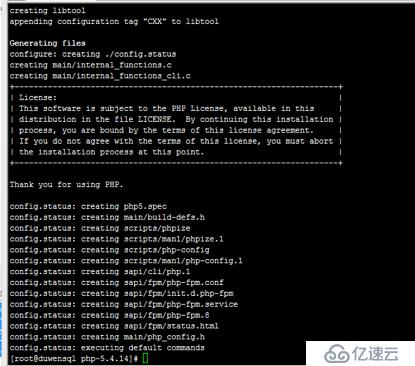
这里贴上一些参数的意思
--with-iconv-dir #字符集转换 需要的扩展模块
–without-iconv 关闭 iconv 函数,种字符集间的转换
–with-freetype-dir 打开对 freetype 字体库的支持
–with-jpeg-dir 打开对 jpeg 图片的支持
–with-png-dir 打开对 png 图片的支持
–with-libxml-dir 打开 libxml2 库的支持
–disable-rpath 关闭额外的运行库文件
–enable-bcmath 打开图片大小调整,用到 zabbix 监控的时候用到了这个模块
下面 是make && make install
[root@duwensql php-5.4.14]# make -j 4 && make install
生成配置文件
[root@duwensql ~]# cp /usr/local/src/php-5.4.14/php.ini-production /server/php-5.4-nginx/php.ini
生成php-fpm配置文件
[root@duwensql ~]# cp /server/php-5.4-nginx/etc/php-fpm.conf.default /server/php-5.4-nginx/etc/php-fpm.conf
生成php-fpm启动脚本
[root@duwensql ~]# cp /usr/local/src/php-5.4.14/sapi/fpm/init.d.php-fpm /etc/init.d/php-fpm
[root@duwensql ~]# chmod +x /etc/init.d/php-fpm
[root@duwensql ~]# /etc/init.d/php-fpm start
Starting php-fpm  done
[root@duwensql ~]# netstat -anptu | grep 9000
tcp        0      0 127.0.0.1:9000              0.0.0.0:*                   LISTEN      76616/php-fpm
[root@duwensql ~]#
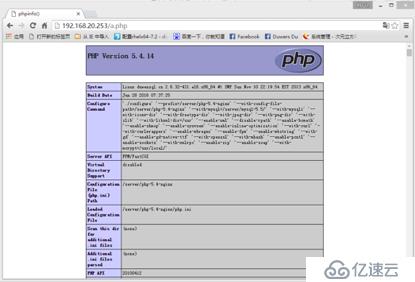
测试php
[root@duwensql ~]# vim /server/nginx-1.2.8/html/a.php
[root@duwensql ~]# cat /server/nginx-1.2.8/html/a.php

[root@duwensql ~]#
效果图如下
The End!
上一篇:-一个简单的数据缓存解决方案