

LAMP搭建17:PHP配置文件php.ini详解
PHP主配置文件是/usr/local/php/etc/php.ini:
[root@centos6 ~]# /usr/local/php/bin/php -i |head
phpinfo()
PHP Version => 5.4.36
System => Linux centos6.5-1 2.6.32-431.el6.i686 #1 SMP Fri Nov 22 00:26:36 UTC 2013 i686
Build Date => Jan 14 2017 00:52:17
Configure Command => './configure' '--prefix=/usr/local/php' '--with-apxs2=/usr/local/apache2/bin/apxs' '--with-config-file-path=/usr/local/php/etc' '--with-mysql=/usr/local/mysql' '--with-libxml-dir' '--with-gd' '--with-jpeg-dir' '--with-png-dir' '--with-freetype-dir' '--with-iconv-dir' '--with-zlib-dir' '--with-bz2' '--with-openssl' '--with-mcrypt' '--enable-soap' '--enable-gd-native-ttf' '--enable-mbstring' '--enable-sockets' '--enable-exif' '--disable-ipv6'
Server API => Command Line Interface
Virtual Directory Support => disabled
Configuration File (php.ini) Path => /usr/local/php/etc
Loaded Configuration File => /usr/local/php/etc/php.ini
该配置文件以分号“;”作为注释符号,可以使用参数 disable_functions 禁用一些高风险的函数:
[root@centos6 ~]# vim /usr/local/php/etc/php.ini
……
; This directive allows you to disable certain functions for security reasons.
; It receives a comma-delimited list of function names. This directive is
; *NOT* affected by whether Safe Mode is turned On or Off.
; http://php.net/disable-functions
disable_functions = eval,assert,popen,passthrn,escapeshllarg,escapes
hellcmd,passthru,exec,system,chroot,scandir,chgrp,chown,escapeshellc
md,escapeshellarg,shell_exec,proc_get_status,ini_alter,ini_restore,d
l,pfsockopen,openlog,syslog,readlink,syslink,leak,popepassthru,strea
m_socket_server,popen,proc_open,proc_close
可以打开display_errors=On(默认是Off)在浏览器中显示错误信息
; On or stdout = Display errors to STDOUT
; Default Value: On
; Development Value: On
; Production Value: Off
; http://php.net/display-errors
display_errors = On
重新加载配置文件
[root@centos6 ~]# apachectl -t
Syntax OK
[root@centos6 ~]# apachectl graceful
打开我们论坛页面,人为加点错误
[root@centos6 ~]# vim /data/www/forum.php
abcdefgh #来点错误
/**
* [Discuz!] (C)2001-2099 Comsenz Inc.
* This is NOT a freeware, use is subject to license terms
*
* $Id: forum.php 33828 2013-08-20 02:29:32Z nemohou $
*/
define('APPTYPEID', 2);
define('CURSCRIPT', 'forum');
……
访问会出现错误
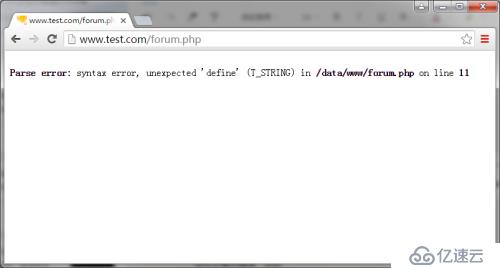
display_errors = On改回默认值Off
[root@centos6 ~]# vim /usr/local/php/etc/php.ini
……
; On or stdout = Display errors to STDOUT
; Default Value: On
; Development Value: On
; Production Value: Off
; http://php.net/display-errors
display_errors = Off
……
[root@centos6 ~]# apachectl -t
Syntax OK
[root@centos6 ~]# apachectl graceful
访问不提示错误,空白,按F12查看状态码为500
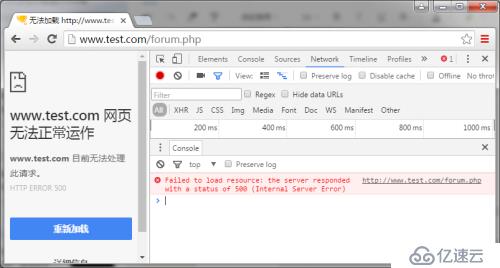
也可以使用curl查看状态码
[root@centos6 ~]# curl -x192.168.147.132:80 www.test.com/forum.php -I
HTTP/1.0 500 Internal Server Error
Date: Sat, 14 Jan 2017 22:40:53 GMT
Server: Apache/2.2.9 (Unix) PHP/5.4.36
X-Powered-By: PHP/5.4.36
Cache-Control: max-age=0
Expires: Sat, 14 Jan 2017 22:40:53 GMT
Connection: close
Content-Type: text/html
我们不可以使用display_errors=On来再浏览器页面中查看我们的错误信息,因为这样会把错误暴露给所有用户,这很危险。我们使用log_errors=On(默认是打开的)来记录错误信息,以供改正。
只需要定义错误日志存放的位置
[root@centos6 ~]# mkdir /usr/local/php/logs
[root@centos6 ~]# chmod 777 !$
chmod 777 /usr/local/php/logs
定义存放位置:
; Example:
error_log = /usr/local/php/logs/php_errors.log
; Log errors to syslog (Event Log on Windows).
定义错误日志级别:
; Default Value: E_ALL & ~E_NOTICE & ~E_STRICT & ~E_DEPRECATED
; Development Value: E_ALL
; Production Value: E_ALL & ~E_DEPRECATED & ~E_STRICT
; http://php.net/error-reporting
error_reporting = E_ALL & ~E_NOTICE
重新加载配置文件后
[root@centos6 ~]# apachectl -t
Syntax OK
[root@centos6 ~]# apachectl graceful
刷新浏览器,会在我们指定的路径下生成一个错误日志,内容跟使用浏览器显示的错误一样:
[root@centos6 logs]# ls
php_errors.log
[root@centos6 logs]# cat php_errors.log
[14-Jan-2017 22:47:45 UTC] PHP Parse error: syntax error, unexpected 'define' (T_STRING) in /data/www/forum.php on line 11
限制用户只能访问的目录,以:分割多个目录(这里我们去掉forum.php中的错误代码)
[root@centos6 logs]# vim /usr/local/php/etc/php.ini
; open_basedir, if set, limits all file operations to the defined directory
; and below. This directive makes most sense if used in a per-directory
; or per-virtualhost web server configuration file. This directive is
; *NOT* affected by whether Safe Mode is turned On or Off.
; http://php.net/open-basedir
open_basedir = /data/www/:/tmp/
[root@centos6 logs]# apachectl -t
Syntax OK
[root@centos6 logs]# apachectl graceful
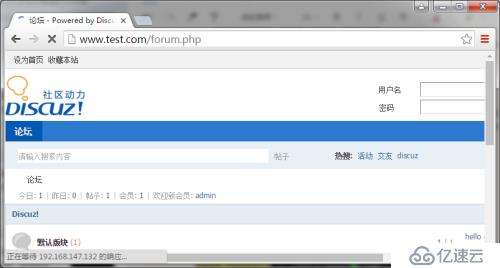
如果我们限制用户到一个错误的目录比如www2(不存在):
[root@centos6 logs]# vim /usr/local/php/etc/php.ini
; open_basedir, if set, limits all file operations to the defined directory
; and below. This directive makes most sense if used in a per-directory
; or per-virtualhost web server configuration file. This directive is
; *NOT* affected by whether Safe Mode is turned On or Off.
; http://php.net/open-basedir
open_basedir = /data/www2/:/tmp/
[root@centos6 logs]# apachectl -t
Syntax OK
[root@centos6 logs]# apachectl graceful
又不能访问了
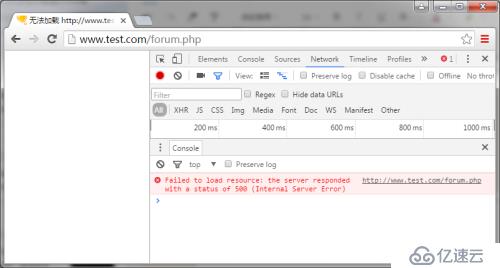
从错误日志中找到原因
[root@centos6 logs]# cat php_errors.log
……
[14-Jan-2017 22:55:07 UTC] PHP Warning: Unknown: open_basedir restriction in effect. File(/data/www/forum.php) is not within the allowed path(s): (/data/www2/:/tmp/) in Unknown on line 0
……
因此允许访问的目录范围一定要限制正确。
如果有多个虚拟主机,多个网站,就需要做多个open_basedir限制,如果使用php.ini配置的话,只能一组目录,多个站点无法指定自己特有的目录,所以我们使用虚拟主机配置文件做配置。
先把php.ini里的open_basedir注释掉
[root@centos6 logs]# vim /usr/local/php/etc/php.ini
……
; open_basedir, if set, limits all file operations to the defined directory
; and below. This directive makes most sense if used in a per-directory
; or per-virtualhost web server configuration file. This directive is
; *NOT* affected by whether Safe Mode is turned On or Off.
; http://php.net/open-basedir
;open_basedir = /data/www/:/tmp/
……
我们这里只有一台虚拟主机,在其中加入如下内容即可,如果有多台虚拟主机,每一台都可以指定自己的目录
[root@centos6 logs]# vim /usr/local/apache2/conf/extra/httpd-vhosts.conf
……
# ServerAdmin webmaster@dummy-host2.example.com
DocumentRoot "/data/www"
ServerName www.test.com
ServerAlias www.aaa.com
ServerAlias www.bbb.com
php_admin_value open_basedir "/data/www/:/tmp/"
AllowOverride None
Options None
……
[root@centos6 logs]# apachectl -t
Syntax OK
[root@centos6 logs]# apachectl graceful