

单主机部署LAMP
单主机LAMP部署
要求:在一个主机上一个虚拟主机提供phpMyAdmin,另一个虚拟主机提供wordpress,且为phpMyAdmim提供https服务:
一.安装所需rpm包
yuminstall -y httpd php php-mysql php-gd php-mbstring php-xml mariadb-servermod_ssl
二.开启并检测服务,配置数据库,测试网页是否联通
启动httpd服务:systemctl start htppd.service
检查服务开启状态:systemctlstatus httpd.service
● httpd.service - The Apache HTTP Server
Loaded: loaded(/usr/lib/systemd/system/httpd.service; enabled; vendor preset: disabled)
Active: active (running) since Mon2016-07-18 22:59:32 CST
将服务设置为默认开启状态:systemctl enable httpd.service
查看80端口状态:ss -tnl
LISTEN 0 128 :::80 :::*
检查httpd进程:ps -aux | grep httpd
root 1709 0.0 1.6 468464 16304 ? Ss 22:59 0:00 /usr/sbin/httpd-DFOREGROUND
apache 2013 0.0 0.8 470680 8560 ? S 22:59 0:00 /usr/sbin/httpd -DFOREGROUND
apache 2014 0.0 0.8 470680 8560 ? S 22:59 0:00 /usr/sbin/httpd -DFOREGROUND
apache 2015 0.0 0.8 470680 8560 ? S 22:59 0:00 /usr/sbin/httpd -DFOREGROUND
apache 2017 0.0 0.8 470680 8560 ? S 22:59 0:00 /usr/sbin/httpd -DFOREGROUND
apache 2018 0.0 0.8 470680 8560 ? S 22:59 0:00 /usr/sbin/httpd -DFOREGROUND
root 4499 0.0 0.0 112644 952 pts/1 R+ 23:05 0:00 grep --color=auto httpd
查看是否是prefork模块:httpd -M | grep mpm :
mpm_prefork_module(shared)
确认ssl模块是否启用成功:httpd -M |grep ssl
ssl_module(shared)
启动mysql服务;systemctl start mariadb.service
Mysql数据库初始化:mysql_secure_installation
授权创建用户
[root@zq~]# mysql
mysql>GRANT ALL ON qqdb.* TO 'qquser'@'172.16.%.%' IDENTIFIED BY 'qqpass';
mysql>FLUSH PRIVILEGES;
mysql>CREATE DATABASE qqdb;
为虚拟主机建FQDN的资源映射路径,并配置默认测试页面:
[root@zq~]# mkdir -p /data/vhost/www{1,2}
配置默认页1:vim /data/vhost/www1/index.php
number1
$conn =mysql_connect('172.16.35.1','qquser','qqpass');
if($conn)
echo"OK";
else
echo"Failure";
phpinfo();
?>
配置默认页2:cp /data/vhost/www1/index.php/data/vhost/www2/index.php
vim/data/vhost/www2/index.php
改1为2即可
改httpd的配置文件
vim /etc/httpd/conf.d/vhost1.conf
ServerNamewww1.test.com
DocumentRoot"/data/vhost/www1"
ProxyRequestson
DirectoryIndexindex.php
OptionsNone
AllowOverrideNone
Requireall granted
vim/etc/httpd/conf.d/vhost2.conf
ServerNamewww2.test.com
DocumentRoot"/data/vhost/www2"
ProxyRequestson
DirectoryIndexindex.php
OptionsNone
AllowOverrideNone
Requireall granted
修改DNS指向自己并添加本地域名解析
vim/etc/resolv.conf
DNS=172.16.35.1
vim/etc/hosts
172.16.100.31www1.test.comwww2.test.com
输入网址www1.test.com或www2.test.com显示ok则说明以上步骤正确
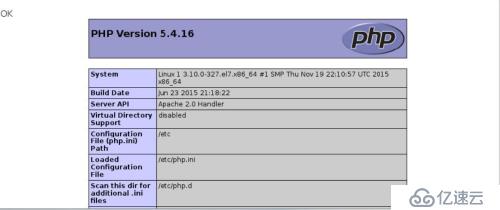
且加速器以启用:

三.安装wordpress和php-myadmin
在教室服务器上用lftp下载wordpress放在/data/vhost/www1中,php-myadmin放在/data/vhost/www2中
1.安装wordpress :
[root@zq~]# unzip wordpress-4.3.1-zh_CN.zip
修改配置文件;
[root@zq~]# vim /data/vhost/www1/wp-config-sample.php
// **MySQL 设置 - 具体信息来自您正在使用的主机 ** //
/**WordPress数据库的名称 */
define('DB_NAME','qqdb');
/** MySQL数据库用户名 */
define('DB_USER','qquser');
/** MySQL数据库密码 */
define('DB_PASSWORD','qqpass');
/** MySQL主机 */
define('DB_HOST','172.16.35.1');
/** 创建数据表时默认的文字编码 */
define('DB_CHARSET','utf8');
/** 数据库整理类型。如不确定请勿更改 */
define('DB_COLLATE','');
2.安装php-myadmin:
[root@zq ~]# unzipphpMyAdmin-4.4.14.1-all-languages.zip
[root@zq ~]#mv /data/vhost/www2/config.sample.inc.php /data/vhost/www2/config.inc.php
[root@zq~]# vim /data/vhost/www2/config.inc.php
$cfg['blowfish_secret']= '4pfPnJU4R8pA4WMWaQxD'; /* YOU MUST FILL IN THIS FOR COOKIE AUTH! */
/*
* Serversconfiguration
*/
$i = 0;
/*
* Firstserver
*/
$i++;
/*Authentication type */
$cfg['Servers'][$i]['auth_type']= 'cookie';
/* Serverparameters */
$cfg['Servers'][$i]['host']= '172.16.35.1'; 这里这指向mysql数据库主机的地址
$cfg['Servers'][$i]['connect_type']= 'tcp';
$cfg['Servers'][$i]['compress']= false;
$cfg['Servers'][$i]['AllowNoPassword']= false;
3.测试wordpress和php-myadmin是否可以连接

第一次登陆要输入认证信息。

四.签署CA证书并为phpmyadmin提供https服务;
1、生成密钥
进入CA目录下
[root@zq~]# cd /etc/pki/CA/
[root@zq CA]#(umask 077; openssl genrsa -out private/cakey.pem 1024)
GeneratingRSA private key, 1024 bit long modulus
............................................................................+++
...............+++
e is65537 (0x10001)
2、生成自签证书
[root@zq CA]# openssl req -new -x509 -keyprivate/cakey.pem -out cacert.pem
You are about to be asked to enterinformation that will be incorporated
into your certificate request.
What you are about to enter is what iscalled a Distinguished Name or a DN.
There are quite a few fields but you canleave some blank
For some fields there will be a defaultvalue,
If you enter '.', the field will be leftblank.
-----
Country Name (2 letter code) [XX]:CN
State or Province Name (full name)[]:beijing
Locality Name (eg, city) [Default City]:haidian
Organization Name (eg, company) [DefaultCompany Ltd]:mage
Organizational Unit Name (eg, section)[]:magedu
Common Name (eg, your name or your
补充文件
[root@zq CA]# touch index.txt
[root@zq CA]# echo 01 > serial
3.在第2台主机上生成请求签署文件以及密钥
在/etc/httpd/目录下创建ssl目录并cd进入
生成密钥:
[root@zq ssl]# (umask 077; openssl genrsa -outhttpd.key 1024)
GeneratingRSA private key, 1024 bit long modulus
.++++++
........................................++++++
e is65537 (0x10001)
生成签署请求文件:
[root@ ssl]# openssl req -new -key httpd.key -outhttpd.csr
You areabout to be asked to enter information that will be incorporated
into yourcertificate request.
What youare about to enter is what is called a Distinguished Name or a DN.
There arequite a few fields but you can leave some blank
For somefields there will be a default value,
If youenter '.', the field will be left blank.
-----
CountryName (2 letter code) [XX]:CN
State orProvince Name (full name) []:beijing
LocalityName (eg, city) [Default City]:haidian
OrganizationName (eg, company) [Default Company Ltd]:mage
OrganizationalUnit Name (eg, section) []:magedu
CommonName (eg, your name or your server's hostname) []:www2.test.com 这个要和客户访问要加密的主机名一样
EmailAddress []:www1admin@test.com
Pleaseenter the following 'extra' attributes
to besent with your certificate request
A challengepassword []:
Anoptional company name []:
4.复制给CA主机签署证书
[root@zq ssl]# scp httpd.csr 172.16.35.2:/tmp
5.到centos7主机上签署文件
[root@1 CA]# openssl ca -in /tmp/httpd.csr -out/etc/pki/CA/certs/httpd.crt
6.签署完成后复制给请求主机
[root@1 CA]# scp certs/httpd.crt 172.16.35.1:/etc/httpd/ssl/
编辑这个文件
[root@zq~]# vim /etc/httpd/conf.d/ssl.conf
DocumentRoot"/data/vhost/www2/myadmin"
ServerNamewww2.test.com:443 主机名也改成自己的
SSLCertificateFile/etc/httpd/ssl/httpd.crt 指明签署的证书文件路径
SSLCertificateKeyFile/etc/httpd/ssl/httpd.key 指明私钥文件的路径
7.重载配置文件
Systemctl reload httpd
8.查看443端口情况:
ss -tnl |grep 443
9.主配置文件中禁掉默认根目录:
#DocumentRoot"/var/www/html"
10.打开浏览器输入myadmin地址访问看看是否提供了https服务
五.对其做压力测试:
ab -n 1000 -c 1000 -k www1.test.com
ab -n 1000 -c 1000 -k www2.test.com
上一篇:三台主机分别部署LAMP
下一篇:基于RPM包的LAMP搭建