

db2 之 入门实验
新单位接触到db2,IBM的重量级数据库产品,还是需要熟悉一下。老套路,先看基础资料,了解基本概念之后,开始搭建实验环境动手实验。
首先使用virtual box 虚拟机准备一个centos7 64位的linux操作系统环境,然后到IBM的官网下载最新版本的90天使用版,下载地址:
https://www-01.ibm.com/marketing/iwm/iwm/web/pick.do?source=swg-dm-db2trial&lang=zh_CN
也许你看到这篇博客的时候地址已经失效了,那就到官网db2的首页(http://www-01.ibm.com/software/cn/data/db2/),应该有一个免费使用版下载的链接,应该都是一样的。我下载的的时候的最新版本是v11.1 。
下载软件的同时,找到相应的安装指导文档,同样的,到官网上看相关文档,网址如下:
http://www-01.ibm.com/support/docview.wss?rs=71&uid=swg27009474
选择看一下相应的主题,主要是db2版本新特性,安装条件,不同的安装方法,针对不同操作系统的安装方法等等,找到对应的linux 64位的安装文档。我看的是这一篇:
Installing DB2 servers using the DB2 Setup wizard (Linux and UNIX)
Version 11.1.0 Version 10.5.0 Version 10.1.0 Version 9.7.0 Version 9.5.0
安装文件有2个G,我不想将这么大的文件传来传去,我用ultraISO将安装文件制作成镜像ISO文件,附带说一下,当时安装的ultraISO是使用版9.6.5版本,到网上找了一个注册码激活,简体中文版注册码: 用户名:王涛 注册码:7C81-1689-4046-626F ,在这里谢谢这位好人。注册过后,ultraISO才能生成大于300M的内容。将ISO镜像文件挂载到虚拟机上,挂载后在虚拟机上的路径是/run/media/root/MYCD/ 直接进去看看。对了,沉醉了一下命令行,这个安装应该是图形安装方式,因此,还是直接到虚拟机上面的图形界面,在桌面上命令窗口(和windows操作一样咯,什么?没有图形界面,对不起,那就请重新安装centos桌面环境 ),将安装文件解压到系统的一个目录中(tar xvf product.tar ),比如 /software ,然后进入到安装目录,找到 db2setup文件,执行: ./db2setup
弹出了一个安装界面,选择NEW INSTALL,然后弹出下面的界面:

嗯,我就选择第一个,单击NEXT:

虽然第一次安装,还是装一下B,多了解一些安装特性,选择Custom,不要忘了勾选同意IBM terms,单击NEXT:

上面这一步,可以看到详细的特性选项,我没有更改,直接下一步NEXT:

上面这一步,选择增加了简体中文和繁体中文(因为项目业主是台湾人,估计要用繁体),下一步NEXT:

上面这一步,不更改,下一步NEXT:

上面这一步是建安装用户和安装目录,选择默认的,生产环境需要根据规划来更改相应的参数,单击NEXT:

上面选择默认,是分区啊什么的,回头再看相关概念,单击NEXT:

上面是确定instance 用户,选择默认,生产环境需要根据规划来更改相应的参数,单击NEXT:

上面是确定fenced 用户,选择默认,生产环境需要根据规划来更改相应的参数,单击NEXT:

上面是确定开放的端口,选择默认,生产环境需要根据规划来更改相应的参数,单击NEXT:

上面是配置通知消息,单击NEXT:
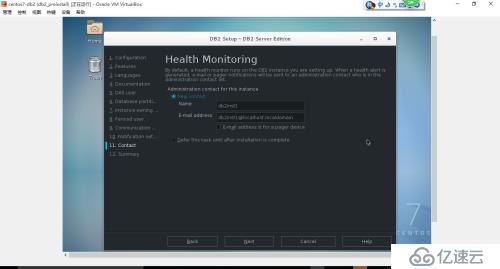
上面是健康检查通知,单击NEXT:

上面是安装汇总,单击FINISH:

上面是开始安装了。。。。。

上面这里就安装完了。第一次安装,选择查看安装后的步骤,就是告诉你安装完之后需要做什么东西,我就罗嗦点,复制下来,如下:
Required steps:
In order to start using DB2 you need to logon using a valid user ID such as the DB2 instance owner's ID "db2inst1".
You can connect to the DB2 instance "db2inst1" using the port number "50000". Record it for future reference.
Optional steps:
To validate your installation files, instance, and database functionality, run the Validation Tool, /opt/ibm/db2/V11.1/bin/db2val. For more information, see "db2val" in the DB2 Information Ce
nter.
Open First Steps by running "db2fs" using a valid user ID such as the DB2 instance owner's ID. You will need to have DISPLAY set and a supported web browser in the path of this user ID.
You should ensure that you have the correct license entitlements for DB2 products and features installed on this machine. Each DB2 product or feature comes with a license certificate file (al
so referred to as a license key) that is distributed on an Activation CD, which also includes instructions for applying the license file. If you purchased a base DB2 product, as well as, sepa
rately priced features, you might need to install more than one license certificate. The Activation CD for your product or feature can be downloaded from Passport Advantage if it is not part
of the physical media pack you received from IBM. For more information about licensing, search the Information Center (http://publib.boulder.ibm.com/infocenter/db2luw/v10r5/index.jsp) using t
erms such as "license compliance", "licensing" or "db2licm".
To use your DB2 database product, you must have a valid license. For information about obtaining and applying DB2 license files, see http://pic.dhe.ibm.com/infocenter/db2luw/v10r5/topic/com.
ibm.db2.luw.qb.server.doc/doc/c0061199.html.
Refer to "What's New" http://publib.boulder.ibm.com/infocenter/db2luw/v10r5/topic/com.ibm.db2.luw.wn.doc/doc/c0052035.html in the DB2 Information Center to learn about the new functions for D
B2 11.1.0.0.
Verify that you have access to the DB2 Information Center based on the choices you made during this installation. If you performed a typical or a compact installation, verify that you can acc
ess the IBM Web site using the internet. If you performed a custom installation, verify that you can access the DB2 Information Center location specified during the installation.
Review the response file created at /root/db2server.rsp. Additional information about response file installation is available in the DB2 documentation under "Installing DB2 using a response
file".
至此,第一次安装db2就完成了。后面再看看基本的使用。