

AIX平台中oracle数据库与打补丁常见错误有哪些
1、执行安装时,图形界面无法弹出并报错.
$ ./runInstaller
********************************************************************************
Your platform requires the root user to perform certain pre-installation
OS preparation. The root user should run the shell script 'rootpre.sh' before
you proceed with Oracle installation. rootpre.sh can be found at the top level
of the CD or the stage area.
Answer 'y' if root has run 'rootpre.sh' so you can proceed with Oracle
installation.
Answer 'n' to abort installation and then ask root to run 'rootpre.sh'.
********************************************************************************
Has 'rootpre.sh' been run by root on all nodes? [y/n] (n)
y
Starting Oracle Universal Installer...
Checking Temp space: must be greater than 190 MB. Actual 8346 MB Passed
Checking swap space: must be greater than 150 MB. Actual 16384 MB Passed
Checking monitor: must be configured to display at least 256 colors
>>> Could not execute auto check for display colors using command /usr/bin/X11/xdpyinfo. Check if the DISPLAY variable is set. Failed <<<<
Some requirement checks failed. You must fulfill these requirements before
continuing with the installation,
Continue? (y/n) [n] y
>>> Ignoring required pre-requisite failures. Continuing...
Preparing to launch Oracle Universal Installer from /tmp/OraInstall2016-10-11_02-15-45PM. Please wait ...$ Exception in thread "main" java.lang.NoClassDefFoundError: sun.awt.motif.MToolkit (initialization failure)
at java.lang.J9VMInternals.initialize(J9VMInternals.java:134)
at java.lang.Class.forNameImpl(Native Method)
at java.lang.Class.forName(Class.java:173)
at java.awt.Toolkit$2.run(Toolkit.java:864)
at java.security.AccessController.doPrivileged(AccessController.java:192)
at java.awt.Toolkit.getDefaultToolkit(Toolkit.java:847)
at com.jgoodies.looks.LookUtils.isLowResolution(LookUtils.java:484)
at com.jgoodies.looks.LookUtils.
at java.lang.J9VMInternals.initializeImpl(Native Method)
at java.lang.J9VMInternals.initialize(J9VMInternals.java:196)
at com.jgoodies.looks.plastic.PlasticLookAndFeel.
at java.lang.J9VMInternals.initializeImpl(Native Method)
at java.lang.J9VMInternals.initialize(J9VMInternals.java:196)
at java.lang.J9VMInternals.initialize(J9VMInternals.java:161)
at java.lang.J9VMInternals.initialize(J9VMInternals.java:161)
at java.lang.J9VMInternals.initialize(J9VMInternals.java:161)
at java.lang.Class.forNameImpl(Native Method)
at java.lang.Class.forName(Class.java:206)
at javax.swing.SwingUtilities.loadSystemClass(SwingUtilities.java:1812)
at javax.swing.UIManager.setLookAndFeel(UIManager.java:510)
at oracle.install.commons.util.Application.startup(Application.java:785)
at oracle.install.commons.flow.FlowApplication.startup(FlowApplication.java:165)
at oracle.install.commons.flow.FlowApplication.startup(FlowApplication.java:182)
at oracle.install.commons.base.driver.common.Installer.startup(Installer.java:348)
at oracle.install.ivw.crs.driver.CRSInstaller.startup(CRSInstaller.java:98)
at oracle.install.ivw.crs.driver.CRSInstaller.main(CRSInstaller.java:105)
解决方法:
步骤:
① root用户下export DISPLAY= xx.xx.xx.xx:0.0 其中xx.xx.xx.xx为我本地电脑的IP
② vi /etc/ssh/sshd_config
找到#X11Forwarding no 这一行,将其改为 X11Forwarding yes (前面的#要去掉)
③重新启动ssh:
stopsrc -s sshd
startsrc -s sshd
④ 然后断开xshell重新登录系统(任意用户),就可以调出图像界面了。
2、打补丁时,报如下错误。
# /u01/app/11.2.0.4/grid/OPatch/opatch auto /tmp/23274134 -ocmrf /tmp/ocm.rsp
Executing /u01/app/11.2.0.4/grid/perl/bin/perl /u01/app/11.2.0.4/grid/OPatch/crs/patch21203.pl -patchdir /tmp -patchn 23274134 -ocmrf /tmp/ocm.rsp -paramfile /u01/app/11.2.0.4/grid/crs/install/crsconfig_params
This is the main log file: /u01/app/11.2.0.4/grid/cfgtoollogs/opatchauto2016-10-17_15-17-30.log
This file will show your detected configuration and all the steps that opatchauto attempted to do on your system:
/u01/app/11.2.0.4/grid/cfgtoollogs/opatchauto2016-10-17_15-17-30.report.log
2016-10-17 15:17:30: Starting Clusterware Patch Setup
Using configuration parameter file: /u01/app/11.2.0.4/grid/crs/install/crsconfig_params
The opatch minimum version check for patch /tmp/23274134/23054359 failed for /u01/app/11.2.0.4/grid
The opatch minimum version check for patch /tmp/23274134/23054319 failed for /u01/app/11.2.0.4/grid
The opatch minimum version check for patch /tmp/23274134/22502505 failed for /u01/app/11.2.0.4/grid
Opatch version check failed for oracle home /u01/app/11.2.0.4/grid
Opatch version check failed
ERROR: update the opatch version for the failed homes and retry
opatch auto failed.
#
查看日志发现如下报错
2016-10-12 15:44:28: The opatch minimum version check for patch /tmp/23274134/22502505 failed for /u01/app/11.2.0.4/grid
2016-10-12 15:44:28: The opatch version check failed with following error
2016-10-12 15:44:28: Oracle Interim Patch Installer version 11.2.0.3.15
Copyright (c) 2016, Oracle Corporation. All rights reserved.
Oracle Home : /u01/app/11.2.0.4/grid
Central Inventory : /u01/app/oraInventory
from : /u01/app/11.2.0.4/grid/oraInst.loc
OPatch version : 11.2.0.3.15
OUI version : 11.2.0.4.0
Log file location : /u01/app/11.2.0.4/grid/cfgtoollogs/opatch/opatch3016-10-12_15-44-27PM_1.log
OPatch failed to lock and get an Inventory Session for the given Oracle Home /u01/app/11.2.0.4/grid
Possible causes are:
No read or write permission to $ORACLE_HOME, cannot create $ORACLE_HOME/.patch_storage
No read or write permission to $ORACLE_HOME/.patch_storage
OPatch cannot proceed further because system will not be able to backup files, or read the backup area for rollback/restore.
OPatchSession cannot load inventory for the given Oracle Home /u01/app/11.2.0.4/grid. Possible causes are:
No read or write permission to ORACLE_HOME/.patch_storage
Central Inventory is locked by another OUI instance
No read permission to Central Inventory
The lock file exists in ORACLE_HOME/.patch_storage
The Oracle Home does not exist in Central Inventory
UtilSession failed: IPMRWServices::verifyPatchStorageDirectory() cannot read or write to /u01/app/11.2.0.4/grid/.patch_storage
OPatch failed with error code 73
2016-10-12 15:44:28: Status of opatch version check for /u01/app/11.2.0.4/grid is 0
2016-10-12 15:44:28: Opatch version check failed for oracle home /u01/app/11.2.0.4/grid
2016-10-12 15:44:28: Opatch version check failed
2016-10-12 15:44:28: ERROR: update the opatch version for the failed homes and retry
解决方法:
grid用户对/u01/app/11.2.0.4/grid目录没有写权限导致patch失败。
3、打补丁报错
# /u01/app/11.2.0.4/grid/OPatch/opatch auto /tmp/23274134 -ocmrf /tmp/ocm.rsp
Executing /u01/app/11.2.0.4/grid/perl/bin/perl /u01/app/11.2.0.4/grid/OPatch/crs/patch21203.pl -patchdir /tmp -patchn 23274134 -ocmrf /tmp/ocm.rsp -paramfile /u01/app/11.2.0.4/grid/crs/install/crsconfig_params
This is the main log file: /u01/app/11.2.0.4/grid/cfgtoollogs/opatchauto2016-10-12_16-44-23.log
This file will show your detected configuration and all the steps that opatchauto attempted to do on your system:
/u01/app/11.2.0.4/grid/cfgtoollogs/opatchauto2016-10-12_16-44-23.report.log
2016-10-12 16:44:23: Starting Clusterware Patch Setup
Using configuration parameter file: /u01/app/11.2.0.4/grid/crs/install/crsconfig_params
Stopping RAC /u01/app/oracle/product/11.2.0.4/dbhome_1 ...
Stopped RAC /u01/app/oracle/product/11.2.0.4/dbhome_1 successfully
ERROR: prepatch execution for DB home ... failed
opatch auto failed.
#
解决方法:
补丁程序文件权限不对导致打补丁失败,做如下处理:
chown -R grid:oinstall /tmp/23274134
chmod -R 777 /tmp/23274134
4、安装检测报告告警
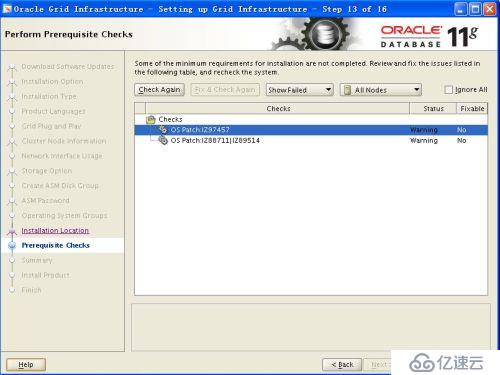
解决方法:
系统版本为AIX6.1(6100-09-03-1415),数据库安装检测报缺少IZ97457,IZ88711,IZ89514,该包已在该版中被修正.可以忽略.
5、rfc1323告警
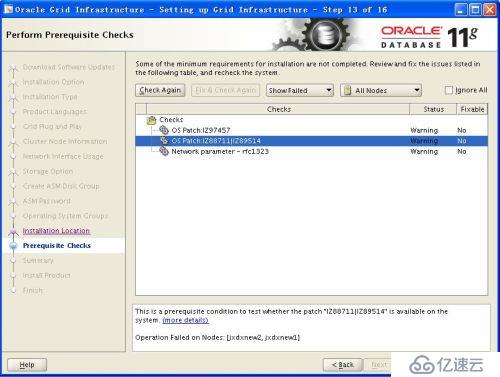
解决方法:
rfc1323 已被修改为1,检测仍然报错,使用如下命令进行修改
ifconfig en4 rfc1323 1
ifconfig en6 rfc1323 1
6、打完补丁之后oracle执行文件权限发生了变化,数据库启动报错
SQL> startup
ORA-01565: error in identifying file '+DATA/zx/spfilejxkzx.ora'
ORA-17503: ksfdopn:2 Failed to open file +DATA/zx/spfilejxkzx.ora
ORA-15001: diskgroup "DATA" does not exist or is not mounted
ORA-15040: diskgroup is incomplete
ORA-15040: diskgroup is incomplete
ORA-15040: diskgroup is incomplete
ORA-15040: diskgroup is incomplete
SQL>
数据库警告日志报错如下:
RSMN started with pid=33, OS id=3605444
ORACLE_BASE from environment = /u01/app/oracle
NOTE: Loaded library: System
ORA-15025: could not open disk "/dev/rhdisk5"
ORA-27041: unable to open file
IBM AIX RISC System/6000 Error: 13: Permission denied
Additional information: 11
ORA-15025: could not open disk "/dev/rhdisk6"
ORA-27041: unable to open file
IBM AIX RISC System/6000 Error: 13: Permission denied
Additional information: 11
ORA-15025: could not open disk "/dev/rhdisk7"
ORA-27041: unable to open file
IBM AIX RISC System/6000 Error: 13: Permission denied
Additional information: 11
ORA-15025: could not open disk "/dev/rhdisk8"
ORA-27041: unable to open file
IBM AIX RISC System/6000 Error: 13: Permission denied
Additional information: 11
SUCCESS: diskgroup DATA was dismounted
ERROR: diskgroup DATA was not mounted
ORA-01565: Unable to open Spfile +DATA/zx/spfilejxkzx.ora.
USER (ospid: 3015500): terminating the instance due to error 1565
Wed Oct 12 18:16:35 2016
ORA-1092 : opitsk aborting process
Instance terminated by USER, pid = 3015500
解决方法
# cd /u01/app/oracle/product/11.2.0.4/dbhome_1/bin
# ls -l oracle
-rwsr-s--x 1 oracle oinstall 309472813 Oct 12 12:08 oracle
修改
# chown oracle:asmadmin oracle
# ls -l oracle
-rwsr-s--x 1 oracle asmadmin 309472813 Oct 12 12:08 oracle
#