

Linux syslog 系统日志管理
admin
2023-06-04 22:01:13
0次
Linux syslog 系统日志管理
===============================================================================
rsyslog记录日志于mysql:
操作如下:
实验环境:CentOS 7 操作系统
前提:
准备好msql server或mariadb server(一定要编辑配置文件/etc/my.cnf,添加跳过反向解析等)并启动服务;
实验步骤:
1.安装rsyslog连接至mysql server的驱动模块;
# yum install rsyslog-mysql
2.在mysql server准备rsyslog专用的用户账号;
[root@centos7 ~]# mysql -p
Enter password:
Welcome to the MariaDB monitor.  Commands end with ; or \g.
Your MariaDB connection id is 3
Server version: 5.5.44-MariaDB MariaDB Server

Copyright (c) 2000, 2015, Oracle, MariaDB Corporation Ab and others.

Type 'help;' or '\h' for help. Type '\c' to clear the current input statement.

# 授权数据库Syslog的所有表允许rsyslog用户在本地主机访问,访问密码为134296
MariaDB [(none)]>  GRANT ALL ON Syslog.* TO 'rsyslog'@'127.0.0.1' IDENTIFIED BY '134296';
Query OK, 0 rows affected (0.00 sec)

# 为了安全不被反解,再授权一个使用local的本地主机
MariaDB [(none)]> GRANT ALL ON Syslog.* TO 'rsyslog'@'local' IDENTIFIED BY '134296';
Query OK, 0 rows affected, 1 warning (0.00 sec)

MariaDB [(none)]> FLUSH PRIVILEGES;
Query OK, 0 rows affected (0.01 sec)

MariaDB [(none)]> use mysql;
MariaDB [mysql]> SELECT user,host,password FROM user;
+------------+-----------+-------------------------------------------+
| user       | host      | password                                  |
+------------+-----------+-------------------------------------------+
| root       | localhost | *41EE0F8759D5340036B009143E1727DB5787A448 |
| root       | centos7   | *41EE0F8759D5340036B009143E1727DB5787A448 |
| root       | 127.0.0.1 | *41EE0F8759D5340036B009143E1727DB5787A448 |
| root       | ::1       | *41EE0F8759D5340036B009143E1727DB5787A448 |
| ultraxuser | 127.0.0.1 | *41EE0F8759D5340036B009143E1727DB5787A448 |
| ultraxuser | localhost | *41EE0F8759D5340036B009143E1727DB5787A448 |
| rsyslog    | 127.0.0.1 | *41EE0F8759D5340036B009143E1727DB5787A448 | # 授权的用户
| rsyslog    | local     | *41EE0F8759D5340036B009143E1727DB5787A448 |
+------------+-----------+-------------------------------------------+
8 rows in set (0.00 sec)

MariaDB [mysql]> \q
Bye
3.生成所需要的数据库和表;
前面已经安装了rsyslog连接至mysql server的驱动模块rsyslog-mysql,查看其配置文件如下:
[root@centos7 ~]#  rpm -ql rsyslog-mysql
/usr/lib64/rsyslog/ommysql.so
/usr/share/doc/rsyslog-7.4.7/mysql-createDB.sql  # 是生成数据库和表的一个脚本文件

[root@centos7 ~]# cat /usr/share/doc/rsyslog-7.4.7/mysql-createDB.sql
CREATE DATABASE Syslog;
USE Syslog;
CREATE TABLE SystemEvents
(
        ID int unsigned not null auto_increment primary key,
        CustomerID bigint,
        ReceivedAt datetime NULL,
        DeviceReportedTime datetime NULL,
        Facility smallint NULL,
        Priority smallint NULL,
        FromHost varchar(60) NULL,
        Message text,
        NTSeverity int NULL,
        Importance int NULL,
        EventSource varchar(60),
        EventUser varchar(60) NULL,
        EventCategory int NULL,
        EventID int NULL,
        EventBinaryData text NULL,
        MaxAvailable int NULL,
        CurrUsage int NULL,
        MinUsage int NULL,
        MaxUsage int NULL,
        InfoUnitID int NULL ,
        SysLogTag varchar(60),
        EventLogType varchar(60),
        GenericFileName VarChar(60),
        SystemID int NULL
);

CREATE TABLE SystemEventsProperties
(
        ID int unsigned not null auto_increment primary key,
        SystemEventID int NULL ,
        ParamName varchar(255) NULL ,
        ParamValue text NULL
);
直接把脚本导入数据库中
[root@centos7 ~]# mysql -ursyslog -h227.0.0.1 -p134296 < /usr/share/doc/rsyslog-7.4.7/mysql-createDB.sql

# 登录数据库查看如下:
[root@centos7 ~]# mysql -ursyslog -h227.0.0.1 -p134296
Welcome to the MariaDB monitor.  Commands end with ; or \g.
Your MariaDB connection id is 7
Server version: 5.5.44-MariaDB MariaDB Server

Copyright (c) 2000, 2015, Oracle, MariaDB Corporation Ab and others.

Type 'help;' or '\h' for help. Type '\c' to clear the current input statement.

MariaDB [(none)]> show databases;
+--------------------+
| Database           |
+--------------------+
| information_schema |
| Syslog             |
| test               |
+--------------------+
3 rows in set (0.00 sec)

MariaDB [(none)]> use Syslog;
Reading table information for completion of table and column names
You can turn off this feature to get a quicker startup with -A

Database changed
MariaDB [Syslog]> show tables;
+------------------------+
| Tables_in_Syslog       |
+------------------------+
| SystemEvents           |
| SystemEventsProperties |
+------------------------+
2 rows in set (0.00 sec)

MariaDB [Syslog]> desc SystemEvents;
+--------------------+------------------+------+-----+---------+----------------+
| Field              | Type             | Null | Key | Default | Extra          |
+--------------------+------------------+------+-----+---------+----------------+
| ID                 | int(10) unsigned | NO   | PRI | NULL    | auto_increment |
| CustomerID         | bigint(20)       | YES  |     | NULL    |                |
| ReceivedAt         | datetime         | YES  |     | NULL    |                |
| DeviceReportedTime | datetime         | YES  |     | NULL    |                |
| Facility           | smallint(6)      | YES  |     | NULL    |                |
| Priority           | smallint(6)      | YES  |     | NULL    |                |
| FromHost           | varchar(60)      | YES  |     | NULL    |                |
| Message            | text             | YES  |     | NULL    |                |
| NTSeverity         | int(11)          | YES  |     | NULL    |                |
| Importance         | int(11)          | YES  |     | NULL    |                |
| EventSource        | varchar(60)      | YES  |     | NULL    |                |
| EventUser          | varchar(60)      | YES  |     | NULL    |                |
| EventCategory      | int(11)          | YES  |     | NULL    |                |
| EventID            | int(11)          | YES  |     | NULL    |                |
| EventBinaryData    | text             | YES  |     | NULL    |                |
| MaxAvailable       | int(11)          | YES  |     | NULL    |                |
| CurrUsage          | int(11)          | YES  |     | NULL    |                |
| MinUsage           | int(11)          | YES  |     | NULL    |                |
| MaxUsage           | int(11)          | YES  |     | NULL    |                |
| InfoUnitID         | int(11)          | YES  |     | NULL    |                |
| SysLogTag          | varchar(60)      | YES  |     | NULL    |                |
| EventLogType       | varchar(60)      | YES  |     | NULL    |                |
| GenericFileName    | varchar(60)      | YES  |     | NULL    |                |
| SystemID           | int(11)          | YES  |     | NULL    |                |
+--------------------+------------------+------+-----+---------+----------------+
24 rows in set (0.01 sec)

MariaDB [Syslog]> Ctrl-C -- exit!
Aborted
4.配置rsyslog使用ommysql模块
[root@centos7 ~]# vim /etc/rsyslog.conf
#### MODULES ####
......
$ModLoad ommysql

5.配置RULES,将所期望的日志信息记录于mysql中;
facility.priority :ommysql:DBHOST,DB,DBUSER,DBUSERPASS

6.重启rsyslog服务;登录数据库查看如下
  # systemctl start rsyslog # 重启服务

  [root@centos7 ~]# mysql -ursyslog -h227.0.0.1 -p134296
Welcome to the MariaDB monitor.  Commands end with ; or \g.
Your MariaDB connection id is 9
Server version: 5.5.44-MariaDB MariaDB Server

Copyright (c) 2000, 2015, Oracle, MariaDB Corporation Ab and others.

Type 'help;' or '\h' for help. Type '\c' to clear the current input statement.

MariaDB [(none)]> use Syslog;
Reading table information for completion of table and column names
You can turn off this feature to get a quicker startup with -A

Database changed
MariaDB [Syslog]> select * from SystemEvents\G;
*************************** 11. row ***************************
                ID: 11
        CustomerID: NULL
        ReceivedAt: 2016-10-20 16:00:01
DeviceReportedTime: 2016-10-20 16:00:01
          Facility: 9
          Priority: 6
          FromHost: centos7
           Message: (root) CMD (/usr/lib64/sa/sa1 1 1)
        NTSeverity: NULL
        Importance: NULL
       EventSource: NULL
         EventUser: NULL
     EventCategory: NULL
           EventID: NULL
   EventBinaryData: NULL
      MaxAvailable: NULL
         CurrUsage: NULL
          MinUsage: NULL
          MaxUsage: NULL
        InfoUnitID: 1
         SysLogTag: CROND[3521]:
      EventLogType: NULL
   GenericFileName: NULL
          SystemID: NULL
11 rows in set (0.00 sec)
7.loganalyzer图形化工具
WebGUI, 运行amp环境中;
1)获取loganalyzer-3.6.5.tar.gz
lftp 10.1.0.1:/pub/Sources/sources/loganalyzer> ls
-rwxr--r--    1 500      500       1046600 Aug 24  2013 loganalyzer-3.6.4.tar.gz
-rwxr--r--    1 500      500       1046957 Aug 19  2014 loganalyzer-3.6.5.tar.gz
lftp 10.1.0.1:/pub/Sources/sources/loganalyzer> mget loganalyzer-3.6.5.tar.gz
1046957 bytes transferred
lftp 10.1.0.1:/pub/Sources/sources/loganalyzer> bye
[root@centos7 ~]# ls
anaconda-ks.cfg    bin    Templates    Desktop   Documents
loganalyzer-3.6.5.tar.gz  Pictures     Videos
Downloads         Music    Public

[root@centos7 ~]# tar xf loganalyzer-3.6.5.tar.gz # 解压缩
[root@centos7 ~]# cd loganalyzer-3.6.5/
[root@centos7 loganalyzer-3.6.5]#
admin  bbs  drupal-7.28  lastlog.txt  messages.txt  phpinfo.php  phpMyAdmin-4.0.5-all-languages  php-mysql.php  pma  src  text.html

# 只复制src目录到/var/www/html/中,并命名为loganalyzer-3.6.5
[root@centos7 loganalyzer-3.6.5]# cp -a src/ /var/www/html/loganalyzer-3.6.5

[root@centos7 loganalyzer-3.6.5]# cd /var/www/html/
[root@centos7 html]# ln -sv loganalyzer-3.6.5/  log # 创建软链接
‘log’ -> ‘loganalyzer-3.6.5/’
[root@centos7 html]# ll
total 432
drwxr-xr-x  2 root root     38 Oct 14 12:51 admin
drwxr-xr-x 12 root root   4096 Jun  9  2015 bbs
drwxr-xr-x  9 6226 6226   4096 May  8  2014 drupal-7.28
-rw-r--r--  1 root root 585460 Oct 10 22:08 lastlog.txt
lrwxrwxrwx  1 root root     18 Oct 20 16:27 log -> loganalyzer-3.6.5/  # 链接文件
drwxrwxr-x 14 root root   4096 Oct  9  2013 loganalyzer-3.6.5
-rw-r--r--  1 root root 329712 Oct 11 09:19 messages.txt
-rw-r--r--  1 root root     25 Oct 11 22:03 phpinfo.php
drwxr-xr-x  9 root root   4096 Oct 13 11:05 phpMyAdmin-4.0.5-all-languages
-rw-r--r--  1 root root    125 Oct 12 22:27 php-mysql.php
lrwxrwxrwx  1 root root     31 Oct 13 10:54 pma -> phpMyAdmin-4.0.5-all-languages/
-rw-r--r--  1 root root    139 Oct  8 17:00 text.html

# 到原来的目录中找到contrib目录,这里面有两个脚本,可以帮助我们配置源码。
[root@centos7 loganalyzer-3.6.5]# ls contrib/
configure.sh  secure.sh
[root@centos7 loganalyzer-3.6.5]# cp  contrib/* /var/www/html/log/   # 复制过去

[root@centos7 log]# cat configure.sh  # 从安装步骤中得知要先执行此脚本
#!/bin/sh

touch config.php
chmod 666 config.php
[root@centos7 log]# cat secure.sh
#!/bin/sh
chmod 644 config.php  # 安装完成之后执行此脚本

[root@centos7 log]# touch config.php  # 因为太简单所以,自己手动修改即可
[root@centos7 log]# chmod 666 config.php
2)准备amp环境,这里以httpd+php为模块的方式
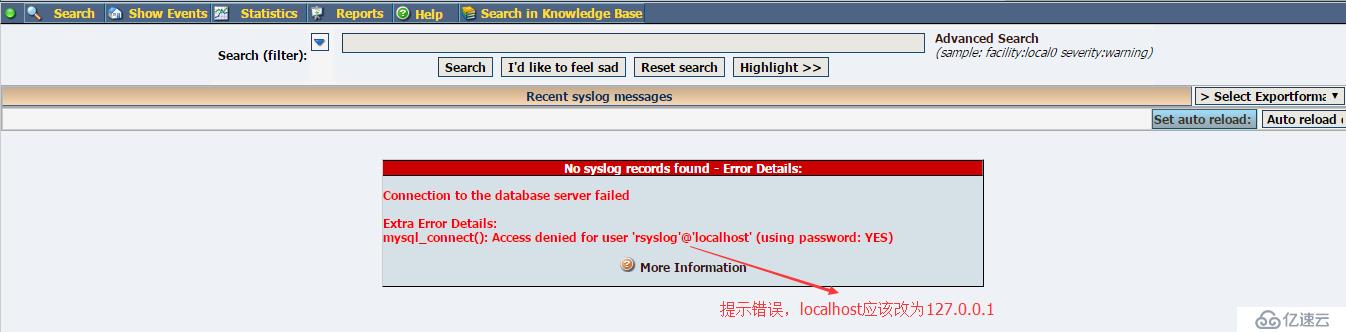
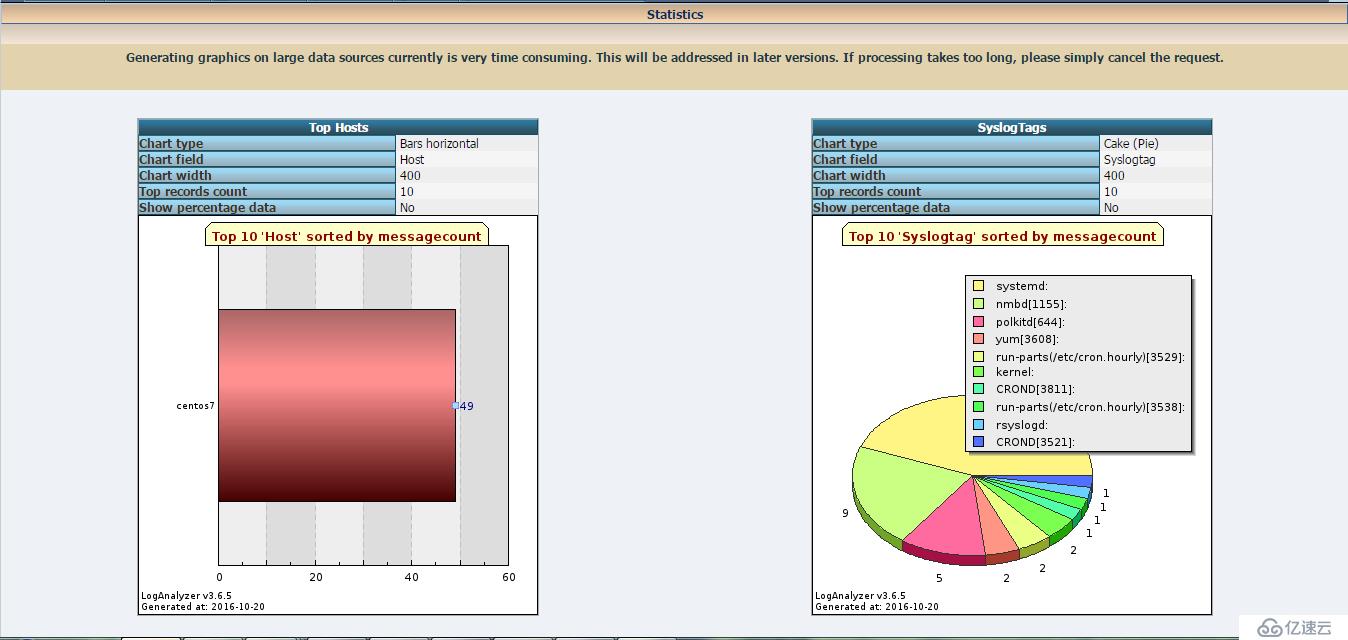
3)安装配置如下图
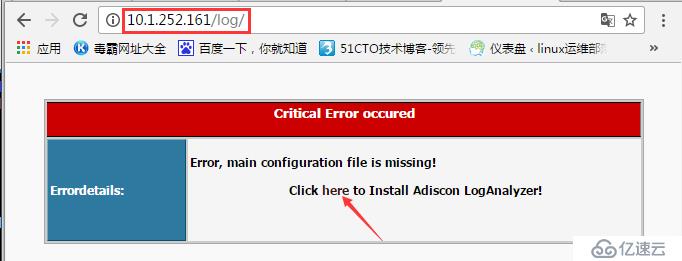
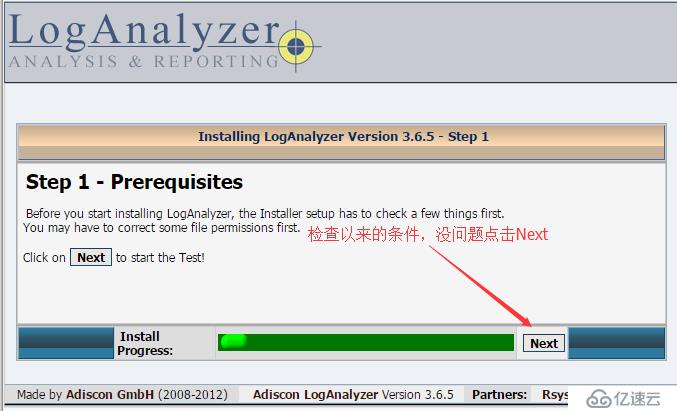
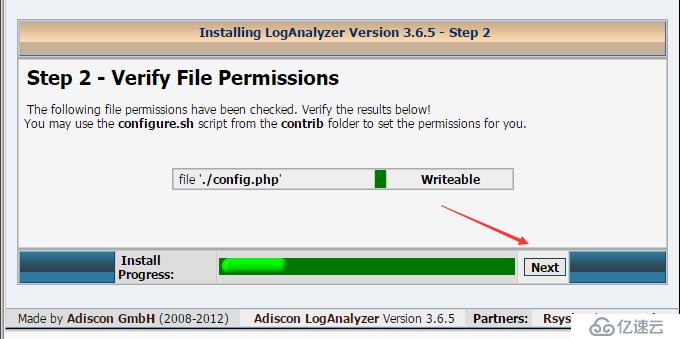
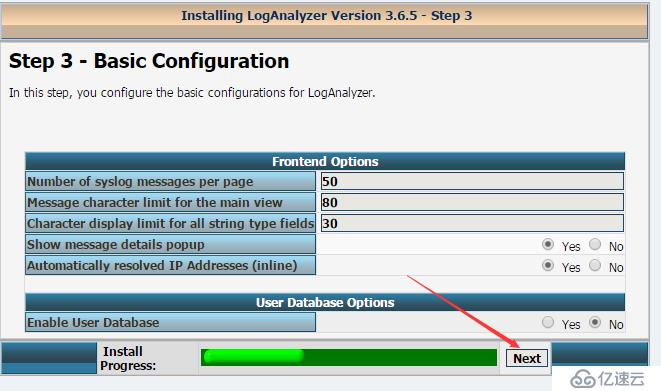
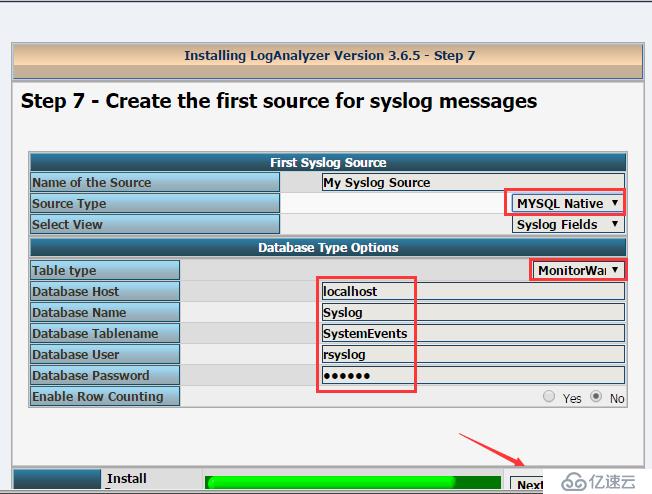
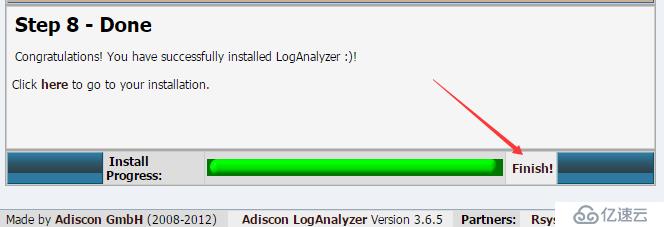
注意:这里localhost应该改为127.0.0.1 编辑配置文件config.php即可
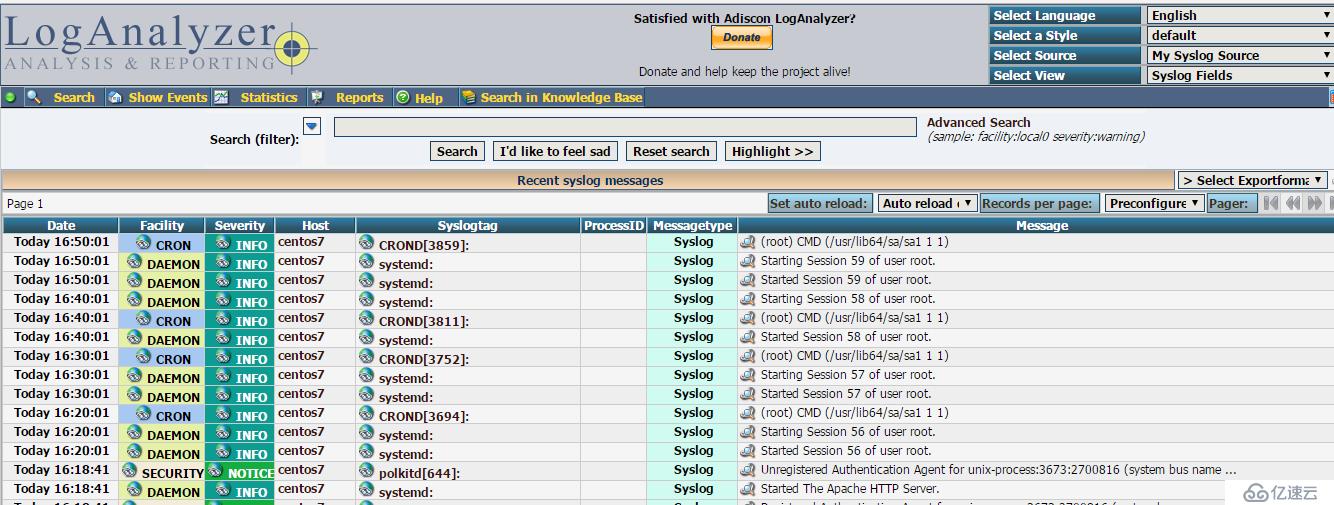
安装php-gd可以显示柱状图
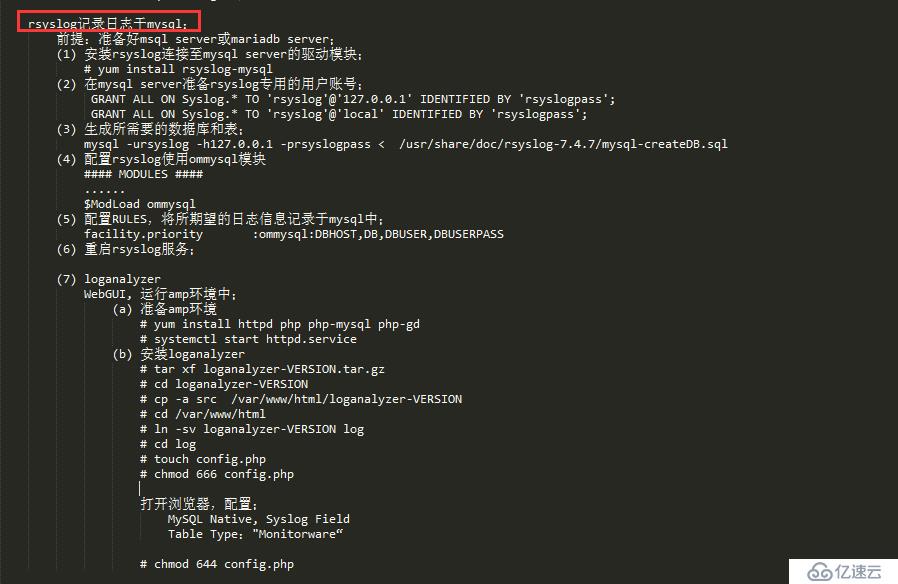
步骤总结如下:
相关内容
热门资讯
美国打压进口多晶硅,中使馆回应
【环球时报报道 记者 倪浩 尹野平】当地时间8月6日,美国总统特朗普签署行政令,依据《1962年贸易...
历史性一天,给美国的一个强烈信...
对中东来说,这是历史性的一天。沙特王储萨勒曼、土耳其总统埃尔多安、巴基斯坦总理夏巴兹,8月7日在沙特...
美参议院法案拟对中印加税100...
据美国消费者新闻与商业频道(CNBC)8月7日报道,美国参议院周五以压倒性优势通过了一项对俄罗斯制裁...
华为×Les Néréides...
IT之家 8 月 7 日消息,华为终端 BG CEO 何刚今日宣布,FreeClip 2 耳夹耳机配...
2026年正规的手机取卡针品控...
现在手机数码行业更新迭代速度越来越快,终端品牌对供应链配套的要求也越来越高,一个小小的手机取卡针,虽...
预计“白海豚”明晚将在浙江舟山...
今天6时中央气象台发布台风橙色预警和强对流天气蓝色预警。台风橙色预警今年第13号台风“白海豚”(强台...
谷歌AI业务重组幕后:商业化压...
财联社8月7日讯(编辑 史正丞)本周早些时候, 美国互联网巨头谷歌宣布对旗下AI业务展开全面洗牌。D...
喜报!古田一小斩获全国青少年无...
近日,第十届全国青少年无人机大赛总决赛在天津收官。古田县第一小学慈育雏鹰基地无人机社团6名学子,在基...
加媒:加拿大正与美国商讨,以贸...
据加拿大《环球邮报》8月7日消息,知情人士称,加拿大和美国正在讨论一项潜在协议。根据该协议,渥太华将...
德意电器油烟机怎么样,口碑好吗
最佳回答 你好,得意的抽油烟机虽然不怎么做广告,但是人家很牛啊,不做广告,我的价格依然很高,关键是,...