

Oracle 关闭(shutdown immediate)时hang住
昨天晚上生产的两套10.2.0.4的数据库修改了参数,需要重启。在发出shutdown immediate命令后等了大概10分钟的时间,数据库还没有down下来。检查后台alert日志,发现从开始shutdown到最后只输出几条日志,其中最后一条日志是:SHUTDOWN: Active processes prevent shutdown operation。
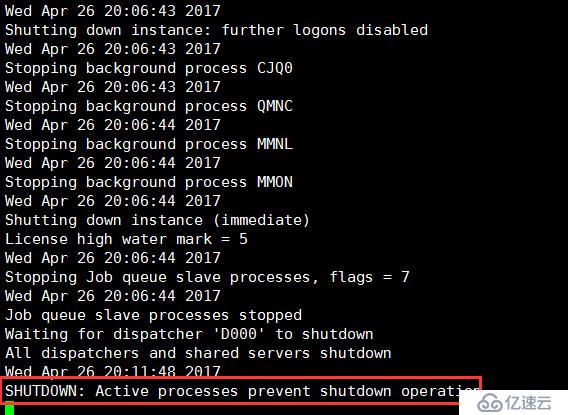
图为在虚拟机上还原场景时的截图。
开一个新的会话连接显示已连接,但无法查视图,又提示未连接。再次执行shutdown immediate命令得到报错如下:
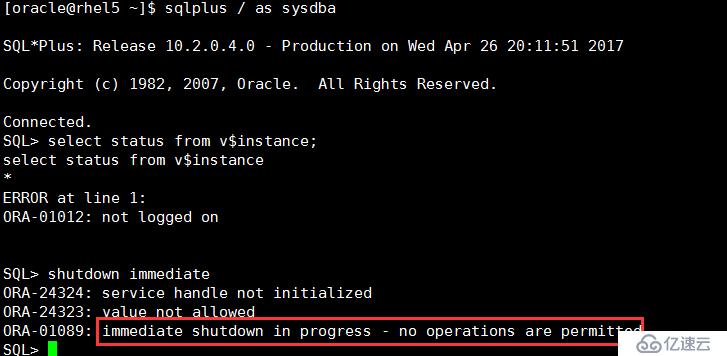
立马百度了一下这个问题,随便点开一个去看,说是因为在sqlplus / as sysdba 连接的情况下又执行host命令导致的。如下图这种情况
 马上想到我这边也是这种情况,赶紧把相应的会话从操作系统中kill掉。kill掉之后,数据库又正常关闭了(这是在虚拟机上的情况)。
在实际的生产中却是,把会话kill掉之后又等了几分种,还是没有返应,于是只得强制shutdown abort了。好在业务都是提前停了,不过在执行这条命令是还是有些忐忑的,就怕数据库起不来。
在看贴子的时候,作者提到了他在停库前做了切换日志,归档和checkpoint的操作来以防万一,我觉得这也是一个可取的地方,以后在停生产库时不应该业务停了就立马停数据库,也应该做这些操作来保护数据。
俗话说祸不单行,真是没错,就在第一个数据库成功重启后,在shutdown第二套数据库也hang住了,但这次报错与上次还不一样!!!(我的小心脏啊。。)
alert输出信息如下:

从输出信息可以了解到有进行还没有执行完,但业务都已经停了,会是什么进行呢。由于还有其他事情,就没去管是什么进行,就直接kill掉了,但数据库还是停不下来啊。
最后还是只得shutdown abort了,还是依然的忐忑。最后平安无事。
这个问题最后也没有在虚拟机上模拟出来,始终不知道是什么。
总结一下:
1、自己给自己挖坑的滋味真是不好受啊。
2、关闭数据库前做一些切换日志文件、归档和checkpoint的操作,来保证数据的安全性
3、关闭数据库前一定做好检查,是否有未解决的事务、JOB、或其他进程,避免出现类似第二种的情况
4、要有一颗强大的内心,相信自己:)
事后在MOS上查到了一些相关信息:
MOS文档
Troubleshooting Shutdown Immediate/Normal Hanging Issues (文档 ID 1906014.1)
列举四种shutdown Hang的情况。
第一种情况的原因和给出的解决方案
Shutdown Immediate Hangs / Active Processes Prevent Shutdown (文档 ID 416658.1)
CAUSE
This is not a bug.
If the DB Control repository is running on the database target against which shutdown immediate was attempted then an incorrect order of events seems used.
You should stop DB Control first to get rid of all connections between DB Control and the repository database and then shutdown the database with 'shutdown immediate'.
Current database sessions may show:
SQL> select SID, USERNAME, PROGRAM from v$session;
SID USERNAME PROGRAM
----- ---------------------- ----------------------------------
243 SYSTEM SQL Developer
246 SYSMAN OMS
247 oracle@lgiora09 (q001)
248 oracle@lgiora09 (q000)
251 DBSNMP emagent@lgiora09 (TNS V1-V3)
252 SYSMAN OMS
253 SYSMAN OMS
254 DBSNMP emagent@lgiora09 (TNS V1-V3)
255 SYSTEM java.exe
256 SYSMAN OMS
Clearly OMS and OEM are connected (Oracle Enterprise Manager Grid Control or DBConsole) via users SYSMAN and DBSNMP.
These sessions should be de-activated (that is to log off any OEM, OMS, SYSMAN and DBSNMP) before the shutdown immediate is attempted.
Oracle Enterprise Manager, Grid Control, Dbconsole and agents keep doing internal processing.
This may include a few PLSQL notification procedures running on the database by database control like
BEGIN EMD_NOTIFICATION.QUEUE_READY(:1, :2, :3); END;
As per internal documentation of the shutdown immediate, if there are active calls then it would wait for all the active calls to finish.
SOLUTION
To implement the solution:
1. Given OEM connections are active (SYSMAN and DBSNMP), de-activate these sessions, i.e. by stopping the agent/DBConsole
2. Then shutdown immediate as normal
- OR -
There may be processes still running and holding locks at the time a shutdown is issued.
Sometimes these are failed jobs or transactions, which are effectively 'zombies', which are not able to receive a signal from Oracle.
If this occurs, the only way to shutdown the database is by doing:
sql>
shutdown abort
startup restrict
shutdown normal
The startup does any necessary recovery and cleanup, so that a valid cold backup can be taken afterward.
If this issue occurs frequently, it would be a good practice to see if there are any active user processes running in v$session or v$process before shutting down the instance.
If the problem persists, and no apparent user processes are active, you can set this event prior to issuing the shutdown command in order to see what is happening. This will dump a systemstate every 5 minutes while shutdown is hanging
SQL>
connect / as sysdba
alter session set events '10400 trace name context forever, level 1';
Then issue the shutdown command.
3. You can kill the sessions preventing shutdown. Refer: Alert Log: Shutdown Waiting for Active Calls to Complete (Doc ID 1039389.6)