

MySQL--------基于半同步复制搭建主从
1. 背景
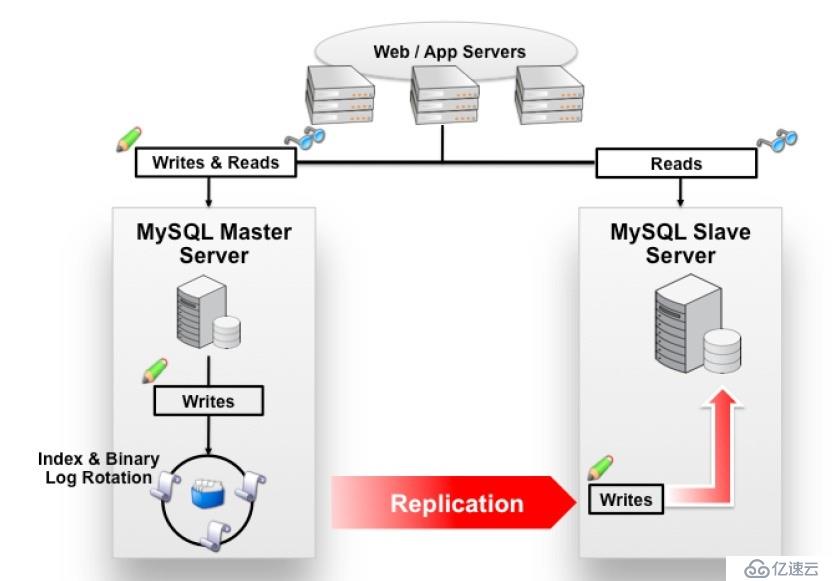
* MySQL Replication默认都是异步(asynchronous),当主库在执行完一些事务后,是不会管备库的进度的。如果备库不幸落后,而更不幸的是主库此时又出现Crash(例如宕机),这时备库中的数据就是不完整的。简而言之,在主库发生故障的时候,我们无法使用备库来继续提供数据一致的服务了。
* Semi sync Replication在一定程度上保证提交的事务已经传给了至少一个备库。
* Semi sync Replication仅仅保证事务的已经传递到备库上,但是并不确保已经在备库上执行完成。
* Semi sync Replication主库等待超时(rpl_semi_sync_master_timeout)后,会自动降级为默认的异步(asynchronous)。
* MySQL 5.5版本开始支持Semi sync Replication
2. 环境
* master 服务器环境
mysql> system cat /etc/redhat-release
CentOS release 6.8 (Final)
mysql> system ifconfig eth0  | sed -rn '2s#^.*addr:(.*)  Bca.*$#\1#gp'
172.18.0.1
mysql> show variables like 'version';
+---------------+------------+
| Variable_name | Value      |
+---------------+------------+
| version       | 5.6.36-log |
+---------------+------------+
1 row in set (0.00 sec)
* master 服务器环境
mysql> system cat /etc/redhat-release
CentOS release 6.8 (Final)
mysql> system ifconfig eth0  | sed -rn '2s#^.*addr:(.*)  Bca.*$#\1#gp'
172.18.4.1
mysql> show variables like 'version';
+---------------+------------+
| Variable_name | Value      |
+---------------+------------+
| version       | 5.6.36-log |
+---------------+------------+
1 row in set (0.00 sec)
* master服务器my.cnf配置文件
[mysqld]
########basic settings########
# 主从server-id一定要设置不同
server-id = 110
port = 3306
user = mysql
bind_address = 0.0.0.0
character_set_server=utf8mb4
skip_name_resolve = 1
datadir = /data/mysql_data
log_error = error.log
#######replication settings########
master_info_repository = TABLE
relay_log_info_repository = TABLE
# MySQL复制是基于binlog日志的
log_bin = bin.log
sync_binlog = 1
log_slave_updates
# MySQL binlog格式搭建主从时必须设置为row
binlog_format = row
relay_log = relay.log
relay_log_recovery = 1
slave_skip_errors = ddl_exist_errors
######semi sync replication settings########
# 设置插件目录路径
plugin_dir=/usr/local/mysql/lib/plugin
# 加载插件
plugin_load = "rpl_semi_sync_master=semisync_master.so;rpl_semi_sync_slave=semisync_slave.so"
# 开启master semi sync replication
loose_rpl_semi_sync_master_enabled = 1
# 开启slave semi sync replication
loose_rpl_semi_sync_slave_enabled = 1
# 等待5秒无ack应答自动切换为异步模式
loose_rpl_semi_sync_master_timeout = 5000
* slave服务器my.cnf配置文件
[mysqld]
########basic settings########
server-id = 210
port = 3306
user = mysql
bind_address = 0.0.0.0
character_set_server=utf8mb4
skip_name_resolve = 1
datadir = /data/mysql_data
log_error = error.log
# slave上开启只读,避免应用误写导致主从数据不一致
read_only = on
#######replication settings########
master_info_repository = TABLE
relay_log_info_repository = TABLE
log_bin = bin.log
sync_binlog = 1
log_slave_updates
binlog_format = row
relay_log = relay.log
relay_log_recovery = 1
binlog_gtid_simple_recovery = 1
slave_skip_errors = ddl_exist_errors
######semi sync replication settings########
plugin_dir=/usr/local/mysql/lib/plugin
plugin_load = "rpl_semi_sync_master=semisync_master.so;rpl_semi_sync_slave=semisync_slave.so"
loose_rpl_semi_sync_master_enabled = 1
loose_rpl_semi_sync_slave_enabled = 1
loose_rpl_semi_sync_master_timeout = 5000
3. 搭建基于半同步主从
* Master 创建复制所使用的用户 [ 此处ip设置为slave服务IP或者% ]
grant replication slave on *.* to 'rpl'@'172.18.4.1' identified by '123';
* master服务器上查看binlog文件名和日志位置
mysql> show master status;
+------------+----------+--------------+------------------+-------------------+
| File       | Position | Binlog_Do_DB | Binlog_Ignore_DB | Executed_Gtid_Set |
+------------+----------+--------------+------------------+-------------------+
| bin.000003 |     1187 |              |                  |                   |
+------------+----------+--------------+------------------+-------------------+
1 row in set (0.00 sec)
* slave服务器上设置master信息
未开启slave服务时,Slave_IO_Running与Slave_SQL_Running状态成No
mysql> show slave status;     # 未开启复制功能时,slave状态是空的
Empty set (0.00 sec)

mysql> change master to master_host='172.18.0.1',master_user='rpl',master_password='123',master_log_file='bin.000003',master_log_pos=1187;
Query OK, 0 rows affected, 2 warnings (0.01 sec)

mysql> show slave status\G
*************************** 1. row ***************************
               Slave_IO_State:
                  Master_Host: 172.18.0.1
                  Master_User: rpl
                  Master_Port: 3306
                Connect_Retry: 60
              Master_Log_File: bin.000003
          Read_Master_Log_Pos: 1187
               Relay_Log_File: relay.000001
                Relay_Log_Pos: 4
        Relay_Master_Log_File: bin.000003
             Slave_IO_Running: No
            Slave_SQL_Running: No
              Replicate_Do_DB:
          Replicate_Ignore_DB:
           Replicate_Do_Table:
       Replicate_Ignore_Table:
      Replicate_Wild_Do_Table:
  Replicate_Wild_Ignore_Table:
                   Last_Errno: 0
                   Last_Error:
                 Skip_Counter: 0
          Exec_Master_Log_Pos: 1187
              Relay_Log_Space: 120
              Until_Condition: None
               Until_Log_File:
                Until_Log_Pos: 0
           Master_SSL_Allowed: No
           Master_SSL_CA_File:
           Master_SSL_CA_Path:
              Master_SSL_Cert:
            Master_SSL_Cipher:
               Master_SSL_Key:
        Seconds_Behind_Master: NULL
Master_SSL_Verify_Server_Cert: No
                Last_IO_Errno: 0
                Last_IO_Error:
               Last_SQL_Errno: 0
               Last_SQL_Error:
  Replicate_Ignore_Server_Ids:
             Master_Server_Id: 0
                  Master_UUID:
             Master_Info_File: mysql.slave_master_info
                    SQL_Delay: 0
          SQL_Remaining_Delay: NULL
      Slave_SQL_Running_State:
           Master_Retry_Count: 86400
                  Master_Bind:
      Last_IO_Error_Timestamp:
     Last_SQL_Error_Timestamp:
               Master_SSL_Crl:
           Master_SSL_Crlpath:
           Retrieved_Gtid_Set:
            Executed_Gtid_Set:
                Auto_Position: 0
1 row in set (0.00 sec)
* 开启slave服务,并查看状态
正常开启slave服务后,Slave_IO_Running与Slave_SQL_Running状态成Yes
mysql> start slave;
Query OK, 0 rows affected (0.01 sec)

mysql> show slave status\G
*************************** 1. row ***************************
               Slave_IO_State: Waiting for master to send event
                  Master_Host: 172.18.0.1
                  Master_User: rpl
                  Master_Port: 3306
                Connect_Retry: 60
              Master_Log_File: bin.000003
          Read_Master_Log_Pos: 1187
               Relay_Log_File: relay.000002
                Relay_Log_Pos: 277
        Relay_Master_Log_File: bin.000003
             Slave_IO_Running: Yes
            Slave_SQL_Running: Yes
              Replicate_Do_DB:
          Replicate_Ignore_DB:
           Replicate_Do_Table:
       Replicate_Ignore_Table:
      Replicate_Wild_Do_Table:
  Replicate_Wild_Ignore_Table:
                   Last_Errno: 0
                   Last_Error:
                 Skip_Counter: 0
          Exec_Master_Log_Pos: 1187
              Relay_Log_Space: 440
              Until_Condition: None
               Until_Log_File:
                Until_Log_Pos: 0
           Master_SSL_Allowed: No
           Master_SSL_CA_File:
           Master_SSL_CA_Path:
              Master_SSL_Cert:
            Master_SSL_Cipher:
               Master_SSL_Key:
        Seconds_Behind_Master: 0
Master_SSL_Verify_Server_Cert: No
                Last_IO_Errno: 0
                Last_IO_Error:
               Last_SQL_Errno: 0
               Last_SQL_Error:
  Replicate_Ignore_Server_Ids:
             Master_Server_Id: 110
                  Master_UUID: 08ea3ca7-6dd4-11e7-a45c-00163e0432c5
             Master_Info_File: mysql.slave_master_info
                    SQL_Delay: 0
          SQL_Remaining_Delay: NULL
      Slave_SQL_Running_State: Slave has read all relay log; waiting for the slave I/O thread to update it
           Master_Retry_Count: 86400
                  Master_Bind:
      Last_IO_Error_Timestamp:
     Last_SQL_Error_Timestamp:
               Master_SSL_Crl:
           Master_SSL_Crlpath:
           Retrieved_Gtid_Set:
            Executed_Gtid_Set:
                Auto_Position: 0
1 row in set (0.00 sec)
* Master上查看Slave连接信息
mysql> show slave hosts;
+-----------+------+------+-----------+--------------------------------------+
| Server_id | Host | Port | Master_id | Slave_UUID                           |
+-----------+------+------+-----------+--------------------------------------+
|       210 |      | 3306 |       110 | d6ceba69-6dd4-11e7-a462-00163e028c02 |
+-----------+------+------+-----------+--------------------------------------+
1 row in set (0.00 sec)
* Master上操作创建数据库与表,并插入数据
mysql> create database mytest character set utf8mb4;
Query OK, 1 row affected (0.01 sec)

mysql> use mytest;
mysql> create table users(
    -> id BIGINT NOT NULL AUTO_INCREMENT,
    -> name VARCHAR(255) NOT NULL,
    -> sex ENUM('M', 'F') NOT NULL DEFAULT 'M',
    -> age INT SIGNED NOT NULL DEFAULT '0',
    -> PRIMARY KEY (id)
    -> )ENGINE=INNODB DEFAULT CHARSET=utf8mb4;
Query OK, 0 rows affected (0.03 sec)

mysql> insert into users values(null, 'tom', 'M', 24), (null, 'jak', 'F', 32), (null, 'sea', 'M', 35), (null, 'lisea', 'M', 29);
Query OK, 4 rows affected (0.01 sec)
Records: 4  Duplicates: 0  Warnings: 0

mysql> select * from users;
+----+-------+-----+-----+
| id | name  | sex | age |
+----+-------+-----+-----+
|  1 | tom   | M   |  24 |
|  2 | jak   | F   |  32 |
|  3 | sea   | M   |  35 |
|  4 | lisea | M   |  29 |
+----+-------+-----+-----+
4 rows in set (0.00 sec)
* Slave上查看
mysql> show databases;
+--------------------+
| Database           |
+--------------------+
| information_schema |
| mysql              |
| mytest             |
| performance_schema |
| test               |
+--------------------+
5 rows in set (0.00 sec)

mysql> use mytest;
Reading table information for completion of table and column names
You can turn off this feature to get a quicker startup with -A

Database changed
mysql> show tables;
+------------------+
| Tables_in_mytest |
+------------------+
| users            |
+------------------+
1 row in set (0.00 sec)

mysql> select * from users;
+----+-------+-----+-----+
| id | name  | sex | age |
+----+-------+-----+-----+
|  1 | tom   | M   |  24 |
|  2 | jak   | F   |  32 |
|  3 | sea   | M   |  35 |
|  4 | lisea | M   |  29 |
+----+-------+-----+-----+
4 rows in set (0.00 sec)
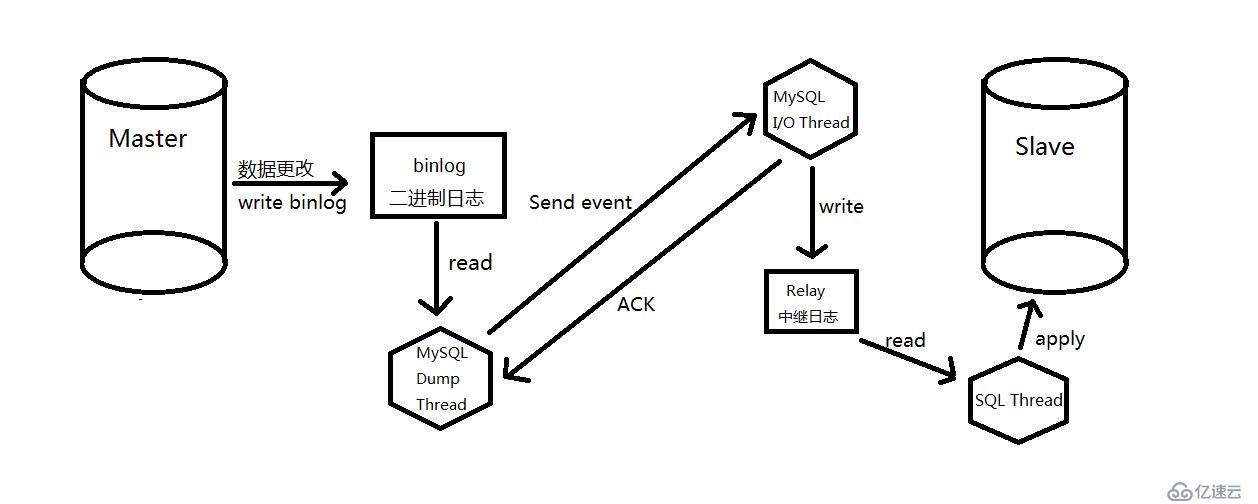
4. Master/Slave传输过程
5. 总结
以需求驱动技术,技术本身没有优略之分,只有业务之分。