

Oracle 11gR2构建RAC之(4)--安装GI
admin
2023-05-14 18:42:47
0次
Oracle 11gR2构建RAC之(4)--安装GI
系统环境:
操作系统:RedHat EL5
Cluster: Oracle GI(Grid Infrastructure)
Oracle: Oracle 11.2.0.1.0
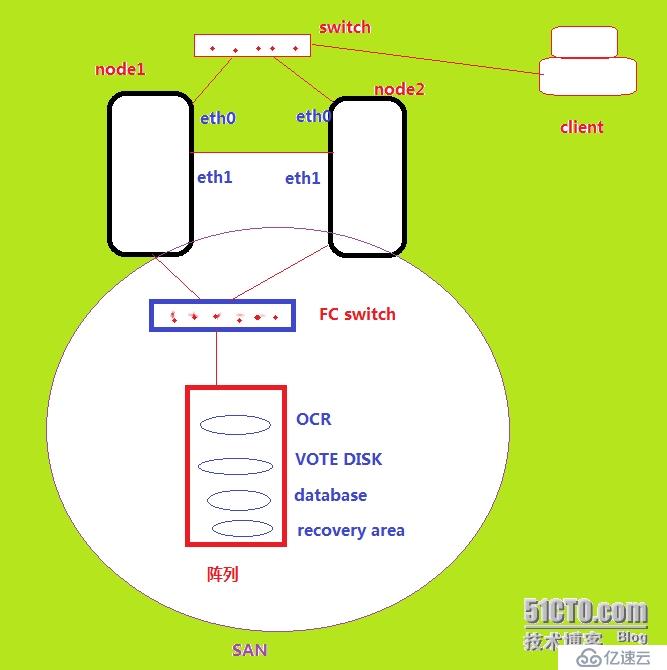
如图所示:RAC 系统架构
四、安装并配置GI
以grid用户的身份登录系统,安装GI.
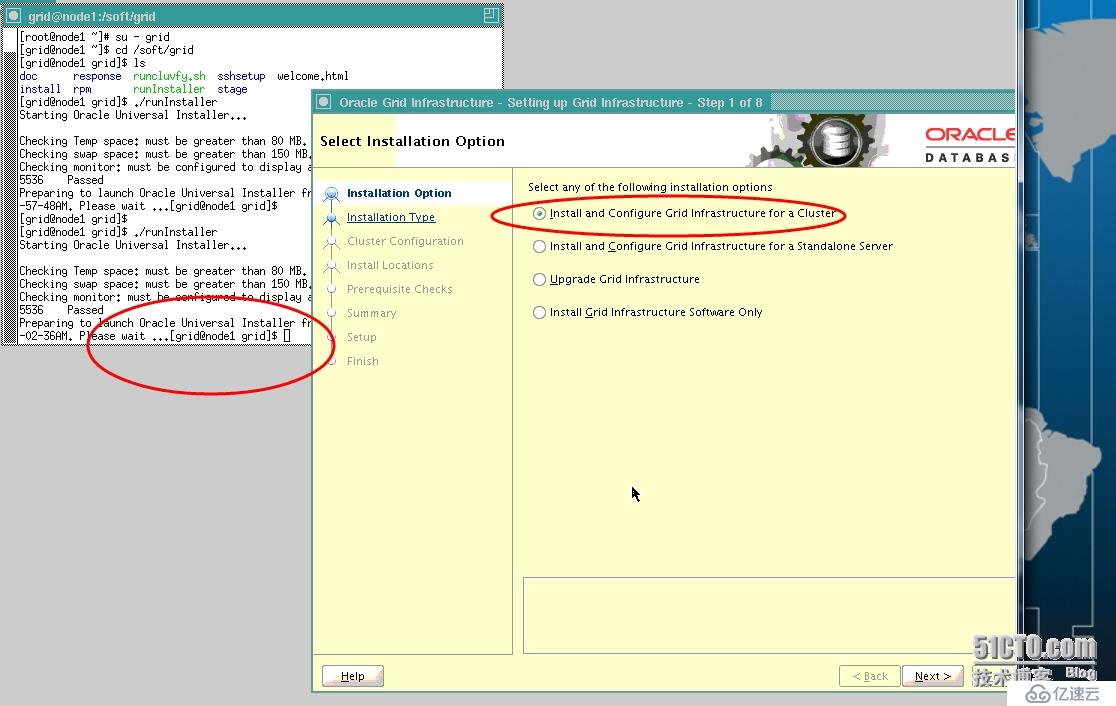
安装并配置GI
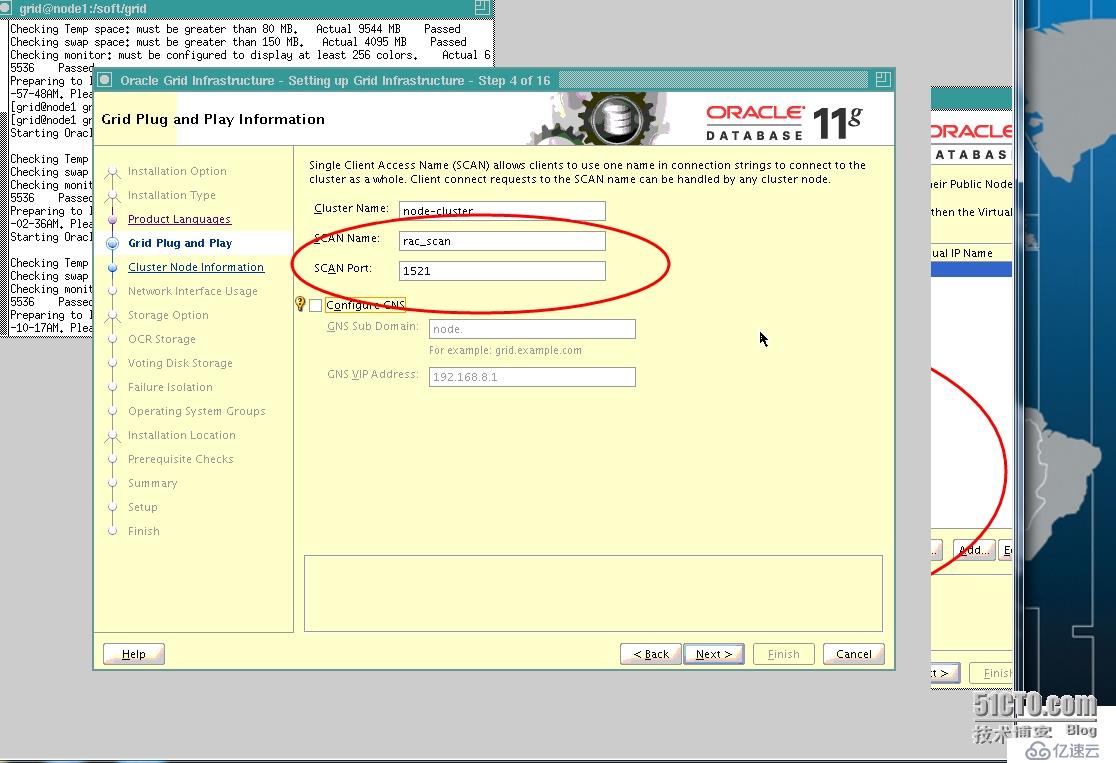
配置scan ip(注意要和hosts文件一致)
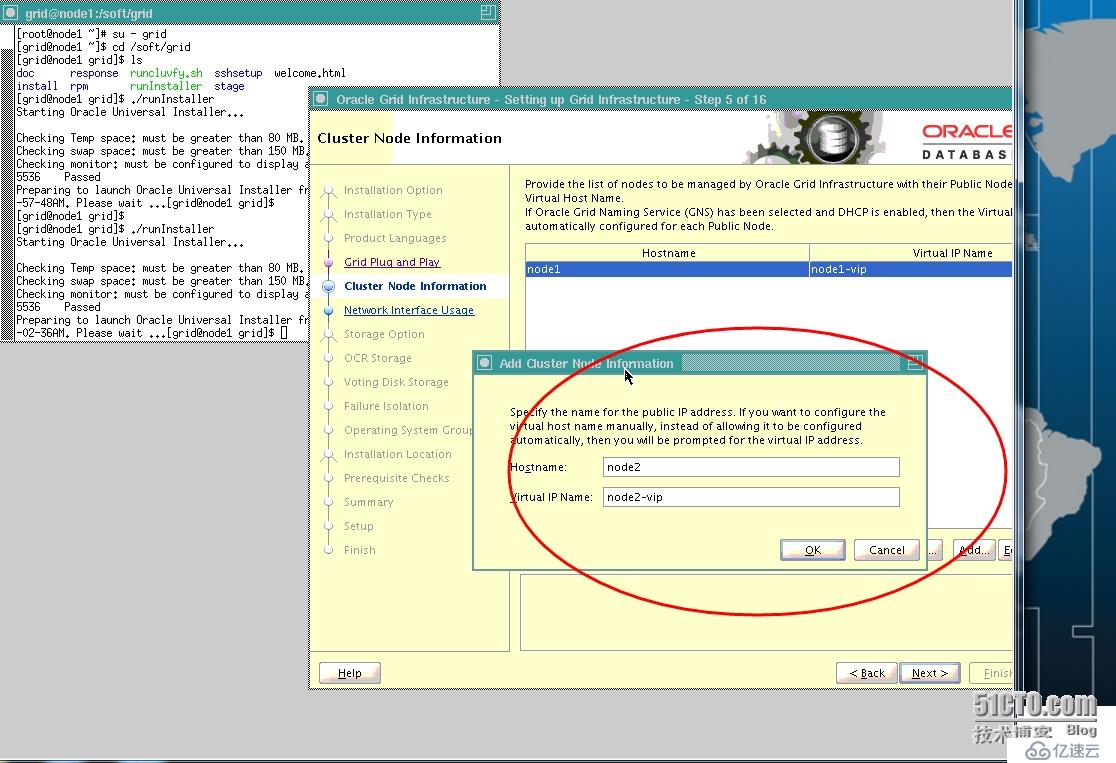
添加node(注意信任关系配置)
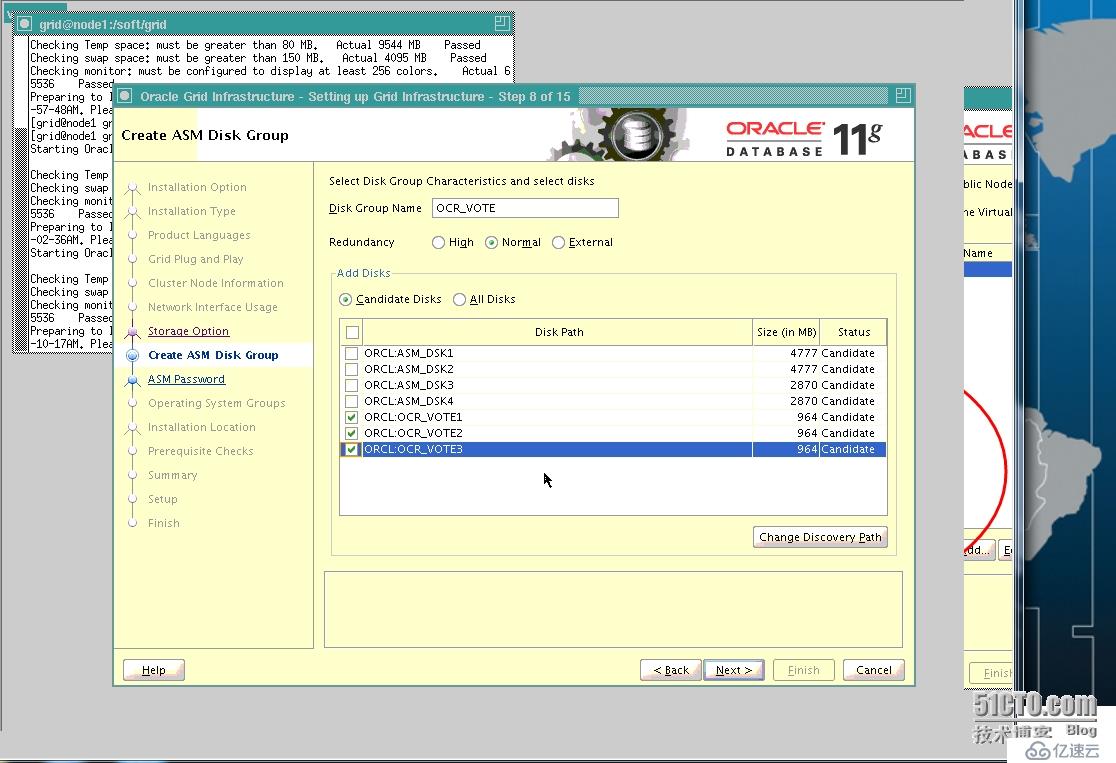
配置ocr和votedisk磁盘,加入到磁盘组里(normal redundancy需要三块ASM disk)
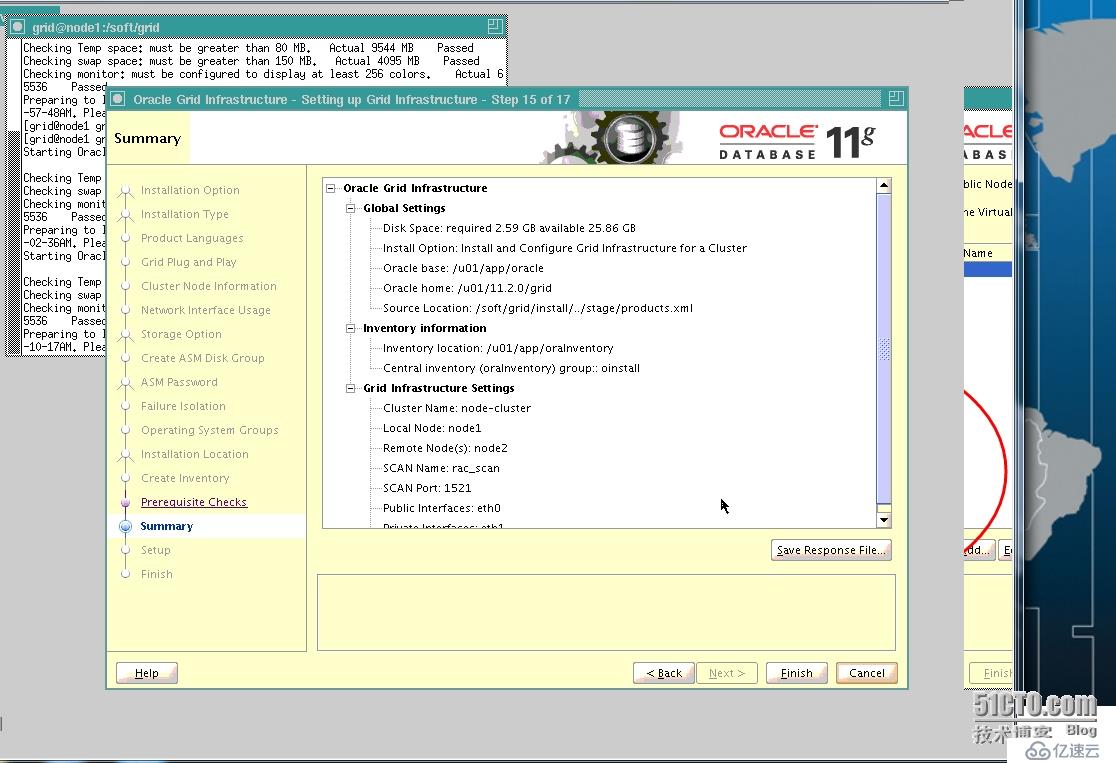
安装grid软件
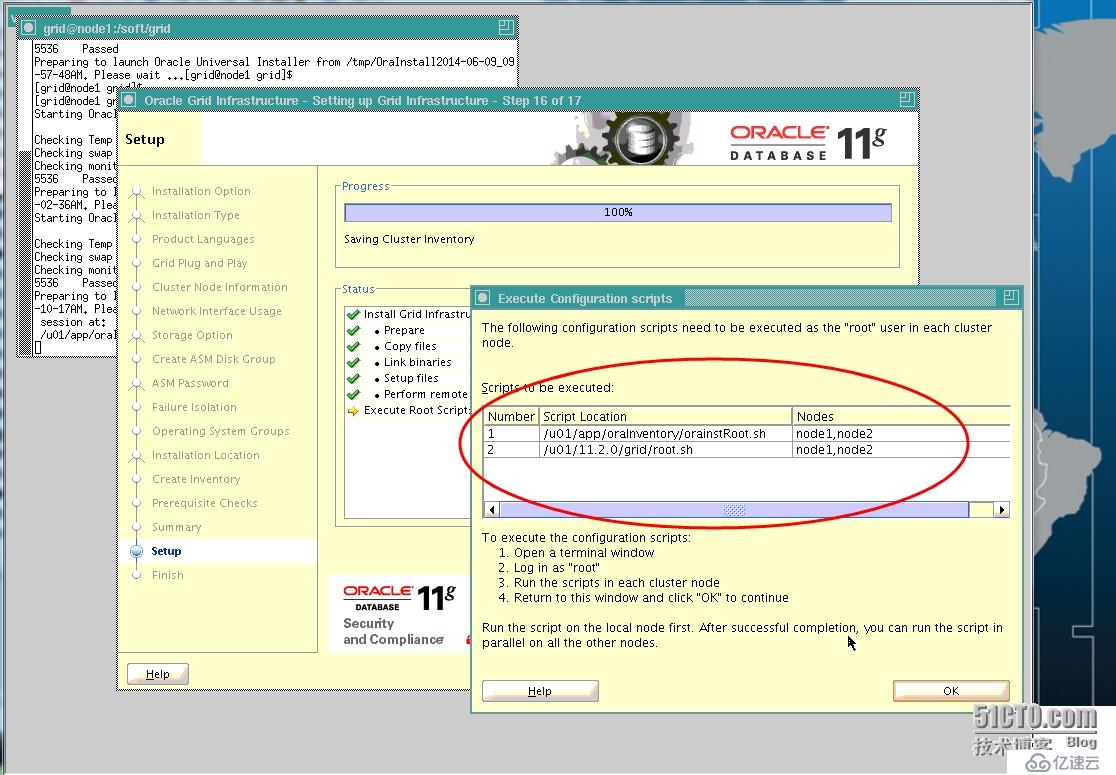
运行脚本(注意先后循序)
node1:
[root@node1 ~]# /u01/app/oraInventory/orainstRoot.sh
Changing permissions of /u01/app/oraInventory.
Adding read,write permissions for group.
Removing read,write,execute permissions for world.

Changing groupname of /u01/app/oraInventory to oinstall.
The execution of the script is complete.

[root@node1 ~]# /u01/11.2.0/grid/root.sh
Running Oracle 11g root.sh script...

The following environment variables are set as:
    ORACLE_OWNER= grid
    ORACLE_HOME=  /u01/11.2.0/grid

Enter the full pathname of the local bin directory: [/usr/local/bin]:
   Copying dbhome to /usr/local/bin ...
   Copying oraenv to /usr/local/bin ...
   Copying coraenv to /usr/local/bin ...


Creating /etc/oratab file...
Entries will be added to the /etc/oratab file as needed by
Database Configuration Assistant when a database is created
Finished running generic part of root.sh script.
Now product-specific root actions will be performed.
2014-06-09 10:26:02: Parsing the host name
2014-06-09 10:26:02: Checking for super user privileges
2014-06-09 10:26:02: User has super user privileges
Using configuration parameter file: /u01/11.2.0/grid/crs/install/crsconfig_params
Creating trace directory
LOCAL ADD MODE
Creating OCR keys for user 'root', privgrp 'root'..
Operation successful.
  root wallet
  root wallet cert
  root cert export
  peer wallet
  profile reader wallet
  pa wallet
  peer wallet keys
  pa wallet keys
  peer cert request
  pa cert request
  peer cert
  pa cert
  peer root cert TP
  profile reader root cert TP
  pa root cert TP
  peer pa cert TP
  pa peer cert TP
  profile reader pa cert TP
  profile reader peer cert TP
  peer user cert
  pa user cert
Adding daemon to inittab
CRS-4123: Oracle High Availability Services has been started.
ohasd is starting
CRS-2672: Attempting to start 'ora.gipcd' on 'node1'
CRS-2672: Attempting to start 'ora.mdnsd' on 'node1'
CRS-2676: Start of 'ora.mdnsd' on 'node1' succeeded
CRS-2676: Start of 'ora.gipcd' on 'node1' succeeded
CRS-2672: Attempting to start 'ora.gpnpd' on 'node1'
CRS-2676: Start of 'ora.gpnpd' on 'node1' succeeded
CRS-2672: Attempting to start 'ora.cssdmonitor' on 'node1'
CRS-2676: Start of 'ora.cssdmonitor' on 'node1' succeeded
CRS-2672: Attempting to start 'ora.cssd' on 'node1'
CRS-2672: Attempting to start 'ora.diskmon' on 'node1'
CRS-2676: Start of 'ora.diskmon' on 'node1' succeeded
CRS-2676: Start of 'ora.cssd' on 'node1' succeeded
CRS-2672: Attempting to start 'ora.ctssd' on 'node1'
CRS-2676: Start of 'ora.ctssd' on 'node1' succeeded

ASM created and started successfully.

DiskGroup OCR_VOTE created successfully.

clscfg: -install mode specified
Successfully accumulated necessary OCR keys.
Creating OCR keys for user 'root', privgrp 'root'..
Operation successful.
CRS-2672: Attempting to start 'ora.crsd' on 'node1'
CRS-2676: Start of 'ora.crsd' on 'node1' succeeded
CRS-4256: Updating the profile
Successful addition of voting disk 66690fe966214f83bfea1505011fc4f0.
Successful addition of voting disk 9a2c94cb249e4f85bff8f4c3930d0a1d.
Successful addition of voting disk 7cd28e57ae964f94bf31e35471fdefec.
Successfully replaced voting disk group with +OCR_VOTE.
CRS-4256: Updating the profile
CRS-4266: Voting file(s) successfully replaced
##  STATE    File Universal Id                File Name Disk group
--  -----    -----------------                --------- ---------
 1. ONLINE   66690fe966214f83bfea1505011fc4f0 (ORCL:OCR_VOTE1) [OCR_VOTE]
 2. ONLINE   9a2c94cb249e4f85bff8f4c3930d0a1d (ORCL:OCR_VOTE2) [OCR_VOTE]
 3. ONLINE   7cd28e57ae964f94bf31e35471fdefec (ORCL:OCR_VOTE3) [OCR_VOTE]
Located 3 voting disk(s).
CRS-2673: Attempting to stop 'ora.crsd' on 'node1'
CRS-2677: Stop of 'ora.crsd' on 'node1' succeeded
CRS-2673: Attempting to stop 'ora.asm' on 'node1'
CRS-2677: Stop of 'ora.asm' on 'node1' succeeded
CRS-2673: Attempting to stop 'ora.ctssd' on 'node1'
CRS-2677: Stop of 'ora.ctssd' on 'node1' succeeded
CRS-2673: Attempting to stop 'ora.cssdmonitor' on 'node1'
CRS-2677: Stop of 'ora.cssdmonitor' on 'node1' succeeded
CRS-2673: Attempting to stop 'ora.cssd' on 'node1'
CRS-2677: Stop of 'ora.cssd' on 'node1' succeeded
CRS-2673: Attempting to stop 'ora.gpnpd' on 'node1'
CRS-2677: Stop of 'ora.gpnpd' on 'node1' succeeded
CRS-2673: Attempting to stop 'ora.gipcd' on 'node1'
CRS-2677: Stop of 'ora.gipcd' on 'node1' succeeded
CRS-2673: Attempting to stop 'ora.mdnsd' on 'node1'
CRS-2677: Stop of 'ora.mdnsd' on 'node1' succeeded
CRS-2672: Attempting to start 'ora.mdnsd' on 'node1'
CRS-2676: Start of 'ora.mdnsd' on 'node1' succeeded
CRS-2672: Attempting to start 'ora.gipcd' on 'node1'
CRS-2676: Start of 'ora.gipcd' on 'node1' succeeded
CRS-2672: Attempting to start 'ora.gpnpd' on 'node1'
CRS-2676: Start of 'ora.gpnpd' on 'node1' succeeded
CRS-2672: Attempting to start 'ora.cssdmonitor' on 'node1'
CRS-2676: Start of 'ora.cssdmonitor' on 'node1' succeeded
CRS-2672: Attempting to start 'ora.cssd' on 'node1'
CRS-2672: Attempting to start 'ora.diskmon' on 'node1'
CRS-2676: Start of 'ora.diskmon' on 'node1' succeeded
CRS-2676: Start of 'ora.cssd' on 'node1' succeeded
CRS-2672: Attempting to start 'ora.ctssd' on 'node1'
CRS-2676: Start of 'ora.ctssd' on 'node1' succeeded
CRS-2672: Attempting to start 'ora.asm' on 'node1'
CRS-2676: Start of 'ora.asm' on 'node1' succeeded
CRS-2672: Attempting to start 'ora.crsd' on 'node1'
CRS-2676: Start of 'ora.crsd' on 'node1' succeeded
CRS-2672: Attempting to start 'ora.evmd' on 'node1'
CRS-2676: Start of 'ora.evmd' on 'node1' succeeded
CRS-2672: Attempting to start 'ora.asm' on 'node1'
CRS-2676: Start of 'ora.asm' on 'node1' succeeded
CRS-2672: Attempting to start 'ora.OCR_VOTE.dg' on 'node1'
CRS-2676: Start of 'ora.OCR_VOTE.dg' on 'node1' succeeded
CRS-2672: Attempting to start 'ora.registry.acfs' on 'node1'
CRS-2676: Start of 'ora.registry.acfs' on 'node1' succeeded

node1     2014/06/09 10:31:50     /u01/11.2.0/grid/cdata/node1/backup_20140609_103150.olr
Preparing packages for installation...
cvuqdisk-1.0.7-1
Configure Oracle Grid Infrastructure for a Cluster ... succeeded
Updating inventory properties for clusterware
Starting Oracle Universal Installer...

Checking swap space: must be greater than 500 MB.   Actual 4071 MB    Passed
The inventory pointer is located at /etc/oraInst.loc
The inventory is located at /u01/app/oraInventory
'UpdateNodeList' was successful.
node2:
[root@node2 ~]# /u01/app/oraInventory/orainstRoot.sh
Changing permissions of /u01/app/oraInventory.
Adding read,write permissions for group.
Removing read,write,execute permissions for world.

Changing groupname of /u01/app/oraInventory to oinstall.
The execution of the script is complete.

[root@node2 ~]# /u01/11.2.0/grid/root.sh
Running Oracle 11g root.sh script...

The following environment variables are set as:
    ORACLE_OWNER= grid
    ORACLE_HOME=  /u01/11.2.0/grid

Enter the full pathname of the local bin directory: [/usr/local/bin]:
   Copying dbhome to /usr/local/bin ...
   Copying oraenv to /usr/local/bin ...
   Copying coraenv to /usr/local/bin ...


Creating /etc/oratab file...
Entries will be added to the /etc/oratab file as needed by
Database Configuration Assistant when a database is created
Finished running generic part of root.sh script.
Now product-specific root actions will be performed.
2014-06-09 10:32:35: Parsing the host name
2014-06-09 10:32:35: Checking for super user privileges
2014-06-09 10:32:35: User has super user privileges
Using configuration parameter file: /u01/11.2.0/grid/crs/install/crsconfig_params
Creating trace directory
LOCAL ADD MODE
Creating OCR keys for user 'root', privgrp 'root'..
Operation successful.
Adding daemon to inittab
CRS-4123: Oracle High Availability Services has been started.
ohasd is starting

CRS-4402: The CSS daemon was started in exclusive mode but found an active CSS daemon on node node1, number 1, and is terminating
An active cluster was found during exclusive startup, restarting to join the cluster
CRS-2672: Attempting to start 'ora.mdnsd' on 'node2'
CRS-2676: Start of 'ora.mdnsd' on 'node2' succeeded
CRS-2672: Attempting to start 'ora.gipcd' on 'node2'
CRS-2676: Start of 'ora.gipcd' on 'node2' succeeded
CRS-2672: Attempting to start 'ora.gpnpd' on 'node2'
CRS-2676: Start of 'ora.gpnpd' on 'node2' succeeded
CRS-2672: Attempting to start 'ora.cssdmonitor' on 'node2'
CRS-2676: Start of 'ora.cssdmonitor' on 'node2' succeeded
CRS-2672: Attempting to start 'ora.cssd' on 'node2'
CRS-2672: Attempting to start 'ora.diskmon' on 'node2'
CRS-2676: Start of 'ora.diskmon' on 'node2' succeeded
CRS-2676: Start of 'ora.cssd' on 'node2' succeeded
CRS-2672: Attempting to start 'ora.ctssd' on 'node2'
CRS-2676: Start of 'ora.ctssd' on 'node2' succeeded
CRS-2672: Attempting to start 'ora.drivers.acfs' on 'node2'
CRS-2676: Start of 'ora.drivers.acfs' on 'node2' succeeded
CRS-2672: Attempting to start 'ora.asm' on 'node2'
CRS-2676: Start of 'ora.asm' on 'node2' succeeded
CRS-2672: Attempting to start 'ora.crsd' on 'node2'
CRS-2676: Start of 'ora.crsd' on 'node2' succeeded
CRS-2672: Attempting to start 'ora.evmd' on 'node2'
CRS-2676: Start of 'ora.evmd' on 'node2' succeeded

node2     2014/06/09 10:36:24     /u01/11.2.0/grid/cdata/node2/backup_20140609_103624.olr
Preparing packages for installation...
cvuqdisk-1.0.7-1
Configure Oracle Grid Infrastructure for a Cluster ... succeeded
Updating inventory properties for clusterware
Starting Oracle Universal Installer...

Checking swap space: must be greater than 500 MB.   Actual 4095 MB    Passed
The inventory pointer is located at /etc/oraInst.loc
The inventory is located at /u01/app/oraInventory
'UpdateNodeList' was successful.
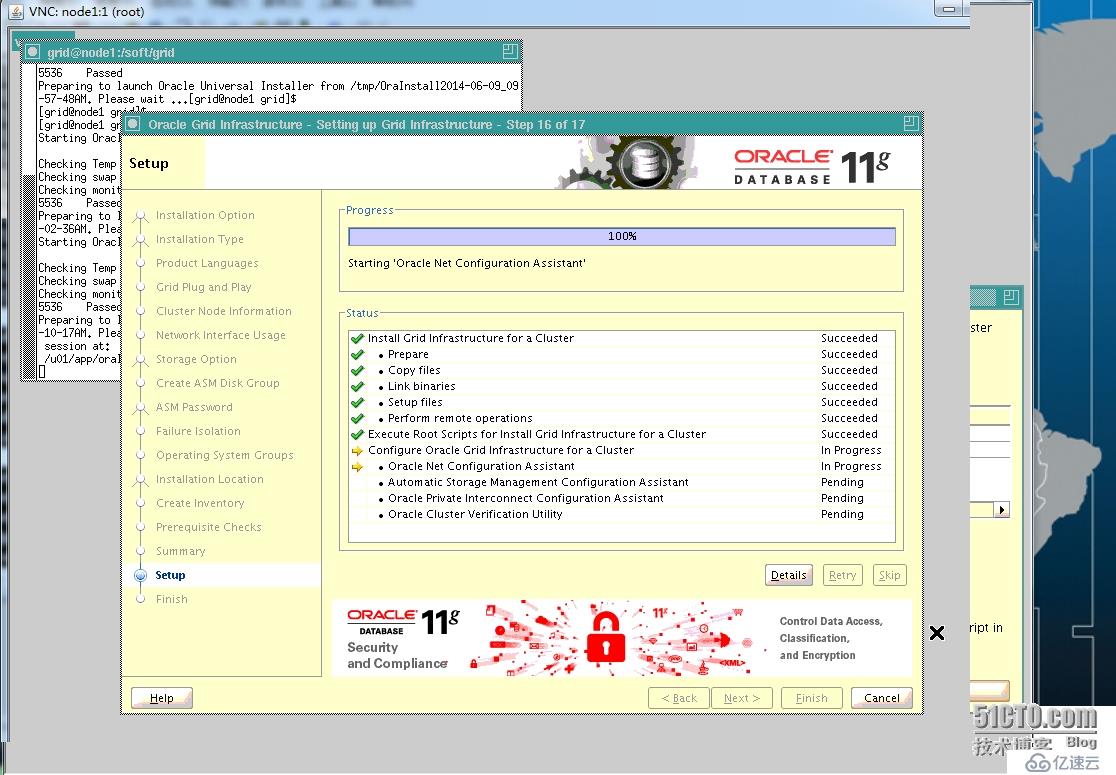
GI安装后的检测,安装成功并退出。
验证GI:
[root@node1 soft]# crsctl check crs
CRS-4638: Oracle High Availability Services is online
CRS-4537: Cluster Ready Services is online
CRS-4529: Cluster Synchronization Services is online
CRS-4533: Event Manager is online
[root@node1 soft]#

[root@node1 soft]# crs_stat -t
Name           Type           Target    State     Host
------------------------------------------------------------
ora.DG1.dg     ora....up.type ONLINE    ONLINE    node1
ora....ER.lsnr ora....er.type ONLINE    ONLINE    node1
ora....N1.lsnr ora....er.type ONLINE    ONLINE    node1
ora....VOTE.dg ora....up.type ONLINE    ONLINE    node1
ora.RCY1.dg    ora....up.type ONLINE    ONLINE    node1
ora.asm        ora.asm.type   ONLINE    ONLINE    node1
ora.eons       ora.eons.type  ONLINE    ONLINE    node1
ora.gsd        ora.gsd.type   OFFLINE   OFFLINE
ora....network ora....rk.type ONLINE    ONLINE    node1
ora....SM1.asm application    ONLINE    ONLINE    node1
ora....E1.lsnr application    ONLINE    ONLINE    node1
ora.node1.gsd  application    OFFLINE   OFFLINE
ora.node1.ons  application    ONLINE    ONLINE    node1
ora.node1.vip  ora....t1.type ONLINE    ONLINE    node1
ora....SM2.asm application    ONLINE    ONLINE    node2
ora....E2.lsnr application    ONLINE    ONLINE    node2
ora.node2.gsd  application    OFFLINE   OFFLINE
ora.node2.ons  application    ONLINE    ONLINE    node2
ora.node2.vip  ora....t1.type ONLINE    ONLINE    node2
ora.oc4j       ora.oc4j.type  OFFLINE   OFFLINE
ora.ons        ora.ons.type   ONLINE    ONLINE    node1
ora.prod.db    ora....se.type OFFLINE   OFFLINE
ora....ry.acfs ora....fs.type ONLINE    ONLINE    node1
ora.scan1.vip  ora....ip.type ONLINE    ONLINE    node1
@至此,GI安装成功!
相关内容
热门资讯
空调连续工作多久需要停机休息
空调连续工作的时间取决于多个因素,包括空调的型号、功率、使用环境和维护情况等。一般来说,空调可以连续...
空调哪个符号是除湿的
空调除湿功能通常用一个水滴形状的符号表示。不同品牌和型号的空调遥控器可能会有所差异,但一般来说,除湿...
格力空调多长时间加一次氟利昂
1、一般情况下,空调对氟利昂的使用量是非常小的,所以在空调使用了四年左右的时候再考虑加也没问题。2、...
空调用多长时间需要加氟一次
一般情况下是五年。当出现以下这几种情况时,空调才需要加氟。1、空调的室内机和室外机各有两个接口,当接...
格调生活·C标思享荟:卡萨帝在...
9月12日的郑州龙湖金融岛,夜风轻拂,灯光璀璨。“C标时刻共传奇——卡萨帝思享荟暨20周年品牌盛典郑...
品牌价值破千亿、高端份额持续领...
9月12日,“C标时刻共传奇——卡萨帝思享荟暨20周年品牌盛典郑州站”在郑州龙湖金融岛举办。2026...
空调主板坏了修800还是换新的
空调主板坏了是修还是换新,需要考虑多个因素,以下是一些建议:1. 维修成本:如果维修费用较低,比如 ...
空调开多久需要休息多长时间
问题:空调开多久需要休息多长时间回答:1、在使用空调的过程中,一般空调开7~8个小时左右需要休息2~...
中央空调多长时间清洗一次
1、一般空调开机前清洗一次即可,空调开机中间时段再清洗一次,空调关机时清洗一次,这样比较合理。2、空...
中央空调氟利昂多久加一次
看空调制热和制冷程度,很多人的观点认为氟利昂必须一年放一次,其实这个观点是错误的,理解上面有点偏差,...