

Oracle 11gR2 安装RAC错误之--时钟不同步
Oracle 11gR2 安装RAC错误之--时钟不同步
系统环境:
操作系统:RedHat EL5
Cluster: Oracle GI(Grid Infrastructure)
Oracle: Oracle 11.2.0.1.0
如图所示:RAC 系统架构
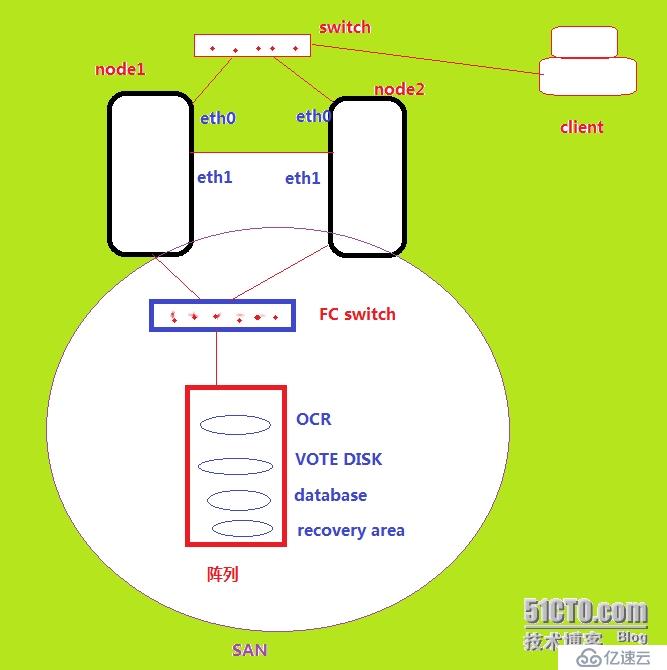
对于Oracle 11G构建RAC首先需要构建GI(Grid Infrastructure)的架构
错误现象:
在node2执行root.sh脚本时报错:
[root@xun2 install]# /u01/11.2.0/grid/root.sh
Running Oracle 11g root.sh script...
The following environment variables are set as:
    ORACLE_OWNER= grid
    ORACLE_HOME=  /u01/11.2.0/grid
Enter the full pathname of the local bin directory: [/usr/local/bin]:
The file "dbhome" already exists in /usr/local/bin.  Overwrite it? (y/n)
[n]: y
   Copying dbhome to /usr/local/bin ...
The file "oraenv" already exists in /usr/local/bin.  Overwrite it? (y/n)
[n]: y
   Copying oraenv to /usr/local/bin ...
The file "coraenv" already exists in /usr/local/bin.  Overwrite it? (y/n)
[n]: y
   Copying coraenv to /usr/local/bin ...
Entries will be added to the /etc/oratab file as needed by
Database Configuration Assistant when a database is created
Finished running generic part of root.sh script.
Now product-specific root actions will be performed.
2014-07-05 02:00:09: Parsing the host name
2014-07-05 02:00:09: Checking for super user privileges
2014-07-05 02:00:09: User has super user privileges
Using configuration parameter file: /u01/11.2.0/grid/crs/install/crsconfig_params
LOCAL ADD MODE
Creating OCR keys for user 'root', privgrp 'root'..
Operation successful.
Adding daemon to inittab
CRS-4123: Oracle High Availability Services has been started.
ohasd is starting
CRS-4402: The CSS daemon was started in exclusive mode but found an active CSS daemon on node xun1, number 1, and is terminating
An active cluster was found during exclusive startup, restarting to join the cluster
CRS-2672: Attempting to start 'ora.mdnsd' on 'xun2'
CRS-2676: Start of 'ora.mdnsd' on 'xun2' succeeded
CRS-2672: Attempting to start 'ora.gipcd' on 'xun2'
CRS-2676: Start of 'ora.gipcd' on 'xun2' succeeded
CRS-2672: Attempting to start 'ora.gpnpd' on 'xun2'
CRS-2676: Start of 'ora.gpnpd' on 'xun2' succeeded
CRS-2672: Attempting to start 'ora.cssdmonitor' on 'xun2'
CRS-2676: Start of 'ora.cssdmonitor' on 'xun2' succeeded
CRS-2672: Attempting to start 'ora.cssd' on 'xun2'
CRS-2672: Attempting to start 'ora.diskmon' on 'xun2'
CRS-2676: Start of 'ora.diskmon' on 'xun2' succeeded
CRS-2676: Start of 'ora.cssd' on 'xun2' succeeded
CRS-2672: Attempting to start 'ora.ctssd' on 'xun2'
CRS-2674: Start of 'ora.ctssd' on 'xun2' failed
CRS-4000: Command Start failed, or completed with errors.
Command return code of 1 (256) from command: /u01/11.2.0/grid/bin/crsctl start resource ora.ctssd -init -env USR_ORA_ENV=CTSS_REBOOT=TRUE
Start of resource "ora.ctssd -init -env USR_ORA_ENV=CTSS_REBOOT=TRUE" failed
Failed to start CTSS
Failed to start Oracle Clusterware stack
查看日志:
[root@xun2 ctssd]# more octssd.log
Oracle Database 11g Clusterware Release 11.2.0.1.0 - Production Copyright 1996, 2009 Oracle. A
ll rights reserved.
2014-07-05 01:36:39.677: [    CTSS][3046594240]Oracle Database CTSS Release 11.2.0.1.0 Product
ion Copyright 2006, 2007 Oracle.  All rights reserved.
2014-07-05 01:36:39.677: [    CTSS][3046594240]ctss_scls_init: SCLs Context is 0x88205f0
2014-07-05 01:36:39.685: [    CTSS][3046594240]ctss_css_init: CSS Context is 0x8820698
2014-07-05 01:36:39.686: [    CTSS][3046594240]ctss_clsc_init: CLSC Context is 0x8820fd8
2014-07-05 01:36:39.686: [    CTSS][3046594240]ctss_init: CTSS production mode
2014-07-05 01:36:39.686: [    CTSS][3046594240]ctss_init: CTSS_REBOOT=TRUE. Overriding 'reboot
' argument as if 'octssd reboot' is executed. Turn on start up step sync.
2014-07-05 01:36:39.695: [    CTSS][3046594240]sclsctss_gvss2: NTP default pid file not found
2014-07-05 01:36:39.695: [    CTSS][3046594240]sclsctss_gvss8: Return [0] and NTP status [1].
2014-07-05 01:36:39.695: [    CTSS][3046594240]ctss_check_vendor_sw: Vendor time sync software
 is not detected. status [1].
2014-07-05 01:36:39.695: [    CTSS][3046594240]ctsscomm_init: The Socket name is [(ADDRESS=(PR
OTOCOL=tcp)(HOST=xun2))]
2014-07-05 01:36:39.772: [    CTSS][3046594240]ctsscomm_init: Successful completion.
2014-07-05 01:36:39.772: [    CTSS][3046594240]ctsscomm_init: PORT = 31165
2014-07-05 01:36:39.772: [    CTSS][3020295056]CTSS connection handler started
[    CTSS][3009805200]clsctsselect_mm: Master Monitor thread started
[    CTSS][2999315344]ctsselect_msm: Slave Monitor thread started
2014-07-05 01:36:39.772: [    CTSS][2988825488]ctsselect_mmg: The local nodenum is 2
2014-07-05 01:36:39.776: [    CTSS][2988825488]ctsselect_mmg2_5: Pub data for member [1]. {Ver
sion [1] Node [1] Priv node name [xun1] Port num [53367] SW version [186646784] Mode [0x40]}
2014-07-05 01:36:39.779: [    CTSS][2988825488]ctsselect_mmg4: Successfully registered with [C
TSSMASTER]
2014-07-05 01:36:39.779: [    CTSS][2988825488]ctsselect_mmg6: Receive reconfig event. Inc num
[2] New master [2] members count[1]
2014-07-05 01:36:39.780: [    CTSS][2988825488]ctsselect_mmg8: Host [xun1] Node num [1] is the
 master
2014-07-05 01:36:39.781: [    CTSS][2988825488]ctsselect_sm2: Node [1] is the CTSS master
2014-07-05 01:36:39.782: [    CTSS][2988825488]ctssslave_meh2: Master private node name [xun1]
2014-07-05 01:36:39.782: [    CTSS][2988825488]ctssslave_msh: Connect String is (ADDRESS=(PROT
OCOL=tcp)(HOST=xun1)(PORT=53367))
[  clsdmt][2978335632]Listening to (ADDRESS=(PROTOCOL=ipc)(KEY=xun2DBG_CTSSD))
2014-07-05 01:36:39.783: [  clsdmt][2978335632]PID for the Process [24020], connkey 11
2014-07-05 01:36:39.783: [    CTSS][2988825488]ctssslave_msh: Forming connection with CTSS mas
ter node [1]
2014-07-05 01:36:39.784: [  clsdmt][2978335632]Creating PID [24020] file for home /u01/11.2.0/
grid host xun2 bin ctss to /u01/11.2.0/grid/ctss/init/
2014-07-05 01:36:39.786: [  clsdmt][2978335632]Writing PID [24020] to the file [/u01/11.2.0/gr
id/ctss/init/xun2.pid]
2014-07-05 01:36:39.786: [    CTSS][2988825488]ctssslave_msh: Successfully connected to master
 [1]
2014-07-05 01:36:39.827: [    CTSS][2988825488]ctssslave_swm: The magnitude [228530967053 usec
] of the offset [-228530967053 usec] is larger than [86400000000 usec] sec which is the CTSS l
imit.
2014-07-05 01:36:39.827: [    CTSS][2988825488]ctsselect_mmg9_3: Failed in clsctsselect_select
_mode [12]: Time offset is too much to be corrected
2014-07-05 01:36:40.582: [    CTSS][2978335632]ctss_checkcb: clsdm requested check alive. Retu
rns [40000050]
2014-07-05 01:36:40.582: [    CTSS][2988825488]ctsselect_mmg: CTSS daemon exiting [12].
2014-07-05 01:36:40.582: [    CTSS][2988825488]CTSS daemon aborting
查看两个节点的时钟:
[root@xun2 ctssd]# date
Sat Jul 5 02:06:09 CST 2014
[root@xun2 ctssd]# date 0707173614
Mon Jul 7 17:36:00 CST 2014
两个节点时间相差很远,导致CRS时间同步失败!
调整node2的时间:
[root@xun2 ctssd]# man date
DATE(1) User Commands DATE(1)
NAME
date - print or set the system date and time
SYNOPSIS
date [OPTION]... [+FORMAT]
date [-u|--utc|--universal] [MMDDhhmm[[CC]YY][.ss]]
[root@xun2 ctssd]# date 0707173614
[grid@xun1 ~]$ date
Mon Jul 7 17:36:04 CST 2014
删除node CRS配置信息,重新执行root.sh:
[root@xun2 install]# perl rootcrs.pl -deconfig -force
2014-07-07 17:36:14: Parsing the host name
2014-07-07 17:36:14: Checking for super user privileges
2014-07-07 17:36:14: User has super user privileges
Using configuration parameter file: ./crsconfig_params
PRCR-1035 : Failed to look up CRS resource ora.cluster_vip.type for 1
PRCR-1068 : Failed to query resources
Cannot communicate with crsd
PRCR-1070 : Failed to check if resource ora.gsd is registered
Cannot communicate with crsd
PRCR-1070 : Failed to check if resource ora.ons is registered
Cannot communicate with crsd
PRCR-1070 : Failed to check if resource ora.eons is registered
Cannot communicate with crsd
ACFS-9200: Supported
CRS-4535: Cannot communicate with Cluster Ready Services
CRS-4000: Command Stop failed, or completed with errors.
CRS-2791: Starting shutdown of Oracle High Availability Services-managed resources on 'xun2'
CRS-2673: Attempting to stop 'ora.gpnpd' on 'xun2'
CRS-2673: Attempting to stop 'ora.cssdmonitor' on 'xun2'
CRS-2673: Attempting to stop 'ora.mdnsd' on 'xun2'
CRS-2677: Stop of 'ora.cssdmonitor' on 'xun2' succeeded
CRS-2673: Attempting to stop 'ora.cssd' on 'xun2'
CRS-2677: Stop of 'ora.cssd' on 'xun2' succeeded
CRS-2673: Attempting to stop 'ora.diskmon' on 'xun2'
CRS-2677: Stop of 'ora.gpnpd' on 'xun2' succeeded
CRS-2673: Attempting to stop 'ora.gipcd' on 'xun2'
CRS-2677: Stop of 'ora.mdnsd' on 'xun2' succeeded
CRS-2677: Stop of 'ora.gipcd' on 'xun2' succeeded
CRS-2677: Stop of 'ora.diskmon' on 'xun2' succeeded
CRS-2793: Shutdown of Oracle High Availability Services-managed resources on 'xun2' has completed
CRS-4133: Oracle High Availability Services has been stopped.
error: package cvuqdisk is not installed
Successfully deconfigured Oracle clusterware stack on this node
[root@xun2 install]# /u01/11.2.0/grid/root.sh
Running Oracle 11g root.sh script...
The following environment variables are set as:
    ORACLE_OWNER= grid
    ORACLE_HOME=  /u01/11.2.0/grid
Enter the full pathname of the local bin directory: [/usr/local/bin]:
The file "dbhome" already exists in /usr/local/bin.  Overwrite it? (y/n)
[n]: y
   Copying dbhome to /usr/local/bin ...
The file "oraenv" already exists in /usr/local/bin.  Overwrite it? (y/n)
[n]: y
   Copying oraenv to /usr/local/bin ...
The file "coraenv" already exists in /usr/local/bin.  Overwrite it? (y/n)
[n]: y
   Copying coraenv to /usr/local/bin ...
Entries will be added to the /etc/oratab file as needed by
Database Configuration Assistant when a database is created
Finished running generic part of root.sh script.
Now product-specific root actions will be performed.
2014-07-07 17:37:31: Parsing the host name
2014-07-07 17:37:31: Checking for super user privileges
2014-07-07 17:37:31: User has super user privileges
Using configuration parameter file: /u01/11.2.0/grid/crs/install/crsconfig_params
LOCAL ADD MODE
Creating OCR keys for user 'root', privgrp 'root'..
Operation successful.
Adding daemon to inittab
CRS-4123: Oracle High Availability Services has been started.
ohasd is starting
CRS-4402: The CSS daemon was started in exclusive mode but found an active CSS daemon on node xun1, number 1, and is terminating
An active cluster was found during exclusive startup, restarting to join the cluster
CRS-2672: Attempting to start 'ora.mdnsd' on 'xun2'
CRS-2676: Start of 'ora.mdnsd' on 'xun2' succeeded
CRS-2672: Attempting to start 'ora.gipcd' on 'xun2'
CRS-2676: Start of 'ora.gipcd' on 'xun2' succeeded
CRS-2672: Attempting to start 'ora.gpnpd' on 'xun2'
CRS-2676: Start of 'ora.gpnpd' on 'xun2' succeeded
CRS-2672: Attempting to start 'ora.cssdmonitor' on 'xun2'
CRS-2676: Start of 'ora.cssdmonitor' on 'xun2' succeeded
CRS-2672: Attempting to start 'ora.cssd' on 'xun2'
CRS-2672: Attempting to start 'ora.diskmon' on 'xun2'
CRS-2676: Start of 'ora.diskmon' on 'xun2' succeeded
CRS-2676: Start of 'ora.cssd' on 'xun2' succeeded
CRS-2672: Attempting to start 'ora.ctssd' on 'xun2'
CRS-2676: Start of 'ora.ctssd' on 'xun2' succeeded
CRS-2672: Attempting to start 'ora.drivers.acfs' on 'xun2'
CRS-2676: Start of 'ora.drivers.acfs' on 'xun2' succeeded
CRS-2672: Attempting to start 'ora.asm' on 'xun2'
CRS-2676: Start of 'ora.asm' on 'xun2' succeeded
CRS-2672: Attempting to start 'ora.crsd' on 'xun2'
CRS-2676: Start of 'ora.crsd' on 'xun2' succeeded
CRS-2672: Attempting to start 'ora.evmd' on 'xun2'
CRS-2676: Start of 'ora.evmd' on 'xun2' succeeded
xun2     2014/07/07 17:40:58     /u01/11.2.0/grid/cdata/xun2/backup_20140707_174058.olr
Preparing packages for installation...
cvuqdisk-1.0.7-1
Configure Oracle Grid Infrastructure for a Cluster ... succeeded
Updating inventory properties for clusterware
Starting Oracle Universal Installer...
Checking swap space: must be greater than 500 MB.   Actual 3104 MB    Passed
The inventory pointer is located at /etc/oraInst.loc
The inventory is located at /u01/app/oraInventory
'UpdateNodeList' was successful.
脚本执行成功!
查看日志信息:
[root@xun2 ctssd]# more octssd.log
2014-07-07 17:39:33.284: [    CTSS][3046536896]Oracle Database CTSS Release 11.2.0.1.0 Product
ion Copyright 2006, 2007 Oracle.  All rights reserved.
2014-07-07 17:39:33.284: [    CTSS][3046536896]ctss_scls_init: SCLs Context is 0x9393618
2014-07-07 17:39:33.291: [    CTSS][3046536896]ctss_css_init: CSS Context is 0x93936c0
2014-07-07 17:39:33.292: [    CTSS][3046536896]ctss_clsc_init: CLSC Context is 0x9394000
2014-07-07 17:39:33.292: [    CTSS][3046536896]ctss_init: CTSS production mode
2014-07-07 17:39:33.292: [    CTSS][3046536896]ctss_init: CTSS_REBOOT=TRUE. Overriding 'reboot
' argument as if 'octssd reboot' is executed. Turn on start up step sync.
2014-07-07 17:39:33.292: [    CTSS][3046536896]sclsctss_gvss2: NTP default pid file not found
2014-07-07 17:39:33.292: [    CTSS][3046536896]sclsctss_gvss8: Return [0] and NTP status [1].
2014-07-07 17:39:33.292: [    CTSS][3046536896]ctss_check_vendor_sw: Vendor time sync software
 is not detected. status [1].
2014-07-07 17:39:33.292: [    CTSS][3046536896]ctsscomm_init: The Socket name is [(ADDRESS=(PR
OTOCOL=tcp)(HOST=xun2))]
2014-07-07 17:39:33.327: [    CTSS][3046536896]ctsscomm_init: Successful completion.
2014-07-07 17:39:33.327: [    CTSS][3046536896]ctsscomm_init: PORT = 10000
2014-07-07 17:39:33.327: [    CTSS][3020237712]CTSS connection handler started
[    CTSS][3009747856]clsctsselect_mm: Master Monitor thread started
[    CTSS][2×××58000]ctsselect_msm: Slave Monitor thread started
2014-07-07 17:39:33.327: [    CTSS][2988768144]ctsselect_mmg: The local nodenum is 2
2014-07-07 17:39:33.330: [    CTSS][2988768144]ctsselect_mmg2_5: Pub data for member [1]. {Ver
sion [1] Node [1] Priv node name [xun1] Port num [53367] SW version [186646784] Mode [0x40]}
2014-07-07 17:39:33.333: [    CTSS][2988768144]ctsselect_mmg4: Successfully registered with [C
TSSMASTER]
2014-07-07 17:39:33.333: [    CTSS][2988768144]ctsselect_mmg6: Receive reconfig event. Inc num
[12] New master [2] members count[1]
2014-07-07 17:39:33.334: [    CTSS][2988768144]ctsselect_mmg8: Host [xun1] Node num [1] is the
 master
2014-07-07 17:40:14.349: [    CTSS][2×××58000]ctssslave_swm19: The offset is [160 usec] and s
ync interval set to [1]
2014-07-07 17:40:14.349: [    CTSS][2×××58000]ctssslave_sync_with_master: Received from maste
r (mode [0x4c] nodenum [1] hostname [xun1] )
2014-07-07 17:40:14.349: [    CTSS][2×××58000]ctsselect_msm: Sync interval returned in [1]
2014-07-07 17:40:22.351: [    CTSS][2×××58000]ctsselect_msm: CTSS mode is [44]
2014-07-07 17:40:22.352: [    CTSS][2×××58000]ctssslave_swm: Clock delay too small [31] usec
to sync.
验证:
[root@xun2 bin]# ./crsctl check crs
CRS-4638: Oracle High Availability Services is online
CRS-4537: Cluster Ready Services is online
CRS-4529: Cluster Synchronization Services is online
CRS-4533: Event Manager is online
[root@xun2 bin]# ./crs_stat -t
Name           Type           Target    State     Host
------------------------------------------------------------
ora....N1.lsnr ora....er.type ONLINE    ONLINE    xun1
ora....VOTE.dg ora....up.type ONLINE    ONLINE    xun1
ora.asm        ora.asm.type   ONLINE    ONLINE    xun1
ora.eons       ora.eons.type  ONLINE    ONLINE    xun1
ora.gsd        ora.gsd.type   OFFLINE   OFFLINE
ora....network ora....rk.type ONLINE    ONLINE    xun1
ora.oc4j       ora.oc4j.type  OFFLINE   OFFLINE
ora.ons        ora.ons.type   ONLINE    ONLINE    xun1
ora....ry.acfs ora....fs.type ONLINE    ONLINE    xun1
ora.scan1.vip  ora....ip.type ONLINE    ONLINE    xun1
ora....SM1.asm application    ONLINE    ONLINE    xun1
ora.xun1.gsd   application    OFFLINE   OFFLINE
ora.xun1.ons   application    ONLINE    ONLINE    xun1
ora.xun1.vip   ora....t1.type ONLINE    ONLINE    xun1
ora....SM2.asm application    ONLINE    ONLINE    xun2
ora.xun2.gsd   application    OFFLINE   OFFLINE
ora.xun2.ons   application    ONLINE    ONLINE    xun2
ora.xun2.vip   ora....t1.type ONLINE    ONLINE    xun2
@至此,问题解决