

Solaris 10(x86)构建Oracle 11gR2 RAC之--配置系统环境(2)
admin
2023-05-11 05:41:04
0次
Solaris 10(x86)构建Oracle 11gR2 RAC之--配置系统环境(2)
系统环境:
操作系统:Solaris 10(x86-64)
Cluster: Oracle GRID 11.2.0
Oracle: Oracle 11.2.0.1.0
如图所示:RAC 系统架构
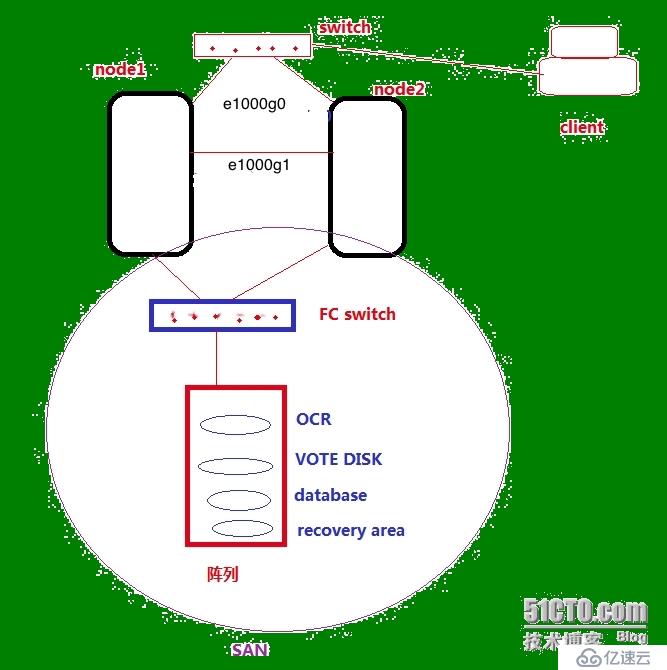
对于Oracle 11G构建RAC首先需要构建GI(Grid Infrastructure)的架构
三、安装相关软件和补丁包(所有node)
1、检查软件包:
[root@node2:/]# pkginfo -i SUNWarc SUNWbtool SUNWhea SUNWlibm SUNWlibms SUNWsprot SUNWtoo SUNWi1of SUNWi1cs SUNWi15cs SUNWxwfnt
system      SUNWarc   Lint Libraries (usr)
system      SUNWbtool CCS tools bundled with SunOS
system      SUNWhea   SunOS Header Files
system      SUNWi1of  ISO-8859-1 (Latin-1) Optional Fonts
system      SUNWlibm  Math & Microtasking Library Headers & Lint Files (Usr)
system      SUNWlibms Math & Microtasking Libraries (Usr)
system      SUNWsprot Solaris Bundled tools
system      SUNWtoo   Programming Tools
system      SUNWxwfnt X Window System platform required fonts
ERROR: information for "SUNWi1cs" was not found
ERROR: information for "SUNWi15cs" was not found
2、安装软件:
挂载Solaris 10系统安装盘
[root@node1:/]# ls /cdrom cdrom0 sol_10_910_x86 [root@node1:/cdrom/sol_10_910_x86/Solaris_10/Product]# pkgadd /cdrom/sol_10_910_x86/Solaris_10/Product SUNWi1cs pkgadd: ERROR: no packages were found in [root@node1:/cdrom/sol_10_910_x86/Solaris_10/Product]# pkgadd -d /cdrom/sol_10_910_x86/Solaris_10/Product SUNWi1cs Processing package instancefrom X11 ISO8859-1 Codeset Support(i386) 2.0,REV=2004.10.17.15.04 Copyright 2004 Sun Microsystems, Inc. All rights reserved. Use is subject to license terms. Using as the package base directory. ## Processing package information. ## Processing system information. 8 package pathnames are already properly installed. ## Verifying package dependencies. ## Verifying disk space requirements. ## Checking for conflicts with packages already installed. ## Checking for setuid/setgid programs. This package contains scripts which will be executed with super-user permission during the process of installing this package. Do you want to continue with the installation of [y,n,?] y Installing X11 ISO8859-1 Codeset Support as ## Installing part 1 of 1. 232 blocks Installation of was successful. [root@node1:/cdrom/sol_10_910_x86/Solaris_10/Product]# pkgadd -d /cdrom/sol_10_910_x86/Solaris_10/Product SUNWi15cs Processing package instance from X11 ISO8859-15 Codeset Support(i386) 2.0,REV=2004.10.17.15.04 Copyright 2004 Sun Microsystems, Inc. All rights reserved. Use is subject to license terms. Using as the package base directory. ## Processing package information. ## Processing system information. 6 package pathnames are already properly installed. ## Verifying package dependencies. ## Verifying disk space requirements. ## Checking for conflicts with packages already installed. ## Checking for setuid/setgid programs. This package contains scripts which will be executed with super-user permission during the process of installing this package. Do you want to continue with the installation of [y,n,?] y Installing X11 ISO8859-15 Codeset Support as ## Installing part 1 of 1. 1460 blocks Installation of was successful. [root@node1:/cdrom/sol_10_910_x86/Solaris_10/Product]#
3、检查安装结果:
[root@node2:/]# pkginfo -i SUNWi1cs SUNWi15cs
system      SUNWi15cs X11 ISO8859-15 Codeset Support
system      SUNWi1cs  X11 ISO8859-1 Codeset Support
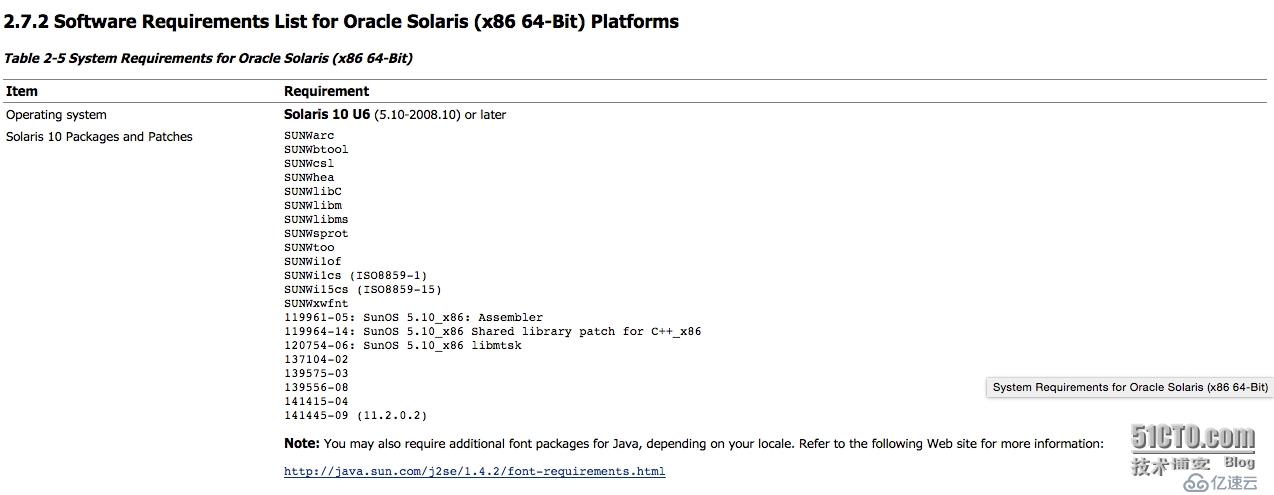
4、系统补丁需求:
四、建立主机间信任关系(node1)
通过ssh建立信任关系
Oracle 用户:
[oracle@node1:/export/home/oracle]$ ssh-keygen -t rsa
Generating public/private rsa key pair.
Enter file in which to save the key (/export/home/oracle/.ssh/id_rsa):
Enter passphrase (empty for no passphrase):
Enter same passphrase again:
Your identification has been saved in /export/home/oracle/.ssh/id_rsa.
Your public key has been saved in /export/home/oracle/.ssh/id_rsa.pub.
The key fingerprint is:
22:85:5f:22:01:97:3b:f1:8a:8d:d2:aa:87:30:4c:49 oracle@node1

[oracle@node1:/export/home/oracle]$ ssh-keygen -t dsa
Generating public/private dsa key pair.
Enter file in which to save the key (/export/home/oracle/.ssh/id_dsa):
Enter passphrase (empty for no passphrase):
Enter same passphrase again:
Your identification has been saved in /export/home/oracle/.ssh/id_dsa.
Your public key has been saved in /export/home/oracle/.ssh/id_dsa.pub.
The key fingerprint is:
e2:11:e1:ed:4e:a4:e8:b1:73:8f:3e:e2:f2:e2:d8:0d oracle@node1


[oracle@node2:/export/home/oracle]$ ssh-keygen -t rsa
Generating public/private rsa key pair.
Enter file in which to save the key (/export/home/oracle/.ssh/id_rsa):
Enter passphrase (empty for no passphrase):
Enter same passphrase again:
Your identification has been saved in /export/home/oracle/.ssh/id_rsa.
Your public key has been saved in /export/home/oracle/.ssh/id_rsa.pub.
The key fingerprint is:
04:a7:fd:b0:b3:33:6a:ab:7b:ae:f8:08:93:32:05:96 oracle@node2


[oracle@node2:/export/home/oracle]$ ssh-keygen -t dsa
Generating public/private dsa key pair.
Enter file in which to save the key (/export/home/oracle/.ssh/id_dsa):
Enter passphrase (empty for no passphrase):
Enter same passphrase again:
Your identification has been saved in /export/home/oracle/.ssh/id_dsa.
Your public key has been saved in /export/home/oracle/.ssh/id_dsa.pub.
The key fingerprint is:
af:3a:e7:36:f7:e2:96:58:9c:4d:f5:d8:d4:47:32:fe oracle@node2


[oracle@node1:/export/home/oracle]$ cat .ssh/id_rsa.pub >>.ssh/authorized_keys
[oracle@node1:/export/home/oracle]$ cat .ssh/id_dsa.pub >>.ssh/authorized_keys
[oracle@node1:/export/home/oracle]$ ssh node2 cat .ssh/id_rsa.pub >>.ssh/authorized_keys
Password:
[oracle@node1:/export/home/oracle]$ ssh node2 cat .ssh/id_dsa.pub >>.ssh/authorized_keys
Password:
[oracle@node1:/export/home/oracle]$ scp .ssh/authorized_keys node2:~/.ssh
Password:
authorized_keys      100% |*******************************************************************************|  1648       00:00
验证信任关系:(所有node)

在node1验证:
[oracle@node1:/export/home/oracle]$ ssh node2 date
Mon Jan 26 11:43:43 CST 2015
[oracle@node1:/export/home/oracle]$ ssh node2-priv date
The authenticity of host 'node2-priv (10.10.10.12)' can't be established.
RSA key fingerprint is e8:4f:7a:13:f7:46:8b:f8:85:7f:7f:00:6c:5c:0f:66.
Are you sure you want to continue connecting (yes/no)? yes
Warning: Permanently added 'node2-priv,10.10.10.12' (RSA) to the list of known hosts.
Mon Jan 26 11:43:49 CST 2015
[oracle@node1:/export/home/oracle]$ ssh node1-priv date
The authenticity of host 'node1-priv (10.10.10.11)' can't be established.
RSA key fingerprint is e8:4f:7a:13:f7:46:8b:f8:85:7f:7f:00:6c:5c:0f:66.
Are you sure you want to continue connecting (yes/no)? yes
Warning: Permanently added 'node1-priv,10.10.10.11' (RSA) to the list of known hosts.
Mon Jan 26 11:43:53 CST 2015
[oracle@node1:/export/home/oracle]$ ssh node1 date
The authenticity of host 'node1 (192.168.8.11)' can't be established.
RSA key fingerprint is e8:4f:7a:13:f7:46:8b:f8:85:7f:7f:00:6c:5c:0f:66.
Are you sure you want to continue connecting (yes/no)? yes
Warning: Permanently added 'node1,192.168.8.11' (RSA) to the list of known hosts.
Mon Jan 26 11:43:58 CST 2015

在node2验证:
[oracle@node2:/export/home/oracle]$ ssh node1 date
The authenticity of host 'node1 (192.168.8.11)' can't be established.
RSA key fingerprint is e8:4f:7a:13:f7:46:8b:f8:85:7f:7f:00:6c:5c:0f:66.
Are you sure you want to continue connecting (yes/no)? yes
Warning: Permanently added 'node1,192.168.8.11' (RSA) to the list of known hosts.
Mon Jan 26 11:44:17 CST 2015
[oracle@node2:/export/home/oracle]$ ssh node1-priv date
The authenticity of host 'node1-priv (10.10.10.11)' can't be established.
RSA key fingerprint is e8:4f:7a:13:f7:46:8b:f8:85:7f:7f:00:6c:5c:0f:66.
Are you sure you want to continue connecting (yes/no)? yes
Warning: Permanently added 'node1-priv,10.10.10.11' (RSA) to the list of known hosts.
Mon Jan 26 11:44:23 CST 2015
[oracle@node2:/export/home/oracle]$ ssh node2-priv date
The authenticity of host 'node2-priv (10.10.10.12)' can't be established.
RSA key fingerprint is e8:4f:7a:13:f7:46:8b:f8:85:7f:7f:00:6c:5c:0f:66.
Are you sure you want to continue connecting (yes/no)? yes
Warning: Permanently added 'node2-priv,10.10.10.12' (RSA) to the list of known hosts.
Mon Jan 26 11:44:29 CST 2015
[oracle@node2:/export/home/oracle]$ ssh node2 date
The authenticity of host 'node2 (192.168.8.12)' can't be established.
RSA key fingerprint is e8:4f:7a:13:f7:46:8b:f8:85:7f:7f:00:6c:5c:0f:66.
Are you sure you want to continue connecting (yes/no)? yes
Warning: Permanently added 'node2,192.168.8.12' (RSA) to the list of known hosts.
Mon Jan 26 11:44:35 CST 2015
grid 用户:
操作步骤同oracle用户相同!
五、配置时间同步(所有node)
对于Oracle 11gR2中,可以采用Oracle Cluster Time Synchronization daemon (ctssd) 服务,来进行时间的同步,不需要采用系统的NTP服务进行同步,需要关闭系统的NTP服务。
[root@node1:/]# svcs -a |grep ntp
disabled        9:38:42 svc:/network/ntp:default
disabled        9:38:43 svc:/network/ntp4:default
----默认已经被关闭
相关内容
热门资讯
以军士兵集体丢掉武器抗命,大喊...
据凤凰卫视报道,以色列国防军一军事基地7月30日发生士兵抗命事件,约120名士兵抗议指挥官做法,将武...
蒋成华任商务部副部长
国务院任免国家工作人员。任命蒋成华为商务部副部长。免去蒋成华的商务部国际贸易谈判副代表职务。
伊朗驻华大使:在军事威胁下,不...
新华社北京7月31日电(记者刁慧琳) 伊朗驻华大使法兹里7月28日表示,伊美回到谈判桌的前提是美国必...
伊朗革命卫队在霍尔木兹海峡击中...
当地时间31日,伊朗伊斯兰革命卫队发布声明称,革命卫队海军当天在霍尔木兹海峡击中并扣留了两艘违反禁令...
美媒:特朗普,遇到了一个更强硬...
据《纽约时报》7月29日报道,就在特朗普总统看似放弃战事升级计划几天后,美国再次与伊朗交火。上周末,...
女子做气管镜时不幸身亡,丈夫称...
7月29日,西安刘先生反映妻子在当地医院做支气管镜检查时死亡,看监控时发现医生疑有违规操作。刘先生表...
全网“帮卖西瓜”,然后呢?
近日,河南部分地区西瓜滞销的消息在网上热度很高。很多地方也伸出援手:有景区收购千斤西瓜、免费赠予游客...
美媒:乌克兰袭击伊朗船只,险引...
据《纽约时报》7月28日报道,据伊朗和西方官员称,伊朗曾考虑攻击乌克兰的一个港口,以报复乌克兰对一艘...
20年里,他只画美女,用东方风...
迈进KIM在上海的工作室,迎面是一整墙的美女们。她们像是刚从一场时髦的沙龙里退场,或倚或立,眉宇间是...
Google在港推出AI代理G...
观点网讯:7月29日,Google在香港推出AI代理Gemini Spark,该代理可全天候在后台运...