

Mysql 5.7.20中mysql innodb系统表损坏应该如何处理
本文主要给大家介绍Mysql 5.7.20中mysql innodb系统表损坏应该如何处理,文章内容都是笔者用心摘选和编辑的,具有一定的针对性,对大家的参考意义还是比较大的,下面跟笔者一起了解下Mysql 5.7.20中mysql innodb系统表损坏应该如何处理吧。
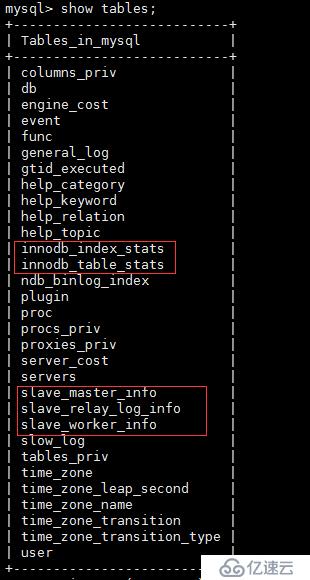
早上上班后,mysql云服务器遇到点小问题,在排查故障过程查看mysql错误日志过程中发现有几个innodb 表无法打开,使用desc查看有关表的表结构提示表不存在,show tables 可以查到一下五个表,以下是具体的报错信息:
2018-01-12 09:17:41 17235 [Warning] InnoDB: Cannot open table mysql/innodb_index_stats from the internal data dictionary of InnoDB though the .frm file for the table exists. See http://dev.mysql.com/doc/refman/5.6/en/innodb-troubleshooting.html for how you can resolve the problem.
2018-01-12 09:17:41 17235 [Warning] InnoDB: Cannot open table mysql/innodb_table_stats from the internal data dictionary of InnoDB though the .frm file for the table exists. See http://dev.mysql.com/doc/refman/5.6/en/innodb-troubleshooting.html for how you can resolve the problem.
2018-01-12 09:17:41 17235 [Warning] InnoDB: Cannot open table mysql/slave_master_info from the internal data dictionary of InnoDB though the .frm file for the table exists. See http://dev.mysql.com/doc/refman/5.6/en/innodb-troubleshooting.html for how you can resolve the problem.
2018-01-12 09:17:41 17235 [Warning] InnoDB: Cannot open table mysql/slave_relay_log_info from the internal data dictionary of InnoDB though the .frm file for the table exists. See http://dev.mysql.com/doc/refman/5.6/en/innodb-troubleshooting.html for how you can resolve the problem.
2018-01-12 09:17:41 17235 [Warning] InnoDB: Cannot open table mysql/slave_worker_info from the internal data dictionary of InnoDB though the .frm file for the table exists. See http://dev.mysql.com/doc/refman/5.6/en/innodb-troubleshooting.html for how you can resolve the problem.
网上查了下资料,问题的问题产生原因:数据库打开这几张表的默认引擎为MyISAM,但是这几张表在建表时的引擎为INNODB;从而引起mysql报错
msyql在5.6版本引入了以下五个表
innodb_index_stats,
innodb_tables_stats,
slave_master_info,
slave_relay_log_info,
slave_worker_info
定位了问题原因后,那我们就开始着手准备解决以上存在的问题,解决的思路是,删除有问题的表和数据文件,使用安装msyql的官方自带建表脚本,重新创建有问题的5个表。
操作步骤如下
1,登录数据库执行以下操作,sql语句加if 判断,如果表存在,则删除
mysql> use mysql;
mysql> drop table if exists innodb_index_stats;
mysql> drop table if exists innodb_table_stats;
mysql> drop table if exists slave_master_info;
mysql> drop table if exists slave_relay_log_info;
mysql> drop table if exists slave_worker_info;
mysql> show tables; 验证执行结果,以上表是否已删除
2,停止mysql数据库服务,并进入到数据库数据文件所在目录,删除上面5个表所对应的idb文件,linux系统环境,我的msyql的basedir目录是 /usr/local/mysql/
datadir目录是/data/mysql/var/mysql/
[root@mysql5 ]# systemctl restart stop
[root@sql5 root]# cd /data/mysql/var/mysql/
[root@sql5 mysql]# ls -l *.ibd
-rw-rw---- 1 mysql mysql 98304 3月 7 2017 innodb_index_stats.ibd
-rw-rw---- 1 mysql mysql 98304 3月 7 2017 innodb_table_stats.ibd
-rw-rw---- 1 mysql mysql 98304 3月 7 2017 slave_master_info.ibd
-rw-rw---- 1 mysql mysql 98304 3月 7 2017 slave_relay_log_info.ibd
-rw-rw---- 1 mysql mysql 98304 3月 7 2017 slave_worker_info.ibd
[root@sql5 mysql]#rm -rf *.ibd
3,重启mysql服务,并重建被删除的五个表的表结构,建表脚本在mysql软件的安装目录的share目录下或者mysql的安装包的script目录下
[root@mysql5 mysql]# cd /usr/local/mysql/share/
[root@mysql5 share]# ls -l *.sql //查看所有的建表脚本
-rw-r--r--. 1 root root 932622 9月 13 23:56 fill_help_tables.sql
-rw-r--r--. 1 root root 3999 9月 13 23:48 innodb_memcached_config.sql
-rw-r--r--. 1 root root 1812 11月 7 11:42 install_rewriter.sql
-rw-r--r--. 1 root root 1760 9月 13 23:48 mysql_security_commands.sql
-rw-r--r--. 1 root root 287110 9月 13 23:48 mysql_sys_schema.sql
-rw-r--r--. 1 root root 811 9月 13 23:48 mysql_system_tables_data.sql
-rw-r--r--. 1 root root 154624 9月 13 23:48 mysql_system_tables.sql
-rw-r--r--. 1 root root 10410 9月 13 23:48 mysql_test_data_timezone.sql
-rw-r--r--. 1 root root 834 11月 7 11:42 uninstall_rewriter.sql
[root@mysql5 share]# systemctl restart mysqld
mysql> USE MYSQL;
mysql> source /usr/local/mysql/share/innodb_memcached_config.sql
mysql> show tables; 删除的5个表已恢复
mysql> DESC innodb_table_stats ;
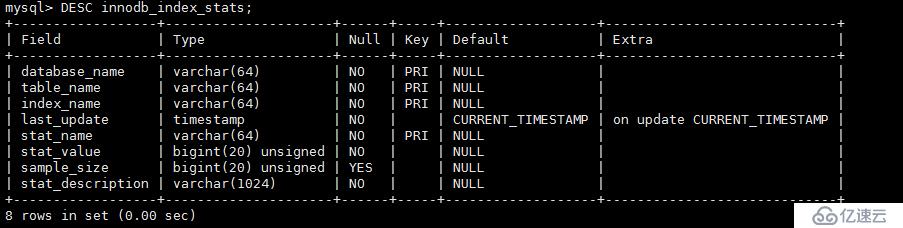
其余四个表结构的查看过程略,
在查看mysql的错误日志,报错信息没有了
[root@mysql5 share]# tail /data/mysql/var/mysqld.err

看完以上关于Mysql 5.7.20中mysql innodb系统表损坏应该如何处理,很多读者朋友肯定多少有一定的了解,如需获取更多的行业知识信息 ,可以持续关注我们的行业资讯栏目的。