

Oracle database 11.2.0.1 升级至 11.2.0.3
admin
2023-05-07 20:21:47
0次
首先下载Oracle 11.2.0.3 Patchset
http://yunpan.cn/cHgQuIuxUTThS
访问密码 043f
将Patchset上传至服务器
[oracle@localhost ~]$ ls
p10404530_112030_Linux-x86-64_1of7.zip  p10404530_112030_Linux-x86-64_2of7.zip
解压安装包
[oracle@localhost ~]$ unzip p10404530_112030_Linux-x86-64_1of7.zip
[oracle@localhost ~]$ unzip p10404530_112030_Linux-x86-64_2of7.zip
进入安装目录
[oracle@localhost ~]$ cd database/
[oracle@localhost database]$ ls
doc  install  readme.html  response  rpm  runInstaller  sshsetup  stage  welcome.html
一、安装11.2.0.3 只安装软件软件
运行runInstaller
[oracle@localhost database]$ export ORACLE_HOME="/u01/app/oracle/product/11.2.0.3/db_1"
[oracle@localhost database]$ ./runInstaller
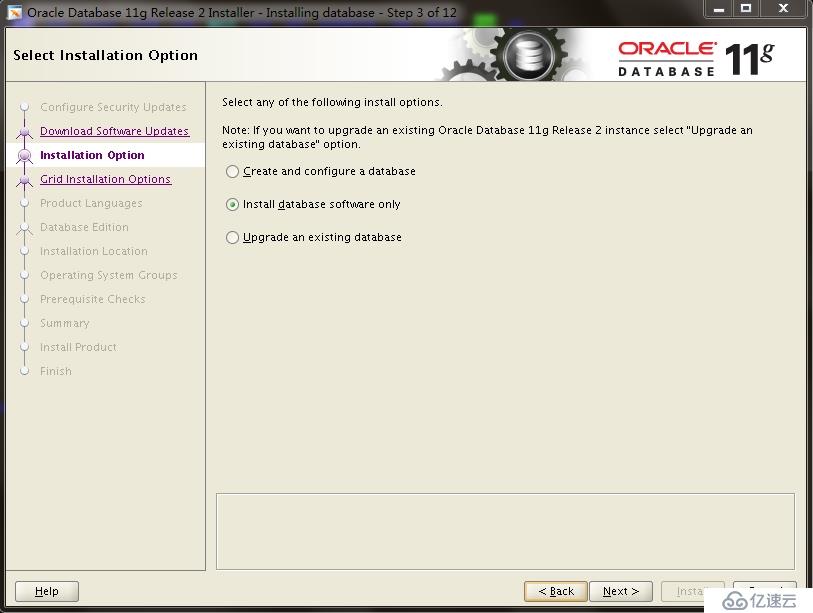
选择只安装软件选项
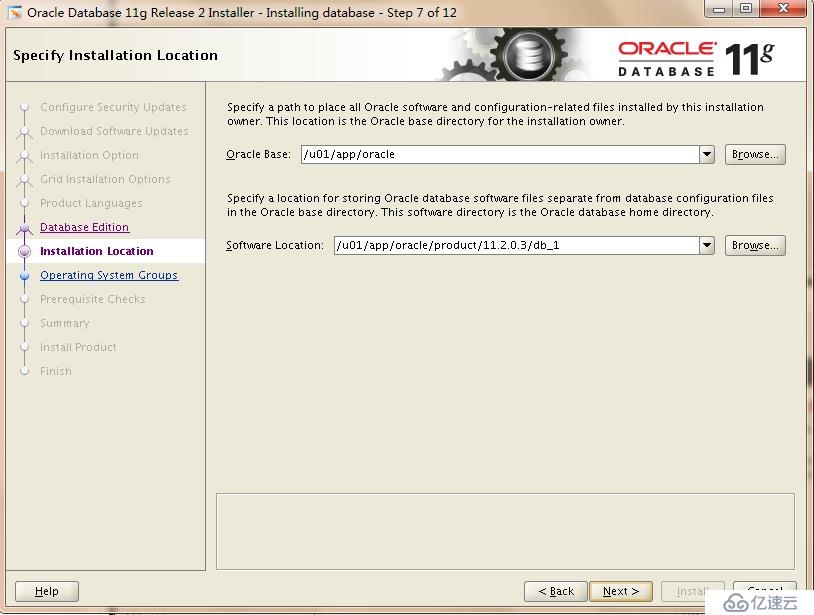
选择新的ORACLE_HOME
二、安装完毕11.2.0.3后,需要运行脚本执行升级前的预检查。
[root@localhost ~]# su - oracle
[oracle@localhost ~]$ export | grep ORACLE_HOME
declare -x ORACLE_HOME="/u01/app/oracle/product/11.2.0.1/db_1"
注意,使用旧版本登录数据库
SQL> SPOOL upgrade_info.log
SQL> @/u01/app/oracle/product/11.2.0.3/db_1/rdbms/admin/utlu112i.sql
SQL> SPOOL OFF
日志如下
Oracle Database 11.2 Pre-Upgrade Information Tool 09-17-2015 22:13:08
Script Version: 11.2.0.3.0 Build: 001
.
**********************************************************************
Database:
**********************************************************************
--> name:	   ORCL
--> version:	   11.2.0.1.0
--> compatible:    11.2.0.0.0
--> blocksize:	   8192
--> platform:	   Linux x86 64-bit
--> timezone file: V11
.
**********************************************************************
Tablespaces: [make adjustments in the current environment]
**********************************************************************
--> SYSTEM tablespace is adequate for the upgrade.
.... minimum required size: 681 MB
--> SYSAUX tablespace is adequate for the upgrade.
.... minimum required size: 468 MB
--> UNDOTBS1 tablespace is adequate for the upgrade.
.... minimum required size: 400 MB
--> TEMP tablespace is adequate for the upgrade.
.... minimum required size: 60 MB
.
**********************************************************************
Flashback: OFF
**********************************************************************
**********************************************************************
Update Parameters: [Update Oracle Database 11.2 init.ora or spfile]
Note: Pre-upgrade tool was run on a lower version 64-bit database.
**********************************************************************
--> If Target Oracle is 32-Bit, refer here for Update Parameters:
-- No update parameter changes are required.
.

--> If Target Oracle is 64-Bit, refer here for Update Parameters:
-- No update parameter changes are required.
.
**********************************************************************
Renamed Parameters: [Update Oracle Database 11.2 init.ora or spfile]
**********************************************************************
-- No renamed parameters found. No changes are required.
.
**********************************************************************
Obsolete/Deprecated Parameters: [Update Oracle Database 11.2 init.ora or spfile]
**********************************************************************
-- No obsolete parameters found. No changes are required
.

**********************************************************************
Components: [The following database components will be upgraded or installed]
**********************************************************************
--> Oracle Catalog Views	 [upgrade]  VALID
--> Oracle Packages and Types	 [upgrade]  VALID
--> JServer JAVA Virtual Machine [upgrade]  VALID
--> Oracle XDK for Java 	 [upgrade]  VALID
--> Oracle Workspace Manager	 [upgrade]  VALID
--> OLAP Analytic Workspace	 [upgrade]  VALID
--> OLAP Catalog		 [upgrade]  VALID
--> EM Repository		 [upgrade]  VALID
--> Oracle Text 		 [upgrade]  VALID
--> Oracle XML Database 	 [upgrade]  VALID
--> Oracle Java Packages	 [upgrade]  VALID
--> Oracle interMedia		 [upgrade]  VALID
--> Spatial			 [upgrade]  VALID
--> Expression Filter		 [upgrade]  VALID
--> Rule Manager		 [upgrade]  VALID
--> Oracle Application Express	 [upgrade]  VALID
... APEX will only be upgraded if the version of APEX in
... the target Oracle home is higher than the current one.
--> Oracle OLAP API		 [upgrade]  VALID
.
**********************************************************************
Miscellaneous Warnings
**********************************************************************
WARNING: --> Database is using a timezone file older than version 14.
.... After the release migration, it is recommended that DBMS_DST package
.... be used to upgrade the 11.2.0.1.0 database timezone version
.... to the latest version which comes with the new release.
WARNING: --> Your recycle bin is turned on and currently contains no objects.
.... Because it is REQUIRED that the recycle bin be empty prior to upgrading
.... and your recycle bin is turned on, you may need to execute the command:
	PURGE DBA_RECYCLEBIN
.... prior to executing your upgrade to confirm the recycle bin is empty.
WARNING: --> Database contains schemas with objects dependent on DBMS_LDAP package.
.... Refer to the 11g Upgrade Guide for instructions to configure Network ACLs.
.... USER APEX_030200 has dependent objects.
.
**********************************************************************
Recommendations
**********************************************************************
Oracle recommends gathering dictionary statistics prior to
upgrading the database.
To gather dictionary statistics execute the following command
while connected as SYSDBA:

    EXECUTE dbms_stats.gather_dictionary_stats;

**********************************************************************
Oracle recommends reviewing any defined events prior to upgrading.

To view existing non-default events execute the following commands
while connected AS SYSDBA:
  Events:
    SELECT (translate(value,chr(13)||chr(10),' ')) FROM sys.v$parameter2
      WHERE  UPPER(name) ='EVENT' AND  isdefault='FALSE'

  Trace Events:
    SELECT (translate(value,chr(13)||chr(10),' ')) from sys.v$parameter2
      WHERE UPPER(name) = '_TRACE_EVENTS' AND isdefault='FALSE'

Changes will need to be made in the init.ora or spfile.

**********************************************************************
按照日志要求,执行数据库字典统计
EXECUTE dbms_stats.gather_dictionary_stats;
SQL>  SELECT (translate(value,chr(13)||chr(10),' ')) FROM sys.v$parameter2 WHERE  UPPER(name) ='EVENT' AND  isdefault='FALSE';

no rows selected
SQL> SELECT (translate(value,chr(13)||chr(10),' ')) from sys.v$parameter2 WHERE UPPER(name) = '_TRACE_EVENTS' AND isdefault='FALSE';

no rows selected
三、配置新版的LISTENER
[oracle@localhost bin]$ export ORACLE_HOME=/u01/app/oracle/product/11.2.0.3/db_1
[oracle@localhost bin]$ export TNS_ADMIN="/u01/app/oracle/product/11.2.0.3/db_1/network/admin"
[oracle@localhost ~]$ cd /u01/app/oracle/product/11.2.0.3/db_1/bin/
[oracle@localhost bin]$ ./netmgr
[oracle@localhost bin]$ cd /u01/app/oracle/product/11.2.0.3/db_1/network/admin
[oracle@localhost admin]$ cat listener.ora
# listener.ora Network Configuration File: /u01/app/oracle/product/11.2.0.3/db_1/network/admin/listener.ora
# Generated by Oracle configuration tools.

SID_LIST_LISTENER =
  (SID_LIST =
    (SID_DESC =
      (GLOBAL_DBNAME = orcl)
      (ORACLE_HOME = /u01/app/oracle/product/11.2.0.3/db_1)
      (SID_NAME = orcl)
    )
  )

LISTENER =
  (DESCRIPTION =
    (ADDRESS = (PROTOCOL = TCP)(HOST = 192.168.199.240)(PORT = 1521))
  )

ADR_BASE_LISTENER = /u01/app/oracle
关闭旧listener
[oracle@localhost ~]$ lsnrctl stop

LSNRCTL for Linux: Version 11.2.0.1.0 - Production on 17-SEP-2015 22:54:22

Copyright (c) 1991, 2009, Oracle.  All rights reserved.

Connecting to (DESCRIPTION=(ADDRESS=(PROTOCOL=TCP)(HOST=192.168.199.240)(PORT=1521)))
The command completed successfully
启动新listener
[oracle@localhost admin]$ cd /u01/app/oracle/product/11.2.0.3/db_1/bin/
[oracle@localhost bin]$ ./lsnrctl start

LSNRCTL for Linux: Version 11.2.0.3.0 - Production on 17-SEP-2015 22:52:47

Copyright (c) 1991, 2011, Oracle.  All rights reserved.

Starting /u01/app/oracle/product/11.2.0.3/db_1/bin/tnslsnr: please wait...

TNSLSNR for Linux: Version 11.2.0.3.0 - Production
System parameter file is /u01/app/oracle/product/11.2.0.3/db_1/network/admin/listener.ora
Log messages written to /u01/app/oracle/diag/tnslsnr/localhost/listener/alert/log.xml
Listening on: (DESCRIPTION=(ADDRESS=(PROTOCOL=tcp)(HOST=192.168.199.240)(PORT=1521)))

Connecting to (DESCRIPTION=(ADDRESS=(PROTOCOL=TCP)(HOST=192.168.199.240)(PORT=1521)))
STATUS of the LISTENER
------------------------
Alias                     LISTENER
Version                   TNSLSNR for Linux: Version 11.2.0.3.0 - Production
Start Date                17-SEP-2015 22:52:47
Uptime                    0 days 0 hr. 0 min. 0 sec
Trace Level               off
Security                  ON: Local OS Authentication
SNMP                      OFF
Listener Parameter File   /u01/app/oracle/product/11.2.0.3/db_1/network/admin/listener.ora
Listener Log File         /u01/app/oracle/diag/tnslsnr/localhost/listener/alert/log.xml
Listening Endpoints Summary...
  (DESCRIPTION=(ADDRESS=(PROTOCOL=tcp)(HOST=192.168.199.240)(PORT=1521)))
Services Summary...
Service "orcl" has 1 instance(s).
  Instance "orcl", status UNKNOWN, has 1 handler(s) for this service...
The command completed successfully
四、执行dbua
[oracle@localhost bin]$ pwd
/u01/app/oracle/product/11.2.0.3/db_1/bin
[oracle@localhost bin]$ ./dbua
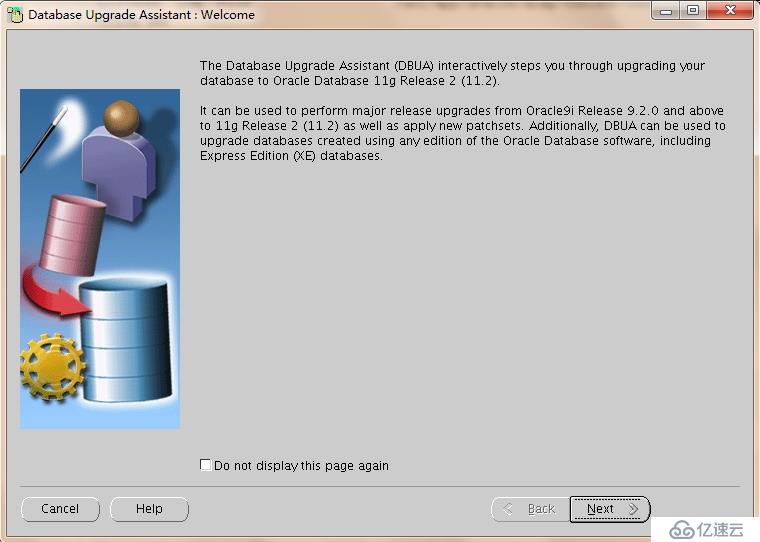
点击Next
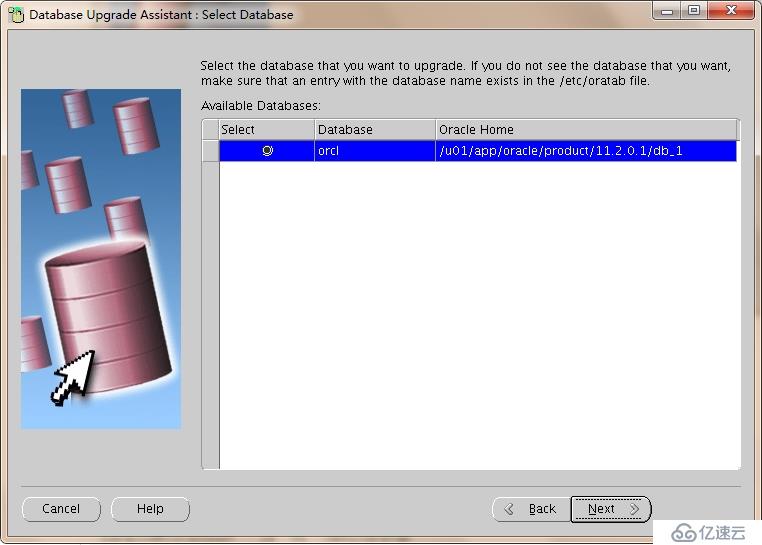 点击Next
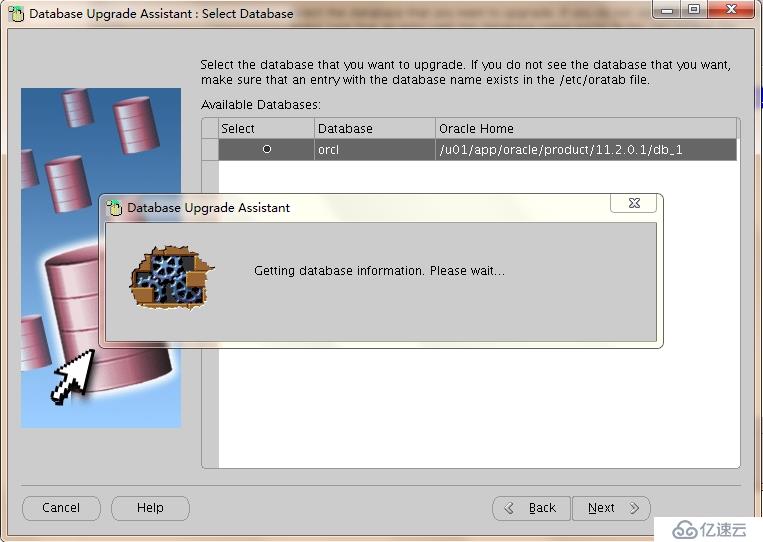
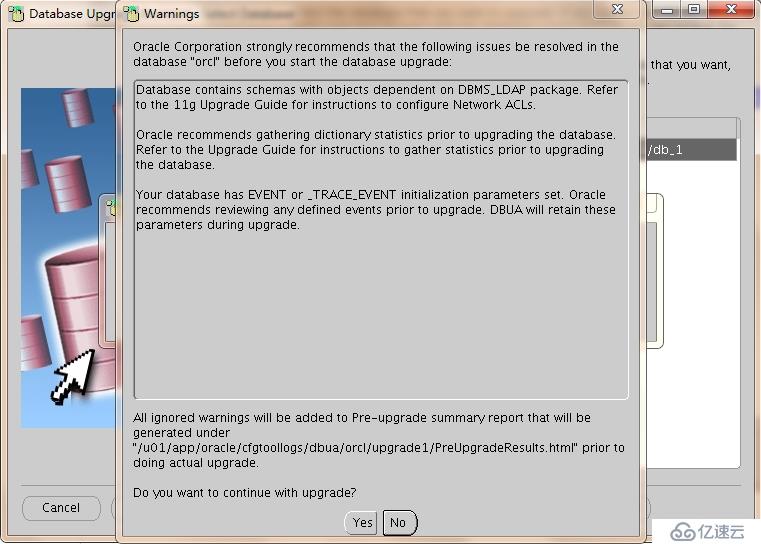
点击Yes
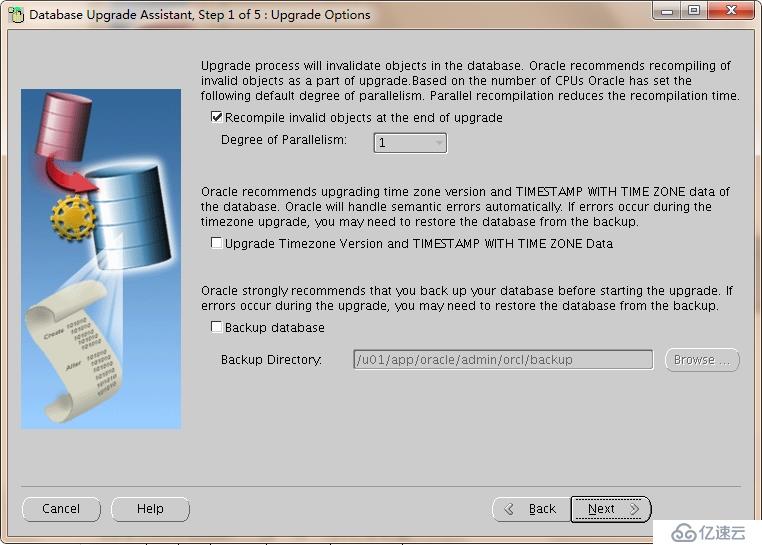
你可以选择进行Timezone更新,也可以选择备份数据库。点击Next
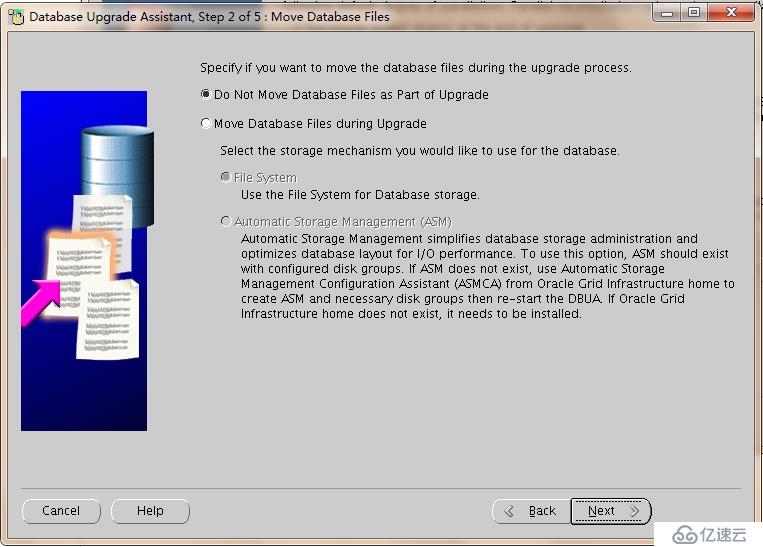
点击Next
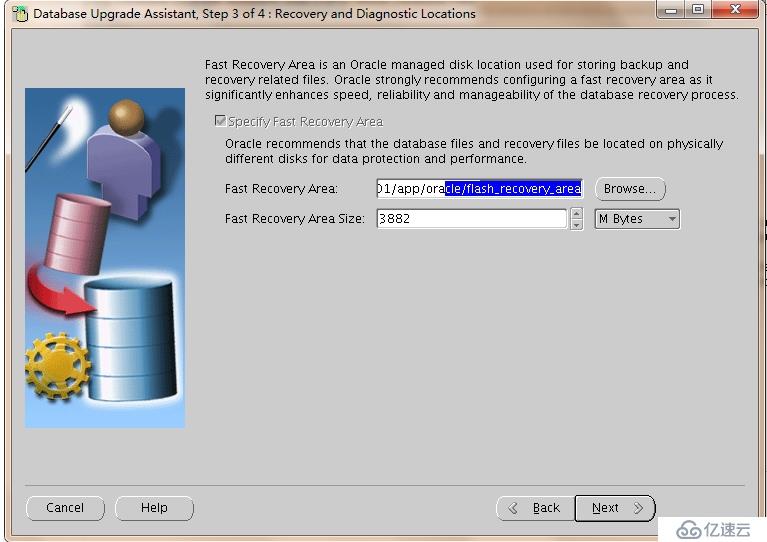
点击Next
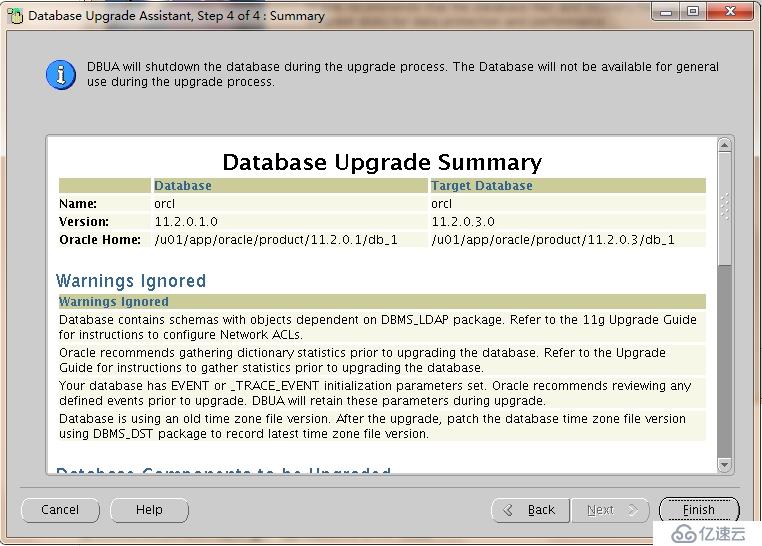 点击Finish
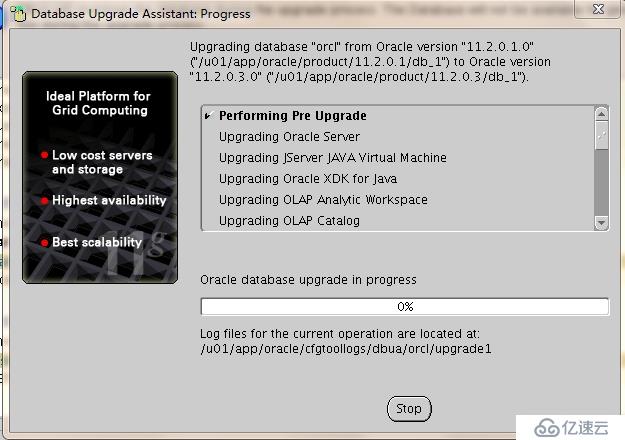
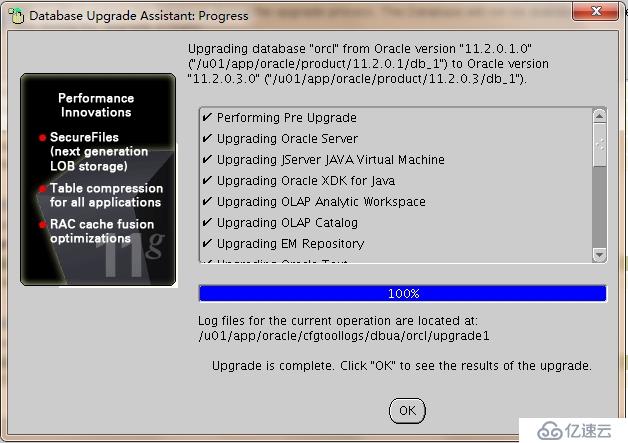
点击OK
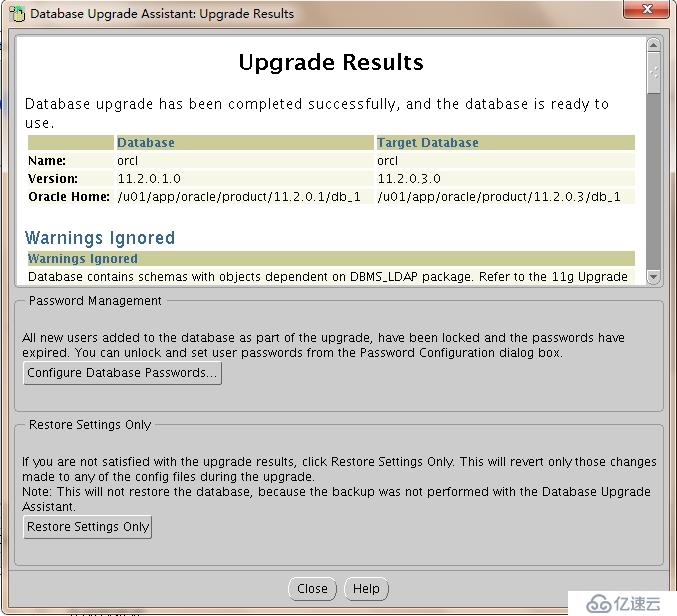
检查升级结果,如果没有错误,升级完成。
修改ORACLE_HOME环境变量,指向新的Oracle home
[oracle@localhost ~]$ vi .bash_profile
export ORACLE_HOME=$ORACLE_BASE/product/11.2.0.3/db_1
修改/etc/oratab
[oracle@localhost ~]$ vi /etc/oratab
orcl:/u01/app/oracle/product/11.2.0.3/db_1:N
上一篇:Oracle安装--简单篇
下一篇:掌握学习mysql相关知识
相关内容
热门资讯
Google在港推出AI代理G...
观点网讯:7月29日,Google在香港推出AI代理Gemini Spark,该代理可全天候在后台运...
5G+165Hz!联想新品官宣...
近两年来,小屏平板一直是比较有趣的一个品类。 不同于大平板注重效率、手机追求万能的特点,拯救者Y70...
原创 马...
马斯克又出来了。这次说2036年钱就没用了。 理由是人工智能加机器人,东西多到你用不完,还拿钱干嘛...
美的集团:我国智能家居互联互通...
IT之家 7 月 30 日消息,美的集团今日发布公告,7 月 21 日至 23 日,智能家居互联互通...
华为新款MatePad Pro...
【CNMO科技消息】7月30日,@华为终端 官宣全新旗舰平板华为MatePad Pro。 新款华为...
从实验室到实景验证:6G光子太...
全息通信是第六代移动通信(6G)的典型应用场景之一,旨在通过融合无线传输与全息三维成像技术,实现超大...
从“能对话”到“能干活”——人...
【经济界面】 光明日报记者 刘坤 李晓东 周洪双 人工智能(AI)眼镜化身为个人“助理”,实时进行...
【全新发布】UminiP Pr...
(来源:洲明科技)
日本通过“H3火箭8号”发射失...
△H3火箭(资料图) 日本文部科学省30日召开关于去年“H3火箭8号”发射失败的会议。会议通过的最终...
互联网巨头抢滩健康硬件,上游芯...
封面新闻记者 付文超 当下,互联网巨头对健康硬件的押注,正在成为产业现实,加速拉动整个产业链步入新一...