Oracle 11g R2 RAC删除一节点过程
实验场景:
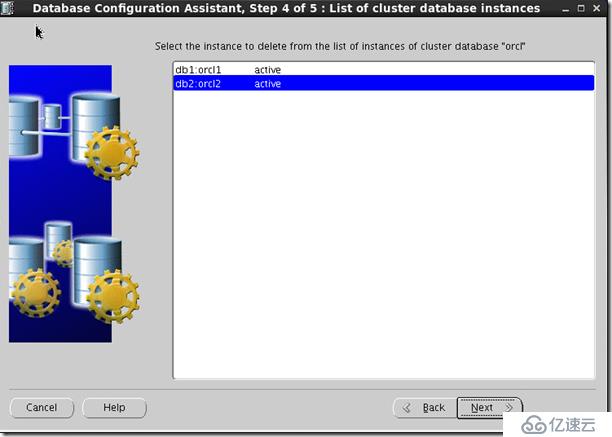
两节点RAC,主机名是db1、db2,现在需要删除db2,本示例是在正常状态下删除。
1. db1,db2节点检查CSS服务器是否正常,如下即为正常。
[root@db1 ~]# su - grid
[grid@db1 ~]$ olsnodes -t -s
db1 Active Unpinned
db2 Active Unpinned
[grid@db1 ~]$
如果pinned, 则需要在db1节点上执行:
[grid@db1 ~]$ crsctl unpin css -n db2
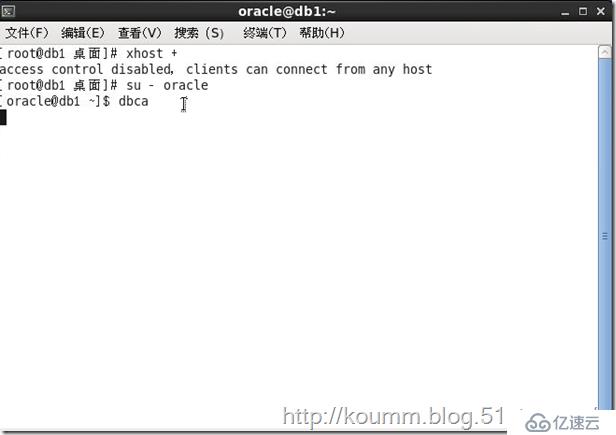
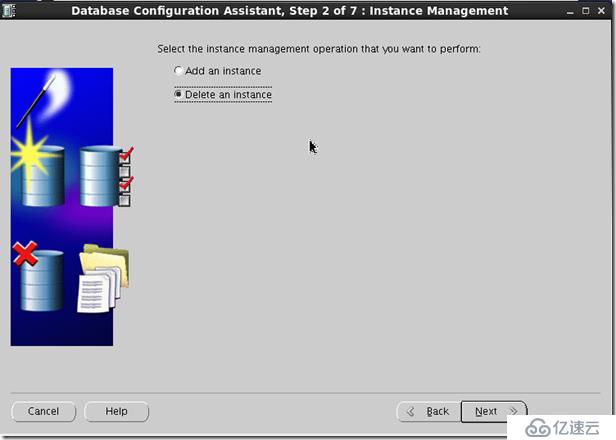
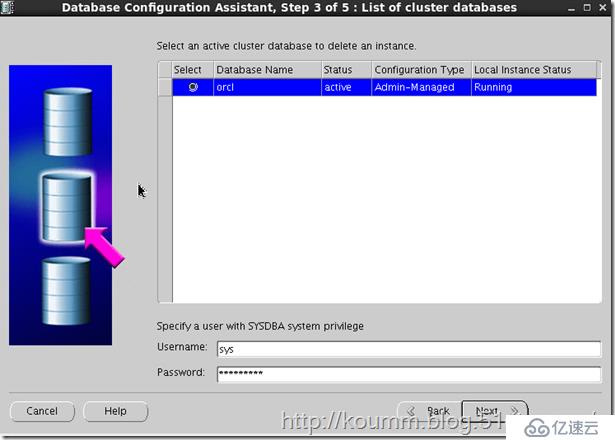
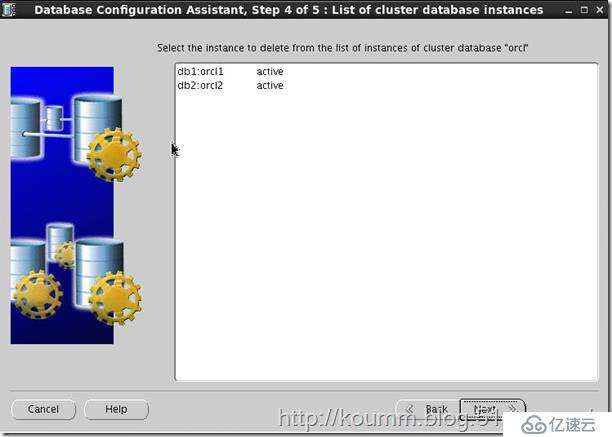
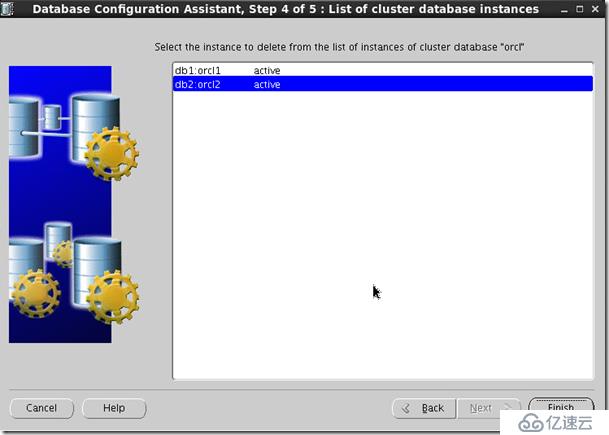
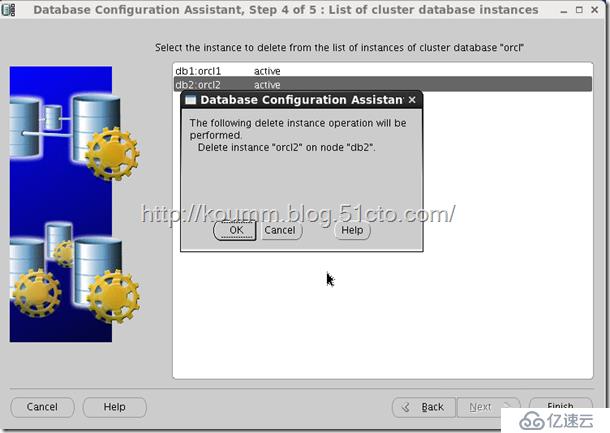
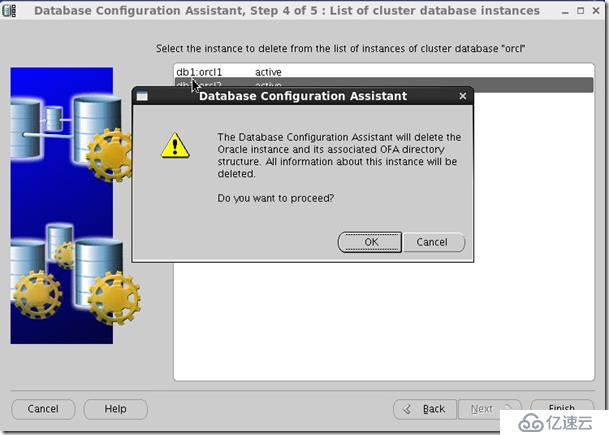
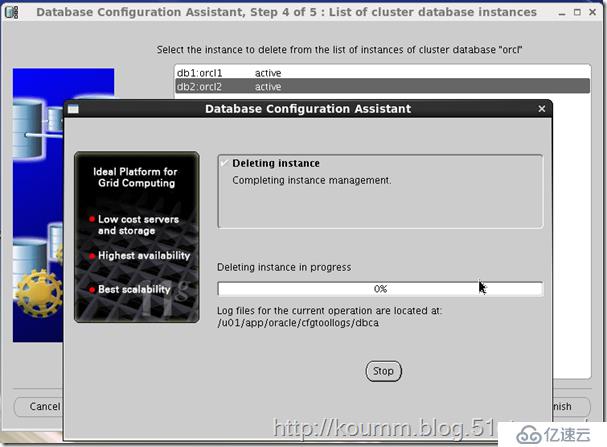
2. 使用dbca删掉db2实例
在任一保留的节点上删除db2实例
[root@db1 ~]# su - oracle
[oracle@db1 ~]$ dbca
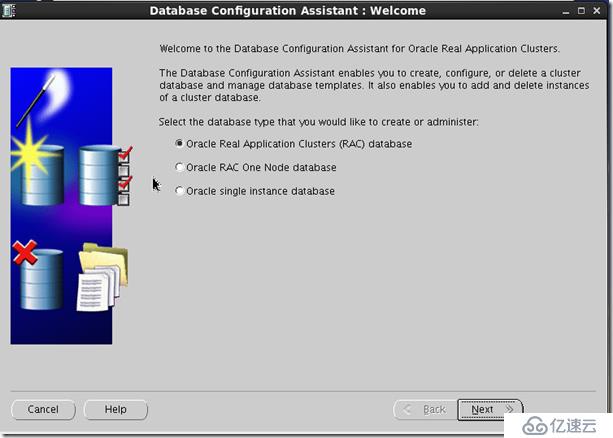
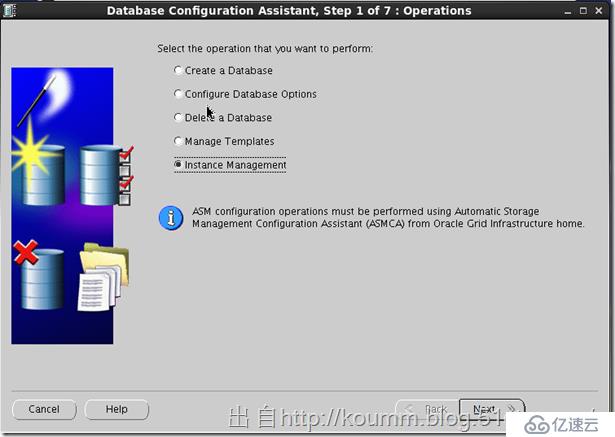
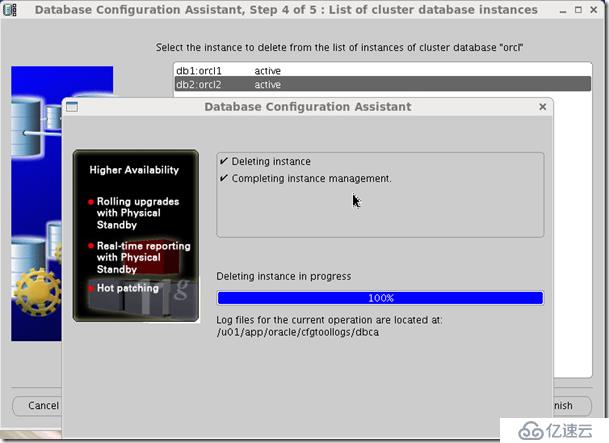
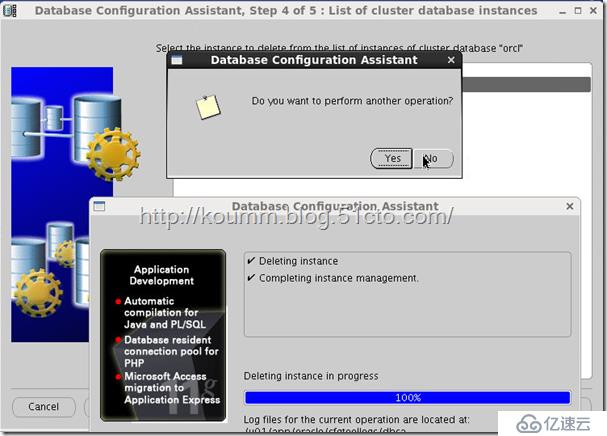
1)验证db2实例已被删除
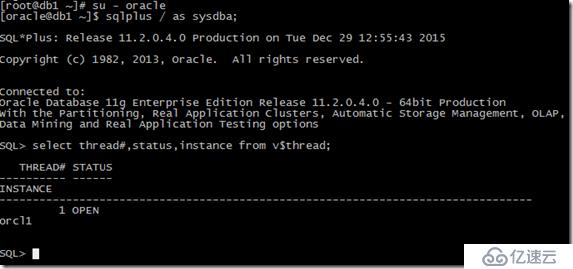
查看活动的实例:
$ sqlplus / as sysdba
SQL> select thread#,status,instance from v$thread;
THREAD# STATUS INSTANCE
---------- ------ ------------------------------
1 OPEN orcl1
2) 查看库的配置:
[oracle@db1 ~]$ srvctl config database -d orcl
Database unique name: orcl
Database name: orcl
Oracle home: /u01/app/oracle/product/11.2.0/db_1
Oracle user: oracle
Spfile: +DATA/orcl/spfileorcl.ora
Domain:
Start options: open
Stop options: immediate
Database role: PRIMARY
Management policy: AUTOMATIC
Server pools: orcl
Database instances: orcl1
Disk Groups: DATA,RECOVERY
Mount point paths:
Services:
Type: RAC
Database is administrator managed
3. 停止db2节点的监听
[root@db2 ~]# su - grid
[grid@db2 ~]$ srvctl disable listener -l listener -n db2
[grid@db2 ~]$ srvctl config listener -a
Name: LISTENER
Network: 1, Owner: grid
Home:
/u01/app/11.2.0/grid on node(s) db2,db1
End points: TCP:1521
[grid@db2 ~]$
[grid@db2 ~]$ srvctl stop listener -l listener -n db2
[grid@db2 ~]$
4. 在db2节点使用使用oracle用户更新集群列表
# su - oracle
$ $ORACLE_HOME/oui/bin/runInstaller -updateNodeList ORACLE_HOME=$ORACLE_HOME "CLUSTER_NODES={db2}" -local
Starting Oracle Universal Installer...
Checking swap space: must be greater than 500 MB. Actual 4031 MB Passed
The inventory pointer is located at /etc/oraInst.loc
The inventory is located at /u01/app/oraInventory
'UpdateNodeList' was successful.
5. 删除db2节点的数据库软件
在db2节点上执行:
# su - oracle
$ $ORACLE_HOME/deinstall/deinstall -local
Checking for required files and bootstrapping ...
Please wait ...
Location of logs /u01/app/oraInventory/logs/
############ ORACLE DEINSTALL & DECONFIG TOOL START ############
######################### CHECK OPERATION START #########################
## [START] Install check configuration ##
Checking for existence of the Oracle home location /u01/app/oracle/product/11.2.0/db_1
Oracle Home type selected for deinstall is: Oracle Real Application Cluster Database
Oracle Base selected for deinstall is: /u01/app/oracle
Checking for existence of central inventory location /u01/app/oraInventory
Checking for existence of the Oracle Grid Infrastructure home /u01/app/11.2.0/grid
The following nodes are part of this cluster: db2
Checking for sufficient temp space availability on node(s) : 'db2'
## [END] Install check configuration ##
Network Configuration check config START
Network de-configuration trace file location: /u01/app/oraInventory/logs/netdc_check2015-12-29_11-35-16-AM.log
Network Configuration check config END
Database Check Configuration START
Database de-configuration trace file location: /u01/app/oraInventory/logs/databasedc_check2015-12-29_11-35-19-AM.log
Database Check Configuration END
Enterprise Manager Configuration Assistant START
EMCA de-configuration trace file location: /u01/app/oraInventory/logs/emcadc_check2015-12-29_11-35-22-AM.log
Enterprise Manager Configuration Assistant END
Oracle Configuration Manager check START
OCM check log file location : /u01/app/oraInventory/logs//ocm_check7428.log
Oracle Configuration Manager check END
######################### CHECK OPERATION END #########################
####################### CHECK OPERATION SUMMARY #######################
Oracle Grid Infrastructure Home is: /u01/app/11.2.0/grid
The cluster node(s) on which the Oracle home deinstallation will be performed are:db2
Since -local option has been specified, the Oracle home will be deinstalled only on the local node, 'db2', and the global configuration will be removed.
Oracle Home selected for deinstall is: /u01/app/oracle/product/11.2.0/db_1
Inventory Location where the Oracle home registered is: /u01/app/oraInventory
The option -local will not modify any database configuration for this Oracle home.
No Enterprise Manager configuration to be updated for any database(s)
No Enterprise Manager ASM targets to update
No Enterprise Manager listener targets to migrate
Checking the config status for CCR
Oracle Home exists with CCR directory, but CCR is not configured
CCR check is finished
Do you want to continue (y - yes, n - no)? [n]: y
A log of this session will be written to: '/u01/app/oraInventory/logs/deinstall_deconfig2015-12-29_11-35-12-AM.out'
Any error messages from this session will be written to: '/u01/app/oraInventory/logs/deinstall_deconfig2015-12-29_11-35-12-AM.err'
######################## CLEAN OPERATION START ########################
Enterprise Manager Configuration Assistant START
EMCA de-configuration trace file location: /u01/app/oraInventory/logs/emcadc_clean2015-12-29_11-35-22-AM.log
Updating Enterprise Manager ASM targets (if any)
Updating Enterprise Manager listener targets (if any)
Enterprise Manager Configuration Assistant END
Database de-configuration trace file location: /u01/app/oraInventory/logs/databasedc_clean2015-12-29_11-47-34-AM.log
Network Configuration clean config START
Network de-configuration trace file location: /u01/app/oraInventory/logs/netdc_clean2015-12-29_11-47-34-AM.log
De-configuring Local Net Service Names configuration file...
Local Net Service Names configuration file de-configured successfully.
De-configuring backup files...
Backup files de-configured successfully.
The network configuration has been cleaned up successfully.
Network Configuration clean config END
Oracle Configuration Manager clean START
OCM clean log file location : /u01/app/oraInventory/logs//ocm_clean7428.log
Oracle Configuration Manager clean END
Setting the force flag to false
Setting the force flag to cleanup the Oracle Base
Oracle Universal Installer clean START
Detach Oracle home '/u01/app/oracle/product/11.2.0/db_1' from the central inventory on the local node : Done
Delete directory '/u01/app/oracle/product/11.2.0/db_1' on the local node : Done
Failed to delete the directory '/u01/app/oracle'. The directory is in use.
Delete directory '/u01/app/oracle' on the local node : Failed <<<<
Oracle Universal Installer cleanup completed with errors.
Oracle Universal Installer clean END
## [START] Oracle install clean ##
Clean install operation removing temporary directory '/tmp/deinstall2015-12-29_11-34-55AM' on node 'db2'
## [END] Oracle install clean ##
######################### CLEAN OPERATION END #########################
####################### CLEAN OPERATION SUMMARY #######################
Cleaning the config for CCR
As CCR is not configured, so skipping the cleaning of CCR configuration
CCR clean is finished
Successfully detached Oracle home '/u01/app/oracle/product/11.2.0/db_1' from the central inventory on the local node.
Successfully deleted directory '/u01/app/oracle/product/11.2.0/db_1' on the local node.
Failed to delete directory '/u01/app/oracle' on the local node.
Oracle Universal Installer cleanup completed with errors.
Oracle deinstall tool successfully cleaned up temporary directories.
#######################################################################
############# ORACLE DEINSTALL & DECONFIG TOOL END #############
6. 在保留的db1节点上停止db2节点NodeApps
[oracle@db1 bin]$ srvctl stop nodeapps -n db2 -f
发现停了db2节点的ons和VIP
[grid@db1 ~]$ crs_stat -t
Name Type Target State Host
------------------------------------------------------------
ora.CRS.dg ora....up.type ONLINE ONLINE db1
ora.DATA.dg ora....up.type ONLINE ONLINE db1
ora....ER.lsnr ora....er.type ONLINE ONLINE db1
ora....N1.lsnr ora....er.type ONLINE ONLINE db1
ora....VERY.dg ora....up.type ONLINE ONLINE db1
ora.asm ora.asm.type ONLINE ONLINE db1
ora.cvu ora.cvu.type ONLINE ONLINE db1
ora....SM1.asm application ONLINE ONLINE db1
ora....B1.lsnr application ONLINE ONLINE db1
ora.db1.gsd application OFFLINE OFFLINE
ora.db1.ons application ONLINE ONLINE db1
ora.db1.vip ora....t1.type ONLINE ONLINE db1
ora....SM2.asm application ONLINE ONLINE db2
ora....B2.lsnr application OFFLINE OFFLINE
ora.db2.gsd application OFFLINE OFFLINE
ora.db2.ons application OFFLINE OFFLINE
ora.db2.vip ora....t1.type OFFLINE OFFLINE
ora.gsd ora.gsd.type OFFLINE OFFLINE
ora....network ora....rk.type ONLINE ONLINE db1
ora.oc4j ora.oc4j.type ONLINE ONLINE db2
ora.ons ora.ons.type ONLINE ONLINE db1
ora.orcl.db ora....se.type ONLINE ONLINE db1
ora....ry.acfs ora....fs.type ONLINE ONLINE db1
ora.scan1.vip ora....ip.type ONLINE ONLINE db1
7. 在db1节点使用oracle用户更新集群列表
在每个保留的db1节点上执行:
# su - oracle
$ $ORACLE_HOME/oui/bin/runInstaller -updateNodeList ORACLE_HOME=$ORACLE_HOME "CLUSTER_NODES={db1}"
Starting Oracle Universal Installer...
Checking swap space: must be greater than 500 MB. Actual 4031 MB Passed
The inventory pointer is located at /etc/oraInst.loc
The inventory is located at /u01/app/oraInventory
'UpdateNodeList' was successful.
8. 删除db2节点的集群软件
在db2节点上root执行:
# /u01/app/11.2.0/grid/crs/install/rootcrs.pl -deconfig -force
Using configuration parameter file: /u01/app/11.2.0/grid/crs/install/crsconfig_params
网络存在: 1/192.168.0.0/255.255.255.0/eth0, 类型 static
VIP 存在: /db1-vip/192.168.0.8/192.168.0.0/255.255.255.0/eth0, 托管节点 db1
VIP 存在: /db2-vip/192.168.0.9/192.168.0.0/255.255.255.0/eth0, 托管节点 db2
GSD 已存在
ONS 存在: 本地端口 6100, 远程端口 6200, EM 端口 2016
PRKO-2426 : ONS 已在节点上停止: db2
PRKO-2425 : VIP 已在节点上停止: db2
PRKO-2440 : 网络资源已停止。
CRS-2673: Attempting to stop 'ora.registry.acfs' on 'db2'
CRS-2677: Stop of 'ora.registry.acfs' on 'db2' succeeded
CRS-2791: Starting shutdown of Oracle High Availability Services-managed resources on 'db2'
CRS-2673: Attempting to stop 'ora.crsd' on 'db2'
CRS-2790: Starting shutdown of Cluster Ready Services-managed resources on 'db2'
CRS-2673: Attempting to stop 'ora.oc4j' on 'db2'
CRS-2673: Attempting to stop 'ora.CRS.dg' on 'db2'
CRS-2673: Attempting to stop 'ora.DATA.dg' on 'db2'
CRS-2673: Attempting to stop 'ora.RECOVERY.dg' on 'db2'
CRS-2677: Stop of 'ora.DATA.dg' on 'db2' succeeded
CRS-2677: Stop of 'ora.RECOVERY.dg' on 'db2' succeeded
CRS-2677: Stop of 'ora.oc4j' on 'db2' succeeded
CRS-2672: Attempting to start 'ora.oc4j' on 'db1'
CRS-2677: Stop of 'ora.CRS.dg' on 'db2' succeeded
CRS-2673: Attempting to stop 'ora.asm' on 'db2'
CRS-2677: Stop of 'ora.asm' on 'db2' succeeded
CRS-2676: Start of 'ora.oc4j' on 'db1' succeeded
CRS-2792: Shutdown of Cluster Ready Services-managed resources on 'db2' has completed
CRS-2677: Stop of 'ora.crsd' on 'db2' succeeded
CRS-2673: Attempting to stop 'ora.mdnsd' on 'db2'
CRS-2673: Attempting to stop 'ora.drivers.acfs' on 'db2'
CRS-2673: Attempting to stop 'ora.ctssd' on 'db2'
CRS-2673: Attempting to stop 'ora.evmd' on 'db2'
CRS-2673: Attempting to stop 'ora.asm' on 'db2'
CRS-2677: Stop of 'ora.ctssd' on 'db2' succeeded
CRS-2677: Stop of 'ora.evmd' on 'db2' succeeded
CRS-2677: Stop of 'ora.mdnsd' on 'db2' succeeded
CRS-2677: Stop of 'ora.asm' on 'db2' succeeded
CRS-2673: Attempting to stop 'ora.cluster_interconnect.haip' on 'db2'
CRS-2677: Stop of 'ora.cluster_interconnect.haip' on 'db2' succeeded
CRS-2673: Attempting to stop 'ora.cssd' on 'db2'
CRS-2677: Stop of 'ora.cssd' on 'db2' succeeded
CRS-2673: Attempting to stop 'ora.gipcd' on 'db2'
CRS-2677: Stop of 'ora.drivers.acfs' on 'db2' succeeded
CRS-2677: Stop of 'ora.gipcd' on 'db2' succeeded
CRS-2673: Attempting to stop 'ora.gpnpd' on 'db2'
CRS-2677: Stop of 'ora.gpnpd' on 'db2' succeeded
CRS-2793: Shutdown of Oracle High Availability Services-managed resources on 'db2' has completed
CRS-4133: Oracle High Availability Services has been stopped.
Removing Trace File Analyzer
Successfully deconfigured Oracle clusterware stack on this node
9. 在db1节点上删除db2节点
# /u01/app/11.2.0/grid/bin/crsctl delete node -n db2
CRS-4661: Node db2 successfully deleted.
[root@db1 ~]# /u01/app/11.2.0/grid/bin/olsnodes -t -s
db1 Active Unpinned
[root@db1 ~]#
10. db2节点使用grid用户更新集群列表
在db2节点上执行:
# su - grid
$ $ORACLE_HOME/oui/bin/runInstaller -updateNodeList ORACLE_HOME=$ORACLE_HOME "CLUSTER_NODES={db2}" CRS=true -local
Starting Oracle Universal Installer...
Checking swap space: must be greater than 500 MB. Actual 4031 MB Passed
The inventory pointer is located at /etc/oraInst.loc
The inventory is located at /u01/app/oraInventory
'UpdateNodeList' was successful.
11. db2节点删除集群软件
在db2节点上执行:
# su - grid
$ /u01/app/11.2.0/grid/deinstall/deinstall -local
期间会有交互,一直回车用默认值,最后产生一个脚本,用root在另一终端执行
---------------------------------------->
The deconfig command below can be executed in parallel on all the remote nodes. Execute the command on the local node after the execution completes on all the remote nodes.
Run the following command as the root user or the administrator on node "db2".
/tmp/deinstall2015-12-29_00-43-59PM/perl/bin/perl -I/tmp/deinstall2015-12-29_00-43-59PM/perl/lib -I/tmp/deinstall2015-12-29_00-43-59PM/crs/install /tmp/deinstall2015-12-29_00-43-59PM/crs/install/rootcrs.pl -force -deconfig -paramfile "/tmp/deinstall2015-12-29_00-43-59PM/response/deinstall_Ora11g_gridinfrahome1.rsp"
Press Enter after you finish running the above commands
<----------------------------------------
新开一个终端,以root 用户运行提示的脚本,如下:
/tmp/deinstall2015-12-29_00-43-59PM/perl/bin/perl -I/tmp/deinstall2015-12-29_00-43-59PM/perl/lib -I/tmp/deinstall2015-12-29_00-43-59PM/crs/install /tmp/deinstall2015-12-29_00-43-59PM/crs/install/rootcrs.pl -force -deconfig -paramfile "/tmp/deinstall2015-12-29_00-43-59PM/response/deinstall_Ora11g_gridinfrahome1.rsp"
Using configuration parameter file: /tmp/deinstall2015-12-29_00-43-59PM/response/deinstall_Ora11g_gridinfrahome1.rsp
****Unable to retrieve Oracle Clusterware home.
Start Oracle Clusterware stack and try again.
CRS-4047: No Oracle Clusterware components configured.
CRS-4000: Command Stop failed, or completed with errors.
Either /etc/oracle/ocr.loc does not exist or is not readable
Make sure the file exists and it has read and execute access
Either /etc/oracle/ocr.loc does not exist or is not readable
Make sure the file exists and it has read and execute access
CRS-4047: No Oracle Clusterware components configured.
CRS-4000: Command Modify failed, or completed with errors.
CRS-4047: No Oracle Clusterware components configured.
CRS-4000: Command Delete failed, or completed with errors.
CRS-4047: No Oracle Clusterware components configured.
CRS-4000: Command Stop failed, or completed with errors.
################################################################
# You must kill processes or reboot the system to properly #
# cleanup the processes started by Oracle clusterware #
################################################################
ACFS-9313: No ADVM/ACFS installation detected.
Either /etc/oracle/olr.loc does not exist or is not readable
Make sure the file exists and it has read and execute access
Either /etc/oracle/olr.loc does not exist or is not readable
Make sure the file exists and it has read and execute access
Failure in execution (rc=-1, 256, 没有那个文件或目录) for command /etc/init.d/ohasd deinstall
error: package cvuqdisk is not installed
Successfully deconfigured Oracle clusterware stack on this node
运行完后,返回原终端按回车,继续运行暂停的脚本。
Remove the directory: /tmp/deinstall2015-12-29_00-43-59PM on node:
Setting the force flag to false
Setting the force flag to cleanup the Oracle Base
Oracle Universal Installer clean START
Detach Oracle home '/u01/app/11.2.0/grid' from the central inventory on the local node : Done
Delete directory '/u01/app/11.2.0/grid' on the local node : Done
Delete directory '/u01/app/oraInventory' on the local node : Done
Delete directory '/u01/app/grid' on the local node : Done
Oracle Universal Installer cleanup was successful.
Oracle Universal Installer clean END
## [START] Oracle install clean ##
Clean install operation removing temporary directory '/tmp/deinstall2015-12-29_00-43-59PM' on node 'db2'
## [END] Oracle install clean ##
######################### CLEAN OPERATION END #########################
####################### CLEAN OPERATION SUMMARY #######################
Following RAC listener(s) were de-configured successfully: LISTENER,LISTENER_SCAN1
Oracle Clusterware is stopped and successfully de-configured on node "db2"
Oracle Clusterware is stopped and de-configured successfully.
Successfully detached Oracle home '/u01/app/11.2.0/grid' from the central inventory on the local node.
Successfully deleted directory '/u01/app/11.2.0/grid' on the local node.
Successfully deleted directory '/u01/app/oraInventory' on the local node.
Successfully deleted directory '/u01/app/grid' on the local node.
Oracle Universal Installer cleanup was successful.
Run 'rm -rf /etc/oraInst.loc' as root on node(s) 'db2' at the end of the session.
Run 'rm -rf /opt/ORCLfmap' as root on node(s) 'db2' at the end of the session.
Run 'rm -rf /etc/oratab' as root on node(s) 'db2' at the end of the session.
Oracle deinstall tool successfully cleaned up temporary directories.
#######################################################################
############# ORACLE DEINSTALL & DECONFIG TOOL END #############
当会话结束时在节点 'db2' 上以 root 用户身份运行 'rm -rf /etc/oraInst.loc' 。
当会话结束时在节点 'db2' 上以 root 身份运行 'rm -rf /opt/ORCLfmap' 。
当会话结束时在节点 'db2' 上以 root 身份运行'rm -rf /etc/oratab'
12. db1上使用grid用户更新集群列表
在db1节点上执行:
# su - grid
$ $ORACLE_HOME/oui/bin/runInstaller -updateNodeList ORACLE_HOME=$ORACLE_HOME "CLUSTER_NODES={db1}" CRS=true
Starting Oracle Universal Installer...
Checking swap space: must be greater than 500 MB. Actual 4031 MB Passed
The inventory pointer is located at /etc/oraInst.loc
The inventory is located at /u01/app/oraInventory
'UpdateNodeList' was successful.
13. 验证db2节点被删除
在保留的db1节点上:
[grid@db1 ~]$ cluvfy stage -post nodedel -n db2
Performing post-checks for node removal
Checking CRS integrity...
Clusterware version consistency passed
CRS integrity check passed
Node removal check passed
Post-check for node removal was successful.
[grid@db1 ~]$ crsctl status resource -t
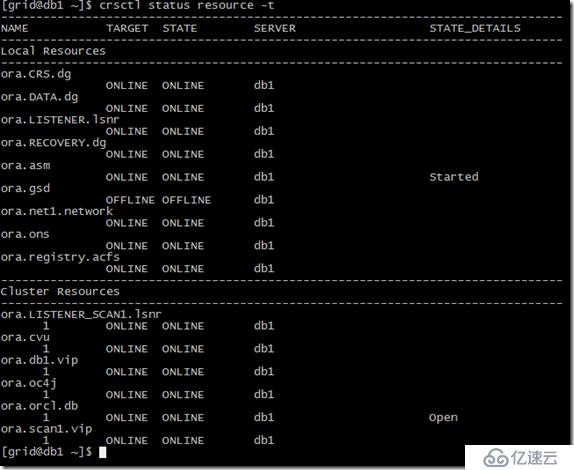
验证db2节点被删除
查看活动的实例: