

RHEL 6.5安装oracle11gR2
admin
2023-04-28 10:03:03
0次
RHEL 6.5安装oracle11gR2
1、安装前准备
OS安装,RHEL6.5默认安装即可,关闭iptables,关闭selinux,修改本地hosts文件
~]# service iptables stop
~]# chkconfig --del iptables
~]# vim /etc/selinux/config #配置重启后永久有效
SELINUX=disabled
~]# vim /etc/hosts
制作本地yum仓库,oracle11gR2所依赖包安装
~]# cd /
/]# mkdir local.repo
~]# cd /media/RHEL_6.5\ x86_64\ Disc\ 1/
cp -rf * /localrepo/

~]# vim /etc/yum.repos.d/localrepo
[localrepo]
name=localrepo
baseurl=file:///localrepo
gpgcheck=0
enabled=1
~]# yum repolist
Loaded plugins: product-id, refresh-packagekit, security, subscription-manager
This system is not registered to Red Hat Subscription Management. You can use subscription-manager to register.
localrepo                                                          | 3.9 kB     00:00 ...
localrepo/primary_db                                               | 3.1 MB     00:00 ...
repo id                                   repo name                                 status
localrepo                                 localrepo                                 3,690
repolist: 3,690
安装所依赖包:
yum install binutils-2.* compat-libstdc++-33* elfutils-libelf-0.* elfutils-libelf-devel-* gcc-4.* gcc-c++-4.* glibc-2.* glibc-common-2.* glibc-devel-2.* glibc-headers-2.* ksh-2* libaio-0.* libaio-devel-0.* libgcc-4.* libstdc++-4.* libstdc++-devel-4.* make-3.* sysstat-7.* unixODBC-2.* unixODBC-devel-2.* pdksh* -y

注意:还有一个包需要单独安装
rpm -ivh pdksh-5.2.14-30.x86_64.rpm
warning: pdksh-5.2.14-30.x86_64.rpm: Header V3 DSA/SHA1 Signature, key ID 73307de6: NOKEY
error: Failed dependencies:
pdksh conflicts with ksh-20120801-10.el6.x86_64


先要对ksh-20120801-10.el6.x86_64进行卸载处理
rpm -e ksh-20120801-10.el6.x86_64

rpm -ivh pdksh-5.2.14-30.x86_64.rpm
warning: pdksh-5.2.14-30.x86_64.rpm: Header V3 DSA/SHA1 Signature, key ID 73307de6: NOKEY
Preparing...                ########################################### [100%]
   1:pdksh                  ########################################### [100%]
创建用户并修改环境变量
~]# groupadd -g 1000 oinstall
~]# groupadd -g 1100 dba
~]# useradd -m -g oinstall -G dba -u 1200 oracle
~]# id oracle
uid=1200(oracle) gid=1000(oinstall) groups=1000(oinstall),1100(dba)
~]# passwd oracle

[oracle@~]$ vim .bash_profile

# .bash_profile

# Get the aliases and functions
if [ -f ~/.bashrc ]; then
        . ~/.bashrc
fi

# User specific environment and startup programs

PATH=$PATH:$HOME/bin
export ORACLE_SID=*****
export ORACLE_HOME=/home/u01/app/oracle/product/11.2.0/db_1
export PATH=$ORACLE_HOME/bin:$PATH
export LD_LIBRARY_PATH=$ORACLE_HOME/lib:/lib:/usr/lib
if [ $USER = "oracle" ]; then
  if [ $SHELL = "/bin/ksh" ]; then
    ulimit -p 16384
    ulimit -n 65536
  else
  ulimit -u 16384 -n 65536
  fi
fi
export PATH
创建目录
~]# mkdir -p /home/u01/app/oracle/product/11.2.0/db_1
~]# chown -R oracle:oinstall /home/u01
修改系统参数配置
~]# vim /etc/sysctl.conf    #添加如下

# Controls the maximum size of a message, in bytes
kernel.msgmax = 65536

# Controls the maximum shared segment size, in bytes
kernel.shmmax = 32000000000

# Controls the maximum number of shared memory segments, in pages
kernel.shmall = 8388608
kernel.shmmni = 4096
kernel.sem = 250 32000 100 128
fs.file-max = 65536
net.ipv4.ip_local_port_range = 1024 65000
net.core.rmem_default = 4194304
net.core.wmem_default = 262144
net.core.rmem_max = 4194304
net.core.wmem_max = 262144
kernel.msgmnb = 65536
kernel.msgmax = 65536
fs.aio-max-nr = 262144

sysctl -p

~]# vim /etc/security/limits.conf   #添加如下
oracle soft nproc 2047
oracle hard nproc 16384
oracle soft nofile 1024
oracle hard nofile 65536


~]# vim /etc/pam.d/login    #添加如下
session required pam_limits.so

~]# vim /etc/security/limits.d/90-nproc.conf
# Default limit for number of user's processes to prevent
# accidental fork bombs.
# See rhbz #432903 for reasoning.

*          -    nproc     16384
root       soft    nproc     unlimited
oracle11204软件安装
授权oracle权限
tmp]# chmod 777 -R oracle/
[root tmp]# chown -R oracle.oinstall oracle/

进入oracle用户进行解压
oracle]$ unzip p13390677_112040_Linux-x86-64_1of7.zip
oracle]$ unzip p13390677_112040_Linux-x86-64_2of7.zip

root用户下进行桌面共享xhost+
进入oracle用户进行安装
oracle]# cd /tmp/oracle/database/
database]# ./runInstaller

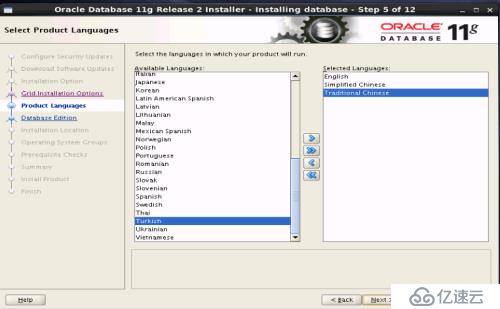
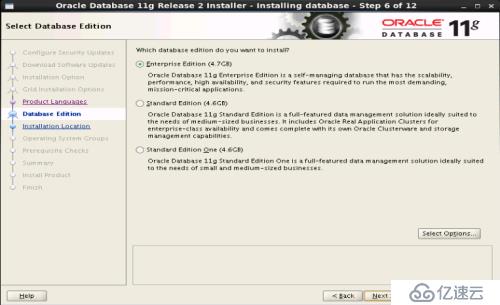
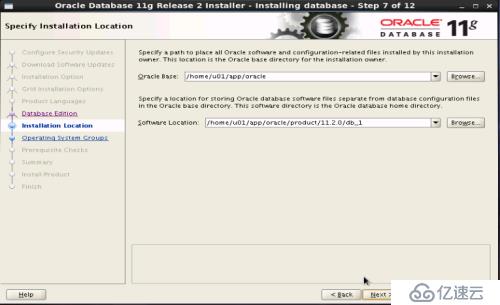
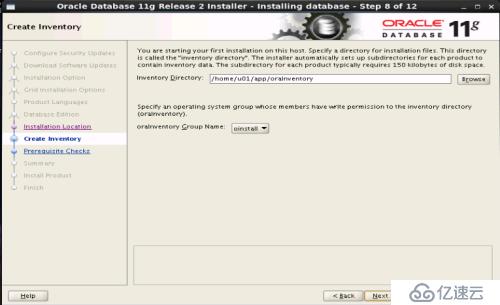
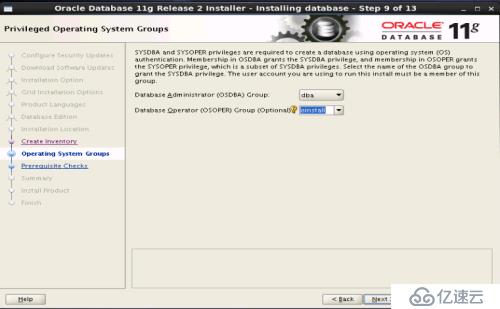
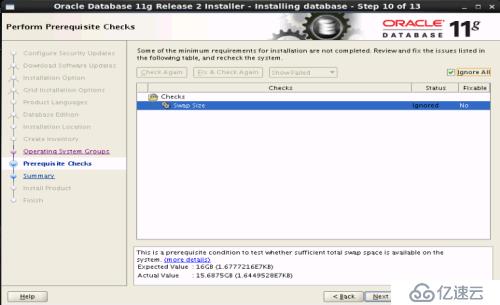
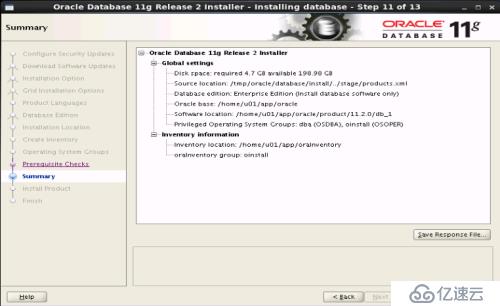
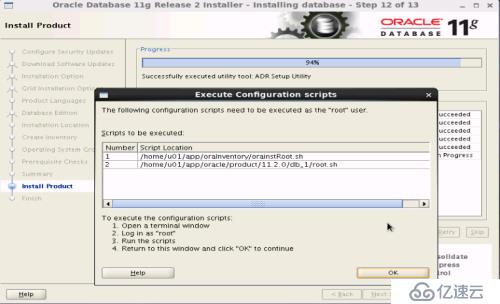
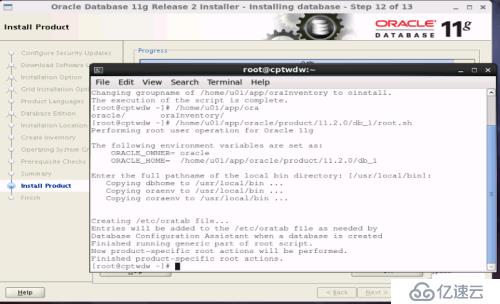
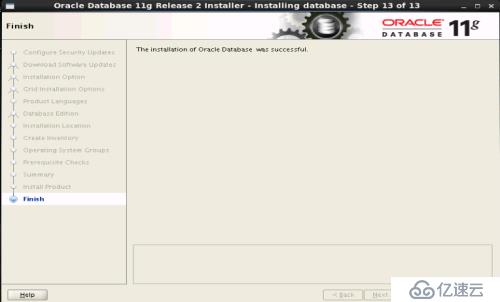
注意安装路径要和之前配置的环境变量路径一致,安装时选择仅安装software,安装验证时报的swap空间错误可以忽略
后续建库可用通过dbca完成,配置监听通过netca
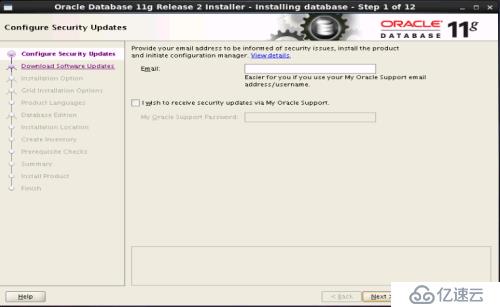
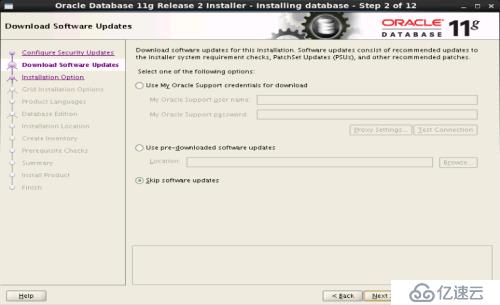
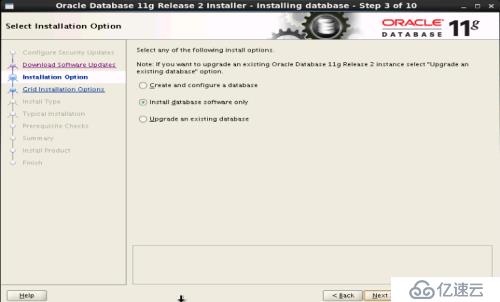
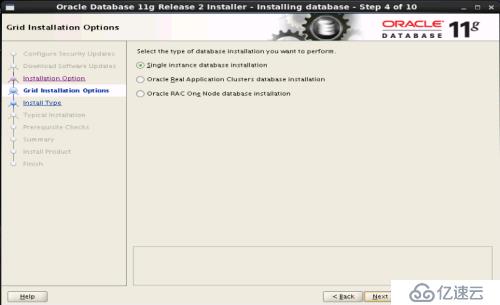
相关内容
热门资讯
烈焰熊熊,堪比“原子弹”,欧洲...
据美国有线电视新闻网(CNN)7月29日报道,席卷法国西南部的大片野火燃烧得如此猛烈,以至于形成了一...
外交部:对日本熊本县地震遇难者...
据凤凰卫视报道,针对日本熊本县发生强震造成人员伤亡,中国外交部发言人毛宁7月29日在例行记者会上表示...
高铁喧哗被劝阻后叫嚣全家体制内...
“女子高铁喧哗被劝阻后叫嚣全家体制内”一事迎来官方通报。据新京报报道,7月29日,辽宁北票市公安局发...
广东专业蓝牙耳机定制厂家推荐,...
在珠三角腹地,广东早已成为全球蓝牙耳机产业链的“心脏地带”。从深圳华强北的声学元件批发,到东莞、惠州...
格雷厄姆葬礼变地缘竞价场!两大...
有些葬礼,送别的是逝者;有些葬礼,演的却是活人最现实的政治博弈。当地时间7月28日,美国老牌鹰派参议...
一道小学数学题难住3名医学博士...
3名不同学校的博士同做一道数学题,谁最厉害?近日,一陕西网友发布的视频引发热议。29日,视频发布者“...
华为全新“小艺任务”亮相:整合...
7月29日,在华为鸿蒙电脑新品技术沟通会上,终端云服务小艺业务部总裁贾永利宣布,小艺将迎来“从对话到...
广西日报特稿《王的猜想》火了,...
澎湃新闻记者 蒋子文 实习生 汤煜炜为应对外界购买纸质版特稿《王的猜想》的热情,《广西日报》宣布紧急...
月租20元内!2026年平价云...
不少手游玩家、账号运营从业者挑选云手机时,首要诉求就是低价够用,想要控制每月支出在20元以内,同时兼...
诺奖得主如何看待王虹境遇?“我...
中村修二(2014年诺贝尔物理学奖得主)【导读】近日王虹与邓煜双双获得2026年菲尔兹奖,成为了首批...