

MySQL中MMM高可用架构的安装配置流程
下文我给大家简单讲讲关于MySQL中MMM高可用架构的安装配置流程,大家之前了解过相关类似主题内容吗?感兴趣的话就一起来看看这篇文章吧,相信看完MySQL中MMM高可用架构的安装配置流程对大家多少有点帮助吧。
实验环境
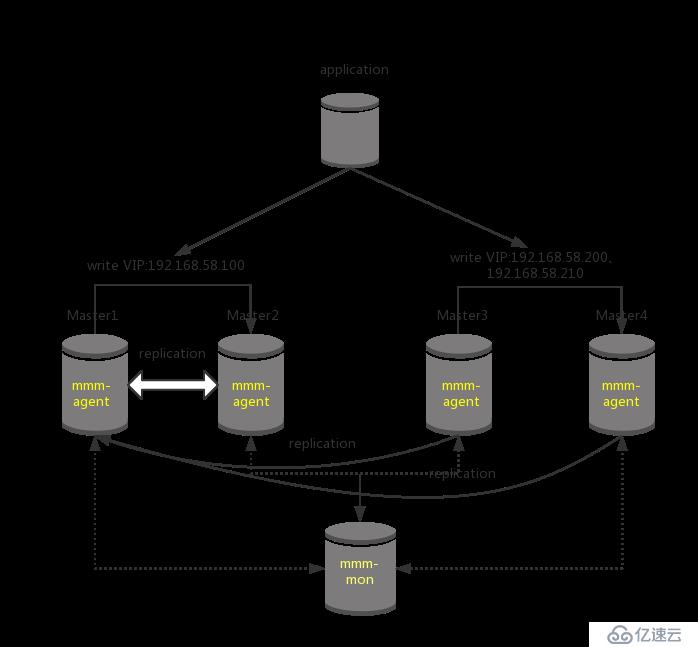
| 主机 | IP地址 |
|---|---|
| mysql-m1主云服务器 | 192.168.58.131 |
| mysql-m2主云服务器 | 192.168.58.136 |
| mysql-m3从云服务器 | 192.168.58.146 |
| mysql-m4从云服务器 | 192.168.58.147 |
| mysql-monitor监视代理云服务器 | 192.168.58.148 |
实验过程
搭建MySQL多主多从模式
1、在四台MySQL云服务器上,都安装MySQL,过程省略
2、配置ALI云源,然后安装epel-rlease源,为了下面安装mysql-mmm工具套件。
[root@localhost ~]# wget -O /etc/yum.repos.d/CentOS-Base.repo http://mirrors.aliyun.com/repo/Centos-7.repo
[root@localhost ~]# yum -y install epel-release
[root@localhost ~]# yum clean all && yum makecache
3、配置修改m1主配置文件。
vim /etc/my.cnf

[mysqld]
log_error=/var/lib/mysql/mysql.err                     #配置错误日志
log=/var/lib/mysql/mysql_log.log                       #配置常用日志
log_slow_queries=/var/lib/mysql_slow_queris.log        #配置慢日志
binlog-ignore-db=mysql,information_schema              #配置不需要记录二进制日志的数据库
character_set_server=utf8                              #配置字符集
log_bin=mysql_bin                                      #开启binlog日志用于主从数据复制
server_id=1                                            #每台server-id的值不能一样
log_slave_updates=true                                 #此数据库宕机,备用数据库接管
sync_binlog=1                                          #允许同步二进制日志
auto_increment_increment=2                             #字段依次递增多少
auto_increment_offset=1                                #自增字段的起始值:1、3、5等奇数ID
配置没问题后,把配置文件复制到另外一台主云服务器
[root@localhost ~]# scp /etc/my.cnf root@192.168.58.136:/etc/
4、配置mysql-m1、mysql-m2主主模式
首先查看log bin日志和pos值的位置。
[root@localhost1 ~]# mysql
Welcome to the MariaDB monitor.  Commands end with ; or \g.
Your MySQL connection id is 1065
Server version: 5.5.24-log Source distribution

Copyright (c) 2000, 2017, Oracle, MariaDB Corporation Ab and others.

Type 'help;' or '\h' for help. Type '\c' to clear the current input statement.

MySQL [(none)]> show master status;
+------------------+----------+--------------+--------------------------+
| File             | Position | Binlog_Do_DB | Binlog_Ignore_DB         |
+------------------+----------+--------------+--------------------------+
| mysql_bin.000002 |      107 |              | mysql,information_schema |
+------------------+----------+--------------+--------------------------+
1 row in set (0.00 sec)

[root@localhost2 ~]# mysql
Welcome to the MariaDB monitor.  Commands end with ; or \g.
Your MySQL connection id is 1065
Server version: 5.5.24-log Source distribution

Copyright (c) 2000, 2017, Oracle, MariaDB Corporation Ab and others.

Type 'help;' or '\h' for help. Type '\c' to clear the current input statement.

MySQL [(none)]> show master status;
+------------------+----------+--------------+--------------------------+
| File             | Position | Binlog_Do_DB | Binlog_Ignore_DB         |
+------------------+----------+--------------+--------------------------+
| mysql_bin.000002 |      107 |              | mysql,information_schema |
+------------------+----------+--------------+--------------------------+
1 row in set (0.00 sec)
然后,mysql-m1、mysql-m2互相提升访问权限。
mysql-m1
MySQL [(none)]> grant replication slave on *.* to 'replication'@'192.168.58.%' identified by '123456';
MySQL [(none)]> change master to master_host='192.168.58.136',master_user='replication',master_password='123456',master_log_file='mysql_bin.000002',master_log_pos=107;
MySQL [(none)]> flush privileges;

mysql-m2
MySQL [(none)]> grant replication slave on *.* to 'replication'@'192.168.58.%' identified by '123456';
MySQL [(none)]> change master to master_host='192.168.58.131',master_user='replication',master_password='123456',master_log_file='mysql_bin.000002',master_log_pos=107;
MySQL [(none)]> flush privileges;
最后分别查看mysql-m1、mysql-m2云服务器的主从状态,主要查看
Slave_IO_Running: Yes
Slave_SQL_Running: Yes。
MySQL [(none)]> start slave;
MySQL [(none)]> show slave status\G;
*************************** 1. row ***************************
               Slave_IO_State: Waiting for master to send event
                  Master_Host: 192.168.58.131
                  Master_User: replication
                  Master_Port: 3306
                Connect_Retry: 60
              Master_Log_File: mysql_bin.000002
          Read_Master_Log_Pos: 107
               Relay_Log_File: localhost-relay-bin.000012
                Relay_Log_Pos: 253
        Relay_Master_Log_File: mysql_bin.000002
             Slave_IO_Running: Yes
            Slave_SQL_Running: Yes
说明主主同步配置成功。
测试主主同步,在mysql-m1新建一个库test01
mysql-m1
MySQL [(none)]> create database test01;
MySQL [(none)]> show databases;
+--------------------+
| Database           |
+--------------------+
| information_schema |
| #mysql50#.mozilla  |
| bbs                |
| mysql              |
| performance_schema |
| test               |
| test01             |
+--------------------+
7 rows in set (0.22 sec)

mysql-m2                                #测试成功
MySQL [(none)]> show databases;
+--------------------+
| Database           |
+--------------------+
| information_schema |
| #mysql50#.mozilla  |
| mysql              |
| performance_schema |
| test               |
| test01             |
+--------------------+
7 rows in set (0.22 sec)
5、配置myqsl-m3、mysql-m4作为mysql-m1的从库。
首先将mysql-m1上的/etc/my.cnf文件,复制到myqsl-m3、mysql-m4两台云服务器上。
mysql-m1
[root@localhost ~]# scp /etc/my.cnf root@192.168.58.146:/etc/
[root@localhost ~]# scp /etc/my.cnf root@192.168.58.147:/etc/
查看mysql-m1中数据库的状态值。
MySQL [(none)]> show master status;
+------------------+----------+--------------+--------------------------+
| File             | Position | Binlog_Do_DB | Binlog_Ignore_DB         |
+------------------+----------+--------------+--------------------------+
| mysql_bin.000002 |      107 |              | mysql,information_schema |
+------------------+----------+--------------+--------------------------+
1 row in set (0.00 sec)
在mysql-m3、mysql-m4上分别执行。
mysql-m3
MySQL [(none)]> change master to master_host='192.168.58.131',master_user='replication',master_password='123456',master_log_file='mysql_bin.000002',master_log_pos=107;

mysql-m4
MySQL [(none)]> change master to master_host='192.168.58.131',master_user='replication',master_password='123456',master_log_file='mysql_bin.000002',master_log_pos=107;
分别查看mysql-m3、mysql-m4云服务器的主从状态,如下所示。
MySQL [(none)]> show slave status\G;
*************************** 1. row ***************************
               Slave_IO_State: Waiting for master to send event
                  Master_Host: 192.168.58.131
                  Master_User: replication
                  Master_Port: 3306
                Connect_Retry: 60
              Master_Log_File: mysql_bin.000002
          Read_Master_Log_Pos: 107
               Relay_Log_File: localhost-relay-bin.000012
                Relay_Log_Pos: 253
        Relay_Master_Log_File: mysql_bin.000002
             Slave_IO_Running: Yes
            Slave_SQL_Running: Yes
安装配置MySQL-MMM
CentOS默认没有mysql-mmm软件包,由于之前我们epel官方源已经安装好,在五台主机上都要安装MMM
[root@localhost ~]# yum -y install mysql-mmm*
安装完后,对MMM进行配置
[root@localhost mongodb1]# vim /etc/mysql-mmm/mmm_common.confcluster_interface ens33 #网卡名称 …… replication_user replication replication_password 123456 agent_user mmm_agent agent_password 123456 ip 192.168.58.131 mode master peer db2 ip 192.168.58.136 mode master peer db1 ip 192.168.58.146 mode slave ip 192.168.58.147 mode slave hosts db1, db2 ips 192.168.58.100 mode exclusive hosts db3, db4 ips 192.168.58.200, 192.168.58.210 mode balanced #将配置文件复制到其他几台数据库云服务器对应的目录下 [root@localhost mysql-mmm]# scp mmm_common.conf root@192.168.58.136:/etc/mysql-mmm/ [root@localhost mysql-mmm]# scp mmm_common.conf root@192.168.58.146:/etc/mysql-mmm/ [root@localhost mysql-mmm]# scp mmm_common.conf root@192.168.58.147:/etc/mysql-mmm/ [root@localhost mysql-mmm]# scp mmm_common.conf root@192.168.58.148:/etc/mysql-mmm/
在作为monitor云服务器的终端上配置
cd /etc/mysql-mmm/ #改密码 vim mmm_mon.confmonitor_user mmm_monitor monitor_password 123456
在所有数据库上为mmm_agent授权
MySQL [(none)]> grant super, replication client, process on *.* to 'mmm_agent'@'192.168.58.%' identified by '123456';
#为mmm_agent授权
在所有数据库上为mmm_moniter授权
MySQL [(none)]> grant replication client on *.* to 'mmm_monitor'@'192.168.58.%' identified by '123456';
#为mmm_monitor授权
MySQL [(none)]> flush privileges
#刷新权限设置
修改所有数据库的mmm_agent.conf
[root@localhost mysql-mmm]# vim /etc/mysql-mmm/mmm_agent.conf
include mmm_common.conf

# The 'this' variable refers to this server.  Proper operation requires
# that 'this' server (db1 by default), as well as all other servers, have the
# proper IP addresses set in mmm_common.conf.
this db1        #分别在四台数据库云服务器上设置为db1,db2,db3,db4
~
在所有数据库云服务器上启动mysql-mmm-agent
[root@localhost mysql-mmm]# systemctl start mysql-mmm-agent.service
#启动mmm-agent服务
[root@localhost mysql-mmm]# systemctl enable mysql-mmm-agent.service
#设置mmm-agent服务开机启动
在monitor云服务器上配置
[root@localhost mysql-mmm]# cd /etc/mysql-mmm/ [root@localhost mysql-mmm]# vim mmm_mon.confip 127.0.0.1 pid_path /run/mysql-mmm-monitor.pid bin_path /usr/libexec/mysql-mmm status_path /var/lib/mysql-mmm/mmm_mond.status ping_ips 192.168.58.131,192.168.58.136,192.168.58.146,192.168.58.147 #指定监管的云服务器IP地址 auto_set_online 10 # The kill_host_bin does not exist by default, though the monitor will # throw a warning about it missing. See the section 5.10 "Kill Host # Functionality" in the PDF documentation. # # kill_host_bin /usr/libexec/mysql-mmm/monitor/kill_host # monitor_user mmm_monitor #设置监管账户 monitor_password 123456 #设置监管密码 [root@localhost mysql-mmm]# systemctl start mysql-mmm-monitor.service #启动mysql-mmm-monitor [root@localhost mysql-mmm]# mmm_control show #查看节点运行情况 db1(192.168.58.131) master/ONLINE. Roles: writer(192.168.58.100) db2(192.168.58.136) master/ONLINE. Roles: db3(192.168.58.146) slave/ONLINE. Roles: reader(192.168.58.200) db4(192.168.58.147) slave/ONLINE. Roles: reader(192.168.58.210)
当我们把mysql-m3的mysql服务停掉以后,对应的VIP会自动绑定到mysql-m4上
[root@localhost mysql-mmm]# mmm_control show db1(192.168.58.131) master/ONLINE. Roles: writer(192.168.58.100) db2(192.168.58.136) master/ONLINE. Roles: db3(192.168.58.146) slave/HARD_OFFLINE. Roles:db4(192.168.58.147) slave/ONLINE. Roles: reader(192.168.58.210)(192.168.58.200)
大家觉得MySQL中MMM高可用架构的安装配置流程这篇文章怎么样,是否有所收获。如果想要了解更多相关,可以继续关注我们的行业资讯板块。
下一篇:查询Oracle 表字段