

MySQL数据库如何配置Keepalived双主
下面一起来了解下MySQL数据库如何配置Keepalived双主,相信大家看完肯定会受益匪浅,文字在精不在多,希望MySQL数据库如何配置Keepalived双主这篇短内容是你想要的。
1、环境设置
10.0.0.132 master1
10.0.0.134 master2
setenforce 0
systemctl stop firewalld
2、配置my.cnf配置文件
master1上
vim /etc/my.cnf
	[client]
	socket=/usr/local/mysql/mysql.sock
	[mysqld]
	basedir=/usr/local/mysql
	datadir=/usr/local/mysql/data
	user=mysql
	pid-file=/usr/local/mysql/data/mysqld.pid
	log-error=/usr/local/mysql/data/mysql.err
	socket=/usr/local/mysql/mysql.sock
	port=3306
	server_id=1
	log-bin=mysql-bin
	gtid-mode=on
	enforce-gtid-consistency=1
	log_slave_updates = 1
	binlog-format=mixed
	auto-increment-increment=2
	auto-increment-offset=1
systemctl restart mysqld
master2上
vim /etc/my.cnf
[client]
	socket=/usr/local/mysql/mysql.sock
	[mysqld]
	basedir=/usr/local/mysql
	datadir=/usr/local/mysql/data
	user=mysql
	pid-file=/usr/local/mysql/data/mysqld.pid
	log-error=/usr/local/mysql/data/mysql.err
	socket=/usr/local/mysql/mysql.sock
	port=3306
	server_id=2
	log-bin=mysql-bin
	gtid-mode=on
	enforce-gtid-consistency=1
	log_slave_updates = 1
	binlog-format=mixed
	auto-increment-increment=2
	auto-increment-offset=2
systemctl restart mysqld
3、授权允许同步
master1上
mysql -uroot -p
mysql> grant replication slave on *.* to rep@'10.0.0.%' identified by '123';
master2上
mysql -uroot -p
mysql> grant replication slave on *.* to rep@'10.0.0.%' identified by '123';
4、开启slave同步
master1上
mysql> change master to master_host='10.0.0.134',master_user='rep',master_password='123',master_port=3306,master_autoter_auto_position=1;
mysql> start slave;
master2上
mysql> change master to master_host='10.0.0.132',master_user='rep',master_password='123',master_port=3306,master_autoter_auto_position=1;
mysql> start slave;
5、验证互为主从
master1上
mysql> show slave status\G;
*************************** 1. row ***************************
               Slave_IO_State: Waiting for master to send event
                  Master_Host: 10.0.0.134
                  Master_User: rep
                  Master_Port: 3306
                Connect_Retry: 60
              Master_Log_File: mysql-bin.000001
          Read_Master_Log_Pos: 154
               Relay_Log_File: master1-relay-bin.000002
                Relay_Log_Pos: 367
        Relay_Master_Log_File: mysql-bin.000001
             Slave_IO_Running: Yes
            Slave_SQL_Running: Yes
              Replicate_Do_DB:
          Replicate_Ignore_DB:
           Replicate_Do_Table:
       Replicate_Ignore_Table:
      Replicate_Wild_Do_Table:
  Replicate_Wild_Ignore_Table:
                   Last_Errno: 0
                   Last_Error:
                 Skip_Counter: 0
          Exec_Master_Log_Pos: 154
              Relay_Log_Space: 576
              Until_Condition: None
               Until_Log_File:
                Until_Log_Pos: 0
           Master_SSL_Allowed: No
           Master_SSL_CA_File:
           Master_SSL_CA_Path:
              Master_SSL_Cert:
            Master_SSL_Cipher:
               Master_SSL_Key:
        Seconds_Behind_Master: 0
Master_SSL_Verify_Server_Cert: No
                Last_IO_Errno: 0
                Last_IO_Error:
               Last_SQL_Errno: 0
               Last_SQL_Error:
  Replicate_Ignore_Server_Ids:
             Master_Server_Id: 2
                  Master_UUID: e59d0925-be6a-11e8-9cab-000c29b63bad
             Master_Info_File: /usr/local/mysql/data/master.info
                    SQL_Delay: 0
          SQL_Remaining_Delay: NULL
      Slave_SQL_Running_State: Slave has read all relay log; waiting for more updates
           Master_Retry_Count: 86400
                  Master_Bind:
      Last_IO_Error_Timestamp:
     Last_SQL_Error_Timestamp:
               Master_SSL_Crl:
           Master_SSL_Crlpath:
           Retrieved_Gtid_Set:
            Executed_Gtid_Set:
                Auto_Position: 1
         Replicate_Rewrite_DB:
                 Channel_Name:
           Master_TLS_Version:
1 row in set (0.00 sec)
master2上
mysql> show slave status\G;
*************************** 1. row ***************************
               Slave_IO_State: Waiting for master to send event
                  Master_Host: 10.0.0.132
                  Master_User: rep
                  Master_Port: 3306
                Connect_Retry: 60
              Master_Log_File: mysql-bin.000001
          Read_Master_Log_Pos: 154
               Relay_Log_File: master2-relay-bin.000002
                Relay_Log_Pos: 367
        Relay_Master_Log_File: mysql-bin.000001
             Slave_IO_Running: Yes
            Slave_SQL_Running: Yes
              Replicate_Do_DB:
          Replicate_Ignore_DB:
           Replicate_Do_Table:
       Replicate_Ignore_Table:
      Replicate_Wild_Do_Table:
  Replicate_Wild_Ignore_Table:
                   Last_Errno: 0
                   Last_Error:
                 Skip_Counter: 0
          Exec_Master_Log_Pos: 154
              Relay_Log_Space: 576
              Until_Condition: None
               Until_Log_File:
                Until_Log_Pos: 0
           Master_SSL_Allowed: No
           Master_SSL_CA_File:
           Master_SSL_CA_Path:
              Master_SSL_Cert:
            Master_SSL_Cipher:
               Master_SSL_Key:
        Seconds_Behind_Master: 0
Master_SSL_Verify_Server_Cert: No
                Last_IO_Errno: 0
                Last_IO_Error:
               Last_SQL_Errno: 0
               Last_SQL_Error:
  Replicate_Ignore_Server_Ids:
             Master_Server_Id: 1
                  Master_UUID: ceb0ca3d-8366-11e8-ad2b-000c298b7c9a
             Master_Info_File: /usr/local/mysql/data/master.info
                    SQL_Delay: 0
          SQL_Remaining_Delay: NULL
      Slave_SQL_Running_State: Slave has read all relay log; waiting for more updates
           Master_Retry_Count: 86400
                  Master_Bind:
      Last_IO_Error_Timestamp:
     Last_SQL_Error_Timestamp:
               Master_SSL_Crl:
           Master_SSL_Crlpath:
           Retrieved_Gtid_Set:
            Executed_Gtid_Set:
                Auto_Position: 1
         Replicate_Rewrite_DB:
                 Channel_Name:
           Master_TLS_Version:
1 row in set (0.00 sec)
6、安装keepalived
master1上
yum -y install keepalived
master2上
yum -y install keepalived
7、配置keepalived
master1上
vim /etc/keepalived/keepalived.conf
global_defs {
   router_id master1
}

vrrp_instance VI_1 {
    state BACKUP
    interface ens33
    virtual_router_id 51
    priority 100
    advert_int 1
    nopreempt
    authentication {
        auth_type PASS
        auth_pass 1111
    }
    virtual_ipaddress {
        10.0.0.100
    }
}

virtual_server 192.168.1.100 3306 {
    delay_loop 6
    lb_algo rr
    lb_kind DR
    persistence_timeout 50
    protocol TCP

    real_server 10.0.0.132 3306 {
        weight 1
        notify_down /etc/keepalived/bin/mysql.sh
        TCP_CHECK {
            connect_timeout 3
            retry 3
            delay_before_retry 3
            connect_port 3306
        }
    }
}
systemctl enable keepalived systemctl start keepalived mkdir /etc/keepalived/bin
vim /etc/keepalived/bin/mysql.sh
#!/bin/bash
pkill keepalived
/sbin/ifdown ens33 && /sbin/ifup ens33
chmod +x /etc/keepalived/bin/mysql.sh
master2上
vim /etc/keepalived/keepalived.conf
global_defs {
   router_id master2
}

vrrp_instance VI_1 {
    state BACKUP
    interface ens33
    virtual_router_id 51
    priority 50
    advert_int 1
    nopreempt
    authentication {
        auth_type PASS
        auth_pass 1111
    }
    virtual_ipaddress {
        10.0.0.100
    }
}

virtual_server 192.168.1.100 3306 {
    delay_loop 6
    lb_algo rr
    lb_kind DR
    persistence_timeout 50
    protocol TCP

    real_server 10.0.0.134 3306 {
        weight 1
        notify_down /etc/keepalived/bin/mysql.sh
        TCP_CHECK {
            connect_timeout 3
            retry 3
            delay_before_retry 3
            connect_port 3306
        }
    }
}
systemctl enable keepalived systemctl start keepalived mkdir /etc/keepalived/bin
vim /etc/keepalived/bin/mysql.sh
#!/bin/bash
pkill keepalived
/sbin/ifdown ens33 && /sbin/ifup ens33
chmod +x /etc/keepalived/bin/mysql.sh
8、最终验证(keepalived双主)
验证一
在master1上
ip addr show ens33可以看到我们设置vip

在master2上
ip addr show ens33没有vip出现

验证二
在两台数据库上授权允许remote用户允许远程登录
master1上
mysql -uroot -p
mysql> grant all on *.* to remote@'%' identified by '123';
master2上
mysql -uroot -p
mysql> grant all on *.* to remote@'%' identified by '123';
另寻找一台MySQL数据库使用vip远程访问数据库集群
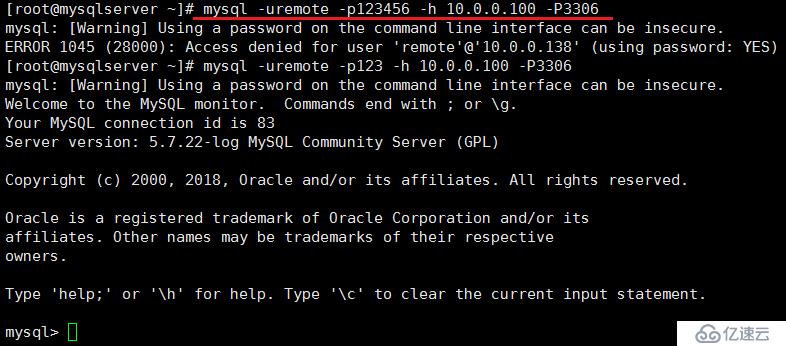
查看server_id,图示为1,所以说明我们当前登录到了master1上;也证明了master1如今是active状态的,而master2是备份状态

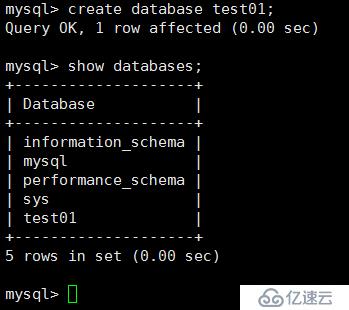
我们创建创建一个数据库试试
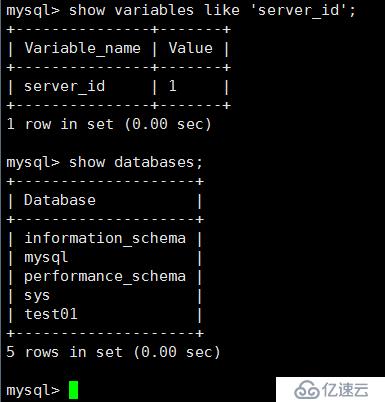
回到master1上
再到master2上查看
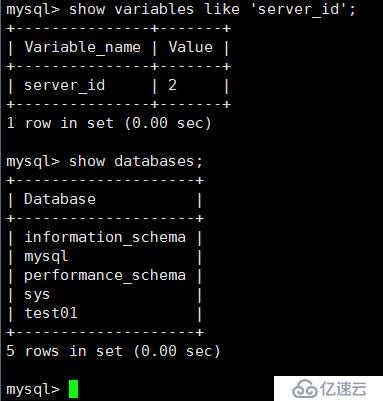
这就说明我们的主从复制也是没有问题的
验证三:验证keepalived双主集群的可用性
首先停掉master1上mysqld服务
systemctl stop mysqld
再次查看master1的ens33网卡,vip已经消失

查看master2的ens33网卡,出现vip
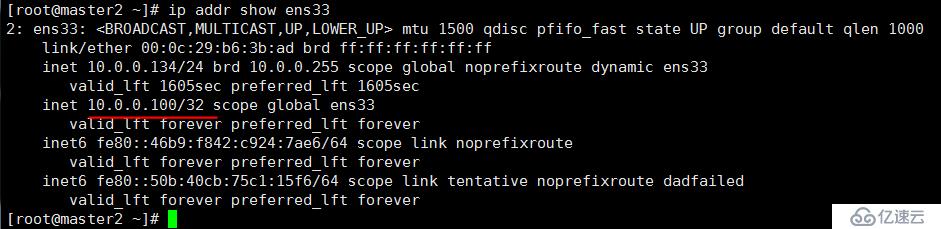
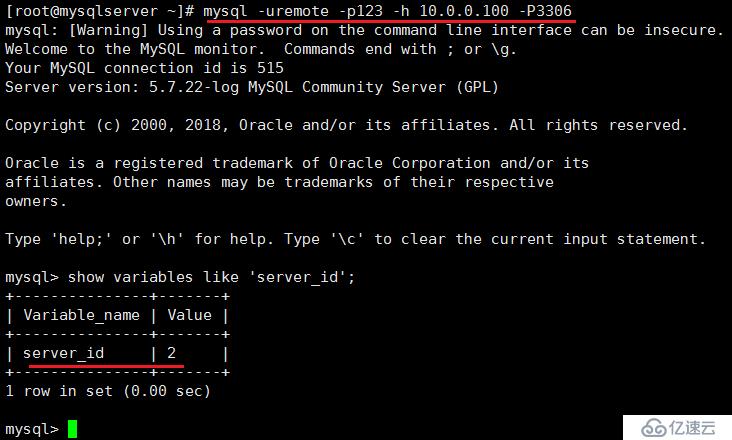
再次通过vip远程登录,依然可以登录,而且可以看到server_id变成了2。
看完MySQL数据库如何配置Keepalived双主这篇文章后,很多读者朋友肯定会想要了解更多的相关内容,如需获取更多的行业信息,可以关注我们的行业资讯栏目。