

centos7系统 mysql数据库如何安装及配置
本文主要给大家介绍centos7系统 mysql数据库如何安装及配置,希望可以给大家补充和更新些知识,如有其它问题需要了解的可以持续在行业资讯里面关注我的更新文章的。
centos7 mysql数据库安装和配置
一、系统环境
yum update升级以后的系统版本为
[root@yl-web yl]# cat /etc/redhat-release CentOS Linux release 7.1.1503 (Core)
二、mysql安装
一般网上给出的资料都是
#yum install mysql#yum install mysql-server#yum install mysql-devel
安装mysql和mysql-devel都成功,但是安装mysql-server失败,如下:

[root@yl-web yl]# yum install mysql-serverLoaded plugins: fastestmirror
Loading mirror speeds from cached hostfile * base: mirrors.sina.cn * extras: mirrors.sina.cn * updates: mirrors.sina.cn
No package mysql-server available.
Error: Nothing to do
查资料发现是CentOS 7 版本将MySQL数据库软件从默认的程序列表中移除,用mariadb代替了。
有两种解决办法:
1、方法一:安装mariadb
MariaDB数据库管理系统是MySQL的一个分支,主要由开源社区在维护,采用GPL授权许可。开发这个分支的原因之一是:甲骨文公司收购了MySQL后,有将MySQL闭源的潜在风险,因此社区采用分支的方式来避开这个风险。MariaDB的目的是完全兼容MySQL,包括API和命令行,使之能轻松成为MySQL的代替品。
安装mariadb,大小59 M。
[root@yl-web yl]# yum install mariadb-server mariadb
mariadb数据库的相关命令是:
systemctl start mariadb #启动MariaDB
systemctl stop mariadb #停止MariaDB
systemctl restart mariadb #重启MariaDB
systemctl enable mariadb #设置开机启动
所以先启动数据库
[root@yl-web yl]# systemctl start mariadb
然后就可以正常使用mysql了
[root@yl-web yl]# mysql -u root -pEnter password:
Welcome to the MariaDB monitor.  Commands end with ; or \g.
Your MariaDB connection id is 3Server version: 5.5.41-MariaDB MariaDB Server

Copyright (c) 2000, 2014, Oracle, MariaDB Corporation Ab and others.

Type 'help;' or '\h' for help. Type '\c' to clear the current input statement.

MariaDB [(none)]> show databases;+--------------------+
| Database           |
+--------------------+
| information_schema |
| mysql              |
| performance_schema |
| test               |
+--------------------+
4 rows in set (0.00 sec)

MariaDB [(none)]>
安装mariadb后显示的也是 MariaDB [(none)]> ,可能看起来有点不习惯。下面是第二种方法。
2、方法二:官网下载安装mysql-server
# wget http://dev.mysql.com/get/mysql-community-release-el7-5.noarch.rpm# rpm -ivh mysql-community-release-el7-5.noarch.rpm# yum install mysql-community-server
安装成功后重启mysql服务。
# service mysqld restart
初次安装mysql,root账户没有密码。
[root@yl-web yl]# mysql -u root Welcome to the MySQL monitor.  Commands end with ; or \g.
Your MySQL connection id is 3Server version: 5.6.26 MySQL Community Server (GPL)

Copyright (c) 2000, 2015, Oracle and/or its affiliates. All rights reserved.

Oracle is a registered trademark of Oracle Corporation and/or its
affiliates. Other names may be trademarks of their respective
owners.

Type 'help;' or '\h' for help. Type '\c' to clear the current input statement.

mysql> show databases;+--------------------+
| Database           |
+--------------------+
| information_schema |
| mysql              |
| performance_schema |
| test               |
+--------------------+
4 rows in set (0.01 sec)

mysql>
设置密码
mysql> set password for 'root'@'localhost' =password('password');
Query OK, 0 rows affected (0.00 sec)

mysql>
不需要重启数据库即可生效。
在mysql安装过程中如下内容:
Installed:
  mysql-community-client.x86_64 0:5.6.26-2.el7                mysql-community-devel.x86_64 0:5.6.26-2.el7
  mysql-community-libs.x86_64 0:5.6.26-2.el7                  mysql-community-server.x86_64 0:5.6.26-2.el7

Dependency Installed:
  mysql-community-common.x86_64 0:5.6.26-2.el7

Replaced:
  mariadb.x86_64 1:5.5.41-2.el7_0          mariadb-devel.x86_64 1:5.5.41-2.el7_0   mariadb-libs.x86_64 1:5.5.41-2.el7_0
  mariadb-server.x86_64 1:5.5.41-2.el7_0
所以安装完以后mariadb自动就被替换了,将不再生效。
[root@yl-web yl]# rpm -qa |grep mariadb[root@yl-web yl]#
三、配置mysql
1、编码
mysql配置文件为/etc/my.cnf
最后加上编码配置
[mysql]
default-character-set =utf8
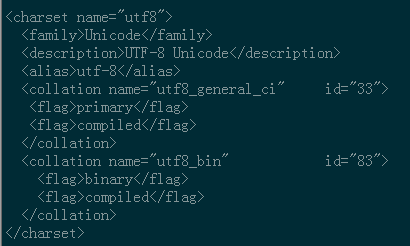
这里的字符编码必须和/usr/share/mysql/charsets/Index.xml中一致。
2、远程连接设置
把在所有数据库的所有表的所有权限赋值给位于所有IP地址的root用户。
mysql> grant all privileges on *.* to root@'%'identified by 'password';
如果是新用户而不是root,则要先新建用户
mysql>create user 'username'@'%' identified by 'password';
此时就可以进行远程连接了。
看了以上关于centos7系统 mysql数据库如何安装及配置,希望能给大家在实际运用中带来一定的帮助。本文由于篇幅有限,难免会有不足和需要补充的地方,如有需要更加专业的解答,可在官网联系我们的24小时售前售后,随时帮您解答问题的。
下一篇:MySQl简单命令讲义