

【静默】在RHEL 6.5上静默安装Oracle 18c
【静默】在RHEL 6.5上静默安装Oracle 18c
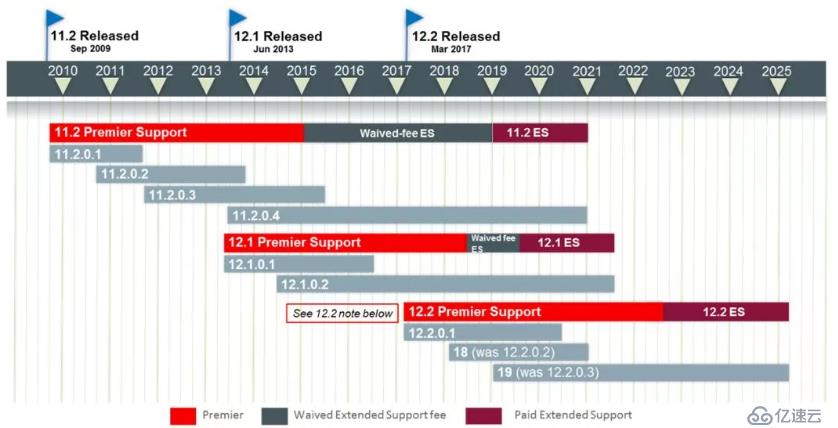
Oracle 18c。18c其实就是12.2.0.2,19c就是12.2.0.3。db_home.zip 安装包大概4.25G,解压后有8.9G,数据库软件安装完成后有9.4G,创建完数据库后有13G。注:安装18c时需要把压缩文件解压到ORACLE_HOME路径下,在此目录下运行./runInstaller
注:该RHEL6.5的OS环境里已经安装了10g,11g,12c,现在需要安装18c。所以,有的OS参数已经不用修改了。
database 介质下载:
渠道1:
http://www.oracle.com/technetwork/database/enterprise-edition/downloads/index.html
渠道2:
https://edelivery.oracle.com/osdc/faces/SoftwareDelivery
http://www.oracle.com/technetwork/database/enterprise-edition/downloads/oracle18c-linux-180000-5022980.html
创建数据库用户:
/usr/sbin/groupadd -g 54321 oinstall
/usr/sbin/groupadd -g 54327 asmdba
/usr/sbin/groupadd -g 54328 asmoper
/usr/sbin/groupadd -g 54322 dba
/usr/sbin/groupadd -g 54323 oper
/usr/sbin/groupadd -g 54324 backupdba
/usr/sbin/groupadd -g 54325 dgdba
/usr/sbin/groupadd -g 54326 kmdba
/usr/sbin/groupadd -g 54330 racdba
/usr/sbin/useradd -u 54321 -g oinstall -G oper,dba,asmdba,backupdba,dgdba,kmdba,racdba oracle
如果oracle已存在,那么将 useradd 修改为 usermod 。
$ id oracle
uid=54321(oracle) gid=54321(oinstall) groups=54321(oinstall),54322(dba),
54323(oper),54324(backupdba),54325(dgdba),54326(kmdba),54327(asmdba),54330(racdba)
环境变量:
export ORACLE_SID=lhr18c
export ORACLE_BASE=/u08/app/oracle
export ORACLE_HOME=$ORACLE_BASE/product/18.0.0/dbhome_1
安装:
https://docs.oracle.com/en/database/oracle/oracle-database/18/ladbi/running-oracle-universal-installer-to-install-oracle-database.html#GUID-DD4800E9-C651-4B08-A6AC-E5ECCC6512B9
1. Log in as the Oracle installation owner user account (oracle) that you want to own the software binaries.
2. Download the Oracle Database installation image files (db_home.zip) to a directory of your choice. For example, you can download the image files to the /tmp directory.
3. Create the Oracle home directory and extract the image files that you have downloaded in to this Oracle home directory. For example:
$ mkdir -p /u01/app/oracle/product/18.0.0/dbhome_1
$ chgrp oinstall /u01/app/oracle/product/18.0.0/dbhome_1
$ cd /u01/app/oracle/product/18.0.0/dbhome_1
$ unzip -q /tmp/db_home.zip
db_home.zip 8.9G
Note:
Oracle recommends that the Oracle home directory path you create is in compliance with the Oracle Optimal Flexible Architecture recommendations. Also, unzip the installation image files only in this Oracle home directory that you created.
注: 安装18c时需 要把压缩文件解压到 _ 路径下,在此目录下运行
4. From the Oracle home directory, run the runInstaller command to start the Oracle Database Setup Wizard.
$ cd /u01/app/oracle/product/18.0.0/dbhome_1
$ ./runInstaller
Note:
Run the runInstaller command from the Oracle home directory only. Do not run runInstaller from any other location.
5. In the Select Configuration Option screen, select Create and configure a single instance database.
6. Select your installation type.
Installation screens vary depending on the installation option you select. Respond to the configuration prompts as needed.
---静默安装 18c 数据库单机软件
/u08/app/oracle/product/18.0.0/dbhome_1/runInstaller -silent -force -noconfig -ignorePrereq \
oracle.install.responseFileVersion=/oracle/install/rspfmt_dbinstall_response_schema_v18.0.0 \
oracle.install.option=INSTALL_DB_SWONLY \
UNIX_GROUP_NAME=oinstall \
INVENTORY_LOCATION=/u00/app/oraInventory \
ORACLE_BASE=/u08/app/oracle \
oracle.install.db.InstallEdition=EE \
oracle.install.db.OSDBA_GROUP=dba \
oracle.install.db.OSOPER_GROUP=oper \
oracle.install.db.OSBACKUPDBA_GROUP=backupdba \
oracle.install.db.OSDGDBA_GROUP=dgdba \
oracle.install.db.OSKMDBA_GROUP=kmdba \
oracle.install.db.OSRACDBA_GROUP=dba \
oracle.install.db.config.starterdb.type=GENERAL_PURPOSE
---静默安装 18c 数据库
dbca -silent -createDatabase \
-gdbName lhr18c \
-sid lhr18c \
-sysPassword lhr -systemPassword lhr \
-databaseConfigType SI \
-createAsContainerDatabase false \
-useLocalUndoForPDBs true \
-templateName /u08/app/oracle/product/18.0.0/dbhome_1/assistants/dbca/templates/General_Purpose.dbc \
-dvConfiguration false \
-olsConfiguration false \
-datafileJarLocation /u08/app/oracle/product/18.0.0/dbhome_1/assistants/dbca/templates/ \
-datafileDestination /u08/app/oracle/oradata/lhr18c/ \
-recoveryAreaDestination /u08/app/oracle/fast_recovery_area/lhr18c \
-storageType FS \
-registerWithDirService false \
-variables ORACLE_BASE_HOME=/u08/app/oracle/product/18.0.0/dbhome_1,DB_UNIQUE_NAME=lhr18c,ORACLE_BASE=/u08/app/oracle,PDB_NAME=,DB_NAME=lhr18c,ORACLE_HOME=/u08/app/oracle/produ-ct/18.0.0/dbhome_1,SID=lhr18c \
-initParams undo_tablespace=UNDOTBS1,db_block_size=8KB,diagnostic_dest=/u08/app/oracle,remote_login_passwordfile=EXCLUSIVE,db_create_file_dest=/u08/app/oracle/oradata/lhr18c/,au-dit_file_dest=/u08/app/oracle/admin/lhr18c/adump,processes=300,memory_target=529MB,db_recovery_file_dest_size=8106MB,open_cursors=300,compatible=18.0.0,db_name=lhr18c,db_recovery_file_dest=/u08/app/oracle/fast_recovery_area/lhr18c,audit_trail=db \
-sampleSchema TRUE \
-databaseType MULTIPURPOSE \
-automaticMemoryManagement true \
-totalMemory 529 \
-emConfiguration NONE
执行过程
[oracle@rhel6lhr dbhome_1]$ /u08/app/oracle/product/18.0.0/dbhome_1/runInstaller -silent -force -noconfig -ignorePrereq \
> oracle.install.responseFileVersion=/oracle/install/rspfmt_dbinstall_response_schema_v18.0.0 \
> oracle.install.option=INSTALL_DB_SWONLY \
> UNIX_GROUP_NAME=oinstall \
> INVENTORY_LOCATION=/u00/app/oraInventory \
> ORACLE_BASE=/u08/app/oracle \
> oracle.install.db.InstallEdition=EE \
> oracle.install.db.OSDBA_GROUP=dba \
> oracle.install.db.OSOPER_GROUP=oper \
> oracle.install.db.OSBACKUPDBA_GROUP=backupdba \
> oracle.install.db.OSDGDBA_GROUP=dgdba \
> oracle.install.db.OSKMDBA_GROUP=kmdba \
> oracle.install.db.OSRACDBA_GROUP=dba \
> oracle.install.db.config.starterdb.type=GENERAL_PURPOSE
Launching Oracle Database Setup Wizard...
[WARNING] [INS-13013] Target environment does not meet some mandatory requirements.
CAUSE: Some of the mandatory prerequisites are not met. See logs for details. /u00/app/oraInventory/logs/InstallActions2018-08-02_10-43-40AM/installActions2018-08-02_10-43-40AM.log
ACTION: Identify the list of failed prerequisite checks from the log: /u00/app/oraInventory/logs/InstallActions2018-08-02_10-43-40AM/installActions2018-08-02_10-43-40AM.log. Then either from the log file or from installation manual find the appropriate configuration to meet the prerequisites and fix it manually.
The response file for this session can be found at:
/u08/app/oracle/product/18.0.0/dbhome_1/install/response/db_2018-08-02_10-43-40AM.rsp
You can find the log of this install session at:
/u00/app/oraInventory/logs/InstallActions2018-08-02_10-43-40AM/installActions2018-08-02_10-43-40AM.log
As a root user, execute the following script(s):
1. /u08/app/oracle/product/18.0.0/dbhome_1/root.sh
Execute /u08/app/oracle/product/18.0.0/dbhome_1/root.sh on the following nodes:
[rhel6lhr]
Successfully Setup Software with warning(s).
[root@rhel6lhr response]# /u08/app/oracle/product/18.0.0/dbhome_1/root.sh
Check /u08/app/oracle/product/18.0.0/dbhome_1/install/root_rhel6lhr_2018-08-02_10-49-01-987900512.log for the output of root script
[root@rhel6lhr response]# cat /u08/app/oracle/product/18.0.0/dbhome_1/install/root_rhel6lhr_2018-08-02_10-49-01-987900512.log
Performing root user operation.
The following environment variables are set as:
ORACLE_OWNER= oracle
ORACLE_HOME= /u08/app/oracle/product/18.0.0/dbhome_1
Copying dbhome to /usr/local/bin ...
Copying oraenv to /usr/local/bin ...
Copying coraenv to /usr/local/bin ...
Entries will be added to the /etc/oratab file as needed by
Database Configuration Assistant when a database is created
Finished running generic part of root script.
Now product-specific root actions will be performed.
Oracle Trace File Analyzer (TFA) is available at : /u08/app/oracle/product/18.0.0/dbhome_1/suptools/tfa/release/tfa_home/bin/tfactl
[oracle@rhel6lhr dbhome_1]$ dbca -silent -createDatabase \
> -gdbName lhr18c \
> -sid lhr18c \
> -sysPassword lhr -systemPassword lhr \
> -databaseConfigType SI \
> -createAsContainerDatabase false \
> -useLocalUndoForPDBs true \
> -templateName /u08/app/oracle/product/18.0.0/dbhome_1/assistants/dbca/templates/General_Purpose.dbc \
> -dvConfiguration false \
> -olsConfiguration false \
> -datafileJarLocation /u08/app/oracle/product/18.0.0/dbhome_1/assistants/dbca/templates/ \
> -datafileDestination /u08/app/oracle/oradata/lhr18c/ \
> -recoveryAreaDestination /u08/app/oracle/fast_recovery_area/lhr18c \
> -storageType FS \
> -registerWithDirService false \
> -variables ORACLE_BASE_HOME=/u08/app/oracle/product/18.0.0/dbhome_1,DB_UNIQUE_NAME=lhr18c,ORACLE_BASE=/u08/app/oracle,PDB_NAME=,DB_NAME=lhr18c,ORACLE_HOME=/u08/app/oracle/produ-ct/18.0.0/dbhome_1,SID=lhr18c \
> -initParams undo_tablespace=UNDOTBS1,db_block_size=8KB,diagnostic_dest=/u08/app/oracle,remote_login_passwordfile=EXCLUSIVE,db_create_file_dest=/u08/app/oracle/oradata/lhr18c/,au-dit_file_dest=/u08/app/oracle/admin/lhr18c/adump,processes=300,memory_target=529MB,db_recovery_file_dest_size=8106MB,open_cursors=300,compatible=18.0.0,db_name=lhr18c,db_recovery_file_dest=/u08/app/oracle/fast_recovery_area/lhr18c,audit_trail=db \
> -sampleSchema TRUE \
> -databaseType MULTIPURPOSE \
> -automaticMemoryManagement true \
> -totalMemory 529 \
> -emConfiguration NONE
[WARNING] [DBT-14502] Oracle Restart is not running in Grid Infrastructure home. Created database will not be registered with Oracle Grid Infrastructure.
ACTION: Startup the Oracle Restart in the Grid Infrastructure home.
[WARNING] [DBT-06303] Unable to check if location (/u08/app/oracle/oradata/lhr18c/) is on ACFS.
[WARNING] [DBT-06303] Unable to check if location (/u08/app/oracle/product/18.0.0/dbhome_1/dbs/) is on ACFS.
[WARNING] [DBT-06303] Unable to check if location (/u08/app/oracle/fast_recovery_area/lhr18c/) is on ACFS.
[WARNING] [DBT-06208] The 'SYS' password entered does not conform to the Oracle recommended standards.
CAUSE:
a. Oracle recommends that the password entered should be at least 8 characters in length, contain at least 1 uppercase character, 1 lower case character and 1 digit [0-9].
b.The password entered is a keyword that Oracle does not recommend to be used as password
ACTION: Specify a strong password. If required refer Oracle documentation for guidelines.
[WARNING] [DBT-06208] The 'SYSTEM' password entered does not conform to the Oracle recommended standards.
CAUSE:
a. Oracle recommends that the password entered should be at least 8 characters in length, contain at least 1 uppercase character, 1 lower case character and 1 digit [0-9].
b.The password entered is a keyword that Oracle does not recommend to be used as password
ACTION: Specify a strong password. If required refer Oracle documentation for guidelines.
Prepare for db operation
10% complete
Copying database files
40% complete
Creating and starting Oracle instance
42% complete
46% complete
50% complete
54% complete
58% complete
60% complete
Completing Database Creation
66% complete
69% complete
70% complete
Executing Post Configuration Actions
100% complete
Database creation complete. For details check the logfiles at:
/u08/app/oracle/cfgtoollogs/dbca/lhr18c.
Database Information:
Global Database Name:lhr18c
System Identifier(SID):lhr18c
Look at the log file "/u08/app/oracle/cfgtoollogs/dbca/lhr18c/lhr18c.log" for further details.
[oracle@rhel6lhr dbhome_1]$
[oracle@rhel6lhr ~]$ cd env_oracle/
[oracle@rhel6lhr env_oracle]$ ll
total 36
-rw-r--r-- 1 oracle oinstall 834 Mar 10 2017 env_oracle_all.txt
-rw-r--r-- 1 oracle oinstall 27 Jan 19 2015 env_utf8test.sh
-rwxrwxrwx 1 oracle oinstall 1181 Mar 21 2016 oracle_10201_env.sh
-rwxrwxrwx 1 oracle oinstall 1156 Mar 11 2015 oracle_10204_env.sh
-rwxr-xr-x 1 oracle oinstall 1071 Mar 21 15:41 oracle_11201_env.sh
-rwxrwxrwx 1 oracle oinstall 1071 Mar 10 2017 oracle_11203_env.sh
-rwxrwxrwx 1 oracle oinstall 746 Mar 10 2017 oracle_12102_env.sh
-rwxrwxrwx 1 oracle oinstall 746 Mar 10 2017 oracle_12201_env.sh
-rwxr-xr-x 1 oracle oinstall 746 Aug 1 18:01 oracle_18c_12202_env.sh
[oracle@rhel6lhr env_oracle]$ . oracle_18c_12202_env.sh
[oracle@rhel6lhr env_oracle]$ ORACLE_SID=lhr18c
[oracle@rhel6lhr env_oracle]$ sas
SQL*Plus: Release 18.0.0.0.0 - Production on Thu Aug 2 11:40:46 2018
Version 18.3.0.0.0
Copyright (c) 1982, 2018, Oracle. All rights reserved.
Connected to:
Oracle Database 18c Enterprise Edition Release 18.0.0.0.0 - Production
Version 18.3.0.0.0
SQL>
About Me
........................................................................................................................ ● 本文作者:小麦苗,部分内容整理自网络,若有侵权请联系小麦苗删除 ● 本文在itpub( http://blog.itpub.net/26736162 )、博客园( http://www.cnblogs.com/lhrbest )和个人weixin公众号( xiaomaimiaolhr )上有同步更新 ● 本文itpub地址: http://blog.itpub.net/26736162 ● 本文博客园地址: http://www.cnblogs.com/lhrbest ● 本文pdf版、个人简介及小麦苗云盘地址: http://blog.itpub.net/26736162/viewspace-1624453/ ● 数据库笔试面试题库及解答: http://blog.itpub.net/26736162/viewspace-2134706/ ● DBA宝典今日头条号地址: http://www.toutiao.com/c/user/6401772890/#mid=1564638659405826 ........................................................................................................................ ● QQ群号: 230161599 (满) 、618766405 ● weixin群:可加我weixin,我拉大家进群,非诚勿扰 ● 联系我请加QQ好友 ( 646634621 ) ,注明添加缘由 ● 于 2018-07-01 06:00 ~ 2018-07-31 24:00 在魔都完成 ● 最新修改时间:2018-07-01 06:00 ~ 2018-07-31 24:00 ● 文章内容来源于小麦苗的学习笔记,部分整理自网络,若有侵权或不当之处还请谅解 ● 版权所有,欢迎分享本文,转载请保留出处 ........................................................................................................................ ● 小麦苗的微店 : https://weidian.com/s/793741433?wfr=c&ifr=shopdetail ● 小麦苗出版的数据库类丛书 : http://blog.itpub.net/26736162/viewspace-2142121/ ● 小麦苗OCP、OCM、高可用网络班 : http://blog.itpub.net/26736162/viewspace-2148098/ ● 小麦苗腾讯课堂主页 : https://lhr.ke.qq.com/ ........................................................................................................................ 使用 weixin客户端 扫描下面的二维码来关注小麦苗的weixin公众号( xiaomaimiaolhr )及QQ群(DBA宝典)、添加小麦苗weixin, 学习最实用的数据库技术。
........................................................................................................................ |

 |  |