

【Oracle Database】Oracle RAC(三):Grid Infrastructure
admin
2023-04-14 13:21:36
0次
[root@wallet01 ~]# cat >> /etc/hosts <> /etc/sysctl.conf < > /etc/security/limits.conf < > /etc/hosts < > /etc/sysctl.conf < > /etc/security/limits.conf < >~/.ssh/authorized_keys [grid@wallet01 ~]$ ssh wallet02 cat ~/.ssh/id_dsa.pub >>~/.ssh/authorized_keys [grid@wallet01 ~]$ scp ~/.ssh/authorized_keys wallet02:.ssh/authorized_keys [grid@wallet01 ~]$ (ssh wallet01 "date;hostname";ssh wallet02 "date;hostname") Tue Apr 30 17:34:33 CST 2019 wallet01 Tue Apr 30 17:34:33 CST 2019 wallet02 [grid@wallet02 ~]$ (ssh wallet01 "date;hostname";ssh wallet02 "date;hostname") Tue Apr 30 17:34:42 CST 2019 wallet01 Tue Apr 30 17:34:42 CST 2019 wallet02 [grid@wallet01 ~]$ unzip p13390677_112040_Linux-x86-64_3of7.zip [grid@wallet01 ~]$ cd grid [grid@wallet01 grid]$ ./runcluvfy.sh stage -pre crsinst -n wallet01,wallet02 -fixup -verbose >check1.txt [grid@wallet01 grid]$ ./runInstaller
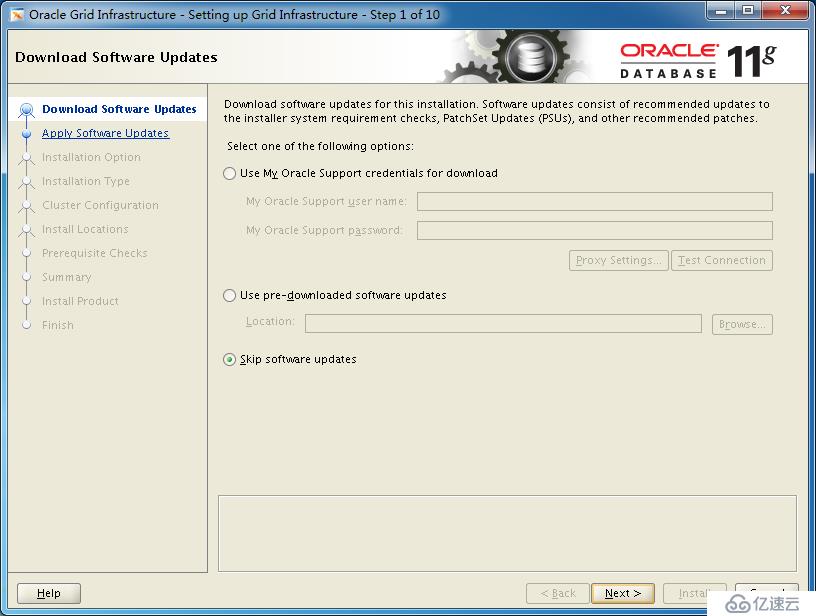
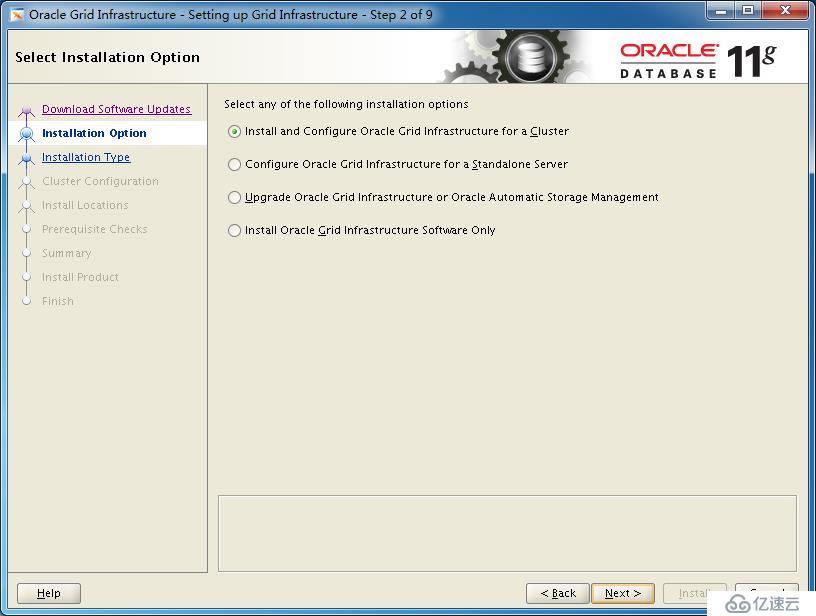
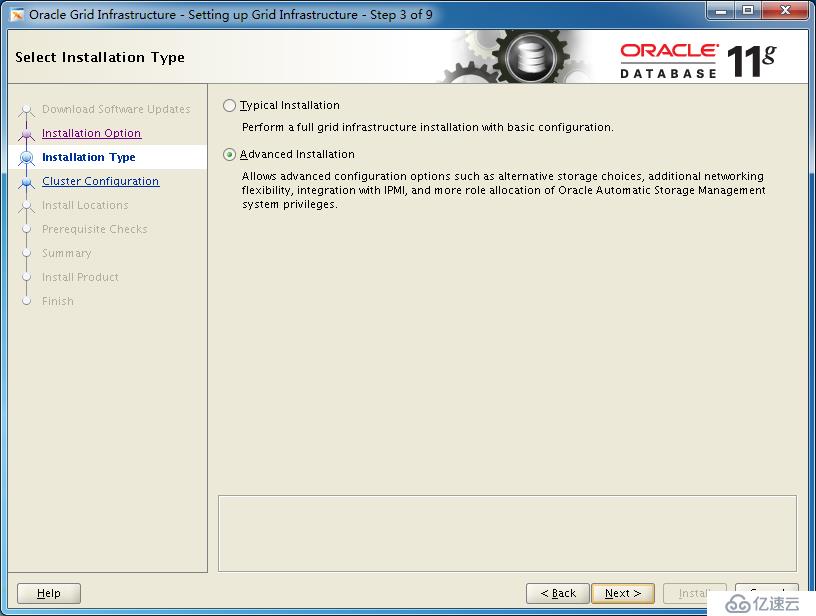
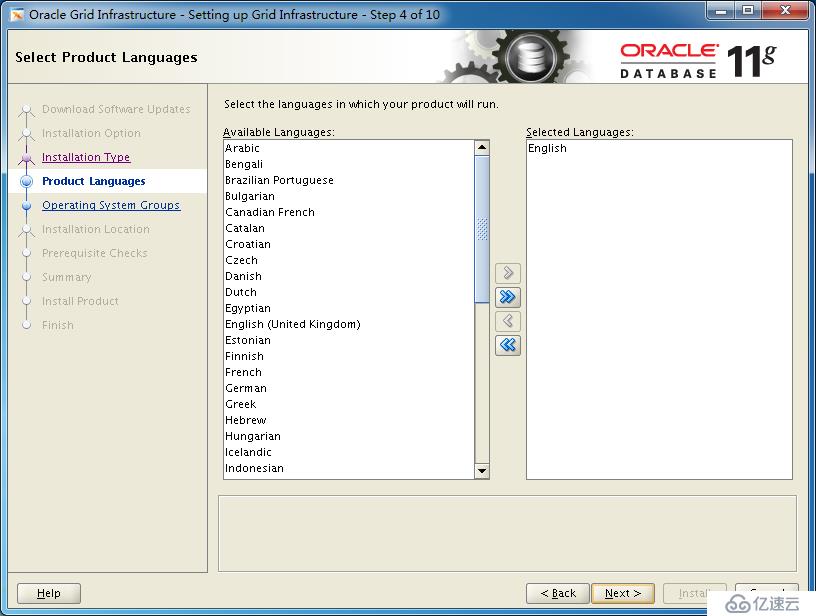
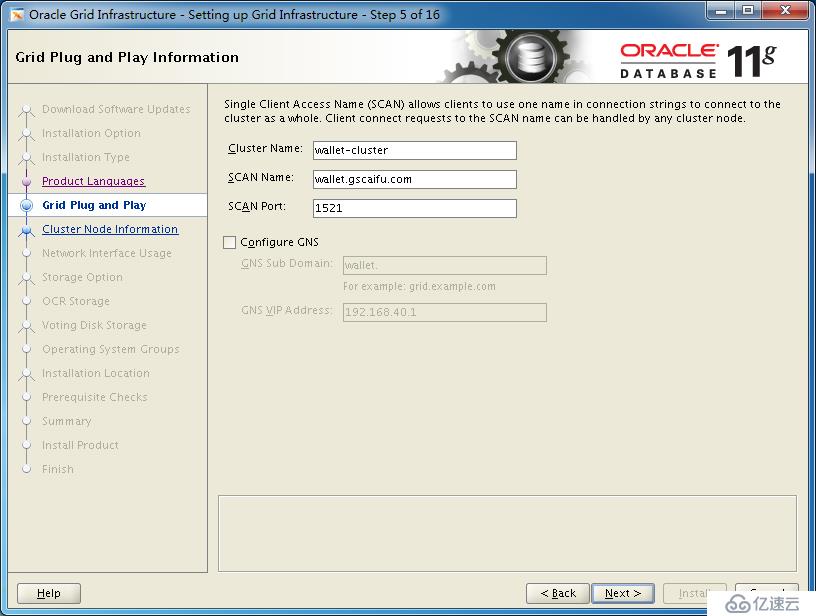
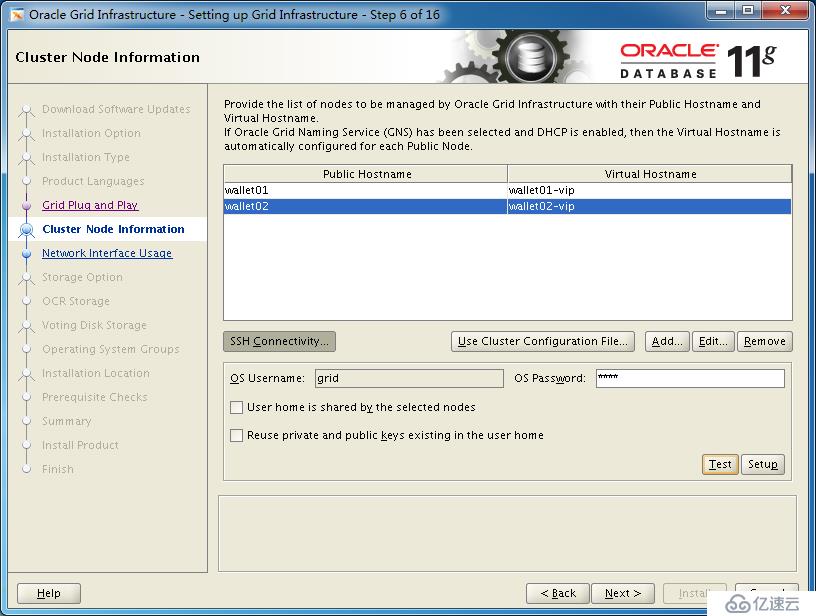
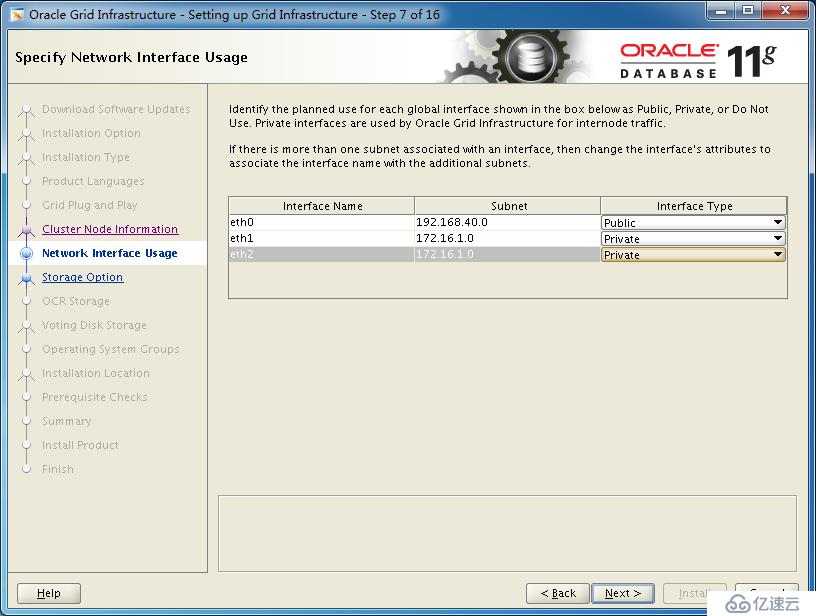
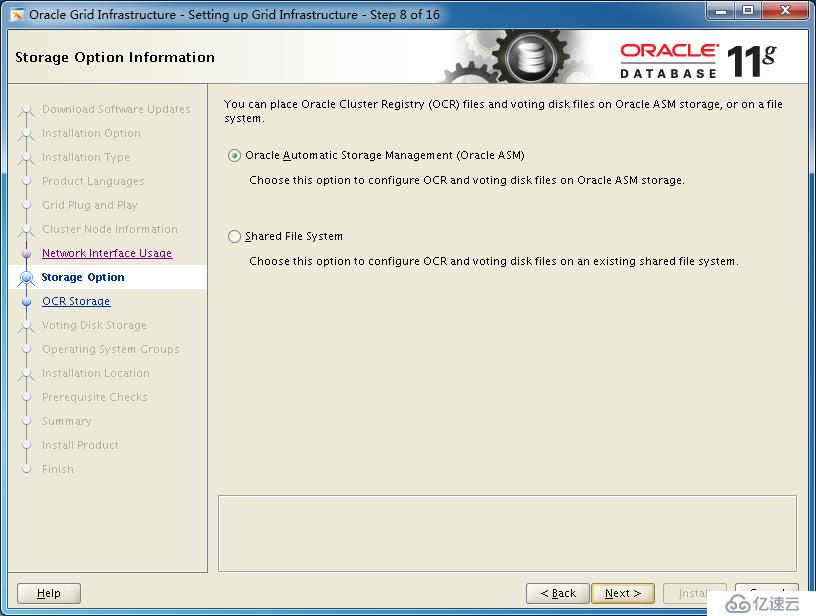
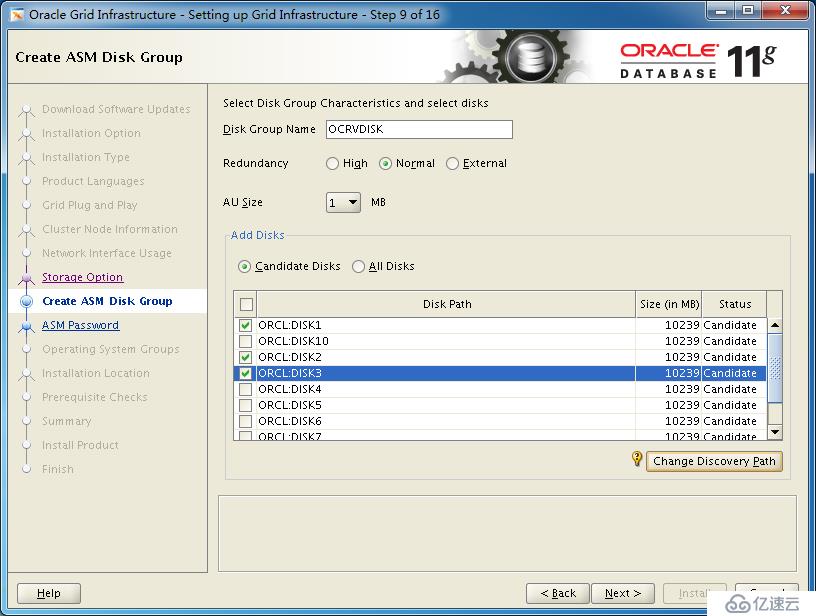
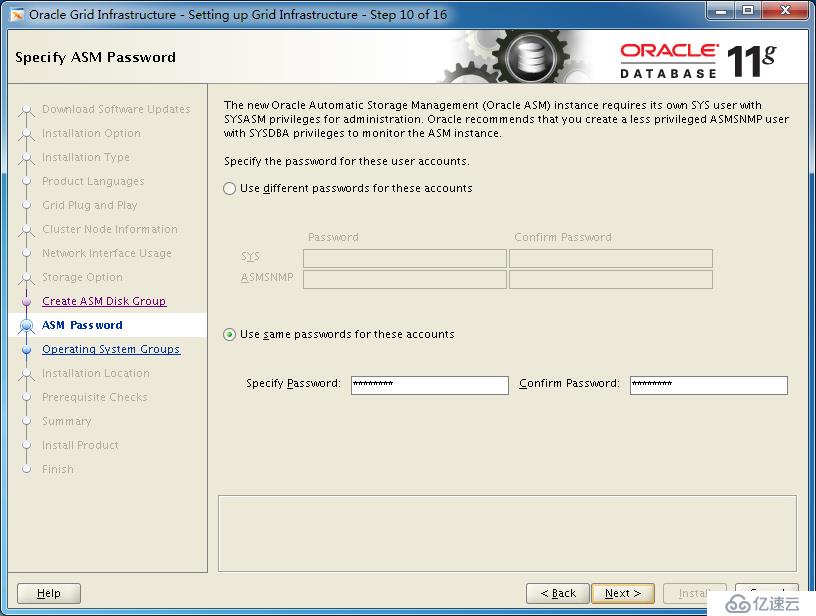
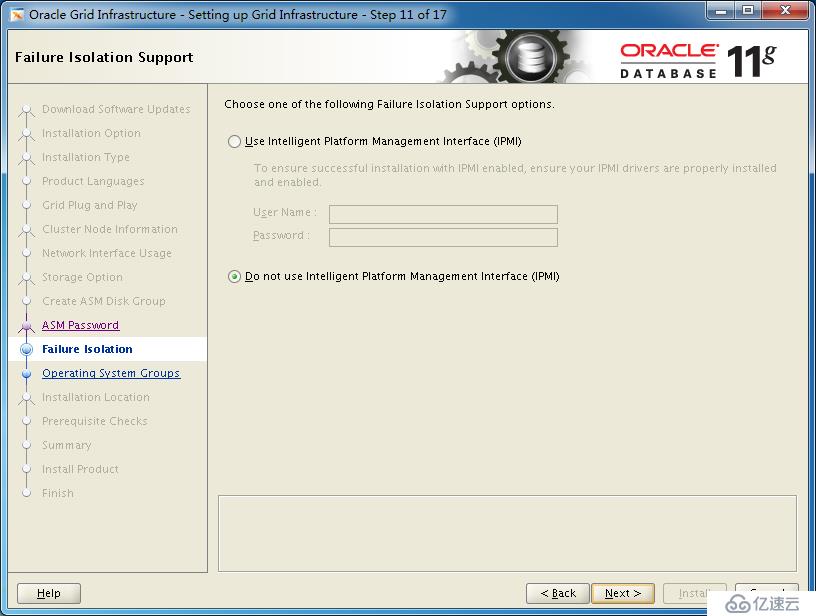
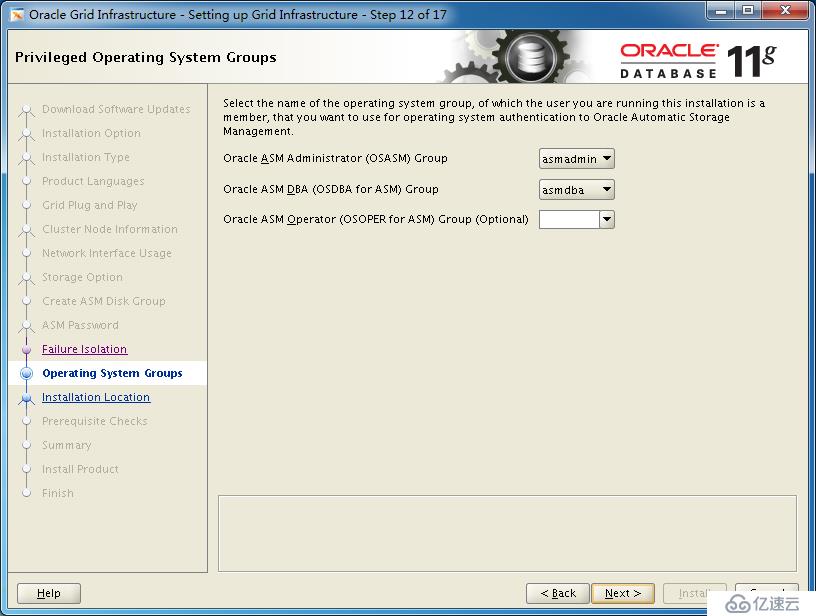
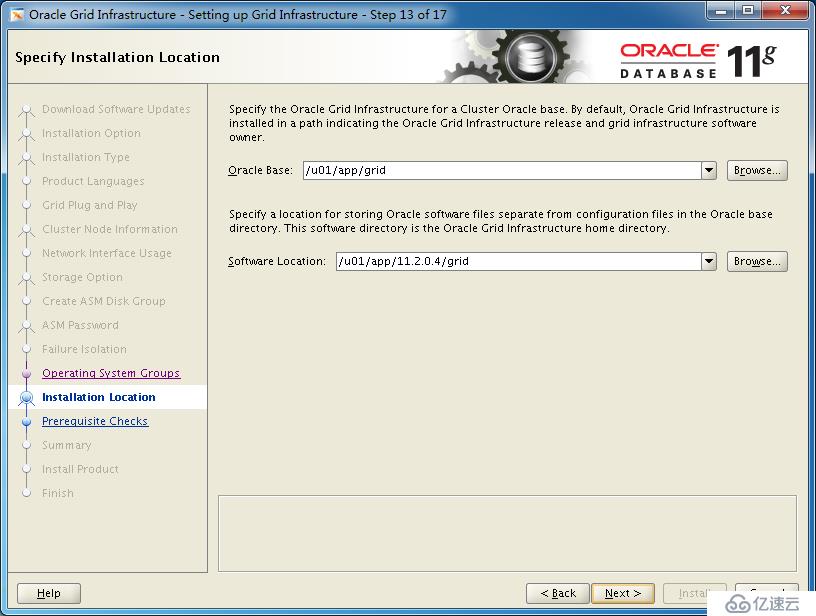
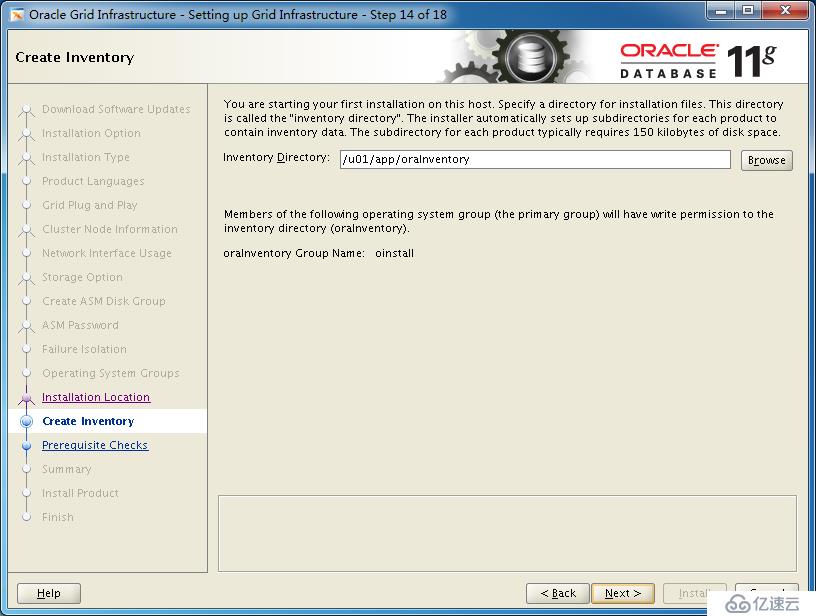
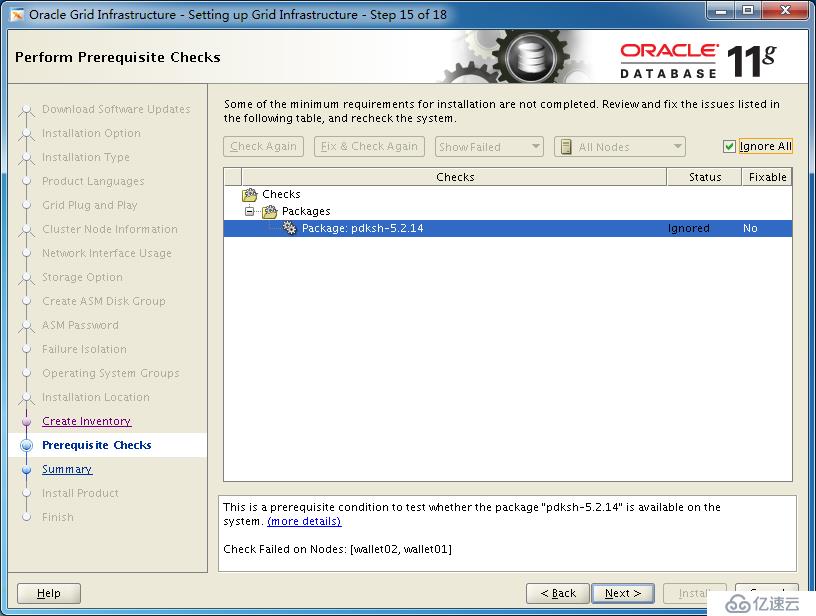
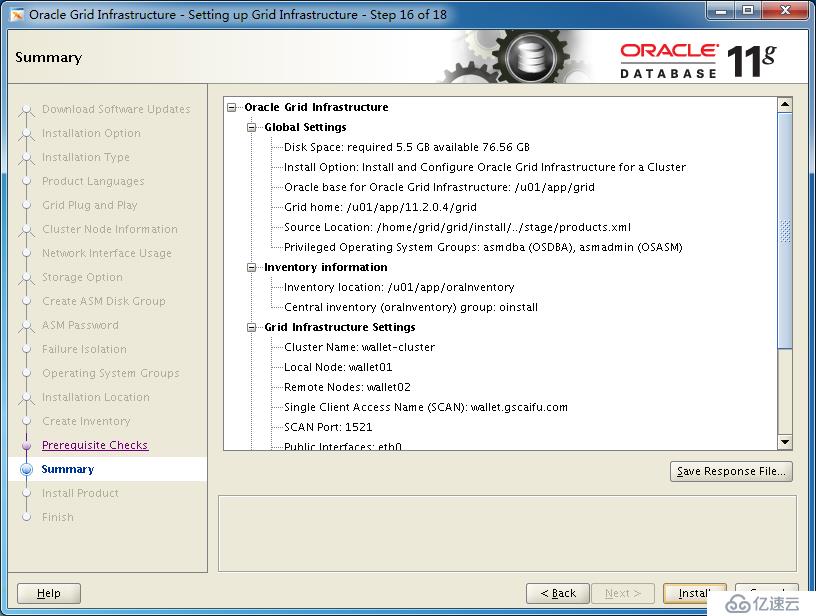
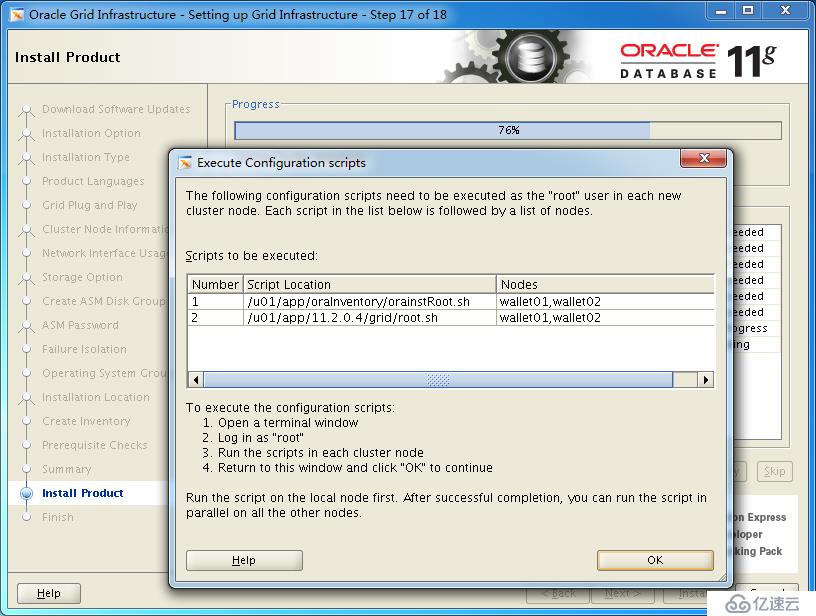
[root@wallet01 ~]# /u01/app/oraInventory/orainstRoot.sh
Changing permissions of /u01/app/oraInventory.
Adding read,write permissions for group.
Removing read,write,execute permissions for world.

Changing groupname of /u01/app/oraInventory to oinstall.
The execution of the script is complete.

[root@wallet01 ~]# /u01/app/11.2.0.4/grid/root.sh
Performing root user operation for Oracle 11g

The following environment variables are set as:
    ORACLE_OWNER= grid
    ORACLE_HOME=  /u01/app/11.2.0.4/grid

Enter the full pathname of the local bin directory: [/usr/local/bin]:
The contents of "dbhome" have not changed. No need to overwrite.
The contents of "oraenv" have not changed. No need to overwrite.
The contents of "coraenv" have not changed. No need to overwrite.


Creating /etc/oratab file...
Entries will be added to the /etc/oratab file as needed by
Database Configuration Assistant when a database is created
Finished running generic part of root script.
Now product-specific root actions will be performed.
Using configuration parameter file: /u01/app/11.2.0.4/grid/crs/install/crsconfig_params
Creating trace directory
User ignored Prerequisites during installation
Installing Trace File Analyzer
OLR initialization - successful
  root wallet
  root wallet cert
  root cert export
  peer wallet
  profile reader wallet
  pa wallet
  peer wallet keys
  pa wallet keys
  peer cert request
  pa cert request
  peer cert
  pa cert
  peer root cert TP
  profile reader root cert TP
  pa root cert TP
  peer pa cert TP
  pa peer cert TP
  profile reader pa cert TP
  profile reader peer cert TP
  peer user cert
  pa user cert
Adding Clusterware entries to upstart
CRS-2672: Attempting to start 'ora.mdnsd' on 'wallet01'
CRS-2676: Start of 'ora.mdnsd' on 'wallet01' succeeded
CRS-2672: Attempting to start 'ora.gpnpd' on 'wallet01'
CRS-2676: Start of 'ora.gpnpd' on 'wallet01' succeeded
CRS-2672: Attempting to start 'ora.cssdmonitor' on 'wallet01'
CRS-2672: Attempting to start 'ora.gipcd' on 'wallet01'
CRS-2676: Start of 'ora.cssdmonitor' on 'wallet01' succeeded
CRS-2676: Start of 'ora.gipcd' on 'wallet01' succeeded
CRS-2672: Attempting to start 'ora.cssd' on 'wallet01'
CRS-2672: Attempting to start 'ora.diskmon' on 'wallet01'
CRS-2676: Start of 'ora.diskmon' on 'wallet01' succeeded
CRS-2676: Start of 'ora.cssd' on 'wallet01' succeeded

ASM created and started successfully.

Disk Group OCRVDISK created successfully.

clscfg: -install mode specified
Successfully accumulated necessary OCR keys.
Creating OCR keys for user 'root', privgrp 'root'..
Operation successful.
CRS-4256: Updating the profile
Successful addition of voting disk 7804bca6d2c44fe8bf9999cdf153bd4d.
Successful addition of voting disk 779015a5f9244f4abfb7732e58abdb09.
Successful addition of voting disk 4e4c64b2b3994f17bfab1a15f9e86b9b.
Successfully replaced voting disk group with +OCRVDISK.
CRS-4256: Updating the profile
CRS-4266: Voting file(s) successfully replaced
##  STATE    File Universal Id                File Name Disk group
--  -----    -----------------                --------- ---------
 1. ONLINE   7804bca6d2c44fe8bf9999cdf153bd4d (ORCL:DISK1) [OCRVDISK]
 2. ONLINE   779015a5f9244f4abfb7732e58abdb09 (ORCL:DISK2) [OCRVDISK]
 3. ONLINE   4e4c64b2b3994f17bfab1a15f9e86b9b (ORCL:DISK3) [OCRVDISK]
Located 3 voting disk(s).
CRS-2672: Attempting to start 'ora.asm' on 'wallet01'
CRS-2676: Start of 'ora.asm' on 'wallet01' succeeded
CRS-2672: Attempting to start 'ora.OCRVDISK.dg' on 'wallet01'
CRS-2676: Start of 'ora.OCRVDISK.dg' on 'wallet01' succeeded
Configure Oracle Grid Infrastructure for a Cluster ... succeeded

[root@wallet02 ~]# /u01/app/oraInventory/orainstRoot.sh
Changing permissions of /u01/app/oraInventory.
Adding read,write permissions for group.
Removing read,write,execute permissions for world.

Changing groupname of /u01/app/oraInventory to oinstall.
The execution of the script is complete.

[root@wallet02 ~]# /u01/app/11.2.0.4/grid/root.sh
Performing root user operation for Oracle 11g

The following environment variables are set as:
    ORACLE_OWNER= grid
    ORACLE_HOME=  /u01/app/11.2.0.4/grid

Enter the full pathname of the local bin directory: [/usr/local/bin]:
   Copying dbhome to /usr/local/bin ...
   Copying oraenv to /usr/local/bin ...
   Copying coraenv to /usr/local/bin ...

Creating /etc/oratab file...
Entries will be added to the /etc/oratab file as needed by
Database Configuration Assistant when a database is created
Finished running generic part of root script.
Now product-specific root actions will be performed.
Using configuration parameter file: /u01/app/11.2.0.4/grid/crs/install/crsconfig_params
Creating trace directory
User ignored Prerequisites during installation
Installing Trace File Analyzer
OLR initialization - successful
Adding Clusterware entries to upstart
CRS-4402: The CSS daemon was started in exclusive mode but found an active CSS daemon on node wallet01, number 1, and is terminating
An active cluster was found during exclusive startup, restarting to join the cluster
Configure Oracle Grid Infrastructure for a Cluster ... succeeded
相关内容
热门资讯
徐巧芯剖析赖清德:最怕自己丢掉...
海峡导报综合报道 大罢免投票一周年纪念活动26日举行,台北市长蒋万安出席并怒轰,民进党一年过后仍没有...
中国红十字会总会紧急向广东调拨...
记者从中国红十字会总会了解到,针对台风“红霞”给广东造成的灾情,中国红十字会总会启动四级应急响应,紧...
这些少年,正被“毒蛋”围猎
李梦抽了几口电子烟,吐出了白色的烟雾,有一股浓烈的水果香味。随后,她看着自己握电子烟的手,跟身边人说...
蒋万安号召“倒阁”,卢秀燕认为...
海峡导报综合报道 台北市长蒋万安27日抛出震撼议题,表示多名民代向他提议推动“倒阁”,要求台行政机构...
特朗普将在白宫会见两位重要客人
俄乌战争仍未结束,美伊冲突又有升级风险。在此背景下,美国总统特朗普将在白宫接见乌克兰和以色列领导人。...
新租客打扫卧室柜子上掉落4万元...
近日,莲前西路某小区内,张倩签下一套房子的租赁合同。当天上午,她带着12岁的大女儿周馨怡和11岁的小...
六部门通告:禁止涉军队退役报废...
关于禁止涉军队退役报废装备销售活动的通告近年来,部分经营者在线上线下公开销售涉及我军退役报废装备(指...
九寨沟景区发生泥石流,部分道路...
7月26日,九寨沟风景名胜区管理局发布泥石流灾害通报:2026年7月26日15时50分,九寨沟景区局...
空调26度不凉是什么原因
从空调内部元器件来说,不凉的原因有可能是温度传感器出现故障了,也有可能是空调压缩机或者铜管出现问题,...
鲸鸿动能携手香港国际机场、鸿蒙...
2026 年 7 月 25 日,十余位鸿蒙车主组成的车队从珠海出发,经港珠澳大桥通关抵达香港国际...