

elasticsearch数据备份恢复
admin
2023-03-23 11:00:52
0次
本文主要介绍elasticsearch集群数据备份及恢复,利用共享文件系统,通过快照方式备份。
集群的部署参考:http://hnr520.blog.51cto.com/4484939/1876467
一、配置修改
1.配置文件必须添加如下参数
path.repo: /mnt/backups/es_mybak
二、数据备份
1.创建备份仓库
curl -XPUT 'http://192.168.115.11:9200/_snapshot/EsBackup' -d '{
"type": "fs",
"settings": {
    "location": "/mnt/backups/es_mybak"
    }
}'
[root@node1 local]# curl -XPUT 'http://192.168.115.11:9200/_snapshot/EsBackup' -d '{
> "type": "fs",
> "settings": {
>     "location": "/mnt/backups/es_mybak"
> }
> }'
{"acknowledged":true}
给我们的仓库取一个名字,在本例它叫 EsBackup 。
我们指定仓库的类型应该是一个共享文件系统,这里采用nfs。
最后,我们提供一个已挂载的设备(/mnt/backups/es_mybak )作为目的地址。
注意:共享文件系统路径必须确保集群所有节点都可以访问到。
2.查询备份仓库
[root@node1 local]# curl -XGET 'http://192.168.115.11:9200/_snapshot?pretty'
{
  "EsBackup" : {
    "type" : "fs",
    "settings" : {
      "location" : "/mnt/backups/es_mybak"
    }
  }
}
3.备份所有索引
curl -XPUT 'http://192.168.115.11:9200/_snapshot/EsBackup/snapshot_all'
[root@node1 local]# curl -XPUT 'http://192.168.115.11:9200/_snapshot/EsBackup/snapshot_all'
{"accepted":true}
4.查看备份快照
curl -XGET 'http://192.168.115.11:9200/_snapshot/EsBackup/snapshot_all?pretty'
[root@node1 elasticsearch6]# curl -XGET 'http://192.168.115.11:9200/_snapshot/EsBackup/snapshot_*?pretty'
{
  "snapshots" : [
    {
      "snapshot" : "snapshot_all",
      "uuid" : "MRTYocxBT4qgwtpu_6jdpg",
      "version_id" : 5000199,
      "version" : "5.0.1",
      "indices" : [
        "els_student_hnr05",
        "hnrtest",
        "els_student_hnr03",
        "els_student",
        "els_student_hnr02",
        "els_student_hnr04",
        "els_python01",
        "els_student_hnr01"
      ],
      "state" : "SUCCESS",
      "start_time" : "2017-05-17T10:00:46.860Z",
      "start_time_in_millis" : 1495015246860,
      "end_time" : "2017-05-17T10:00:54.209Z",
      "end_time_in_millis" : 1495015254209,
      "duration_in_millis" : 7349,
      "failures" : [ ],
      "shards" : {
        "total" : 40,
        "failed" : 0,
        "successful" : 40
      }
    }
  ]
}
5.备份部分索引
curl -XPUT 'http://192.168.115.11:9200/_snapshot/EsBackup/snapshot_els_student_hnr05' -d '{ "indices": "els_student_hnr05" }'
[root@node1 elasticsearch6]# curl -XPUT 'http://192.168.115.11:9200/_snapshot/EsBackup/snapshot_els_student_hnr05' -d '{ "indices": "els_student_hnr05" }'
{"accepted":true}
6.查看备份快照
curl -XGET 'http://192.168.115.11:9200/_snapshot/EsBackup/snapshot_els_student_hnr05?pretty'
查看快照的详细信息,可以看到每个shard的信息
curl -XGET 'http://192.168.115.11:9200/_snapshot/EsBackup/snapshot_els_student_hnr05/_status?pretty'
[root@node1 elasticsearch6]# curl -XGET 'http://192.168.115.11:9200/_snapshot/EsBackup/snapshot_els_student_hnr05?pretty'
{
  "snapshots" : [
    {
      "snapshot" : "snapshot_els_student_hnr05",
      "uuid" : "hsSkWa63Ss6MJjh0Eo4arA",
      "version_id" : 5000199,
      "version" : "5.0.1",
      "indices" : [
        "els_student_hnr05"
      ],
      "state" : "SUCCESS",
      "start_time" : "2017-05-18T00:58:35.699Z",
      "start_time_in_millis" : 1495069115699,
      "end_time" : "2017-05-18T00:58:36.396Z",
      "end_time_in_millis" : 1495069116396,
      "duration_in_millis" : 697,
      "failures" : [ ],
      "shards" : {
        "total" : 5,
        "failed" : 0,
        "successful" : 5
      }
    }
  ]
}
三、.部分索引数据恢复
1.查询索引
curl -XGET '192.168.115.11:9200/_cat/indices?v'
health status index             uuid                   pri rep docs.count docs.deleted store.size pri.store.size
green  open   els_student_hnr05 mkvmTguZS4m1wGKbB8TOEw   5   1         99            0    124.7kb         62.3kb
green  open   hnrtest           Y-bjuEPLQTGGP88EafDlyg   5   1          0            0      1.5kb           795b
green  open   els_student_hnr03 _UHB6P-fRfucH7lEyE-C7g   5   1         99            0    146.7kb         73.3kb
green  open   els_student       JC69IBEjTji8jU6bxCDE3A   5   1        999            0    495.9kb        247.9kb
green  open   els_student_hnr02 k-aLl7tzRUyRfwJs8O0-kA   5   1         99            0    109.8kb         54.9kb
green  open   els_student_hnr04 zAkj7GvfQ-CqmuFMJUTSuA   5   1         99            0    162.8kb         81.4kb
green  open   els_python01      wmdREADVQmCX773_JDL46Q   5   1          0            0      1.5kb           795b
green  open   els_student_hnr01 BJlcIp7mS0ii9nDYj8UDyQ   5   1        100            0    109.2kb         54.6kb
2.删除索引els_student_hnr05
[root@node1 elasticsearch6]# curl -XDELETE 'http://192.168.115.11:9200/els_student_hnr05'
{"acknowledged":true}
3.根据snapshot_els_student_hnr05快照恢复索引
curl -XPOST 'http://192.168.115.11:9200/_snapshot/EsBackup/snapshot_els_student_hnr05/_restore'
[root@node1 elasticsearch6]# curl -XPOST 'http://192.168.115.11:9200/_snapshot/EsBackup/snapshot_els_student_hnr05/_restore'
{"accepted":true}
4.再次查看索引
[root@node1 elasticsearch6]# curl -XGET '192.168.115.11:9200/_cat/indices?v'
health status index             uuid                   pri rep docs.count docs.deleted store.size pri.store.size
green  open   hnrtest           Y-bjuEPLQTGGP88EafDlyg   5   1          0            0      1.5kb           795b
green  open   els_student_hnr05 S3AsHa4dRtuXXZ3uIDGvuQ   5   1         99            0    124.7kb         62.3kb
被删除的索引els_student_hnr05已经恢复回来
四、数据完全恢复
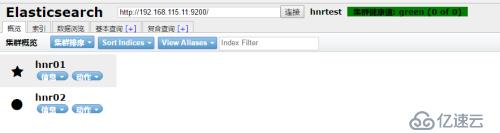
1.关闭所有节点,删除数据目录下的所有数据,重新启动集群
kill -9 $(ps -ef | grep -v grep | grep elasticsearch | awk '{print $2}')
2.重新启动集群
3.创建备份仓库
curl -XPUT 'http://192.168.115.11:9200/_snapshot/EsBackup' -d '{
"type": "fs",
"settings": {
    "location": "/mnt/backups/es_mybak"
    }
}'
4.查看备份快照
curl -XGET 'http://192.168.115.11:9200/_snapshot/EsBackup/snapshot_*?pretty'
{
  "snapshots" : [
    {
      "snapshot" : "snapshot_all",
      "uuid" : "MRTYocxBT4qgwtpu_6jdpg",
      "version_id" : 5000199,
      "version" : "5.0.1",
      "indices" : [
        "els_student_hnr05",
        "hnrtest",
        "els_student_hnr03",
        "els_student",
        "els_student_hnr02",
        "els_student_hnr04",
        "els_python01",
        "els_student_hnr01"
      ],
      "state" : "SUCCESS",
      "start_time" : "2017-05-17T10:00:46.860Z",
      "start_time_in_millis" : 1495015246860,
      "end_time" : "2017-05-17T10:00:54.209Z",
      "end_time_in_millis" : 1495015254209,
      "duration_in_millis" : 7349,
      "failures" : [ ],
      "shards" : {
        "total" : 40,
        "failed" : 0,
        "successful" : 40
      }
    },
    {
      "snapshot" : "snapshot_els_student_hnr05",
      "uuid" : "hsSkWa63Ss6MJjh0Eo4arA",
      "version_id" : 5000199,
      "version" : "5.0.1",
      "indices" : [
        "els_student_hnr05"
      ],
      "state" : "SUCCESS",
      "start_time" : "2017-05-18T00:58:35.699Z",
      "start_time_in_millis" : 1495069115699,
      "end_time" : "2017-05-18T00:58:36.396Z",
      "end_time_in_millis" : 1495069116396,
      "duration_in_millis" : 697,
      "failures" : [ ],
      "shards" : {
        "total" : 5,
        "failed" : 0,
        "successful" : 5
      }
    }
  ]
}
5.恢复数据
curl -XPOST 'http://192.168.115.11:9200/_snapshot/EsBackup/snapshot_all/_restore'
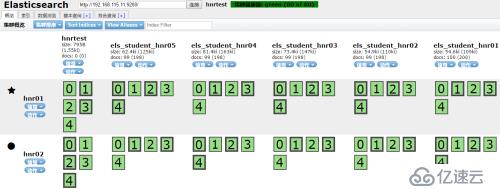
6.查询索引
[root@node1 elasticsearch6]# curl -XGET '192.168.115.11:9200/_cat/indices?v'
health status index             uuid                   pri rep docs.count docs.deleted store.size pri.store.size
green  open   hnrtest           LNkwevA2Sr2Jgue1oLRIGA   5   1          0            0      1.5kb           795b
green  open   els_student       6aE8M7KMRN2EdievhDBXcw   5   1        999            0    495.9kb        247.9kb
green  open   els_student_hnr04 8hXeVjXYRhS5POdy3hnMuQ   5   1         99            0    162.8kb         81.4kb
green  open   els_student_hnr01 afVLqgxpTqii6pNObLC2sA   5   1        100            0    109.2kb         54.6kb
green  open   els_student_hnr05 jzHPY_TlSEm-ZEXWz0sz4Q   5   1         99            0    124.7kb         62.3kb
green  open   els_student_hnr02 f3hqeM1pQkWttZifnCCQDQ   5   1         99            0    109.8kb         54.9kb
green  open   els_python01      4_vFwhn0RCi3SZbz2bORCw   5   1          0            0      1.5kb           795b
green  open   els_student_hnr03 esFyZMwwTaeLf7YrKxyYjQ   5   1         99            0    146.7kb         73.3kb
至此所有索引已经完全恢复
五、从全部索引快照中恢复单个索引
1.删除索引els_student_hnr05
curl -XDELETE 'http://192.168.115.11:9200/els_student_hnr05'
2.恢复被删除的索引els_student_hnr05
curl -XPOST 'http://192.168.115.11:9200/_snapshot/EsBackup/snapshot_all/_restore' -d '{
    "indices": "els_student_hnr05",
    "rename_replacement": "restored_index_$1"
}'
六、删除快照
curl -XDELETE 'http://192.168.115.11:9200/_snapshot/EsBackup/snapshot_els_student_hnr05'
curl -XDELETE 'http://192.168.115.11:9200/_snapshot/EsBackup/snapshot_all'
相关内容
热门资讯
空调连续工作多久需要停机休息
空调连续工作的时间取决于多个因素,包括空调的型号、功率、使用环境和维护情况等。一般来说,空调可以连续...
空调哪个符号是除湿的
空调除湿功能通常用一个水滴形状的符号表示。不同品牌和型号的空调遥控器可能会有所差异,但一般来说,除湿...
格力空调多长时间加一次氟利昂
1、一般情况下,空调对氟利昂的使用量是非常小的,所以在空调使用了四年左右的时候再考虑加也没问题。2、...
空调用多长时间需要加氟一次
一般情况下是五年。当出现以下这几种情况时,空调才需要加氟。1、空调的室内机和室外机各有两个接口,当接...
格调生活·C标思享荟:卡萨帝在...
9月12日的郑州龙湖金融岛,夜风轻拂,灯光璀璨。“C标时刻共传奇——卡萨帝思享荟暨20周年品牌盛典郑...
品牌价值破千亿、高端份额持续领...
9月12日,“C标时刻共传奇——卡萨帝思享荟暨20周年品牌盛典郑州站”在郑州龙湖金融岛举办。2026...
空调主板坏了修800还是换新的
空调主板坏了是修还是换新,需要考虑多个因素,以下是一些建议:1. 维修成本:如果维修费用较低,比如 ...
空调开多久需要休息多长时间
问题:空调开多久需要休息多长时间回答:1、在使用空调的过程中,一般空调开7~8个小时左右需要休息2~...
中央空调多长时间清洗一次
1、一般空调开机前清洗一次即可,空调开机中间时段再清洗一次,空调关机时清洗一次,这样比较合理。2、空...
中央空调氟利昂多久加一次
看空调制热和制冷程度,很多人的观点认为氟利昂必须一年放一次,其实这个观点是错误的,理解上面有点偏差,...