

gitlab-ci自动集成
本文档是用rpm包安装的,如需源码安装请参考文档:
https://github.com/gitlabhq/gitlabhq/blob/master/doc/install/installation.md
环境:
gitlab服务器:10.0.10.50 centos7.3
gitlab-runner服务器:10.0.10.30 centos7.3
一:gitlab的安装和使用:
1:到gitlab官网下载相对应的版本:https://about.gitlab.com/installation/
rpm -ivh   gitlab-ce-9.2.5-ce.0.el7.x86_64.rpm

2:修改gitlab的配置文件中的host,默认是本机的主机名
[root@gitlab-ci system]# vim /var/opt/gitlab/gitlab-rails/etc/gitlab.yml
启动方式一:
[root@gitlab-ci system]# systemctl start gitlab-runsvdir
启动方式二:
[root@gitlab-ci opt]# gitlab-ctl  start
注:防火墙和selinux注意开放
3:在浏览器输入地址:
http://10.0.10.50 提示修改密码,用户名是root,进入后创建项目test2

二:gitlab-runner的安装和使用
1:安装
For Debian/Ubuntu
curl -L https://packages.gitlab.com/install/repositories/runner/gitlab-ci-multi-runner/script.deb.sh | sudo bash
For RHEL/CentOS
curl -L https://packages.gitlab.com/install/repositories/runner/gitlab-ci-multi-runner/script.rpm.sh | sudo bash
For Debian/Ubuntu
sudo apt-get install gitlab-runner
For RHEL/CentOS
sudo yum install gitlab-runner
参考文档:https://docs.gitlab.com/runner/install/linux-repository.html#installing-the-runner

运行gitlab-runner,参考文档:https://docs.gitlab.com/runner/register/index.html
运行以下命令:
sudo gitlab-runner register
输入您的GitLab实例网址:
Please enter the gitlab-ci coordinator URL (e.g. https://gitlab.com )https://10.0.10.50
输入您获得的用于注册Runner的令牌:
Please enter the gitlab-ci token for this runner 6Rz9bnmtcC8f4jQHwo8q
输入Runner的描述,您可以稍后在GitLab的UI中进行更改:
Please enter the gitlab-ci description for this runner[hostame] my-runner
输入与Runner关联的标签,您可以稍后在GitLab的UI中进行更改:
Please enter the gitlab-ci tags for this runner (comma separated):my-tag,another-tag
选择Runner是否应该接收没有标签的作业,您可以稍后在GitLab的UI中进行更改(默认为false):
Whether to run untagged jobs [true/false]:[false]: true
选择是否将Runner锁定到当前项目,您可以稍后在GitLab的UI中进行更改。当Runner是特定的(默认为false)时有用:
Whether to lock Runner to current project [true/false]:[false]: false
输入Runner执行者:
Please enter the executor: ssh, docker+machine, docker-ssh+machine, kubernetes, docker, parallels, virtualbox, docker-ssh, shell:docker
2:注册成功后,启动gitlab-runner
[root@os7 ~]# gitlab-runner start
3:到gitlab服务器下看下gitlab-runner的状态
访问url:http://10.0.10.50/admin/runners

三:使用gitlab-runner
1:在gitlab的test2i项目下创建文件.gitlab-ci.yml
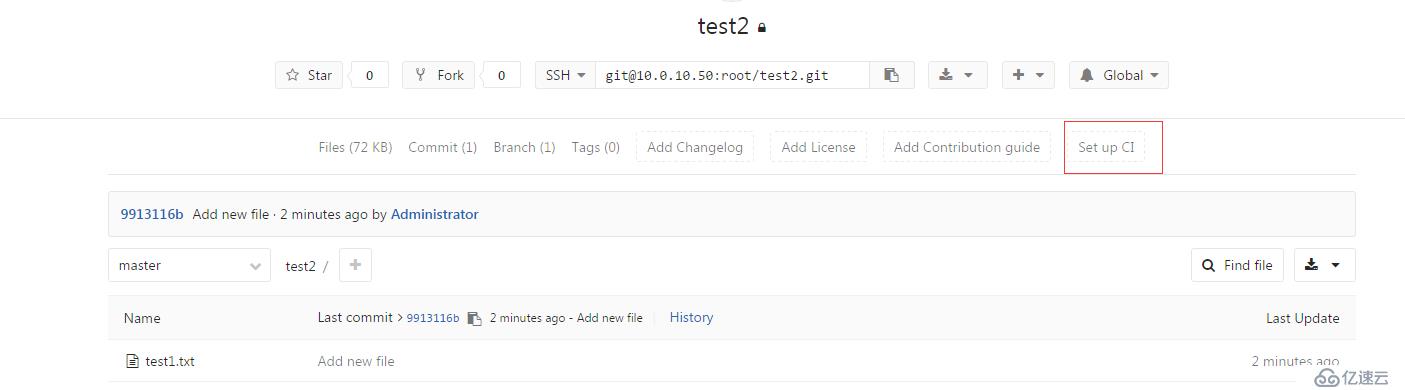
.gitlab-ci.yml文件的语法请参考以下文档:
http://10.0.10.50/help/ci/yaml/README.md
gitlab-ci支持的模板示例文档。如PHP,JAVA,IOS等
http://10.0.10.50/help/ci/examples/README.md
.gitlab-ci.yml文件的内容:
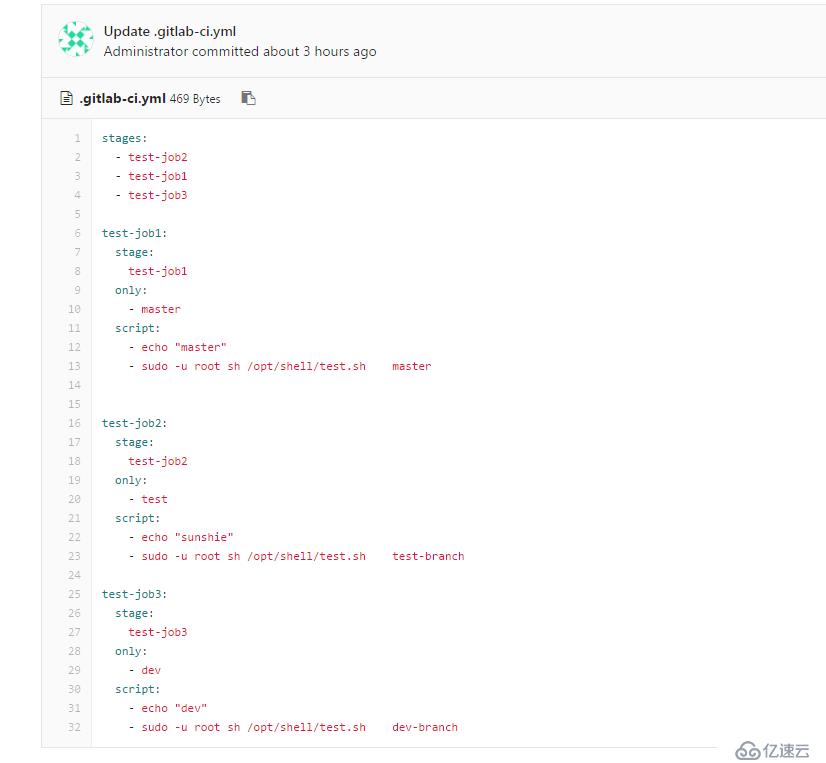
注:
1:script执行命令的脚本是以gitlab-runner用户运行的,要通过sudo提权运行,不然用shell脚本自动化部署项目会报权限错误
2:执行的脚本文件要放在gitlab-runner服务器上
Commit提交到服务器后,点击pipelines会显示构建失败,失败的原因是因为test2项目没有连接上gitlab-runner

2:把项目test2加入到gitla-runner里面去:激活test2项目
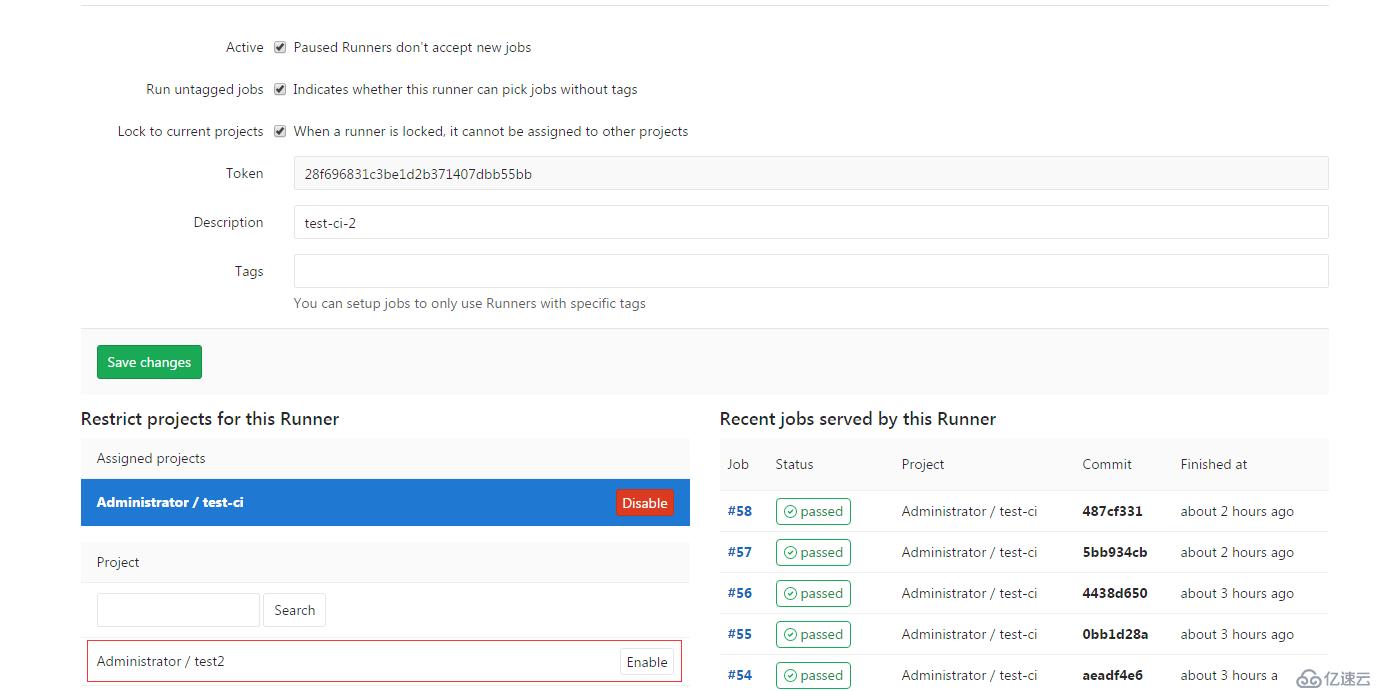
3:修改test2项目下的文件,commit看看效果
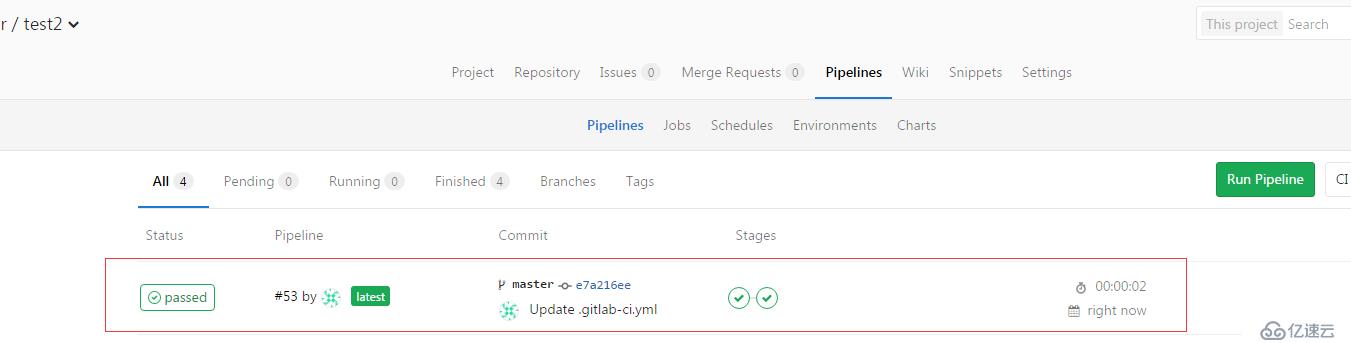
会有绿色标识显示执行成功,看看输出的结果:
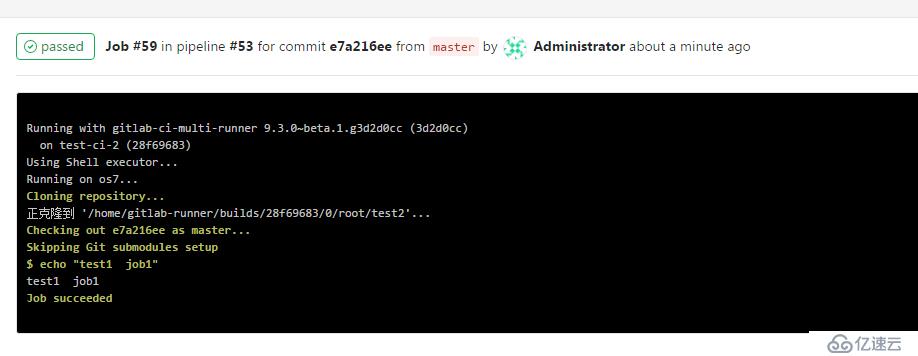
本教程只是简单的描述下gitlab-ci自动集成的使用,能够自定义的自动化部署你在gitlab里面的项目,完美的替换了jenkins