

ELK收集nginx日志并用高德地图展示出IP
(一)测试的环境
agentd:192.168.180.22
ES:192.168.180.23
kibana:192.168.180.23
采用的拓扑:logstash -->ES-->kibana
(二)实施步骤:
(1)logstsh具体配置:
1,配置nginx日志格式,采用log_format格式:
log_format  main  '$remote_addr - $remote_user [$time_local] "$request" '
                      '$status $body_bytes_sent "$http_referer" '
                      '"$http_user_agent" "$http_x_forwarded_for"';
2,在logstash服务器下载IP地址归类查询库
[root@localhost config]# cd /usr/local/logstash/config/
[root@localhost config]#  wget http://geolite.maxmind.com/download/geoip/database/GeoLite2-City.mmdb.
gz
3,配置logstash客户端
[root@localhost config]# vim /usr/local/logstash/config/nginx-access.conf
input {
        file {
                path => "/opt/access.log"
                type => "nginx"
                start_position => "beginning"
              }
            }
filter {
          grok {
                match => { "message" => "%{IPORHOST:remote_addr} - - \[%{HTTPDATE:time_local}\] \"%{WO
RD:method} %{URIPATHPARAM:request} HTTP/%{NUMBER:httpversion}\" %{INT:status} %{INT:body_bytes_sent} %
{QS:http_referer} %{QS:http_user_agent}"
                                }
                     }
 geoip {
     source => "remote_addr"
     target => "geoip"
     database => "/usr/local/logstash/config/GeoLite2-City.mmdb"
     add_field => ["[geoip][coordinates]","%{[geoip][longitude]}"]
     add_field => ["[geoip][coordinates]","%{[geoip][latitude]}"]
                }
   }

output {
                elasticsearch {
                        hosts => ["192.168.180.23:9200"]
                        manage_template => true
                        index => "logstash-map-%{+YYYY-MM}"
                          }
             }
备注:
geoip: IP查询插件
source: 需要通过geoip插件处理的field,一般为ip,这里因为通过控制台手动输入的是ip所以直接填message,生成环境中如果查询nginx访问用户,需先将客户端ip过滤出来,然后这里填remote_addr即可
target: 解析后的Geoip地址数据,应该存放在哪一个字段中,默认是geoip这个字段
database: 指定下载的数据库文件
add_field: 这里两行是添加经纬度,地图中地区显示是根据经纬度来识
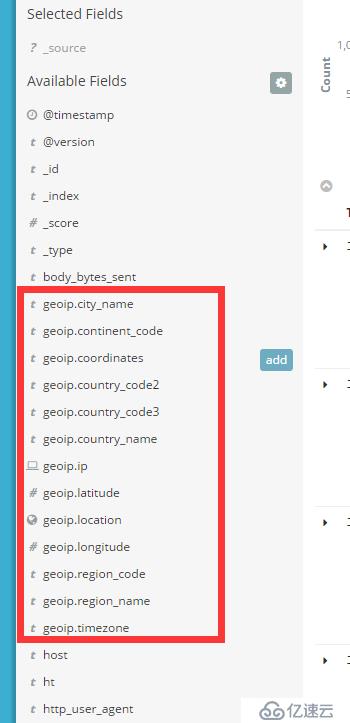
。如果启动正常的话,可以在kibana看到geoip相关的字段,如下图:
3,启动logstash客户端并加载刚才的配置文件。
[root@localhost config]# /usr/local/logstash/bin/logstash -f nginx-access.conf
Sending Logstash's logs to /usr/local/logstash/logs which is now configured via log4j2.properties
[2017-06-20T22:55:23,801][INFO ][logstash.outputs.elasticsearch] Elasticsearch pool URLs updated {:changes=>{:removed=>[], :added=>[http://192.168.180.23:9200/]}}
[2017-06-20T22:55:23,805][INFO ][logstash.outputs.elasticsearch] Running health check to see if an Elasticsearch connection is working {:healthcheck_url=>http://192.168.180.23:9200/, :path=>"/"}
[2017-06-20T22:55:23,901][WARN ][logstash.outputs.elasticsearch] Restored connection to ES instance {:url=>#]}
[2017-06-20T22:55:24,065][INFO ][logstash.filters.geoip ] Using geoip database {:path=>"/usr/local/logstash/config/GeoLite2-City.mmdb"}
[2017-06-20T22:55:24,094][INFO ][logstash.pipeline ] Starting pipeline {"id"=>"main", "pipeline.workers"=>4, "pipeline.batch.size"=>125, "pipeline.batch.delay"=>5, "pipeline.max_inflight"=>500}
[2017-06-20T22:55:24,275][INFO ][logstash.pipeline ] Pipeline main started
[2017-06-20T22:55:24,369][INFO ][logstash.agent ] Successfully started Logstash API endpoint {:port=>9600} (2)Kibana配置.
1,编辑修改kibana的配置文件kibana.yml在最后添加如下:
# The default locale. This locale can be used in certain circumstances to substitute any missing
# translations.
#i18n.defaultLocale: "en"

tilemap.url: 'http://webrd02.is.autonavi.com/appmaptile?lang=zh_cn&size=1&scale=1&style=7&x={x}&y={y}&
z={z}'
2,重启kibana服务。
[root@localhost bin]# /usr/local/kibana/bin/kibana &
[1] 10631
[root@localhost bin]# ps -ef|grep kibana
root     10631  7795 21 10:52 pts/0    00:00:02 /usr/local/kibana/bin/../node/bin/node --no-warnings /usr/local/kibana/bin/../src/cli
root     10643  7795  0 10:52 pts/0    00:00:00 grep --color=auto kibana
[root@localhost bin]#   log   [02:52:59.297] [info][status][plugin:kibana@5.4.0] Status changed from uninitialized to green - Ready
  log   [02:52:59.445] [info][status][plugin:elasticsearch@5.4.0] Status changed from uninitialized to yellow - Waiting for Elasticsearch
  log   [02:52:59.482] [info][status][plugin:console@5.4.0] Status changed from uninitialized to green - Ready
  log   [02:52:59.512] [info][status][plugin:elasticsearch@5.4.0] Status changed from yellow to green - Kibana index ready
  log   [02:52:59.513] [info][status][plugin:metrics@5.4.0] Status changed from uninitialized to green - Ready
  log   [02:53:00.075] [info][status][plugin:timelion@5.4.0] Status changed from uninitialized to green - Ready
  log   [02:53:00.080] [info][listening] Server running at http://192.168.180.23:5601
  log   [02:53:00.081] [info][status][ui settings] Status changed from uninitialized to green - Ready
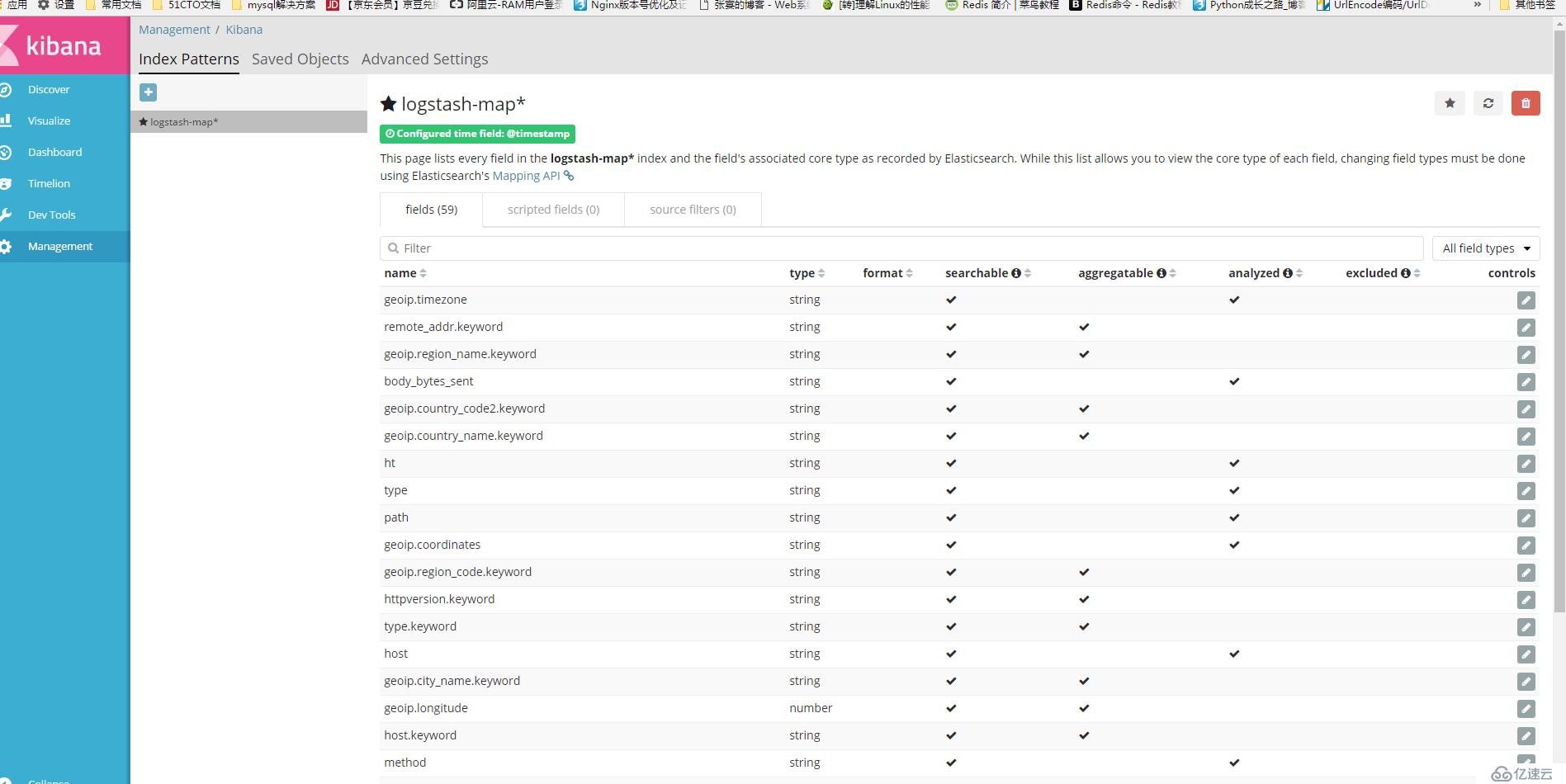
3,创建nginx的访问索引lostash-map*。具体步骤如下:ip:5601--->Management--Index Patterns--->+--->在Index name or pattern中添加logstash-map*--->create。具体如下图:
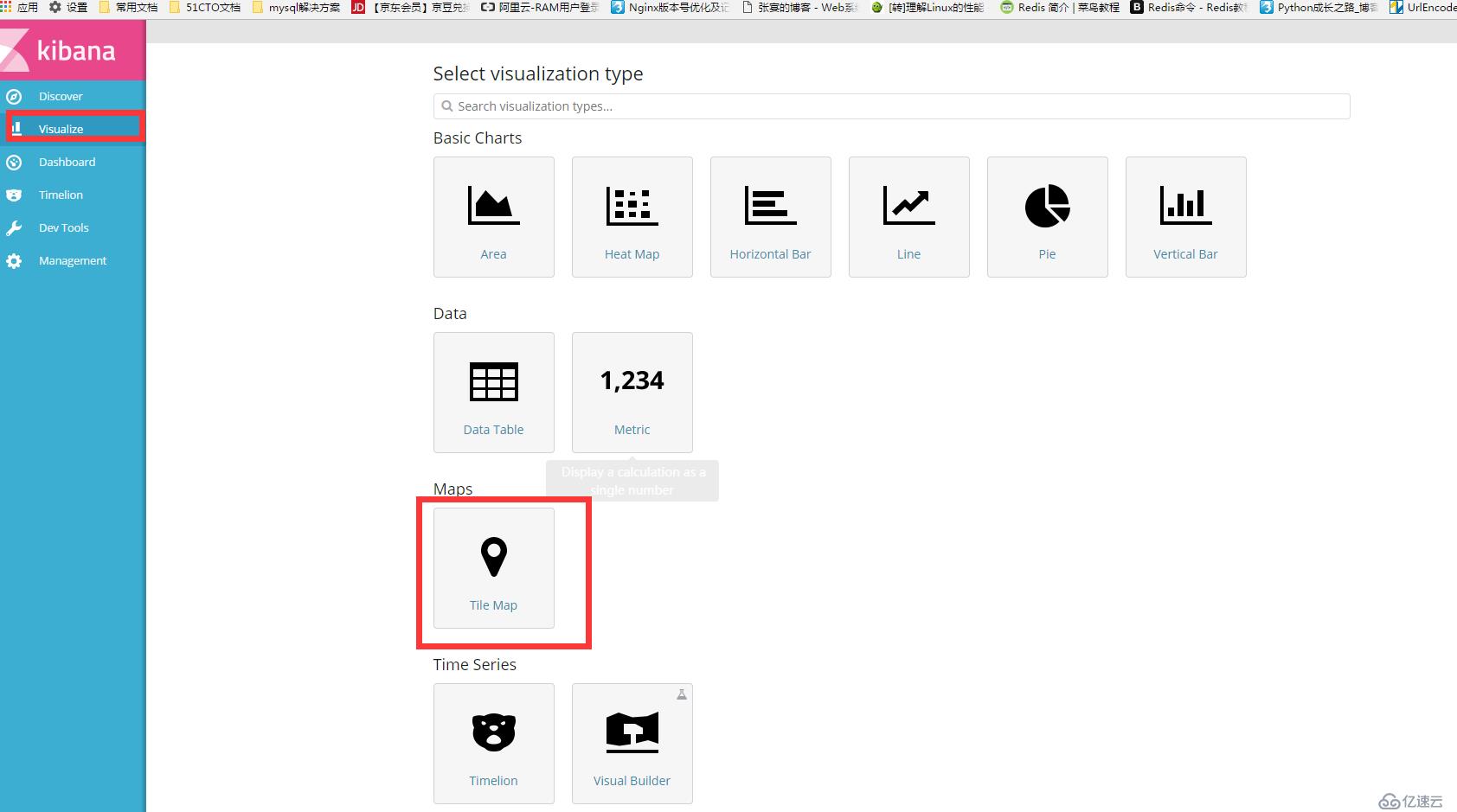
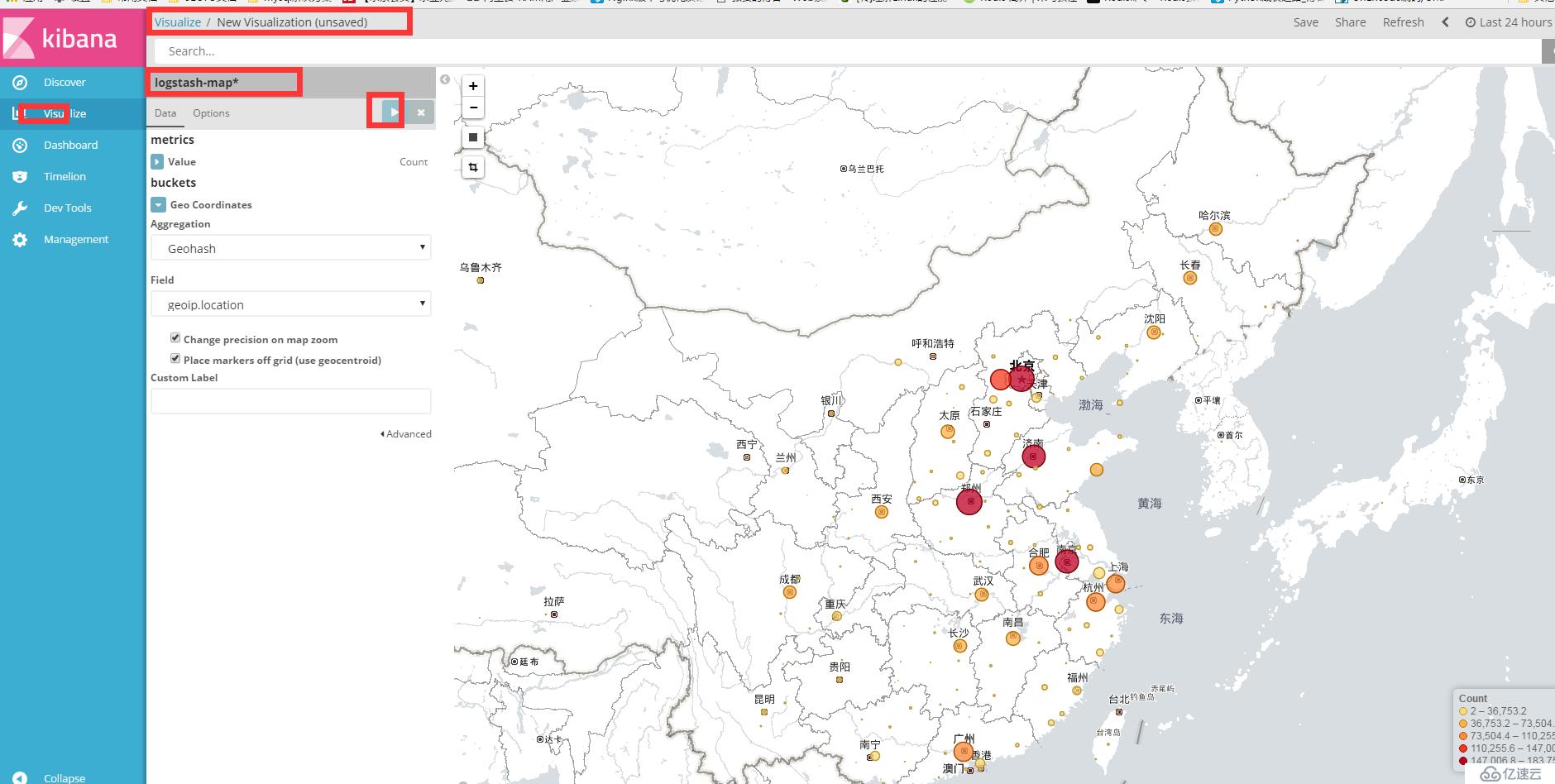
4,创建Visualize。具体步骤如下:Visalize--->+--->Maps(Tile Maps)
已上就是简单的步骤。
上一篇:ELK日志分析系统搭建配置
下一篇:Nginx启动脚本