

使用Python怎么编写一个自动扫雷的脚本
创始人
2024-12-26 15:02:22
0次
一、准备工作
1.扫雷游戏
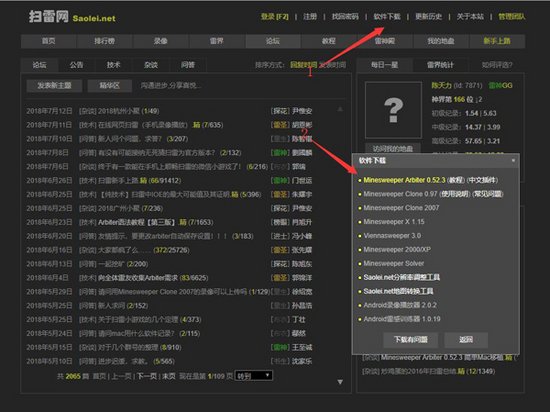
我是win10,没有默认的扫雷,所以去扫雷网下载
2.python 3
我的版本是 python 3.6.1
3.python的第三方库
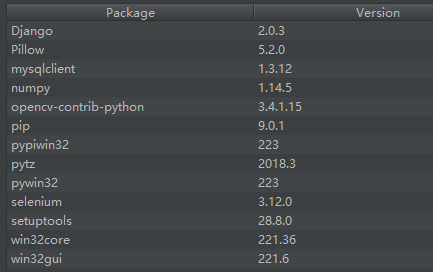
win32api,win32gui,win32con,Pillow,numpy,opencv
可通过 pip install --upgrade SomePackage 来进行安装
注意:有的版本是下载pywin32,但是有的要把pywin32升级到最高并自动下载了pypiwin32,具体情况每个python版本可能都略有不同
我给出我的第三方库和版本仅供参考
二、关键代码组成
1.找到游戏窗口与坐标
#扫雷游戏窗口
class_name = "TMain"
title_name = "Minesweeper Arbiter "
hwnd = win32gui.FindWindow(class_name, title_name)
#窗口坐标
left = 0
top = 0
right = 0
bottom = 0
if hwnd:
 print("找到窗口")
 left, top, right, bottom = win32gui.GetWindowRect(hwnd)
 #win32gui.SetForegroundWindow(hwnd)
 print("窗口坐标:")
 print(str(left)+' '+str(right)+' '+str(top)+' '+str(bottom))
else:
 print("未找到窗口")
2.锁定并抓取雷区图像
#锁定雷区坐标
#去除周围功能按钮以及多余的界面
#具体的像素值是通过QQ的截图来判断的
left += 15
top += 101
right -= 15
bottom -= 42
#抓取雷区图像
rect = (left, top, right, bottom)
img = ImageGrab.grab().crop(rect)
3.各图像的RGBA值
#数字1-8 周围雷数
#0 未被打开
#ed 被打开 空白
#hongqi 红旗
#boom 普通雷
#boom_red 踩中的雷
rgba_ed = [(225, (192, 192, 192)), (31, (128, 128, 128))]
rgba_hongqi = [(54, (255, 255, 255)), (17, (255, 0, 0)), (109, (192, 192, 192)), (54, (128, 128, 128)), (22, (0, 0, 0))]
rgba_0 = [(54, (255, 255, 255)), (148, (192, 192, 192)), (54, (128, 128, 128))]
rgba_1 = [(185, (192, 192, 192)), (31, (128, 128, 128)), (40, (0, 0, 255))]
rgba_2 = [(160, (192, 192, 192)), (31, (128, 128, 128)), (65, (0, 128, 0))]
rgba_3 = [(62, (255, 0, 0)), (163, (192, 192, 192)), (31, (128, 128, 128))]
rgba_4 = [(169, (192, 192, 192)), (31, (128, 128, 128)), (56, (0, 0, 128))]
rgba_5 = [(70, (128, 0, 0)), (155, (192, 192, 192)), (31, (128, 128, 128))]
rgba_6 = [(153, (192, 192, 192)), (31, (128, 128, 128)), (72, (0, 128, 128))]
rgba_8 = [(149, (192, 192, 192)), (107, (128, 128, 128))]
rgba_boom = [(4, (255, 255, 255)), (144, (192, 192, 192)), (31, (128, 128, 128)), (77, (0, 0, 0))]
rgba_boom_red = [(4, (255, 255, 255)), (144, (255, 0, 0)), (31, (128, 128, 128)), (77, (0, 0, 0))]
4.扫描雷区图像保存至一个二维数组map
#扫描雷区图像
def showmap():
 img = ImageGrab.grab().crop(rect)
 for y in range(blocks_y):
  for x in range(blocks_x):
   this_image = img.crop((x * block_width, y * block_height, (x + 1) * block_width, (y + 1) * block_height))
   if this_image.getcolors() == rgba_0:
    map[y][x] = 0
   elif this_image.getcolors() == rgba_1:
    map[y][x] = 1
   elif this_image.getcolors() == rgba_2:
    map[y][x] = 2
   elif this_image.getcolors() == rgba_3:
    map[y][x] = 3
   elif this_image.getcolors() == rgba_4:
    map[y][x] = 4
   elif this_image.getcolors() == rgba_5:
    map[y][x] = 5
   elif this_image.getcolors() == rgba_6:
    map[y][x] = 6
   elif this_image.getcolors() == rgba_8:
    map[y][x] = 8
   elif this_image.getcolors() == rgba_ed:
    map[y][x] = -1
   elif this_image.getcolors() == rgba_hongqi:
    map[y][x] = -4
   elif this_image.getcolors() == rgba_boom or this_image.getcolors() == rgba_boom_red:
    global gameover
    gameover = 1
    break
    #sys.exit(0)
   else:
    print("无法识别图像")
    print("坐标")
    print((y,x))
    print("颜色")
    print(this_image.getcolors())
    sys.exit(0)
 #print(map)
5.扫雷算法
这里我采用的最基础的算法
1.首先点出一个点
2.扫描所有数字,如果周围空白+插旗==数字,则空白均有雷,右键点击空白插旗
3.扫描所有数字,如果周围插旗==数字,则空白均没有雷,左键点击空白
4.循环2、3,如果没有符合条件的,则随机点击一个白块
#插旗
def banner():
 showmap()
 for y in range(blocks_y):
  for x in range(blocks_x):
   if 1 <= map[y][x] and map[y][x] <= 5:
    boom_number = map[y][x]
    block_white = 0
    block_qi = 0
    for yy in range(y-1,y+2):
     for xx in range(x-1,x+2):
      if 0 <= yy and 0 <= xx and yy < blocks_y and xx < blocks_x:
       if not (yy == y and xx == x):if map[yy][xx] == 0:
         block_white += 1
        elif map[yy][xx] == -4:
         block_qi += 1if boom_number == block_white + block_qi:for yy in range(y - 1, y + 2):
      for xx in range(x - 1, x + 2):
       if 0 <= yy and 0 <= xx and yy < blocks_y and xx < blocks_x:
        if not (yy == y and xx == x):
         if map[yy][xx] == 0:
          win32api.SetCursorPos([left+xx*block_width, top+yy*block_height])
          win32api.mouse_event(win32con.MOUSEEVENTF_RIGHTDOWN, 0, 0, 0, 0)
          win32api.mouse_event(win32con.MOUSEEVENTF_RIGHTUP, 0, 0, 0, 0)
           showmap()
#点击白块
def dig():
 showmap()
 iscluck = 0
 for y in range(blocks_y):
  for x in range(blocks_x):
   if 1 <= map[y][x] and map[y][x] <= 5:
    boom_number = map[y][x]
    block_white = 0
    block_qi = 0
    for yy in range(y - 1, y + 2):
     for xx in range(x - 1, x + 2):
      if 0 <= yy and 0 <= xx and yy < blocks_y and xx < blocks_x:
       if not (yy == y and xx == x):
        if map[yy][xx] == 0:
         block_white += 1
        elif map[yy][xx] == -4:
         block_qi += 1if boom_number == block_qi and block_white > 0:for yy in range(y - 1, y + 2):
      for xx in range(x - 1, x + 2):
       if 0 <= yy and 0 <= xx and yy < blocks_y and xx < blocks_x:
        if not(yy == y and xx == x):
         if map[yy][xx] == 0:
          win32api.SetCursorPos([left + xx * block_width, top + yy * block_height])
          win32api.mouse_event(win32con.MOUSEEVENTF_LEFTDOWN, 0, 0, 0, 0)
          win32api.mouse_event(win32con.MOUSEEVENTF_LEFTUP, 0, 0, 0, 0)
          iscluck = 1
 if iscluck == 0:
  luck()
#随机点击
def luck():
 fl = 1
 while(fl):
  randomrandom_x = random.randint(0, blocks_x - 1)
  randomrandom_y = random.randint(0, blocks_y - 1)
  if(map[random_y][random_x] == 0):
   win32api.SetCursorPos([left + random_x * block_width, top + random_y * block_height])
   win32api.mouse_event(win32con.MOUSEEVENTF_LEFTDOWN, 0, 0, 0, 0)
   win32api.mouse_event(win32con.MOUSEEVENTF_LEFTUP, 0, 0, 0, 0)
   fl = 0
def gogo():
 win32api.SetCursorPos([left, top])
 win32api.mouse_event(win32con.MOUSEEVENTF_LEFTDOWN, 0, 0, 0, 0)
 win32api.mouse_event(win32con.MOUSEEVENTF_LEFTUP, 0, 0, 0, 0)
 showmap()
 global gameover
 while(1):
  if(gameover == 0):
   banner()
   banner()
   dig()
  else:
   gameover = 0
   win32api.keybd_event(113, 0, 0, 0)
   win32api.SetCursorPos([left, top])
   win32api.mouse_event(win32con.MOUSEEVENTF_LEFTDOWN, 0, 0, 0, 0)
   win32api.mouse_event(win32con.MOUSEEVENTF_LEFTUP, 0, 0, 0, 0)
   showmap()
下一篇:怎么在Redis中使用哨兵模式
相关内容
热门资讯
空调连续工作多久需要停机休息
空调连续工作的时间取决于多个因素,包括空调的型号、功率、使用环境和维护情况等。一般来说,空调可以连续...
空调哪个符号是除湿的
空调除湿功能通常用一个水滴形状的符号表示。不同品牌和型号的空调遥控器可能会有所差异,但一般来说,除湿...
格力空调多长时间加一次氟利昂
1、一般情况下,空调对氟利昂的使用量是非常小的,所以在空调使用了四年左右的时候再考虑加也没问题。2、...
空调用多长时间需要加氟一次
一般情况下是五年。当出现以下这几种情况时,空调才需要加氟。1、空调的室内机和室外机各有两个接口,当接...
格调生活·C标思享荟:卡萨帝在...
9月12日的郑州龙湖金融岛,夜风轻拂,灯光璀璨。“C标时刻共传奇——卡萨帝思享荟暨20周年品牌盛典郑...
品牌价值破千亿、高端份额持续领...
9月12日,“C标时刻共传奇——卡萨帝思享荟暨20周年品牌盛典郑州站”在郑州龙湖金融岛举办。2026...
空调主板坏了修800还是换新的
空调主板坏了是修还是换新,需要考虑多个因素,以下是一些建议:1. 维修成本:如果维修费用较低,比如 ...
空调开多久需要休息多长时间
问题:空调开多久需要休息多长时间回答:1、在使用空调的过程中,一般空调开7~8个小时左右需要休息2~...
中央空调多长时间清洗一次
1、一般空调开机前清洗一次即可,空调开机中间时段再清洗一次,空调关机时清洗一次,这样比较合理。2、空...
中央空调氟利昂多久加一次
看空调制热和制冷程度,很多人的观点认为氟利昂必须一年放一次,其实这个观点是错误的,理解上面有点偏差,...