

wx-charts中怎么使用微信小程序图表插件
创始人
2024-12-22 10:22:03
0次
微信小程序图表插件(wx-charts)基于canvas绘制,体积小巧,支持图表类型饼图、线图、柱状图 、区域图等图表图形绘制,目前wx-charts是微信小程序图表插件中比较强大好使的一个
支持图标类型
饼图 pie
圆环图 ring
线图 line
柱状图 column
区域图 area
雷达图 radar
如何使用?
直接引用编译好的文件 dist/charts.js(js下载地址)
.wxml中定义
canvas-id与new wxCharts({canvasId:”})中canvasId一致
2. 命令行
git clone github.com/xiaolin3303/wx-charts.git
npm install rollup -g
npm install
rollup -c 或者 rollup --config rollup.config.prod.js
参数说明
opts             Object
opts.canvasId        String required          微信小程序canvas-id
opts.width          Number required        canvas宽度,单位为px
opts.height         Number required        canvas高度,单位为px
opts.title          Object      (only for ring chart)
opts.title.name       String      标题内容
opts.title.fontSize     Number      标题字体大小(可选,单位为px)
opts.title.color       String      标题颜色(可选)
opts.subtitle        Object     (only for ring chart)
opts.subtitle.name      String      副标题内容
opts.subtitle.fontSize    Number     副标题字体大小(可选,单位为px)
opts.subtitle.color     String     副标题颜色(可选)
opts.animation        Boolean default true     是否动画展示
opts.legend         Boolen default true    是否显示图表下方各类别的标识
opts.type          String required 图表类型,可选值为pie, line, column, area……
opts.categories       Array required    (饼图、圆环图不需要) 数据类别分类
opts.dataLabel        Boolean default true   是否在图表中显示数据内容值
opts.dataPointShape     Boolean default true  是否在图表中显示数据点图形标识
opts.xAxis          Object    X轴配置
opts.xAxis.disableGrid    Boolean default false   不绘制X轴网格
opts.yAxis          Object  Y轴配置
opts.yAxis.format      Function      自定义Y轴文案显示
opts.yAxis.min        Number    Y轴起始值
opts.yAxis.max        Number      Y轴终止值
opts.yAxis.title       String    Y轴title
opts.yAxis.disabled     Boolean default false    不绘制Y轴
opts.series         Array required    数据列表
数据列表每项结构定义
dataItem           Object
dataItem.data         Array required (饼图、圆环图为Number) 数据
dataItem.color        String 例如#7cb5ec 不传入则使用系统默认配色方案
dataItem.name         String 数据名称
dateItem.format        Function 自定义显示数据内容
详见demo(具体demo git地址)
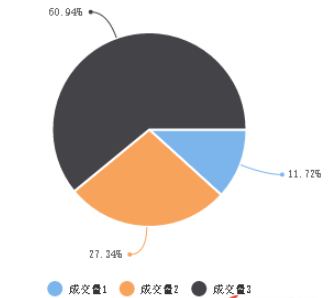
1.pie
new wxCharts({
  animation: true, //是否有动画
  canvasId: 'pieCanvas',
  type: 'pie',
  series: [{
    name: '成交量1',
    data: 15,
  }, {
    name: '成交量2',
    data: 35,
  }, {
    name: '成交量3',
    data: 78,
  }],
  width: windowWidth,
  height: 300,
  dataLabel: true,
 });
}
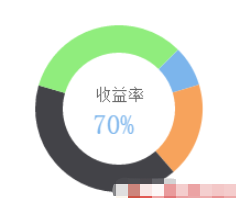
2. ring
new wxCharts({
  animation: true,
  canvasId: 'ringCanvas',
  type: 'ring',
  extra: {
    ringWidth: 25,
    pie: {
      offsetAngle: -45
    }
  },
  title: {
    name: '70%',
    color: '#7cb5ec',
    fontSize: 25
  },
  subtitle: {
    name: '收益率',
    color: '#666666',
    fontSize: 15
  },
  series: [{
    name: '成交量1',
    data: 15,
    stroke: false
  }, {
    name: '成交量2',
    data: 35,
     stroke: false
  }, {
    name: '成交量3',
    data: 78,
    stroke: false
  }, {
    name: '成交量4',
    data: 63,
     stroke: false
  }],
  disablePieStroke: true,
  width: windowWidth,
  height: 200,
  dataLabel: false,
  legend: false,
  padding: 0
});
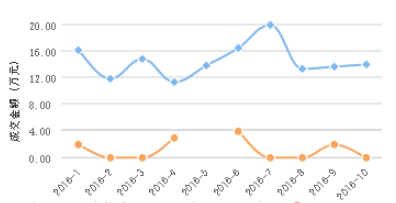
3. line
new wxCharts({
  canvasId: 'lineCanvas',
  type: 'line',
  categories: simulationData.categories,
  animation: true,
  background: '#f5f5f5',
  series: [{
    name: '成交量1',
    data: simulationData.data,
    format: function (val, name) {
      return val.toFixed(2) + '万';
    }
  }, {
    name: '成交量2',
    data: [2, 0, 0, 3, null, 4, 0, 0, 2, 0],
    format: function (val, name) {
      return val.toFixed(2) + '万';
    }
  }],
  xAxis: {
    disableGrid: true
  },
  yAxis: {
    title: '成交金额 (万元)',
    format: function (val) {
      return val.toFixed(2);
    },
    min: 0
  },
  width: windowWidth,
  height: 200,
  dataLabel: false,
  dataPointShape: true,
  extra: {
    lineStyle: 'curve'
  }
});
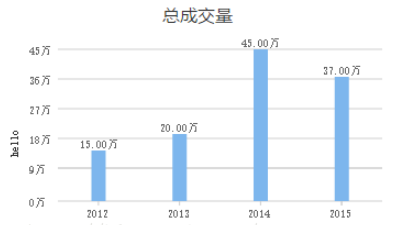
4. column
new wxCharts({
  canvasId: 'columnCanvas',
  type: 'column',
  animation: true,
  categories: chartData.main.categories,
  series: [{
    name: '成交量',
    data: chartData.main.data,
    format: function (val, name) {
      return val.toFixed(2) + '万';
    }
  }],
  yAxis: {
    format: function (val) {
      return val + '万';
    },
    title: 'hello',
    min: 0
  },
  xAxis: {
    disableGrid: false,
    type: 'calibration'
  },
  extra: {
    column: {
      width: 15
    }
  },
  width: windowWidth,
  height: 200,
});
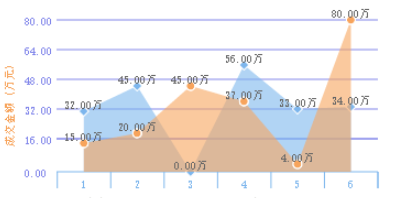
5. area
new wxCharts({
  canvasId: 'areaCanvas',
  type: 'area',
  categories: ['1', '2', '3', '4', '5', '6'],
  animation: true,
  series: [{
    name: '成交量1',
    data: [32, 45, 0, 56, 33, 34],
    format: function (val) {
      return val.toFixed(2) + '万';
    }
  }, {
   name: '成交量2',
   data: [15, 20, 45, 37, 4, 80],
   format: function (val) {
    return val.toFixed(2) + '万';
   },
  }],
  yAxis: {
    title: '成交金额 (万元)',
    format: function (val) {
      return val.toFixed(2);
    },
    min: 0,
    fontColor: '#8085e9',
    gridColor: '#8085e9',
    titleFontColor: '#f7a35c'
  },
  xAxis: {
    fontColor: '#7cb5ec',
    gridColor: '#7cb5ec'
  },
  extra: {
    legendTextColor: '#cb2431'
  },
  width: windowWidth,
  height: 200
});
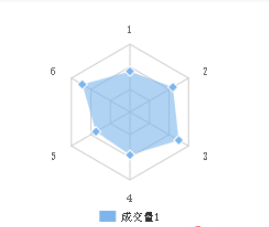
6.radar
new wxCharts({
  canvasId: 'radarCanvas',
  type: 'radar',
  categories: ['1', '2', '3', '4', '5', '6'],
  series: [{
    name: '成交量1',
    data: [90, 110, 125, 95, 87, 122]
  }],
  width: windowWidth,
  height: 200,
  extra: {
    radar: {
      max: 150
    }
  }
});
相关内容
热门资讯
空调连续工作多久需要停机休息
空调连续工作的时间取决于多个因素,包括空调的型号、功率、使用环境和维护情况等。一般来说,空调可以连续...
空调哪个符号是除湿的
空调除湿功能通常用一个水滴形状的符号表示。不同品牌和型号的空调遥控器可能会有所差异,但一般来说,除湿...
格力空调多长时间加一次氟利昂
1、一般情况下,空调对氟利昂的使用量是非常小的,所以在空调使用了四年左右的时候再考虑加也没问题。2、...
空调用多长时间需要加氟一次
一般情况下是五年。当出现以下这几种情况时,空调才需要加氟。1、空调的室内机和室外机各有两个接口,当接...
格调生活·C标思享荟:卡萨帝在...
9月12日的郑州龙湖金融岛,夜风轻拂,灯光璀璨。“C标时刻共传奇——卡萨帝思享荟暨20周年品牌盛典郑...
品牌价值破千亿、高端份额持续领...
9月12日,“C标时刻共传奇——卡萨帝思享荟暨20周年品牌盛典郑州站”在郑州龙湖金融岛举办。2026...
空调主板坏了修800还是换新的
空调主板坏了是修还是换新,需要考虑多个因素,以下是一些建议:1. 维修成本:如果维修费用较低,比如 ...
空调开多久需要休息多长时间
问题:空调开多久需要休息多长时间回答:1、在使用空调的过程中,一般空调开7~8个小时左右需要休息2~...
中央空调多长时间清洗一次
1、一般空调开机前清洗一次即可,空调开机中间时段再清洗一次,空调关机时清洗一次,这样比较合理。2、空...
中央空调氟利昂多久加一次
看空调制热和制冷程度,很多人的观点认为氟利昂必须一年放一次,其实这个观点是错误的,理解上面有点偏差,...