

微信小程序中怎么实现map地图
创始人
2024-12-22 10:21:40
0次
前言
微信小程序地图操作比较简单,api也很少,使用map组件来展示。说到地图,那就先来看基础定位:
定位用到wx.getLocation(OBJECT)函数,代码如下:
wx.getLocation({
 type: 'wgs84',
 success: function(res) {
 var latitude = res.latitude
 var longitude = res.longitude
 var speed = res.speed
 var accuracy = res.accuracy
 }
})
定位成功会返回四个参数值,如下:
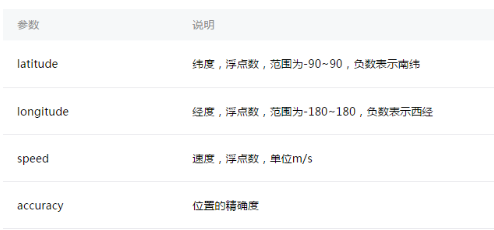
map属性太多,先看一下:
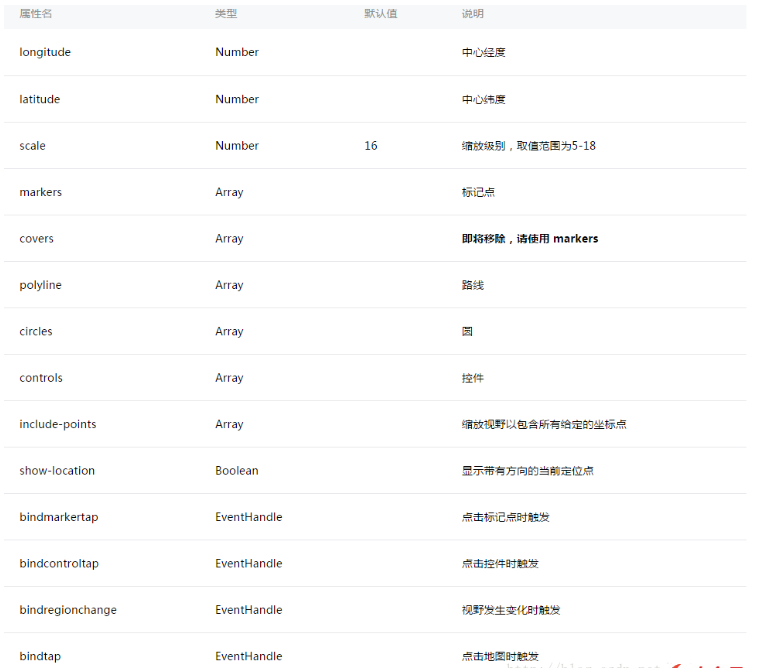
如果用到地图,基本上所有属性都会用到。
下面一一看一下,我们先看效果图吧,先看真相:
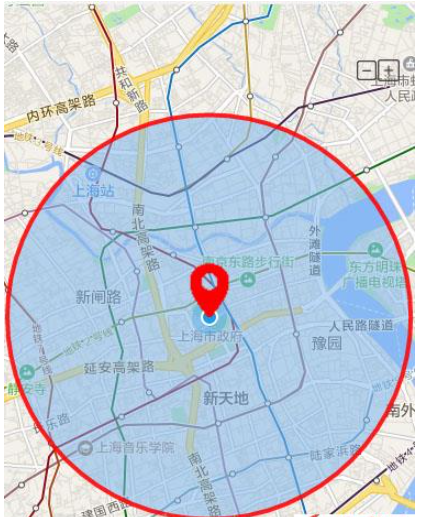
这里我只用了一个markers,就是定位当前位置的红色markers,用法如下:
 wx.getLocation({
  type: 'wgs84', // 默认为 wgs84 返回 gps 坐标,gcj02 返回可用于 wx.openLocation 的坐标
  success: function (res) {

  _this.setData({
   latitude: res.latitude,
   longitude: res.longitude,
   markers: [{
   id: "1",
   latitude: res.latitude,
   longitude: res.longitude,
   width: 50,
   height: 50,
   iconPath: "/assests/imgs/my.png",
   title: "哪里"

   }],
   circles: [{
   latitude: res.latitude,
   longitude: res.longitude,
   color: '#FF0000DD',
   fillColor: '#7cb5ec88',
   radius: 3000,
   strokeWidth: 1
   }]

  })
  }

 })
这里加了circles,半径是3000米,具体的api可自行看官网。
接下来看看controls,控制层,在地图上显示控件,控件不随着地图移动,看API:
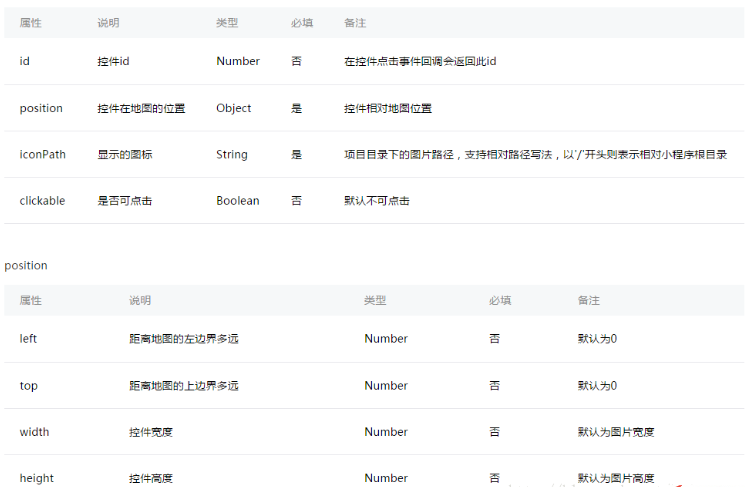
注意看示例图的右上角,有两个按钮,加减号,是控制地图scale的数值变化,动态缩放地图的,controls用法也很简单:
 controls: [{
  id: 1,
  iconPath: '/assests/imgs/jian.png',
  position: {
  left: 320,
  top: 100 - 50,
  width: 20,
  height: 20
  },
  clickable: true
 },
 {
  id: 2,
  iconPath: '/assests/imgs/jia.png',
  position: {
  left: 340,
  top: 100 - 50,
  width: 20,
  height: 20
  },
  clickable: true
 }
 ]
最后我们看一张gif图:
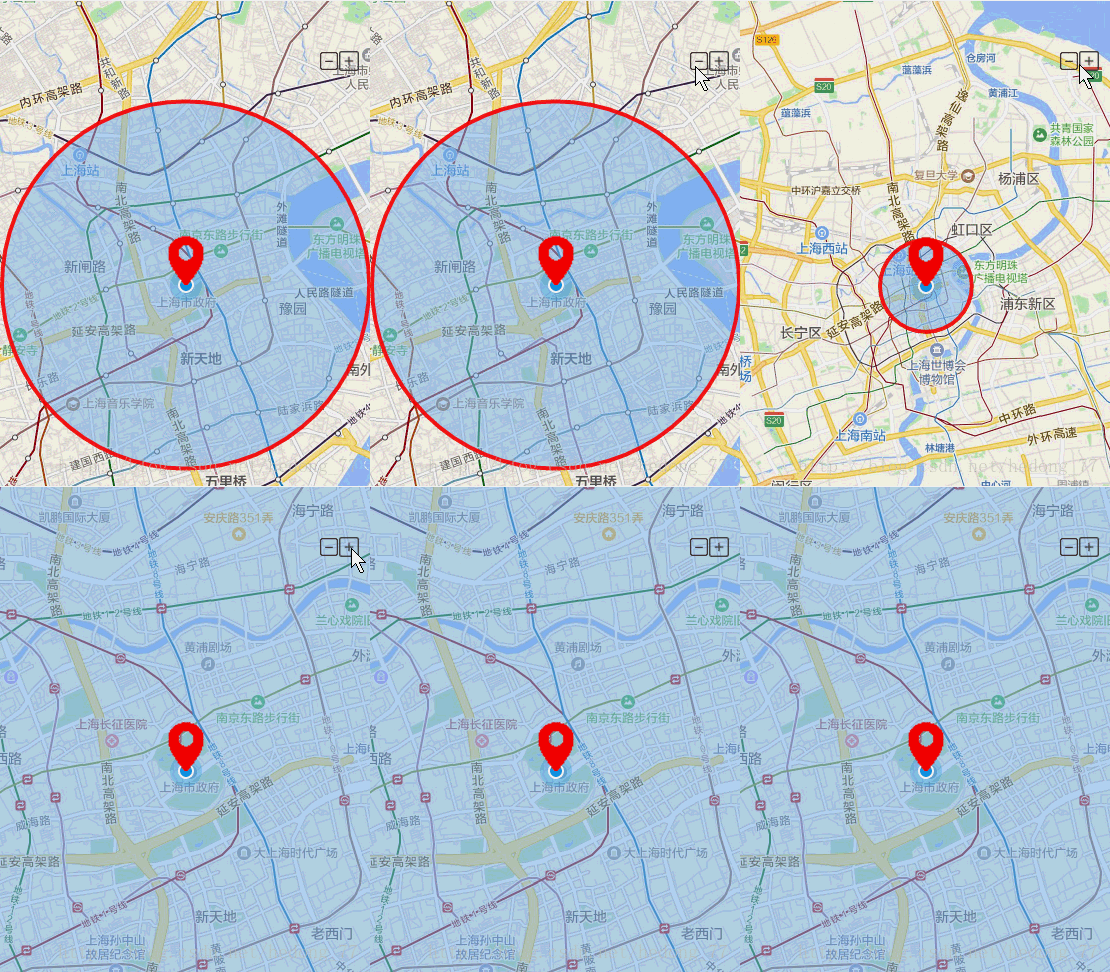
最后上一下具体代码:
wxml:
js:
Page({
 data: {
 Height: 0,
 scale: 13,
 latitude: "",
 longitude: "",
 markers: [],
 controls: [{
  id: 1,
  iconPath: '/assests/imgs/jian.png',
  position: {
  left: 320,
  top: 100 - 50,
  width: 20,
  height: 20
  },
  clickable: true
 },
 {
  id: 2,
  iconPath: '/assests/imgs/jia.png',
  position: {
  left: 340,
  top: 100 - 50,
  width: 20,
  height: 20
  },
  clickable: true
 }
 ],
 circles: []

 },

 onLoad: function () {
 var _this = this;

 wx.getSystemInfo({
  success: function (res) {
  //设置map高度,根据当前设备宽高满屏显示
  _this.setData({
   view: {
   Height: res.windowHeight
   }

  })


  }
 })

 wx.getLocation({
  type: 'wgs84', // 默认为 wgs84 返回 gps 坐标,gcj02 返回可用于 wx.openLocation 的坐标
  success: function (res) {

  _this.setData({
   latitude: res.latitude,
   longitude: res.longitude,
   markers: [{
   id: "1",
   latitude: res.latitude,
   longitude: res.longitude,
   width: 50,
   height: 50,
   iconPath: "/assests/imgs/my.png",
   title: "哪里"

   }],
   circles: [{
   latitude: res.latitude,
   longitude: res.longitude,
   color: '#FF0000DD',
   fillColor: '#7cb5ec88',
   radius: 3000,
   strokeWidth: 1
   }]

  })
  }

 })

 },

 regionchange(e) {
 console.log("regionchange===" + e.type)
 },

 //点击merkers
 markertap(e) {
 console.log(e.markerId)

 wx.showActionSheet({
  itemList: ["A"],
  success: function (res) {
  console.log(res.tapIndex)
  },
  fail: function (res) {
  console.log(res.errMsg)
  }
 })
 },

 //点击缩放按钮动态请求数据
 controltap(e) {
 var that = this;
 console.log("scale===" + this.data.scale)
 if (e.controlId === 1) {
  // if (this.data.scale === 13) {
  that.setData({
  scale: --this.data.scale
  })
  // }
 } else {
  // if (this.data.scale !== 13) {
  that.setData({
  scale: ++this.data.scale
  })
  // }
 }


 },


})
上一篇:微信小程序后台持续定位功能如何用
相关内容
热门资讯
空调连续工作多久需要停机休息
空调连续工作的时间取决于多个因素,包括空调的型号、功率、使用环境和维护情况等。一般来说,空调可以连续...
空调哪个符号是除湿的
空调除湿功能通常用一个水滴形状的符号表示。不同品牌和型号的空调遥控器可能会有所差异,但一般来说,除湿...
格力空调多长时间加一次氟利昂
1、一般情况下,空调对氟利昂的使用量是非常小的,所以在空调使用了四年左右的时候再考虑加也没问题。2、...
空调用多长时间需要加氟一次
一般情况下是五年。当出现以下这几种情况时,空调才需要加氟。1、空调的室内机和室外机各有两个接口,当接...
格调生活·C标思享荟:卡萨帝在...
9月12日的郑州龙湖金融岛,夜风轻拂,灯光璀璨。“C标时刻共传奇——卡萨帝思享荟暨20周年品牌盛典郑...
品牌价值破千亿、高端份额持续领...
9月12日,“C标时刻共传奇——卡萨帝思享荟暨20周年品牌盛典郑州站”在郑州龙湖金融岛举办。2026...
空调主板坏了修800还是换新的
空调主板坏了是修还是换新,需要考虑多个因素,以下是一些建议:1. 维修成本:如果维修费用较低,比如 ...
空调开多久需要休息多长时间
问题:空调开多久需要休息多长时间回答:1、在使用空调的过程中,一般空调开7~8个小时左右需要休息2~...
中央空调多长时间清洗一次
1、一般空调开机前清洗一次即可,空调开机中间时段再清洗一次,空调关机时清洗一次,这样比较合理。2、空...
中央空调氟利昂多久加一次
看空调制热和制冷程度,很多人的观点认为氟利昂必须一年放一次,其实这个观点是错误的,理解上面有点偏差,...