

PHP验证码类ValidateCode怎么用
创始人
2024-12-09 06:41:37
0次
PHP解析验证码类
1.开始
在网上看到使用PHP写的ValidateCode生成验证码类,感觉不错,特拿来分析学习一下。
2.类图
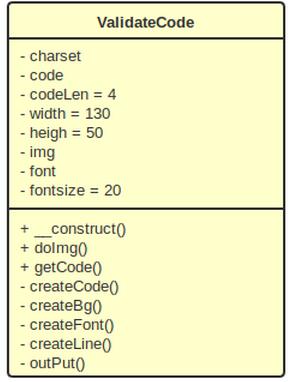
3.验证码类部分代码
3.1 定义变量
  //随机因子
  private $charset = 'abcdefghjkmnprstuvwxyzABCDEFGJKMNPRSTUVWXYZ23456789';
  private $code;
  private $codeLen = 4;

  private $width = 130;
  private $heigh = 50;
  private $img;//图像

  private $font;//字体
  private $fontsize = 20;
$charset 是随机因子,这里是去掉了几个不容易区分的字符,如字母"i,l,o,q",数字"0,1"。有必要可以加入一些中文或其他字符或算式等。
$codeLen表示验证码长度,常见4位。
3.2构造函数,设置验证码字体,生成一个真彩色图像img
public function __construct()
  {
    $this->font = ROOT_PATH.'/font/Chowderhead.ttf';
    $this->img = imagecreatetruecolor($this->width, $this->heigh);
  }
3.3从随机因子中随机抽取4个字符,作为$code验证码.
//生成随机码
  private function createCode()
  {
    $_len = strlen($this->charset) - 1;
    for ($i = 0; $i < $this->codeLen; $i++) {
      $this->code .= $this->charset[mt_rand(0, $_len)];
    }
  }
3.4生成验证码背景色.
//生成背景
  private function createBg()
  {
$color = imagecolorallocate($this->img, mt_rand(157, 255), mt_rand(157, 255), mt_rand(157, 255));
    imagefilledrectangle($this->img, 0, $this->heigh, $this->width, 0, $color);

  }
其中mt_rand(157, 255),目的是随机取比较浅的颜色。
3.5在图像上生成文字.
//生成文字
  private function createFont()
  {
    $_x = $this->width / $this->codeLen;
    $_y = $this->heigh / 2;
    for ($i = 0; $i < $this->codeLen; $i++) {
      $color = imagecolorallocate($this->img, mt_rand(0, 156), mt_rand(0, 156), mt_rand(0, 156));
      imagettftext($this->img, $this->fontsize, mt_rand(-30, 30), $_x * $i + mt_rand(3, 5), $_y + mt_rand(2, 4), $color, $this->font, $this->code[$i]);
    }
  }
在图像上生成验证码文字,主要考虑文字在图像上的位置和每一个文字颜色。
控制第n个文字的x轴位置 = (图像宽度 / 验证码长度) * (n-1) + 随机的偏移数; 其中n = {d1....n}
控制第n个文字的y轴位置 = 图像高度 / 2 + 随机的偏移数;
mt_rand(0, 156) 随机取文字颜色,0-156目的是取比较深的颜色。
mt_rand(-30, 30) 随机的文字旋转。
3.6在图像上生成线条和雪花
//生成线条,雪花
  private function createLine()
  {
    for ($i = 0; $i < 15; $i++) {
      $color = imagecolorallocate($this->img, mt_rand(0, 156), mt_rand(0, 156), mt_rand(0, 156));
      imageline($this->img, mt_rand(0, $this->width), mt_rand(0, $this->heigh), mt_rand(0, $this->width), mt_rand(0, $this->heigh), $color);
    }
    for ($i = 0; $i < 150; $i++) {
      $color = imagecolorallocate($this->img, mt_rand(200, 255), mt_rand(200, 255), mt_rand(200, 255));
      imagestring($this->img, mt_rand(1, 5), mt_rand(0, $this->width), mt_rand(0, $this->heigh), '#', $color);
    }
  }
画线条的时候,取比较深的颜色值,而画雪花的时候取比较淡的颜色值,目的是尽可能的不影响人眼识别验证码,又能干扰自动识别验证码机制。
3.7对外生成验证码图像,供外部调用。
//对外生成
  public function doImg()
  {

    $this->createBg();   //1.创建验证码背景
    $this->createCode();  //2.生成随机码
    $this->createLine();  //3.生成线条和雪花
    $this->createFont();  //4.生成文字
    $this->outPut();    //5.输出验证码图像
  }
3.8完整代码:
font = ROOT_PATH.'/font/Chowderhead.ttf';
    $this->img = imagecreatetruecolor($this->width, $this->heigh);
  }

  //生成随机码
  private function createCode()
  {
    $_len = strlen($this->charset) - 1;
    for ($i = 0; $i < $this->codeLen; $i++) {
      $this->code .= $this->charset[mt_rand(0, $_len)];
    }
  }

  //生成背景
  private function createBg()
  {

    $color = imagecolorallocate($this->img, mt_rand(157, 255), mt_rand(157, 255), mt_rand(157, 255));
    imagefilledrectangle($this->img, 0, $this->heigh, $this->width, 0, $color);

  }

  //生成文字
  private function createFont()
  {
    $_x = $this->width / $this->codeLen;
    $_y = $this->heigh / 2;
    for ($i = 0; $i < $this->codeLen; $i++) {
      $color = imagecolorallocate($this->img, mt_rand(0, 156), mt_rand(0, 156), mt_rand(0, 156));
      imagettftext($this->img, $this->fontsize, mt_rand(-30, 30), $_x * $i + mt_rand(3, 5), $_y + mt_rand(2, 4), $color, $this->font, $this->code[$i]);
    }
  }

  //生成线条,雪花
  private function createLine()
  {
    for ($i = 0; $i < 15; $i++) {
      $color = imagecolorallocate($this->img, mt_rand(0, 156), mt_rand(0, 156), mt_rand(0, 156));
      imageline($this->img, mt_rand(0, $this->width), mt_rand(0, $this->heigh), mt_rand(0, $this->width), mt_rand(0, $this->heigh), $color);
    }
    for ($i = 0; $i < 150; $i++) {
      $color = imagecolorallocate($this->img, mt_rand(200, 255), mt_rand(200, 255), mt_rand(200, 255));
      imagestring($this->img, mt_rand(1, 5), mt_rand(0, $this->width), mt_rand(0, $this->heigh), '#', $color);
    }
  }

  //输出图像
  private function outPut()
  {
    header('Content-Type: image/png');
    imagepng($this->img);
    imagedestroy($this->img);
  }

  //对外生成
  public function doImg()
  {

    $this->createBg();   //1.创建验证码背景
    $this->createCode();  //2.生成随机码
    $this->createLine();  //3.生成线条和雪花
    $this->createFont();  //4.生成文字
    $this->outPut();    //5.输出验证码图像
  }

  //获取验证码
  public function getCode()
  {
    return strtolower($this->code);
  }

}
4.测试
测试代码:
doImg();
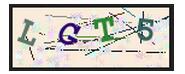
生成验证码:
5.应用
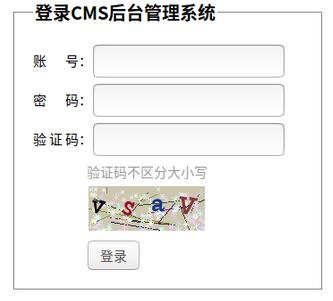
上面onclick代码是点击验证码图片,能自动刷新验证码。
code.php:
doImg();
$_SESSION['ValidateCode']=$_vc->getCode();
相关内容
热门资讯
空调连续工作多久需要停机休息
空调连续工作的时间取决于多个因素,包括空调的型号、功率、使用环境和维护情况等。一般来说,空调可以连续...
空调哪个符号是除湿的
空调除湿功能通常用一个水滴形状的符号表示。不同品牌和型号的空调遥控器可能会有所差异,但一般来说,除湿...
格力空调多长时间加一次氟利昂
1、一般情况下,空调对氟利昂的使用量是非常小的,所以在空调使用了四年左右的时候再考虑加也没问题。2、...
空调用多长时间需要加氟一次
一般情况下是五年。当出现以下这几种情况时,空调才需要加氟。1、空调的室内机和室外机各有两个接口,当接...
格调生活·C标思享荟:卡萨帝在...
9月12日的郑州龙湖金融岛,夜风轻拂,灯光璀璨。“C标时刻共传奇——卡萨帝思享荟暨20周年品牌盛典郑...
品牌价值破千亿、高端份额持续领...
9月12日,“C标时刻共传奇——卡萨帝思享荟暨20周年品牌盛典郑州站”在郑州龙湖金融岛举办。2026...
空调主板坏了修800还是换新的
空调主板坏了是修还是换新,需要考虑多个因素,以下是一些建议:1. 维修成本:如果维修费用较低,比如 ...
空调开多久需要休息多长时间
问题:空调开多久需要休息多长时间回答:1、在使用空调的过程中,一般空调开7~8个小时左右需要休息2~...
中央空调多长时间清洗一次
1、一般空调开机前清洗一次即可,空调开机中间时段再清洗一次,空调关机时清洗一次,这样比较合理。2、空...
中央空调氟利昂多久加一次
看空调制热和制冷程度,很多人的观点认为氟利昂必须一年放一次,其实这个观点是错误的,理解上面有点偏差,...