

使用.NET怎么实现一个二维码生成功能
创始人
2024-11-28 18:04:09
0次
1、新建一个window应用程序,然后引入.NET二维码类库(开源的类库,可从网上下载):
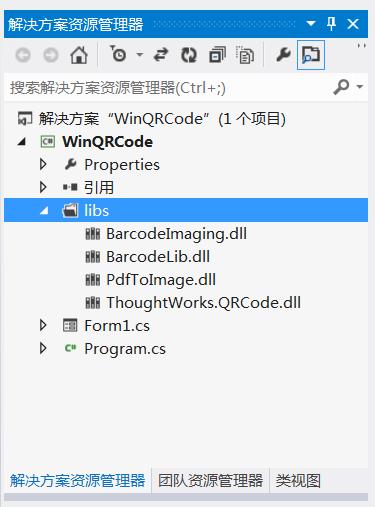
2、构建UI界面,代码如下:
namespace WinQRCode
{
  partial class Form1
  {
    ///
    /// 必需的设计器变量。
    ///
    private System.ComponentModel.IContainer components = null;

    ///
    /// 清理所有正在使用的资源。
    ///
    /// 如果应释放托管资源,为 true;否则为 false。
    protected override void Dispose(bool disposing)
    {
      if (disposing && (components != null))
      {
        components.Dispose();
      }
      base.Dispose(disposing);
    }

    #region Windows 窗体设计器生成的代码

    ///
    /// 设计器支持所需的方法 - 不要
    /// 使用代码编辑器修改此方法的内容。
    ///
    private void InitializeComponent()
    {
      this.button1 = new System.Windows.Forms.Button();
      this.button2 = new System.Windows.Forms.Button();
      this.pictureBox1 = new System.Windows.Forms.PictureBox();
      this.label1 = new System.Windows.Forms.Label();
      this.textBox1 = new System.Windows.Forms.TextBox();
      this.label2 = new System.Windows.Forms.Label();
      this.lbl解码信息 = new System.Windows.Forms.Label();
      ((System.ComponentModel.ISupportInitialize)(this.pictureBox1)).BeginInit();
      this.SuspendLayout();
      //
      // button1
      //
      this.button1.Location = new System.Drawing.Point(446, 31);
      this.button1.Margin = new System.Windows.Forms.Padding(4, 5, 4, 5);
      this.button1.Name = "button1";
      this.button1.Size = new System.Drawing.Size(103, 37);
      this.button1.TabIndex = 0;
      this.button1.Text = "编码";
      this.button1.UseVisualStyleBackColor = true;
      this.button1.Click += new System.EventHandler(this.button1_Click);
      //
      // button2
      //
      this.button2.Location = new System.Drawing.Point(446, 81);
      this.button2.Margin = new System.Windows.Forms.Padding(4, 5, 4, 5);
      this.button2.Name = "button2";
      this.button2.Size = new System.Drawing.Size(103, 37);
      this.button2.TabIndex = 1;
      this.button2.Text = "解码";
      this.button2.UseVisualStyleBackColor = true;
      this.button2.Click += new System.EventHandler(this.button2_Click);
      //
      // pictureBox1
      //
      this.pictureBox1.Location = new System.Drawing.Point(23, 117);
      this.pictureBox1.Margin = new System.Windows.Forms.Padding(4, 5, 4, 5);
      this.pictureBox1.Name = "pictureBox1";
      this.pictureBox1.Size = new System.Drawing.Size(279, 253);
      this.pictureBox1.SizeMode = System.Windows.Forms.PictureBoxSizeMode.StretchImage;
      this.pictureBox1.TabIndex = 2;
      this.pictureBox1.TabStop = false;
      //
      // label1
      //
      this.label1.AutoSize = true;
      this.label1.Location = new System.Drawing.Point(18, 39);
      this.label1.Margin = new System.Windows.Forms.Padding(4, 0, 4, 0);
      this.label1.Name = "label1";
      this.label1.Size = new System.Drawing.Size(69, 25);
      this.label1.TabIndex = 3;
      this.label1.Text = "信息:";
      //
      // textBox1
      //
      this.textBox1.Location = new System.Drawing.Point(95, 37);
      this.textBox1.Margin = new System.Windows.Forms.Padding(4, 5, 4, 5);
      this.textBox1.Name = "textBox1";
      this.textBox1.Size = new System.Drawing.Size(333, 31);
      this.textBox1.TabIndex = 4;
      //
      // label2
      //
      this.label2.AutoSize = true;
      this.label2.Location = new System.Drawing.Point(18, 81);
      this.label2.Margin = new System.Windows.Forms.Padding(4, 0, 4, 0);
      this.label2.Name = "label2";
      this.label2.Size = new System.Drawing.Size(88, 25);
      this.label2.TabIndex = 5;
      this.label2.Text = "二维码:";
      //
      // lbl解码信息
      //
      this.lbl解码信息.AutoSize = true;
      this.lbl解码信息.Location = new System.Drawing.Point(101, 81);
      this.lbl解码信息.Margin = new System.Windows.Forms.Padding(4, 0, 4, 0);
      this.lbl解码信息.Name = "lbl解码信息";
      this.lbl解码信息.Size = new System.Drawing.Size(0, 25);
      this.lbl解码信息.TabIndex = 6;
      //
      // Form1
      //
      this.AutoScaleDimensions = new System.Drawing.SizeF(11F, 24F);
      this.AutoScaleMode = System.Windows.Forms.AutoScaleMode.Font;
      this.ClientSize = new System.Drawing.Size(572, 384);
      this.Controls.Add(this.lbl解码信息);
      this.Controls.Add(this.label2);
      this.Controls.Add(this.textBox1);
      this.Controls.Add(this.label1);
      this.Controls.Add(this.pictureBox1);
      this.Controls.Add(this.button2);
      this.Controls.Add(this.button1);
      this.Font = new System.Drawing.Font("微软雅黑", 10.8F, System.Drawing.FontStyle.Regular, System.Drawing.GraphicsUnit.Point, ((byte)(134)));
      this.Margin = new System.Windows.Forms.Padding(4, 5, 4, 5);
      this.Name = "Form1";
      this.Text = "二维码";
      ((System.ComponentModel.ISupportInitialize)(this.pictureBox1)).EndInit();
      this.ResumeLayout(false);
      this.PerformLayout();

    }

    #endregion

    private System.Windows.Forms.Button button1;
    private System.Windows.Forms.Button button2;
    private System.Windows.Forms.PictureBox pictureBox1;
    private System.Windows.Forms.Label label1;
    private System.Windows.Forms.TextBox textBox1;
    private System.Windows.Forms.Label label2;
    private System.Windows.Forms.Label lbl解码信息;
  }
}
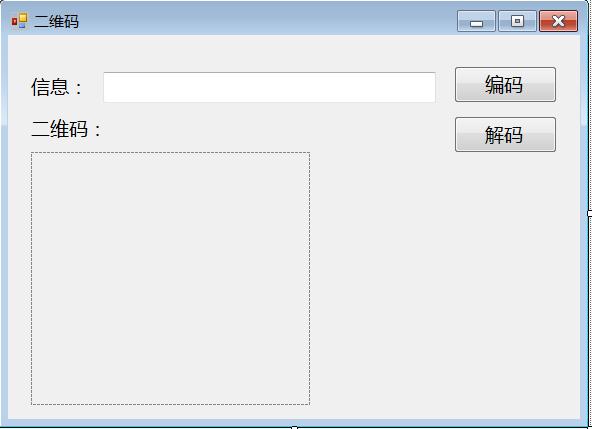
图形如下所示:
3、编写 编码和解码按钮事件,进行编码和解码处理:
using System;
using System.Collections.Generic;
using System.ComponentModel;
using System.Data;
using System.Drawing;
using System.Linq;
using System.Text;
using System.Windows.Forms;

namespace WinQRCode
{
  using ThoughtWorks.QRCode.Codec;
  using ThoughtWorks.QRCode.Codec.Data;
  using ThoughtWorks.QRCode.Codec.Util;
  using System.IO;
  using PdfToImage;
  public partial class Form1 : Form
  {
    public Form1()
    {
      InitializeComponent();
    }
    ///
    /// 编码
    ///
    ///
    ///
    private void button1_Click(object sender, EventArgs e)
    {
      if (this.textBox1.Text != "")
      {
        Cursor.Current = Cursors.WaitCursor;
        if (textBox1.Text.Trim() == String.Empty)
        {
          MessageBox.Show("不能为空.");
          return;
        }
        QRCodeEncoder qrCodeEncoder = new QRCodeEncoder();
        qrCodeEncoder.QRCodeEncodeMode = QRCodeEncoder.ENCODE_MODE.BYTE;
        qrCodeEncoder.QRCodeScale = 4;
        qrCodeEncoder.QRCodeVersion = 7;
        qrCodeEncoder.QRCodeErrorCorrect = QRCodeEncoder.ERROR_CORRECTION.M;
        System.Drawing.Image image;
        String data = textBox1.Text;
        //编码
        image = qrCodeEncoder.Encode(data);
        //图片显示
        this.pictureBox1.Image = image;
        Cursor.Current = Cursors.Default;

      }
    }
    ///
    /// 解码
    ///
    ///
    ///
    private void button2_Click(object sender, EventArgs e)
    {
      Cursor.Current = Cursors.WaitCursor;
      Bitmap b = this.pictureBox1.Image as Bitmap;
      try
      {
        QRCodeDecoder decoder = new QRCodeDecoder();
        //解码
        String decodedString = decoder.decode(new QRCodeBitmapImage(b));
        //显示解码信息
        this.lbl解码信息.Text += decodedString ;
      }
      catch (Exception ex)
      {
        MessageBox.Show(ex.Message);
      }
      Cursor.Current = Cursors.Default;
    }

    private void Form1_Load(object sender, EventArgs e)
    {

    }
  }
}
相关内容
热门资讯
空调连续工作多久需要停机休息
空调连续工作的时间取决于多个因素,包括空调的型号、功率、使用环境和维护情况等。一般来说,空调可以连续...
空调哪个符号是除湿的
空调除湿功能通常用一个水滴形状的符号表示。不同品牌和型号的空调遥控器可能会有所差异,但一般来说,除湿...
格力空调多长时间加一次氟利昂
1、一般情况下,空调对氟利昂的使用量是非常小的,所以在空调使用了四年左右的时候再考虑加也没问题。2、...
空调用多长时间需要加氟一次
一般情况下是五年。当出现以下这几种情况时,空调才需要加氟。1、空调的室内机和室外机各有两个接口,当接...
格调生活·C标思享荟:卡萨帝在...
9月12日的郑州龙湖金融岛,夜风轻拂,灯光璀璨。“C标时刻共传奇——卡萨帝思享荟暨20周年品牌盛典郑...
品牌价值破千亿、高端份额持续领...
9月12日,“C标时刻共传奇——卡萨帝思享荟暨20周年品牌盛典郑州站”在郑州龙湖金融岛举办。2026...
空调主板坏了修800还是换新的
空调主板坏了是修还是换新,需要考虑多个因素,以下是一些建议:1. 维修成本:如果维修费用较低,比如 ...
空调开多久需要休息多长时间
问题:空调开多久需要休息多长时间回答:1、在使用空调的过程中,一般空调开7~8个小时左右需要休息2~...
中央空调多长时间清洗一次
1、一般空调开机前清洗一次即可,空调开机中间时段再清洗一次,空调关机时清洗一次,这样比较合理。2、空...
中央空调氟利昂多久加一次
看空调制热和制冷程度,很多人的观点认为氟利昂必须一年放一次,其实这个观点是错误的,理解上面有点偏差,...