

asp.net中批量导出access某表内容到word文档的案例
创始人
2024-11-28 18:03:59
0次
一、需求:
需要将表中每一条记录中的某些内容导出在一个word文档中,并将这些文档保存在指定文件夹目录下
二、界面,简单设计如下:
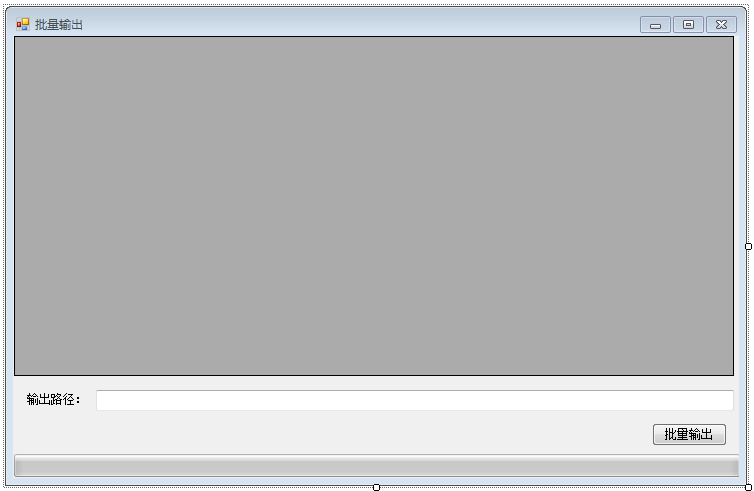
三、添加office相关引用
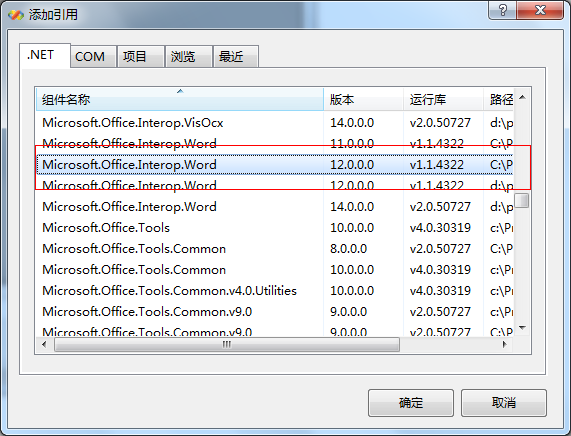
添加后可在解决方案资源管理器中看到:
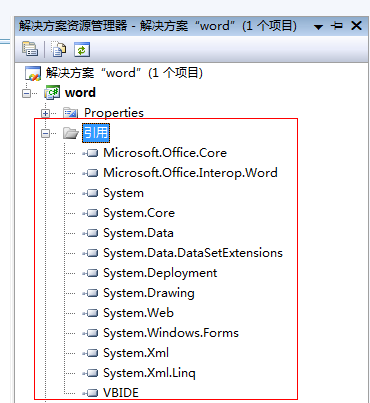
四、添加form1中的引用
using System.Data.OleDb;
using System.Data.SqlClient;
using System.IO;
using Microsoft.Office.Core;
using Word=Microsoft.Office.Interop.Word;
using System.Reflection;
五、窗体Form1中代码如下:
using System;
using System.Collections.Generic;
using System.ComponentModel;
using System.Data;
using System.Drawing;
using System.Linq;
using System.Text;
using System.Windows.Forms;
using System.Data.OleDb;
using System.Data.SqlClient;
using System.IO;
using Microsoft.Office.Core;
using Word=Microsoft.Office.Interop.Word;
using System.Reflection;
using System.Threading;//线程需用,进程中
namespace word
{
 delegate void ShowProgressDelegate(int totalStep, int currentStep); //定义委托,异步调用
 public partial class Form1 : Form
 {
  public Form1()
  {
   InitializeComponent();
  }
  public string filepath = "D:\\zjy\\其他\\NCTDCBJYQ04.mdb"; //数据库所在位置设置
  public string path; //输出路径
  private void Form1_Load(object sender, EventArgs e)
  {
   string sqlstr = "select OBJECTID,CBFBM,CBFMC from CBF";
   //string sqlstr = "select * from CBF";
   DataSet ds = AccessDAO.getDataSetFromAccessTable(sqlstr, filepath);
   this.dataGridView1.DataSource = ds.Tables[0].DefaultView;
   dataGridView1.AllowUserToAddRows = false;
  }
  private void textBox1_MouseClick(object sender, MouseEventArgs e)//输出路径设置
  {
   FolderBrowserDialog dilog = new FolderBrowserDialog();
   dilog.Description = "请选择文件夹";
   if (dilog.ShowDialog() == DialogResult.OK || dilog.ShowDialog() == DialogResult.Yes)
   {
    path = dilog.SelectedPath;
    this.textBox1.Text = path;
   }
  }
  object pathword;      //声明文件路径变量
  private void button2_Click(object sender, EventArgs e) //批量输出
  {
   ParameterizedThreadStart start = new ParameterizedThreadStart(SetProgress);
   Thread progressThread = new Thread(start);
   progressThread.IsBackground = true;//标记为后台进程,在窗口退出时,正常退出
   progressThread.Start();
  }
   ///
  /// 刷新进度条
  ///
  ///
  ///
  void ShowProgress(int totalStep, int currentStep)
  {
   this.progressBar1.Maximum = totalStep;
   this.progressBar1.Value = currentStep;
   if (this.progressBar1.Value * 100 / progressBar1.Maximum != 100)
   {
    this.label2.Text = "当前输出进度为:" + this.progressBar1.Value * 100 / progressBar1.Maximum + "%" + " 请耐心等待:)";
   }
   else if (this.progressBar1.Value * 100 / progressBar1.Maximum == 100)
   {
    this.label2.Text = "输出结束!";
   }
  }
  ///
  /// 设置当前进度
  ///
  ///
  void SetProgress(object state)
  {
   if (this.textBox1.Text == "")
   {
    MessageBox.Show("请选择文件输出路径", "提示");
   }
   else
   {
    for (int i = 0; i < this.dataGridView1.Rows.Count; i++) //遍历获取table中需要的值,并分别创建word文档
    {
     #region 打开进度条
     Thread.Sleep(1);
     object[] objs = new object[] { this.dataGridView1.RowCount, i+1 };
     //异步调用
     this.Invoke(new ShowProgressDelegate(ShowProgress), objs);
     #endregion
     #region 获取word中需要添加的内容
     string dm = this.dataGridView1.Rows[i].Cells[1].Value.ToString();//承包方编码
     string mc = this.dataGridView1.Rows[i].Cells[2].Value.ToString();//承包方名称
     #endregion
     #region 创建word文档,并将内容写入word,并保存起来
     //初始化变量
     object Nothing = Missing.Value;      //COM调用时用于占位
     object format = Word.WdSaveFormat.wdFormatDocument; //Word文档的保存格式
     Word.ApplicationClass wordApp = new Word.ApplicationClass();    //声明一个wordAPP对象
     Word.Document worddoc = wordApp.Documents.Add(ref Nothing, ref Nothing, ref Nothing, ref Nothing);//新建一个word对象
     //向文档中写入内容
     string wordstr = "承包方代码:" + dm + "\n" + "承包方名称:" + mc;
     worddoc.Paragraphs.Last.Range.Text = wordstr;
     //保存文档
     pathword = path + "\\" + dm; //设置文件保存路径
     worddoc.SaveAs(ref pathword, ref format, ref Nothing, ref Nothing,
      ref Nothing, ref Nothing, ref Nothing, ref Nothing, ref Nothing,
      ref Nothing, ref Nothing, ref Nothing, ref Nothing,
      ref Nothing, ref Nothing, ref Nothing);
     //关闭文档
     worddoc.Close(ref Nothing, ref Nothing, ref Nothing); //关闭worddoc文档对象
     wordApp.Quit(ref Nothing, ref Nothing, ref Nothing); //关闭wordApp组对象
     #endregion
    }
    MessageBox.Show("文档创建成功!","提示");
   }
  }
 }
}
六、读取数据库中表需要的数据库类AccessDAO.cs代码如下:
using System;
using System.Collections.Generic;
using System.Linq;
using System.Text;
using System.Data;
using System.Data.OleDb;
using System.Data.SqlClient;
using System.Text.RegularExpressions; //正则表达式引用所需
namespace word
{
 //access的数据访问接口
 class AccessDAO
 {
  public static class Property
  {
   public static string accessFilePath = "d:\\nCTDCBJYQ04DataSet.mdb";
   //若放入主程序,则可如下设置
   //one mainFrm = (one)this.Owner;
   //string prjName = mainFrm.laPrj.Text;
   //string prjPath = mainFrm.laFile_Path.Text;
   // public static string accessFilePath = prjPath + "\\矢量数据\\" + prjName + ".mdb";
  }
  //从access数据库获取数据
  //dataFilePath指定access文件的路径
  //sql指定数据库的查询语句
  //DataSet为查询返回的数据集
  public static DataSet getDataSetFromAccessTable(string sql, string dataFilePath)
  {
   // 连接数据库
   OleDbConnection connct = new OleDbConnection();
   string oleDB = "Provider=Microsoft.Jet.OLEDB.4.0;Data Source=" + dataFilePath;
   connct.ConnectionString = oleDB;
   //创建命令
   OleDbCommand command = new OleDbCommand(sql, connct);
   //打开数据库
   connct.Open();
   //执行命令
   DataSet dataSet = new DataSet();
   OleDbDataAdapter dataAdapter = new OleDbDataAdapter(command);
   dataAdapter.Fill(dataSet);
   // 关闭连接
   connct.Close();
   return dataSet;
  }
  //更新或者插入数据到access数据库
  //dataFilePath指定access文件的路径
  //sql指定数据库的更新或者插入语句
  //返回值int表示此次更新影响的行数
  public static int updateAccessTable(string sql, string dataFilePath)
  {
   // 连接数据库
   OleDbConnection connct = new OleDbConnection();
   string oleDB = "Provider=Microsoft.Jet.OLEDB.4.0;Data Source=" + dataFilePath;
   connct.ConnectionString = oleDB;
   //打开数据库
   connct.Open();
   //执行命令
   OleDbCommand myCommand = new OleDbCommand(sql, connct);
   int res = myCommand.ExecuteNonQuery();
   // 关闭连接
   connct.Close();
   return res;
  }
  //更新或者插入数据到access数据库
  //dataFilePath指定access文件的路径
  //command指定操作(更新或者插入)数据库的命令
  //返回值int表示此次更新影响的行数
  public static int updateAccessTable(OleDbCommand command, string dataFilePath)
  {
   // 连接数据库
   OleDbConnection connct = new OleDbConnection();
   string oleDB = "Provider=Microsoft.Jet.OLEDB.4.0;Data Source=" + dataFilePath;
   connct.ConnectionString = oleDB;
   //打开数据库
   connct.Open();
   //执行命令
   //OleDbCommand myCommand = new OleDbCommand(sql, connct);
   command.Connection = connct;
   int res = command.ExecuteNonQuery();
   // 关闭连接
   connct.Close();
   return res;
  }
  public bool ckDigital_Num(string digitalItem, int digitalNum)    //正则检查是否为数字,且位数一定
  {
   bool isDigital_Num = false;
   Regex reGen = new Regex(@"^\d{" + digitalNum.ToString("F0") + "}$");     //正则表达式,n位数字
   if (reGen.IsMatch(digitalItem))
    isDigital_Num = true;
   return isDigital_Num;
  }
 }
}
相关内容
热门资讯
空调连续工作多久需要停机休息
空调连续工作的时间取决于多个因素,包括空调的型号、功率、使用环境和维护情况等。一般来说,空调可以连续...
空调哪个符号是除湿的
空调除湿功能通常用一个水滴形状的符号表示。不同品牌和型号的空调遥控器可能会有所差异,但一般来说,除湿...
格力空调多长时间加一次氟利昂
1、一般情况下,空调对氟利昂的使用量是非常小的,所以在空调使用了四年左右的时候再考虑加也没问题。2、...
空调用多长时间需要加氟一次
一般情况下是五年。当出现以下这几种情况时,空调才需要加氟。1、空调的室内机和室外机各有两个接口,当接...
格调生活·C标思享荟:卡萨帝在...
9月12日的郑州龙湖金融岛,夜风轻拂,灯光璀璨。“C标时刻共传奇——卡萨帝思享荟暨20周年品牌盛典郑...
品牌价值破千亿、高端份额持续领...
9月12日,“C标时刻共传奇——卡萨帝思享荟暨20周年品牌盛典郑州站”在郑州龙湖金融岛举办。2026...
空调主板坏了修800还是换新的
空调主板坏了是修还是换新,需要考虑多个因素,以下是一些建议:1. 维修成本:如果维修费用较低,比如 ...
空调开多久需要休息多长时间
问题:空调开多久需要休息多长时间回答:1、在使用空调的过程中,一般空调开7~8个小时左右需要休息2~...
中央空调多长时间清洗一次
1、一般空调开机前清洗一次即可,空调开机中间时段再清洗一次,空调关机时清洗一次,这样比较合理。2、空...
中央空调氟利昂多久加一次
看空调制热和制冷程度,很多人的观点认为氟利昂必须一年放一次,其实这个观点是错误的,理解上面有点偏差,...