

ASP.NET 2.0中怎么利用GridView批量删除数据
第一步:创建批删除界面
由于我们在第52章已经创建了一个批删除界面,因此我们可以简单的将其拷贝到BatchDelete.aspx页面。首先,打开BatchData文件夹里的BatchDelete.aspx页面,以及EnhancedGridView文件夹里的CheckBoxField.aspx页面。在CheckBoxField.aspx页面,切换到Source模式,将
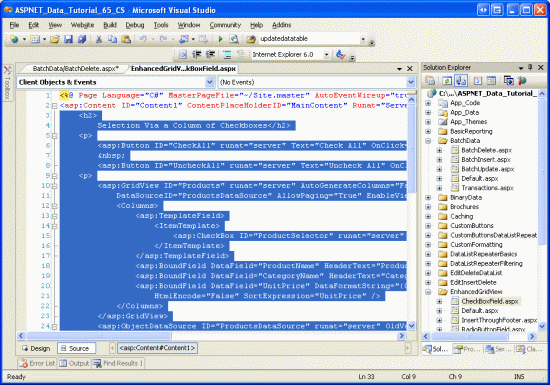
图2:复制CheckBoxField.aspx页面里的声明代码
然后,切换到BatchDelete.aspx页面的Source模式,将代码粘贴到
using System;
using System.Data;
using System.Configuration;
using System.Collections;
using System.Web;
using System.Web.Security;
using System.Web.UI;
using System.Web.UI.WebControls;
using System.Web.UI.WebControls.WebParts;
using System.Web.UI.HtmlControls;
public partial class BatchData_BatchDelete : System.Web.UI.Page
{
protected void DeleteSelectedProducts_Click(object sender, EventArgs e)
{
bool atLeastOneRowDeleted = false;
// Iterate through the Products.Rows property
foreach (GridViewRow row in Products.Rows)
{
// Access the CheckBox
CheckBox cb = (CheckBox)row.FindControl("ProductSelector");
if (cb != null && cb.Checked)
{
// Delete row! (Well, not really...)
atLeastOneRowDeleted = true;
// First, get the ProductID for the selected row
int productID = Convert.ToInt32(Products.DataKeys[row.RowIndex].Value);
// "Delete" the row
DeleteResults.Text += string.Format
("This would have deleted ProductID {0} 完成上述工作后,花几分钟在浏览器里测试该页面.你应该首先看到一个GridView控件列出了前10个产品,每行列出了产品的name, category,price以及一个checkbox. 同时应该有3个按钮“Check All”, “Uncheck All”和“Delete Selected Products”.点“Check All”按钮将会选中所有的checkboxes;而“Uncheck All”按钮将释放所有的
checkboxes;点“Delete Selected Products”的话将显示一个消息,列出选中的产品的ProductID值,不过并不会真的删除产品.
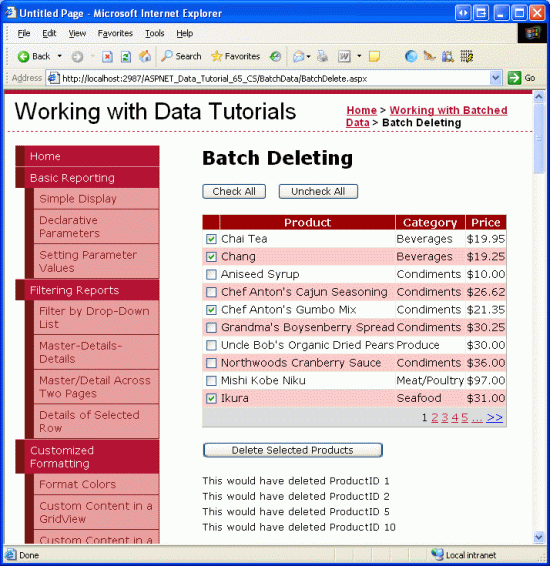
图3:CheckBoxField.aspx页面的界面搬到了BatchDeleting.aspx页面
第二步:在事务里删除选中的产品
完成界面后,剩下的事情是更新代码,以便当点击“Delete Selected Products”按钮时,使用ProductsBLL class类里的DeleteProductsWithTransaction方法来删除选中的产品.该方法是我们在第61章《在事务里对数据库修改进行封装》里添加的,它接受一系列的ProductID值,然后在一个事务里将删除对应的ProductID的记录.
DeleteSelectedProducts按钮的Click事件目前使用的foreach循环如下:
// Iterate through the Products.Rows property
foreach (GridViewRow row in Products.Rows)
{
// Access the CheckBox
CheckBox cb = (CheckBox)row.FindControl("ProductSelector");
if (cb != null && cb.Checked)
{
// Delete row! (Well, not really...)
atLeastOneRowDeleted = true;
// First, get the ProductID for the selected row
int productID = Convert.ToInt32(Products.DataKeys[row.RowIndex].Value);
// "Delete" the row
DeleteResults.Text += string.Format
("This would have deleted ProductID {0}对每行而言,编程引用ProductSelector CheckBox控件,如果它被选中,从DataKeys collection集获取该产品的ProductID值,然后更新DeleteResults控件的Text属性以显示要删除该行.
上面的代码并不会真的删除任何的记录,因为在ProductsBLL class类里我们只是注释出了如何使用Delete方法。 不过就算实际地运用了这些删除逻辑,这些代码虽然可以删除产品但没有运用原子操作.也就是说,如果按顺序对头几个产品删除成功,如果接下来的某个产品删除失败(比如可能是违背里外键约束),那么将抛出一个异常,但是前面的删除操作并不会回滚.
为了保证使用原子操作,我们将转为使用ProductsBLLclass类的DeleteProductsWithTransaction method方法.由于该方法接受一系列的ProductID值,
我们首先需要编译这一系列的值,再将其作为参数传递出去.我们首先创建一个int类型的List
protected void DeleteSelectedProducts_Click(object sender, EventArgs e)
{
// Create a List to hold the ProductID values to delete
System.Collections.Generic.List productIDsToDelete =
new System.Collections.Generic.List();
// Iterate through the Products.Rows property
foreach (GridViewRow row in Products.Rows)
{
// Access the CheckBox
CheckBox cb = (CheckBox)row.FindControl("ProductSelector");
if (cb != null && cb.Checked)
{
// Save the ProductID value for deletion
// First, get the ProductID for the selected row
int productID = Convert.ToInt32(Products.DataKeys[row.RowIndex].Value);
// Add it to the List...
productIDsToDelete.Add(productID);
// Add a confirmation message
DeleteResults.Text += string.Format
("ProductID {0} has been deleted 上述代码创建了一个int类型的List
图4里,我们选择几个产品以删除;图5显示的是点击“Delete Selected Products”按钮后的界面.注意,在Label控件里显示的已经删除的产品的ProductID值,而这些产品已经删除掉了,并没有出现在GridView控件里.
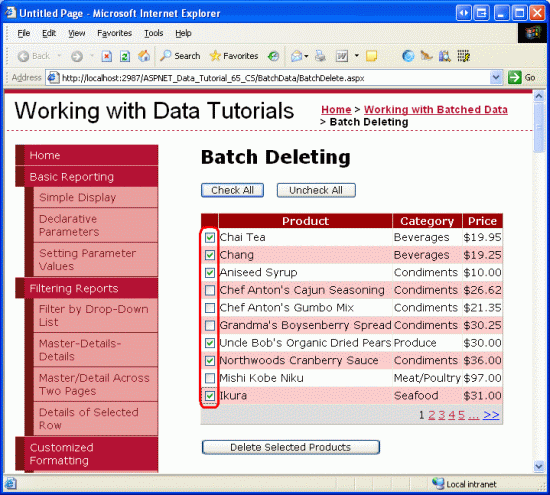
图4:选中的产品将被删除
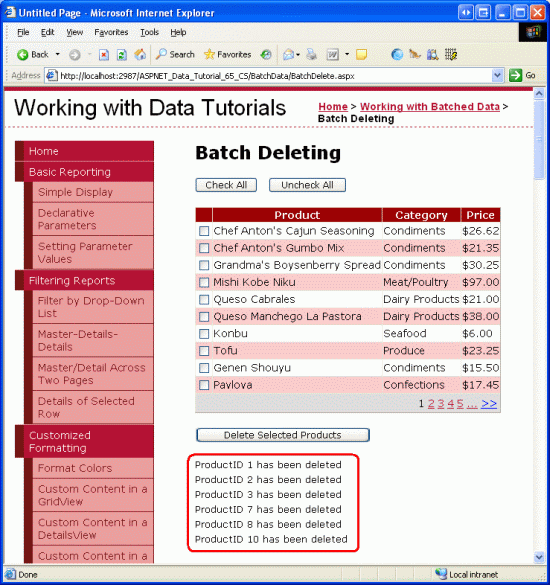
图5:被删除产品的ProductID值出现的GridView下面的Label控件里
注意:为验证DeleteProductsWithTransaction method方法的原子操作,你可以为某个产品在Order Details表里手动添加一个条目,然后尝试删除该产品(当然与其它产品一起删除).这将会违背外键约束,注意对其它产品的删除操作是如何回滚的.