一用户
1.1用户注册
首先在Models里添加用户注册模型类UserRegister 继承自User,在类中new一下密码字段,并添加重复密码和验证码字段。完成后的代码
////// 用户注册模型 /// public class UserRegister : User { ////// 密码 /// [Display(Name="密码",Description="6-20个字符。")] [Required(ErrorMessage = "×")] [StringLength(20,MinimumLength=6,ErrorMessage = "×")] [DataType(DataType.Password)] public new string Password { get; set; } ////// 确认密码 /// [Display(Name = "确认密码", Description = "再次输入密码。")] [Compare("Password", ErrorMessage = "×")] [DataType(DataType.Password)] public string RePassword { get; set; } ////// 验证码 /// [Display(Name = "验证码", Description = "请输入图片中的验证码。")] [Required(ErrorMessage = "×")] [StringLength(6,MinimumLength=6,ErrorMessage = "×")] public string VerificationCode { get; set; } }
打开Controllers,在public ActionResult Register()上点右键添加视图,选强类型视图,模型类选择UserRegister
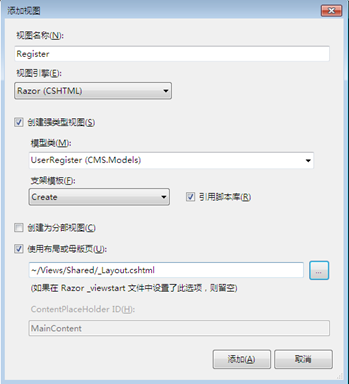
添加完成后转到Register.cshtml编辑视图,删除掉自动生成的内容,手动输入想要的代码,完成后代码如下:
@model CMS.Models.UserRegister
@{
ViewBag.Title = "用户注册";
Layout = "~/Views/Shared/_Layout.cshtml";
}
@using (Html.BeginForm())
{
@Html.ValidationSummary(true)
- 用户注册
-
@Html.LabelFor(model => model.UserName):
@Html.EditorFor(model => model.UserName)
@Html.ValidationMessageFor(model => model.UserName)
@Html.DisplayDescriptionFor(model => model.UserName)
-
@Html.LabelFor(model => model.Gender):
@Html.RadioButton("Gender", 0) 男 @Html.RadioButton("Gender", 1) 女 @Html.RadioButton("Gender", 2, true) 保密
@Html.ValidationMessageFor(model => model)
@Html.DisplayDescriptionFor(model => model)
-
@Html.LabelFor(model => model.Password):
@Html.PasswordFor(model => model.Password)
@Html.ValidationMessageFor(model => model.Password)
@Html.DisplayDescriptionFor(model => model.Password)
-
@Html.LabelFor(model => model.RePassword):
@Html.PasswordFor(model => model.RePassword)
@Html.ValidationMessageFor(model => model.RePassword)
@Html.DisplayDescriptionFor(model => model.RePassword)
-
@Html.LabelFor(model => model.SecurityQuestion):
@Html.EditorFor(model => model.SecurityQuestion)
@Html.ValidationMessageFor(model => model.SecurityQuestion)
@Html.DisplayDescriptionFor(model => model.SecurityQuestion)
-
@Html.LabelFor(model => model.SecurityAnswer):
@Html.EditorFor(model => model.SecurityAnswer)
@Html.ValidationMessageFor(model => model.SecurityAnswer)
@Html.DisplayDescriptionFor(model => model.SecurityAnswer)
-
@Html.LabelFor(model => model.Email):
@Html.EditorFor(model => model.Email)
@Html.ValidationMessageFor(model => model.Email)
@Html.DisplayDescriptionFor(model => model.Email)
-
验证码:
@Html.TextBoxFor(model => model.VerificationCode)
@Html.ValidationMessageFor(model => model.VerificationCode)
换一张
-
注册条款:
@Html.CheckBox("Agreement",new {@class="required"})
我已阅读并同意注册条款
-
}
@section Scripts {
@Scripts.Render("~/bundles/jqueryval")
}下面开始写注册处理的代码。
在Controllers,在public ActionResult Register(){return View();}下面添加一个[HttpPost]方式的Register() Action,代码如下:
[HttpPost]
public ActionResult Register(UserRegister userReg)
{
if (Session["VerificationCode"] == null || Session["VerificationCode"].ToString() == "")
{
Error _e = new Error { Title = "验证码不存在", Details = "在用户注册时,服务器端的验证码为空,或向服务器提交的验证码为空", Cause = "OK,运行一下看看效果

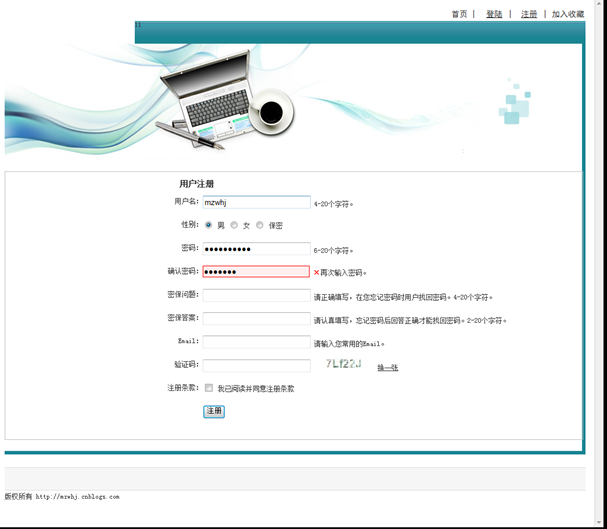
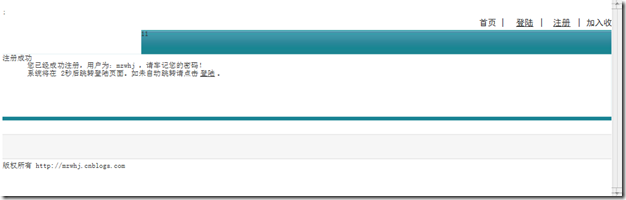
输入完数据点注册。OK 看到注册成功的页面了

看一下数据库中也有相应记录了

注册功能就完成了。