

ASP.NET MVC SSO如何实现单点登录
实验环境配置
HOST文件配置如下:
127.0.0.1 app.com
127.0.0.1 sso.com
IIS配置如下:
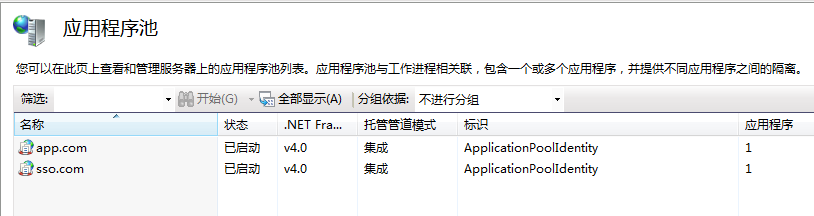
应用程序池采用.Net Framework 4.0
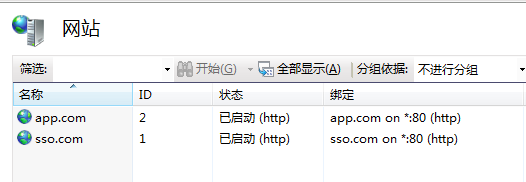
注意IIS绑定的域名,两个完全不同域的域名。
app.com网站配置如下:
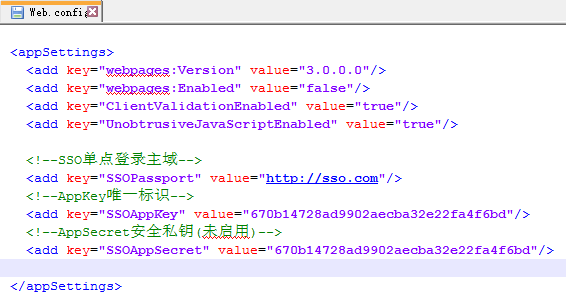
sso.com网站配置如下:
memcached缓存:

数据库配置:

数据库采用EntityFramework 6.0.0,首次运行会自动创建相应的数据库和表结构。
授权验证过程演示:
在浏览器地址栏中访问:http://app.com,如果用户还未登陆则网站会自动重定向至:http://sso.com/passport,同时通过QueryString传参数的方式将对应的AppKey应用标识传递过来,运行截图如下:
URL地址:http://sso.com/passport?appkey=670b14728ad9902aecba32e22fa4f6bd&username=
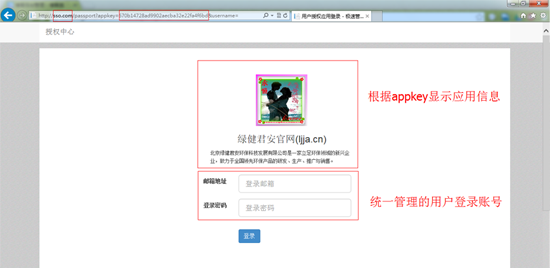
输入正确的登陆账号和密码后,点击登陆按钮系统自动301重定向至应用会掉首页,毁掉成功后如下所示:
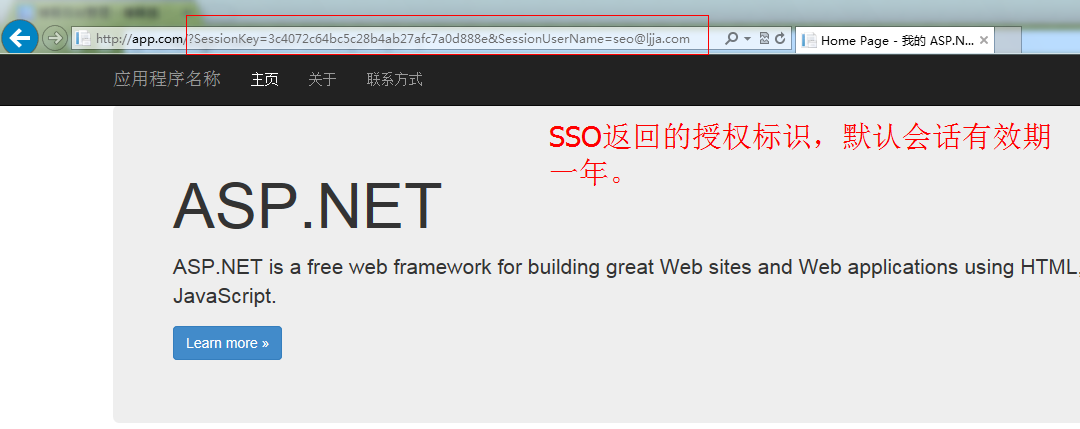
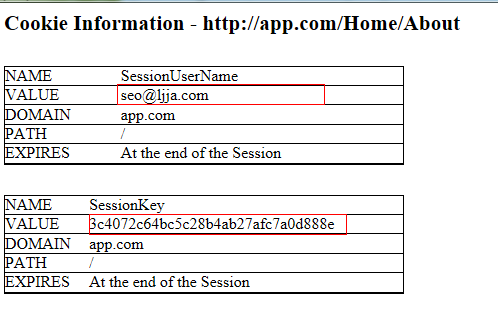
由于在不同的域下进行SSO授权登陆,所以采用QueryString方式返回授权标识。同域网站下可采用Cookie方式。由于301重定向请求是由浏览器发送的,所以在如果授权标识放入Handers中的话,浏览器重定向的时候会丢失。重定向成功后,程序自动将授权标识写入到Cookie中,点击其他页面地址时,URL地址栏中将不再会看到授权标示信息。Cookie设置如下:
登陆成功后的后续授权验证(访问其他需要授权访问的页面):
校验地址:http://sso.com/api/passport?sessionkey=xxxxxx&remark=xxxxxx
返回结果:true,false
客户端可以根据实际业务情况,选择提示用户授权已丢失,需要重新获得授权。默认自动重定向至SSO登陆页面,即:http://sso.com/passport?appkey=670b14728ad9902aecba32e22fa4f6bd&username=seo@ljja.cn 同时登陆页面邮箱地址文本框会自定补全用户的登陆账号,用户只需输入登陆密码即可,授权成功后会话有效期自动延长一年时间。
SSO数据库验证日志:
用户授权验证日志:
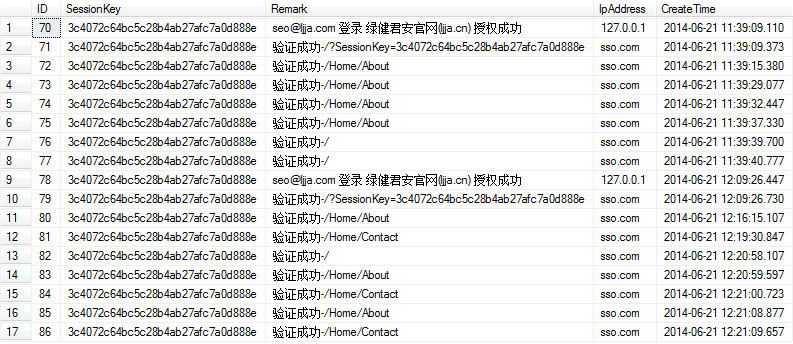
用户授权会话Session:

数据库用户账号和应用信息:

应用授权登陆验证页面核心代码:
////// 公钥:AppKey /// 私钥:AppSecret /// 会话:SessionKey /// public class PassportController : Controller { private readonly IAppInfoService _appInfoService = new AppInfoService(); private readonly IAppUserService _appUserService = new AppUserService(); private readonly IUserAuthSessionService _authSessionService = new UserAuthSessionService(); private readonly IUserAuthOperateService _userAuthOperateService = new UserAuthOperateService(); private const string AppInfo = "AppInfo"; private const string SessionKey = "SessionKey"; private const string SessionUserName = "SessionUserName"; //默认登录界面 public ActionResult Index(string appKey = "", string username = "") { TempData[AppInfo] = _appInfoService.Get(appKey); var viewModel = new PassportLoginRequest { AppKey = appKey, UserName = username }; return View(viewModel); } //授权登录 [HttpPost] public ActionResult Index(PassportLoginRequest model) { //获取应用信息 var appInfo = _appInfoService.Get(model.AppKey); if (appInfo == null) { //应用不存在 return View(model); } TempData[AppInfo] = appInfo; if (ModelState.IsValid == false) { //实体验证失败 return View(model); } //过滤字段无效字符 model.Trim(); //获取用户信息 var userInfo = _appUserService.Get(model.UserName); if (userInfo == null) { //用户不存在 return View(model); } if (userInfo.UserPwd != model.Password.ToMd5()) { //密码不正确 return View(model); } //获取当前未到期的Session var currentSession = _authSessionService.ExistsByValid(appInfo.AppKey, userInfo.UserName); if (currentSession == null) { //构建Session currentSession = new UserAuthSession { AppKey = appInfo.AppKey, CreateTime = DateTime.Now, InvalidTime = DateTime.Now.AddYears(1), IpAddress = Request.UserHostAddress, SessionKey = Guid.NewGuid().ToString().ToMd5(), UserName = userInfo.UserName }; //创建Session _authSessionService.Create(currentSession); } else { //延长有效期,默认一年 _authSessionService.ExtendValid(currentSession.SessionKey); } //记录用户授权日志 _userAuthOperateService.Create(new UserAuthOperate { CreateTime = DateTime.Now, IpAddress = Request.UserHostAddress, Remark = string.Format("{0} 登录 {1} 授权成功", currentSession.UserName, appInfo.Title), SessionKey = currentSession.SessionKey }); 104 var redirectUrl = string.Format("{0}?SessionKey={1}&SessionUserName={2}", appInfo.ReturnUrl, currentSession.SessionKey, userInfo.UserName); //跳转默认回调页面 return Redirect(redirectUrl); } } Memcached会话标识验证核心代码: public class PassportController : ApiController { private readonly IUserAuthSessionService _authSessionService = new UserAuthSessionService(); private readonly IUserAuthOperateService _userAuthOperateService = new UserAuthOperateService(); public bool Get(string sessionKey = "", string remark = "") { if (_authSessionService.GetCache(sessionKey)) { _userAuthOperateService.Create(new UserAuthOperate { CreateTime = DateTime.Now, IpAddress = Request.RequestUri.Host, Remark = string.Format("验证成功-{0}", remark), SessionKey = sessionKey }); return true; } _userAuthOperateService.Create(new UserAuthOperate { CreateTime = DateTime.Now, IpAddress = Request.RequestUri.Host, Remark = string.Format("验证失败-{0}", remark), SessionKey = sessionKey }); return false; } }
Client授权验证Filters Attribute
public class SSOAuthAttribute : ActionFilterAttribute
  {
    public const string SessionKey = "SessionKey";
    public const string SessionUserName = "SessionUserName";

    public override void OnActionExecuting(ActionExecutingContext filterContext)
    {
      var cookieSessionkey = "";
      var cookieSessionUserName = "";

      //SessionKey by QueryString
      if (filterContext.HttpContext.Request.QueryString[SessionKey] != null)
      {
        cookieSessionkey = filterContext.HttpContext.Request.QueryString[SessionKey];
        filterContext.HttpContext.Response.Cookies.Add(new HttpCookie(SessionKey, cookieSessionkey));
      }

      //SessionUserName by QueryString
      if (filterContext.HttpContext.Request.QueryString[SessionUserName] != null)
      {
        cookieSessionUserName = filterContext.HttpContext.Request.QueryString[SessionUserName];
        filterContext.HttpContext.Response.Cookies.Add(new HttpCookie(SessionUserName, cookieSessionUserName));
      }

      //从Cookie读取SessionKey
      if (filterContext.HttpContext.Request.Cookies[SessionKey] != null)
      {
        cookieSessionkey = filterContext.HttpContext.Request.Cookies[SessionKey].Value;
      }

      //从Cookie读取SessionUserName
      if (filterContext.HttpContext.Request.Cookies[SessionUserName] != null)
      {
        cookieSessionUserName = filterContext.HttpContext.Request.Cookies[SessionUserName].Value;
      }

      if (string.IsNullOrEmpty(cookieSessionkey) || string.IsNullOrEmpty(cookieSessionUserName))
      {
        //直接登录
        filterContext.Result = SsoLoginResult(cookieSessionUserName);
      }
      else
      {
        //验证
        if (CheckLogin(cookieSessionkey, filterContext.HttpContext.Request.RawUrl) == false)
        {
          //会话丢失,跳转到登录页面
          filterContext.Result = SsoLoginResult(cookieSessionUserName);
        }
      }

      base.OnActionExecuting(filterContext);
    }

    public static bool CheckLogin(string sessionKey, string remark = "")
    {
      var httpClient = new HttpClient
      {
        BaseAddress = new Uri(ConfigurationManager.AppSettings["SSOPassport"])
      };

      var requestUri = string.Format("api/Passport?sessionKey={0}&remark={1}", sessionKey, remark);

      try
      {
        var resp = httpClient.GetAsync(requestUri).Result;

        resp.EnsureSuccessStatusCode();

        return resp.Content.ReadAsAsync().Result;
      }
      catch (Exception ex)
      {
        throw ex;
      }
    }

    private static ActionResult SsoLoginResult(string username)
    {
      return new RedirectResult(string.Format("{0}/passport?appkey={1}&username={2}",
          ConfigurationManager.AppSettings["SSOPassport"],
          ConfigurationManager.AppSettings["SSOAppKey"],
          username));
    }
  }
示例SSO验证特性使用方法:
[SSOAuth]
  public class HomeController : Controller
  {
    public ActionResult Index()
    {
      return View();
    }

    public ActionResult About()
    {
      ViewBag.Message = "Your application description page.";

      return View();
    }

    public ActionResult Contact()
    {
      ViewBag.Message = "Your contact page.";

      return View();
    }
  }