

使用docker容器时如何转换状态
创始人
2024-11-20 00:01:30
0次
一 docker容器状态转换图
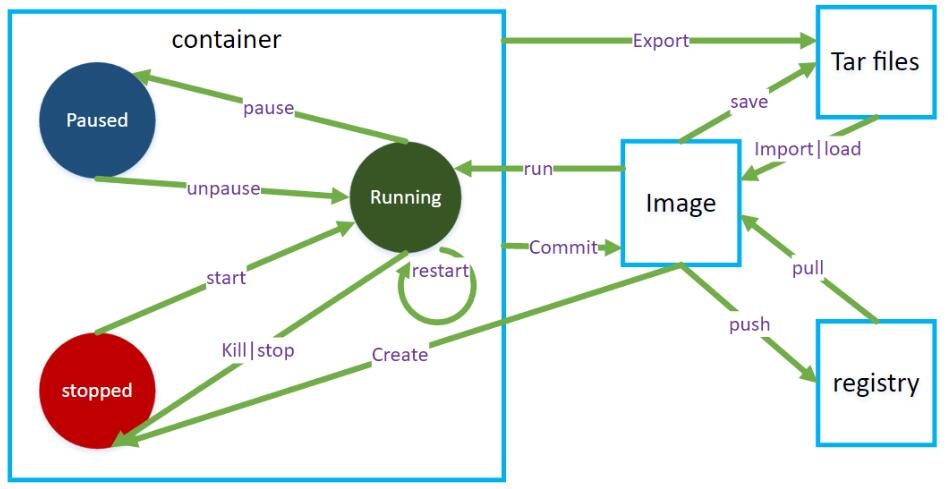
二 实战
[root@localhost ~]# docker info
Containers: 0
Running: 0
Paused: 0
Stopped: 0
Images: 3
Server Version: 17.09.0-ce
Storage Driver: overlay
Backing Filesystem: xfs
Supports d_type: false
Logging Driver: json-file
Cgroup Driver: cgroupfs
Plugins:
Volume: local
Network: bridge host macvlan null overlay
Log: awslogs fluentd gcplogs gelf journald json-file logentries splunk syslog
Swarm: inactive
Runtimes: runc
Default Runtime: runc
Init Binary: docker-init
containerd version: 06b9cb35161009dcb7123345749fef02f7cea8e0
runc version: 3f2f8b84a77f73d38244dd690525642a72156c64
init version: 949e6fa
Security Options:
seccomp
 Profile: default
Kernel Version: 3.10.0-327.el7.x86_64
Operating System: CentOS Linux 7 (Core)
OSType: linux
Architecture: x86_64
CPUs: 1
Total Memory: 993MiB
Name: localhost.localdomain
ID: 6ULL:CFMN:YT7C:4RXZ:2CJ4:26H2:D4Y6:YHUP:SH7L:QLEQ:AWEB:EWTB
Docker Root Dir: /var/lib/docker
Debug Mode (client): false
Debug Mode (server): false
Registry: https://index.docker.io/v1/
Experimental: false
Insecure Registries:
127.0.0.0/8
Live Restore Enabled: false
WARNING: overlay: the backing xfs filesystem is formatted without d_type support, which leads to incorrect behavior.
     Reformat the filesystem with ftype=1 to enable d_type support.
     Running without d_type support will not be supported in future releases.
WARNING: bridge-nf-call-iptables is disabled
WARNING: bridge-nf-call-ip6tables is disabled
[root@localhost ~]# docker images
REPOSITORY     TAG         IMAGE ID      CREATED       SIZE
clearlinux     latest       32685d114002    6 days ago     62.5MB
busybox       latest       6ad733544a63    6 days ago     1.13MB
alpine       latest       053cde6e8953    6 days ago     3.96MB
[root@localhost ~]# docker run -d --name box1 busybox
4ca3d293206cd34e449075491679b0cddd619b451cac7a3d20d5b5daaa6095d8
[root@localhost ~]# docker run -itd --name box2 busybox
9c1578a50f0b97d48c7501dda6d6e1c3d8b3d9ed0e37416120f91f5a634fb12f
[root@localhost ~]# docker ps -a
CONTAINER ID    IMAGE        COMMAND       CREATED       STATUS           PORTS        NAMES
9c1578a50f0b    busybox       "sh"        13 seconds ago   Up 11 seconds                  box2
4ca3d293206c    busybox       "sh"        47 seconds ago   Exited (0) 45 seconds ago            box1
[root@localhost ~]# docker run -itd --name box3 busybox
e84a746ea040603aa4db791da77aee2e2502ff5b184e89049a74805671a58ba9
[root@localhost ~]# docker ps -a
CONTAINER ID    IMAGE        COMMAND       CREATED       STATUS           PORTS        NAMES
e84a746ea040    busybox       "sh"        5 seconds ago    Up 4 seconds                  box3
9c1578a50f0b    busybox       "sh"        About a minute ago  Up About a minute               box2
4ca3d293206c    busybox       "sh"        2 minutes ago    Exited (0) 2 minutes ago
        box1
[root@localhost ~]# docker info
Containers: 3
Running: 2
Paused: 0
Stopped: 1
Images: 3
Server Version: 17.09.0-ce
Storage Driver: overlay
Backing Filesystem: xfs
Supports d_type: false
Logging Driver: json-file
Cgroup Driver: cgroupfs
Plugins:
Volume: local
Network: bridge host macvlan null overlay
Log: awslogs fluentd gcplogs gelf journald json-file logentries splunk syslog
Swarm: inactive
Runtimes: runc
Default Runtime: runc
Init Binary: docker-init
containerd version: 06b9cb35161009dcb7123345749fef02f7cea8e0
runc version: 3f2f8b84a77f73d38244dd690525642a72156c64
init version: 949e6fa
Security Options:
seccomp
 Profile: default
Kernel Version: 3.10.0-327.el7.x86_64
Operating System: CentOS Linux 7 (Core)
OSType: linux
Architecture: x86_64
CPUs: 1
Total Memory: 993MiB
Name: localhost.localdomain
ID: 6ULL:CFMN:YT7C:4RXZ:2CJ4:26H2:D4Y6:YHUP:SH7L:QLEQ:AWEB:EWTB
Docker Root Dir: /var/lib/docker
Debug Mode (client): false
Debug Mode (server): false
Registry: https://index.docker.io/v1/
Experimental: false
Insecure Registries:
127.0.0.0/8
Live Restore Enabled: false
WARNING: overlay: the backing xfs filesystem is formatted without d_type support, which leads to incorrect behavior.
     Reformat the filesystem with ftype=1 to enable d_type support.
     Running without d_type support will not be supported in future releases.
WARNING: bridge-nf-call-iptables is disabled
WARNING: bridge-nf-call-ip6tables is disabled
[root@localhost ~]# docker ps -a
CONTAINER ID    IMAGE        COMMAND       CREATED       STATUS           PORTS        NAMES
e84a746ea040    busybox       "sh"        4 minutes ago    Up 4 minutes                  box3
9c1578a50f0b    busybox       "sh"        6 minutes ago    Up 6 minutes                  box2
4ca3d293206c    busybox       "sh"        6 minutes ago    Exited (0) 6 minutes ago            box1
[root@localhost ~]# docker restart 9c
9c
[root@localhost ~]# docker ps -a
CONTAINER ID    IMAGE        COMMAND       CREATED       STATUS           PORTS        NAMES
e84a746ea040    busybox       "sh"        5 minutes ago    Up 5 minutes                  box3
9c1578a50f0b    busybox       "sh"        7 minutes ago    Up 2 seconds                  box2
4ca3d293206c    busybox       "sh"        8 minutes ago    Exited (0) 8 minutes ago            box1
[root@localhost ~]# docker pause 9c
9c
[root@localhost ~]# docker ps -a
CONTAINER ID    IMAGE        COMMAND       CREATED       STATUS           PORTS        NAMES
e84a746ea040    busybox       "sh"        8 minutes ago    Up 8 minutes                  box3
9c1578a50f0b    busybox       "sh"        10 minutes ago   Up 2 minutes (Paused)              box2
4ca3d293206c    busybox       "sh"        10 minutes ago   Exited (0) 10 minutes ago            box1
[root@localhost ~]# docker info
Containers: 3
Running: 1
Paused: 1
Stopped: 1
Images: 3
Server Version: 17.09.0-ce
Storage Driver: overlay
Backing Filesystem: xfs
Supports d_type: false
Logging Driver: json-file
Cgroup Driver: cgroupfs
Plugins:
Volume: local
Network: bridge host macvlan null overlay
Log: awslogs fluentd gcplogs gelf journald json-file logentries splunk syslog
Swarm: inactive
Runtimes: runc
Default Runtime: runc
Init Binary: docker-init
containerd version: 06b9cb35161009dcb7123345749fef02f7cea8e0
runc version: 3f2f8b84a77f73d38244dd690525642a72156c64
init version: 949e6fa
Security Options:
seccomp
 Profile: default
Kernel Version: 3.10.0-327.el7.x86_64
Operating System: CentOS Linux 7 (Core)
OSType: linux
Architecture: x86_64
CPUs: 1
Total Memory: 993MiB
Name: localhost.localdomain
ID: 6ULL:CFMN:YT7C:4RXZ:2CJ4:26H2:D4Y6:YHUP:SH7L:QLEQ:AWEB:EWTB
Docker Root Dir: /var/lib/docker
Debug Mode (client): false
Debug Mode (server): false
Registry: https://index.docker.io/v1/
Experimental: false
Insecure Registries:
127.0.0.0/8
Live Restore Enabled: false
WARNING: overlay: the backing xfs filesystem is formatted without d_type support, which leads to incorrect behavior.
     Reformat the filesystem with ftype=1 to enable d_type support.
     Running without d_type support will not be supported in future releases.
WARNING: bridge-nf-call-iptables is disabled
WARNING: bridge-nf-call-ip6tables is disabled
[root@localhost ~]# docker unpause 9c
9c
[root@localhost ~]# docker ps -a
CONTAINER ID    IMAGE        COMMAND       CREATED       STATUS           PORTS        NAMES
e84a746ea040    busybox       "sh"        11 minutes ago   Up 11 minutes                  box3
9c1578a50f0b    busybox       "sh"        13 minutes ago   Up 6 minutes                  box2
4ca3d293206c    busybox       "sh"        14 minutes ago   Exited (0) 14 minutes ago            box1
[root@localhost ~]# docker info
Containers: 3
Running: 2
Paused: 0
Stopped: 1
Images: 3
Server Version: 17.09.0-ce
Storage Driver: overlay
Backing Filesystem: xfs
Supports d_type: false
Logging Driver: json-file
Cgroup Driver: cgroupfs
Plugins:
Volume: local
Network: bridge host macvlan null overlay
Log: awslogs fluentd gcplogs gelf journald json-file logentries splunk syslog
Swarm: inactive
Runtimes: runc
Default Runtime: runc
Init Binary: docker-init
containerd version: 06b9cb35161009dcb7123345749fef02f7cea8e0
runc version: 3f2f8b84a77f73d38244dd690525642a72156c64
init version: 949e6fa
Security Options:
seccomp
 Profile: default
Kernel Version: 3.10.0-327.el7.x86_64
Operating System: CentOS Linux 7 (Core)
OSType: linux
Architecture: x86_64
CPUs: 1
Total Memory: 993MiB
Name: localhost.localdomain
ID: 6ULL:CFMN:YT7C:4RXZ:2CJ4:26H2:D4Y6:YHUP:SH7L:QLEQ:AWEB:EWTB
Docker Root Dir: /var/lib/docker
Debug Mode (client): false
Debug Mode (server): false
Registry: https://index.docker.io/v1/
Experimental: false
Insecure Registries:
127.0.0.0/8
Live Restore Enabled: false
WARNING: overlay: the backing xfs filesystem is formatted without d_type support, which leads to incorrect behavior.
     Reformat the filesystem with ftype=1 to enable d_type support.
     Running without d_type support will not be supported in future releases.
WARNING: bridge-nf-call-iptables is disabled
WARNING: bridge-nf-call-ip6tables is disabled
[root@localhost ~]# docker kill 9c
9c
[root@localhost ~]# docker ps -a
CONTAINER ID    IMAGE        COMMAND       CREATED       STATUS            PORTS        NAMES
e84a746ea040    busybox       "sh"        17 minutes ago   Up 17 minutes                  box3
9c1578a50f0b    busybox       "sh"        19 minutes ago   Exited (137) 3 seconds ago            box2
4ca3d293206c    busybox       "sh"        20 minutes ago   Exited (0) 20 minutes ago            box1
[root@localhost ~]# docker stop e8
^[[Ae8
[root@localhost ~]# docker ps -a
CONTAINER ID    IMAGE        COMMAND       CREATED       STATUS            PORTS        NAMES
e84a746ea040    busybox       "sh"        19 minutes ago   Exited (137) 1 second ago            box3
9c1578a50f0b    busybox       "sh"        21 minutes ago   Exited (137) 2 minutes ago            box2
4ca3d293206c    busybox       "sh"        22 minutes ago   Exited (0) 22 minutes ago            box1
[root@localhost ~]# docker start e8
e8
[root@localhost ~]# docker ps -a
CONTAINER ID    IMAGE        COMMAND       CREATED       STATUS            PORTS        NAMES
e84a746ea040    busybox       "sh"        22 minutes ago   Up 5 seconds                   box3
9c1578a50f0b    busybox       "sh"        24 minutes ago   Exited (137) 4 minutes ago            box2
4ca3d293206c    busybox       "sh"        24 minutes ago   Exited (0) 24 minutes ago            box1
[root@localhost ~]# docker start 9c
9c
[root@localhost ~]# docker ps -a
CONTAINER ID    IMAGE        COMMAND       CREATED       STATUS           PORTS        NAMES
e84a746ea040    busybox       "sh"        25 minutes ago   Up 3 minutes                  box3
9c1578a50f0b    busybox       "sh"        27 minutes ago   Up 3 seconds                  box2
4ca3d293206c    busybox       "sh"        28 minutes ago   Exited (0) 28 minutes ago            box1
[root@localhost ~]# docker restart 9c
9c
[root@localhost ~]# docker ps -a
CONTAINER ID    IMAGE        COMMAND       CREATED       STATUS           PORTS        NAMES
e84a746ea040    busybox       "sh"        26 minutes ago   Up 4 minutes                  box3
9c1578a50f0b    busybox       "sh"        28 minutes ago   Up 7 seconds                  box2
4ca3d293206c busybox "sh" 28 minutes ago Exited (0) 28 minutes ago box1补充知识:一张图看懂docker容器的所有状态
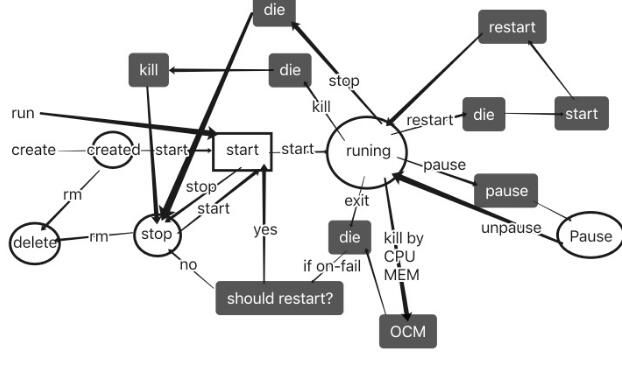
部分解释:
创建容器的命令
run 是create和start的结合
create-created-start
例子:
docker create httpd
OCM硬件信息
docker kill id 强制关闭容器
die某个程序别强制退出,或者进程出错
docker pause :暂停容器中所有的进程。
docker unpause :恢复容器中所有的进程。
相关内容
热门资讯
空调连续工作多久需要停机休息
空调连续工作的时间取决于多个因素,包括空调的型号、功率、使用环境和维护情况等。一般来说,空调可以连续...
空调哪个符号是除湿的
空调除湿功能通常用一个水滴形状的符号表示。不同品牌和型号的空调遥控器可能会有所差异,但一般来说,除湿...
格力空调多长时间加一次氟利昂
1、一般情况下,空调对氟利昂的使用量是非常小的,所以在空调使用了四年左右的时候再考虑加也没问题。2、...
空调用多长时间需要加氟一次
一般情况下是五年。当出现以下这几种情况时,空调才需要加氟。1、空调的室内机和室外机各有两个接口,当接...
格调生活·C标思享荟:卡萨帝在...
9月12日的郑州龙湖金融岛,夜风轻拂,灯光璀璨。“C标时刻共传奇——卡萨帝思享荟暨20周年品牌盛典郑...
品牌价值破千亿、高端份额持续领...
9月12日,“C标时刻共传奇——卡萨帝思享荟暨20周年品牌盛典郑州站”在郑州龙湖金融岛举办。2026...
空调主板坏了修800还是换新的
空调主板坏了是修还是换新,需要考虑多个因素,以下是一些建议:1. 维修成本:如果维修费用较低,比如 ...
空调开多久需要休息多长时间
问题:空调开多久需要休息多长时间回答:1、在使用空调的过程中,一般空调开7~8个小时左右需要休息2~...
中央空调多长时间清洗一次
1、一般空调开机前清洗一次即可,空调开机中间时段再清洗一次,空调关机时清洗一次,这样比较合理。2、空...
中央空调氟利昂多久加一次
看空调制热和制冷程度,很多人的观点认为氟利昂必须一年放一次,其实这个观点是错误的,理解上面有点偏差,...