

使用Python实现秒表功能的方法
创始人
2024-11-18 14:03:42
0次
关于Tkinter:
Tkinter是Python的标准GUI库。Python与Tkinter结合使用时,提供了一种创建GUI应用程序的快速而简单的方法。Tkinter为Tk GUI工具包提供了一个强大的面向对象接口。Tkinter很容易入门,下面是一些示例代码,可以让您在python中使用Tkinter。
语法:
# Python program to create a
# a new window using Tkinter
# importing the required libraires
import tkinter

# creating a object 'top' as instance of class Tk
top = tkinter.Tk()

# This will start the blank window
top.mainloop()
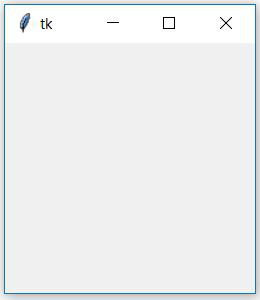
输出:
使用Tkinter创建秒表
现在让我们尝试使用Tkinter模块创建一个程序来创建秒表。
所需模块:我们将仅使用tkinter来创建gui,并且此程序中将不使用其他任何库。
# Python program to illustrate a stop watch
# using Tkinter
#importing the required libraries
import tkinter as Tkinter

counter = -1
running = False
def counter_label(label):
    def count():
        if running:
            global counter

            # To manage the intial delay.
            if counter==-1:
                display="Starting..."
            else:
                display=str(counter)

            label['text']=display   # Or label.config(text=display)

            # label.after(arg1, arg2) delays by
            # first argument given in milliseconds
            # and then calls the function given as second argument.
            # Generally like here we need to call the
            # function in which it is present repeatedly.
            # Delays by 1000ms=1 seconds and call count again.
            label.after(1000, count)
            counter += 1

    # Triggering the start of the counter.
    count()

# start function of the stopwatch
def Start(label):
    global running
    running=True
    counter_label(label)
    start['state']='disabled'
    stop['state']='normal'
    reset['state']='normal'

# Stop function of the stopwatch
def Stop():
    global running
    start['state']='normal'
    stop['state']='disabled'
    reset['state']='normal'
    running = False

# Reset function of the stopwatch
def Reset(label):
    global counter
    counter=-1

    # If rest is pressed after pressing stop.
    if running==False:
        reset['state']='disabled'
        label['text']='Welcome!'

    # If reset is pressed while the stopwatch is running.
    else:
        label['text']='Starting...'

root = Tkinter.Tk()
root.title("Stopwatch")

# Fixing the window size.
root.minsize(width=250, height=70)
label = Tkinter.Label(root, text="Welcome!", fg="black", font="Verdana 30 bold")
label.pack()
start = Tkinter.Button(root, text='Start',
width=15, command=lambda:Start(label))
stop = Tkinter.Button(root, text='Stop',
width=15, state='disabled', command=Stop)
reset = Tkinter.Button(root, text='Reset',
 width=15, state='disabled', command=lambda:Reset(label))
start.pack()
stop.pack()
reset.pack()
root.mainloop()
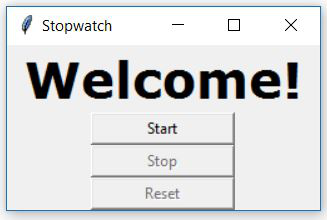
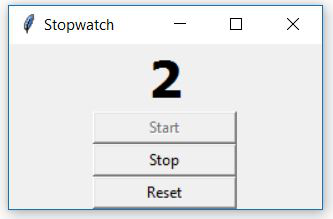
输出:
相关内容
热门资讯
空调连续工作多久需要停机休息
空调连续工作的时间取决于多个因素,包括空调的型号、功率、使用环境和维护情况等。一般来说,空调可以连续...
空调哪个符号是除湿的
空调除湿功能通常用一个水滴形状的符号表示。不同品牌和型号的空调遥控器可能会有所差异,但一般来说,除湿...
格力空调多长时间加一次氟利昂
1、一般情况下,空调对氟利昂的使用量是非常小的,所以在空调使用了四年左右的时候再考虑加也没问题。2、...
空调用多长时间需要加氟一次
一般情况下是五年。当出现以下这几种情况时,空调才需要加氟。1、空调的室内机和室外机各有两个接口,当接...
格调生活·C标思享荟:卡萨帝在...
9月12日的郑州龙湖金融岛,夜风轻拂,灯光璀璨。“C标时刻共传奇——卡萨帝思享荟暨20周年品牌盛典郑...
品牌价值破千亿、高端份额持续领...
9月12日,“C标时刻共传奇——卡萨帝思享荟暨20周年品牌盛典郑州站”在郑州龙湖金融岛举办。2026...
空调主板坏了修800还是换新的
空调主板坏了是修还是换新,需要考虑多个因素,以下是一些建议:1. 维修成本:如果维修费用较低,比如 ...
空调开多久需要休息多长时间
问题:空调开多久需要休息多长时间回答:1、在使用空调的过程中,一般空调开7~8个小时左右需要休息2~...
中央空调多长时间清洗一次
1、一般空调开机前清洗一次即可,空调开机中间时段再清洗一次,空调关机时清洗一次,这样比较合理。2、空...
中央空调氟利昂多久加一次
看空调制热和制冷程度,很多人的观点认为氟利昂必须一年放一次,其实这个观点是错误的,理解上面有点偏差,...