

Ant design vue中实现联动选择取消
html中
{{tag.title}}
js代码
在table中如果想要某个单元格里面是呈现两行或者两行以上,那么就添加template 让slot=命名,将数据循环遍历就可以呈现了
data:{
return{
 const columns = [
 {
  title: '数据类型',
  dataIndex: 'dataTypeName',
  width: '15%'
 },
 {
  title: '数据名称',
  dataIndex: 'dataName',
  width: '15%',
  scopedSlots: { customRender: 'dataName' }
 },
 {
  title: '数据描述',
  dataIndex: 'description',
  scopedSlots: { customRender: 'description' }
 }
 ],
 rowKeys:[],
 dataType:[],
 changeDataType:[],
 addDataType:[],
 rowKeys:[],
 showTip:false // 是否禁止选择(如果最多选择8条)
}
}
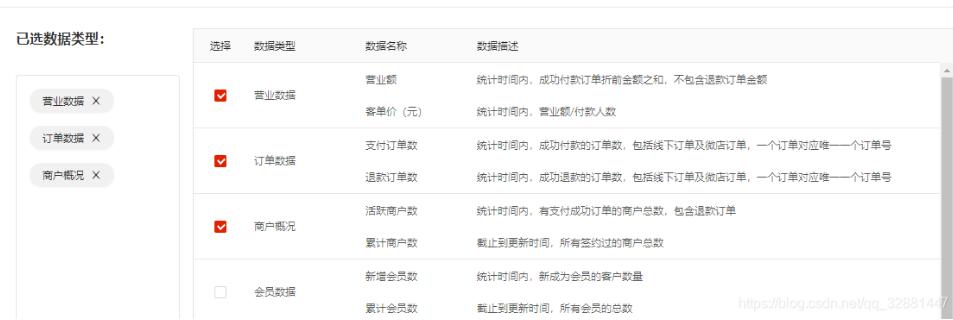
页面为
rowSelection() {
  // const selectedRowKeys = this.selectedRowKeys
  const self = this
  return {
  columnTitle: '选择', // 去掉头部全选框
  hideDefaultSelections: true,
  // selections: { key: 1 },
  selectedRowKeys: self.rowKeys, // 选中的key值
  onChange: (selectedRowKeys, selectedRows) => {
   // 勾选改变触发事件
   if (selectedRows.length <= 7) {
   self.changeDataType = selectedRows
   self.addDataType()
   this.showTip = false
   } else {
   // self.$message.error('数据最多选择8个')
   this.showTip = true
   }
  }
  }
在table中插入选择框,想要将头部全选框去掉直接在rowSelection中设置columnTitle: ‘选择';selectedRows是勾选中的数组集合,selectedRowKeys是选中内容中的key值,可以通过将id设置成key就可以了
如果要做到连动选择,其主要的就是selectedRowKeys和selectedRows,将勾选的selectedRows赋值给侧边的数据
deleteDataType(removedTag) {
  // 侧边数据删除
  const { rowKeys } = this
  const newArr = []
  this.rowKeys = []
  // tag标签close事件是diaplay:none到dome元素上,所有需要用到afterClose key不能使用index,否则删除事件有问题
  const tags = this.dataType.filter(tag => tag.id !== removedTag)
  this.dataType = tags
  rowKeys.forEach(list => {
  if (list !== removedTag) {
   newArr.push(list)
  }
  })
  this.rowKeys = [...newArr]
 },
addDataType() {
  // 勾选列表数据
  this.dataType = []
  this.rowKeys = []
  console.log(this.changeDataType)
  this.changeDataType.forEach(list => {
  if (list.templateItemId && list.selectItem) {
   // 初始化的时候
   this.dataType.push({ title: list.dataTypeName, id: list.templateItemId })
   this.rowKeys.push(list.templateItemId)
  }
  if (list.key) {
   // 点击多选的时候
   this.dataType.push({ title: list.dataTypeName, id: list.key })
   this.rowKeys.push(list.key)
  }
  })
},补充知识:ant-design-vue的select二级联动,联动文本不更新的解决办法
前言
有了需要改动祖传代码项目需求:把之前的select改成二级联动。项目使用了ant-design-vue,数据为[{"id":1,"name":"前端开发"}]
问题描述
handleNoteCategoryChange(value, option) { Axios.post(this.userData.noteUrl + 'get_note_category_by_pid',{ pid: value }) .then((res) => { if (res.data.code == 1) { this.note_category2 = res.data.data; } else if(res.data.code == 0) { this.note_category2 = [];//获取成功,但是数据为空 this.note_category2Id = -1, } else { this.$message.error(res.data.msg); } }) .catch(() => this.$message.error('请检查网络后重试')); }, handleNoteCategoryChange2(value, option) { this.note_category2Id = value; }, //------------------------------- data(){ return { note_category: [], note_category2: [], note_category2Id: -1, } } {{ item.name }} {{ item.name }}
当我切换了一级下拉框,二级下拉框的数据也重新赋值啦,但是二级下拉框选中的文本依旧没有改变。
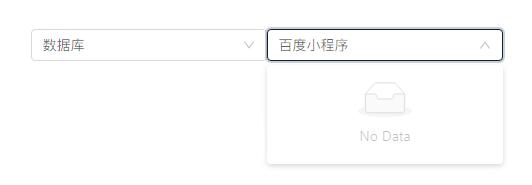
第一次选了一级“前端开发”,选择了二级“百度小程序”,此时切换一级为“数据库”,二级的数据被重新赋值,但是此时二级的文本依然是之前选择的“百度小程序”。
解决方案
首先怀疑是属于特殊方法操作了数组,导致无法更新数据到UI,于是使用this.$forceUpdate()强制渲染。但是结果不如意,没效果。
然后使用了this.$set(this.note_category2,0,{"id":0,"name":"请选择分类"}),但是依然没有效果。
难受,使用了最原始简单暴力的方法,直接修改文本吧。代码如下:
 handleNoteCategoryChange(value, option) {
 console.log(value);
 // 获取note_category笔记分类
 Axios.post(this.userData.noteUrl + 'get_note_category_by_pid',{
 pid: value
 })
 .then((res) => {
 if (res.data.code == 1) {
  this.note_category2 = res.data.data;
 } else if(res.data.code == 0) {
  this.note_category2 = [];
  this.note_category2Id = -1;
  if (this.$refs.note_category2.$el.children[0].children[0].children[1]) {
this.$refs.note_category2.$el.children[0].children[0].children[1].innerText = '请选择分类';
  }
 } else {
  this.$message.error(res.data.msg);
 }
 })
 .catch(() => this.$message.error('请检查网络后重试'));

 },
上一篇:Webstorm解除版本控制