

使用Android自定义View实现圆形进度条
创始人
2024-11-17 16:43:23
0次
效果如下:
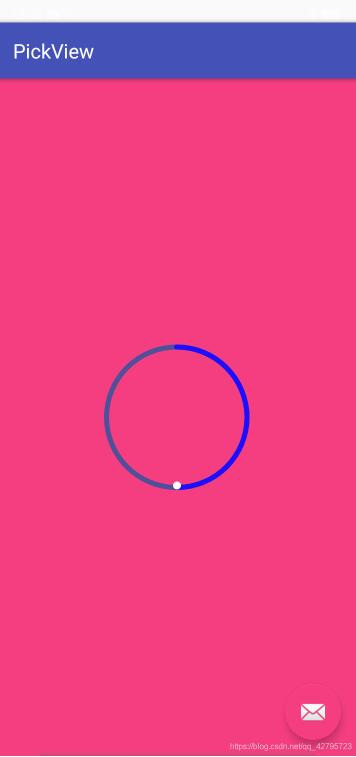
主要代码
CircularProgressView.java
public class CircularProgressView extends View {

  private Paint mBackPaint, mProgPaint;  // 绘制画笔
  private RectF mRectF;    // 绘制区域
  private int[] mColorArray; // 圆环渐变色
  private int mProgress;   // 圆环进度(0-100)
  /**
   * 绘制弧线的画笔
   */
  private Paint progressPaint;

  /**
   * 圆弧圆心位置
   */
  private int centerX, centerY;

  /**
   * 圆弧的半径
   */
  private int circleRadius;

  public CircularProgressView(Context context) {
    this(context, null);
  }

  public CircularProgressView(Context context, @Nullable AttributeSet attrs) {
    this(context, attrs, 0);
  }

  public CircularProgressView(Context context, @Nullable AttributeSet attrs, int defStyleAttr) {
    super(context, attrs, defStyleAttr);
    @SuppressLint("Recycle")
    TypedArray typedArray = context.obtainStyledAttributes(attrs, R.styleable.CircularProgressView);

    // 初始化背景圆环画笔
    mBackPaint = new Paint();
    mBackPaint.setStyle(Paint.Style.STROKE);  // 只描边,不填充
    mBackPaint.setStrokeCap(Paint.Cap.ROUND);  // 设置圆角
    mBackPaint.setAntiAlias(true);       // 设置抗锯齿
    mBackPaint.setDither(true);         // 设置抖动
    mBackPaint.setStrokeWidth(typedArray.getDimension(R.styleable.CircularProgressView_backWidth, 5));
    mBackPaint.setColor(typedArray.getColor(R.styleable.CircularProgressView_progbgColor, Color.LTGRAY));

    // 初始化进度圆环画笔
    mProgPaint = new Paint();
    mProgPaint.setStyle(Paint.Style.STROKE);  // 只描边,不填充
    mProgPaint.setStrokeCap(Paint.Cap.ROUND);  // 设置圆角
    mProgPaint.setAntiAlias(true);       // 设置抗锯齿
    mProgPaint.setDither(true);         // 设置抖动
    mProgPaint.setStrokeWidth(typedArray.getDimension(R.styleable.CircularProgressView_progWidth, 10));
    mProgPaint.setColor(typedArray.getColor(R.styleable.CircularProgressView_progColor, Color.BLUE));


    //初始化结束位置小圆点
    progressPaint = new Paint();
    progressPaint.setStyle(Paint.Style.FILL);  // 填充
    progressPaint.setStrokeCap(Paint.Cap.ROUND);  // 设置圆角
    progressPaint.setAntiAlias(true);       // 设置抗锯齿
    progressPaint.setDither(true);         // 设置抖动
    progressPaint.setStrokeWidth(typedArray.getDimension(R.styleable.CircularProgressView_progWidth, 10));
    progressPaint.setColor(Color.WHITE);

    // 初始化进度圆环渐变色
    int startColor = typedArray.getColor(R.styleable.CircularProgressView_progStartColor, -1);
    int firstColor = typedArray.getColor(R.styleable.CircularProgressView_progFirstColor, -1);
    if (startColor != -1 && firstColor != -1) mColorArray = new int[]{startColor, firstColor};
    else mColorArray = null;

    // 初始化进度
    mProgress = typedArray.getInteger(R.styleable.CircularProgressView_progress, 0);
    typedArray.recycle();
  }

  @Override
  protected void onMeasure(int widthMeasureSpec, int heightMeasureSpec) {
    super.onMeasure(widthMeasureSpec, heightMeasureSpec);
    int viewWide = getMeasuredWidth() - getPaddingLeft() - getPaddingRight();
    int viewHigh = getMeasuredHeight() - getPaddingTop() - getPaddingBottom();
    int mRectLength = (int) ((viewWide > viewHigh ? viewHigh : viewWide) - (mBackPaint.getStrokeWidth() > mProgPaint.getStrokeWidth() ? mBackPaint.getStrokeWidth() : mProgPaint.getStrokeWidth()));
    int mRectL = getPaddingLeft() + (viewWide - mRectLength) / 2;
    int mRectT = getPaddingTop() + (viewHigh - mRectLength) / 2;
    mRectF = new RectF(mRectL, mRectT, mRectL + mRectLength, mRectT + mRectLength);

    centerX = getMeasuredWidth() / 2;
    centerY = getMeasuredHeight() / 2;

    //计算圆弧半径和圆心点
    circleRadius = Math.min(getMeasuredWidth(), getMeasuredHeight()) / 2;
    circleRadius-=8;
    // 设置进度圆环渐变色
    if (mColorArray != null && mColorArray.length > 1)
      mProgPaint.setShader(new LinearGradient(0, 0, 0, getMeasuredWidth(), mColorArray, null, Shader.TileMode.MIRROR));
  }

  @Override
  protected void onDraw(Canvas canvas) {
    super.onDraw(canvas);
    canvas.drawArc(mRectF, 0, 360, false, mBackPaint);
    canvas.drawArc(mRectF, 270, 360 * mProgress / 100, false, mProgPaint);

    //绘制结束位置小圆形
    progressPaint.setStrokeWidth(10);
    progressPaint.setStyle(Paint.Style.FILL);
    float swipe = 360 * mProgress / 100;
    Log.d("=================", swipe + "    mProgress");
    float radians = (float) (((swipe - 90) / 2) / 180 * 2 * Math.PI);
    float endX;
    float endY;

    endX = centerX + circleRadius * (float) Math.cos(radians);
    endY = centerY + circleRadius * (float) Math.sin(radians);

    if (mProgress!=0) {
      canvas.drawCircle(endX, endY, 8, progressPaint);
    }


  }

  /**
   * 获取当前进度
   *
   * @return 当前进度(0-100)
   */
  public int getProgress() {
    return mProgress;
  }

  /**
   * 设置当前进度
   *
   * @param progress 当前进度(0-100)
   */
  public void setProgress(int progress) {
    this.mProgress = progress;
    invalidate();
  }

  /**
   * 设置当前进度,并展示进度动画。如果动画时间小于等于0,则不展示动画
   *
   * @param progress 当前进度(0-100)
   * @param animTime 动画时间(毫秒)
   */
  public void setProgress(int progress, long animTime) {
    if (animTime <= 0) setProgress(progress);
    else {
      ValueAnimator animator = ValueAnimator.ofInt(mProgress, progress);
      animator.addUpdateListener(new ValueAnimator.AnimatorUpdateListener() {
        @Override
        public void onAnimationUpdate(ValueAnimator animation) {
          mProgress = (int) animation.getAnimatedValue();
          invalidate();
        }
      });
      animator.setInterpolator(new OvershootInterpolator());
      animator.setDuration(animTime);
      animator.start();
    }
  }

  /**
   * 设置背景圆环宽度
   *
   * @param width 背景圆环宽度
   */
  public void setBackWidth(int width) {
    mBackPaint.setStrokeWidth(width);
    invalidate();
  }

  /**
   * 设置背景圆环颜色
   *
   * @param color 背景圆环颜色
   */
  public void setBackColor(/*@ColorRes int color*/String color) {
    mBackPaint.setColor(Color.parseColor(color)); //画笔颜色
    invalidate();
  }

  /**
   * 设置进度圆环宽度
   *
   * @param width 进度圆环宽度
   */
  public void setProgWidth(int width) {
    mProgPaint.setStrokeWidth(width);
    invalidate();
  }

  /**
   * 设置进度圆环颜色
   *
   * @param color 景圆环颜色
   */
  public void setProgColor(/*@ColorRes int color*/String color) {
    mProgPaint.setColor(Color.parseColor(color)); //画笔颜色
    mProgPaint.setShader(null);
    invalidate();
  }

  /**
   * 设置进度圆环颜色(支持渐变色)
   *
   * @param startColor 进度圆环开始颜色
   * @param firstColor 进度圆环结束颜色
   */
  public void setProgColor(@ColorRes int startColor, @ColorRes int firstColor) {
    mColorArray = new int[]{ContextCompat.getColor(getContext(), startColor), ContextCompat.getColor(getContext(), firstColor)};
    mProgPaint.setShader(new LinearGradient(0, 0, 0, getMeasuredWidth(), mColorArray, null, Shader.TileMode.MIRROR));
    invalidate();
  }

  /**
   * 设置进度圆环颜色(支持渐变色)
   *
   * @param colorArray 渐变色集合
   */
  public void setProgColor(@ColorRes int[] colorArray) {
    if (colorArray == null || colorArray.length < 2) return;
    mColorArray = new int[colorArray.length];
    for (int index = 0; index < colorArray.length; index++)
      mColorArray[index] = ContextCompat.getColor(getContext(), colorArray[index]);
    mProgPaint.setShader(new LinearGradient(0, 0, 0, getMeasuredWidth(), mColorArray, null, Shader.TileMode.MIRROR));
    invalidate();
  }
}
attrs.xml
使用方法
相关内容
热门资讯
空调连续工作多久需要停机休息
空调连续工作的时间取决于多个因素,包括空调的型号、功率、使用环境和维护情况等。一般来说,空调可以连续...
空调哪个符号是除湿的
空调除湿功能通常用一个水滴形状的符号表示。不同品牌和型号的空调遥控器可能会有所差异,但一般来说,除湿...
格力空调多长时间加一次氟利昂
1、一般情况下,空调对氟利昂的使用量是非常小的,所以在空调使用了四年左右的时候再考虑加也没问题。2、...
空调用多长时间需要加氟一次
一般情况下是五年。当出现以下这几种情况时,空调才需要加氟。1、空调的室内机和室外机各有两个接口,当接...
格调生活·C标思享荟:卡萨帝在...
9月12日的郑州龙湖金融岛,夜风轻拂,灯光璀璨。“C标时刻共传奇——卡萨帝思享荟暨20周年品牌盛典郑...
品牌价值破千亿、高端份额持续领...
9月12日,“C标时刻共传奇——卡萨帝思享荟暨20周年品牌盛典郑州站”在郑州龙湖金融岛举办。2026...
空调主板坏了修800还是换新的
空调主板坏了是修还是换新,需要考虑多个因素,以下是一些建议:1. 维修成本:如果维修费用较低,比如 ...
空调开多久需要休息多长时间
问题:空调开多久需要休息多长时间回答:1、在使用空调的过程中,一般空调开7~8个小时左右需要休息2~...
中央空调多长时间清洗一次
1、一般空调开机前清洗一次即可,空调开机中间时段再清洗一次,空调关机时清洗一次,这样比较合理。2、空...
中央空调氟利昂多久加一次
看空调制热和制冷程度,很多人的观点认为氟利昂必须一年放一次,其实这个观点是错误的,理解上面有点偏差,...