

使用原生js实现俄罗斯方块
创始人
2024-11-17 02:01:19
0次
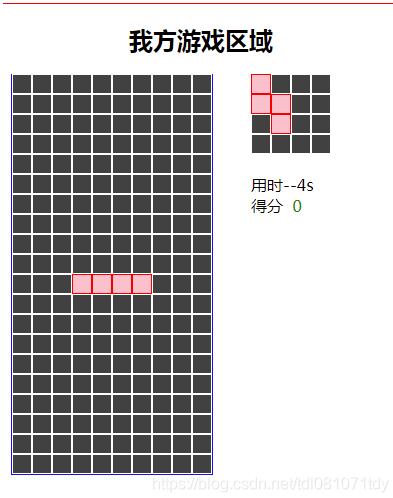
效果如下
html
俄罗斯方块 我方游戏区域
用时 0得分 0对方游戏区域
用时 0得分 0
css
.square{
 width: 400px;
 height: 500px;
 position: absolute;
 border: solid 1px red;
}
.title{
 width: 400px;
 text-align: center;
 margin: 0 auto;
}
.game{
 width: 200px;height: 400px;
 border-bottom: 1px solid blue;
 border-right: 1px solid blue;
 border-left: 1px solid blue;
 position: absolute;
 background-color: #f2faff;
 top: 70px;
 left: 10px;
}
.next{
 width: 80px;height: 80px;
 position: absolute;top: 70px;left: 250px;
 border: solid 0px red;
}
.info{
 position: absolute;top: 170px;left: 250px;
 border: solid 0px red
}

.none,.current,.done{
 width: 20px;height: 20px;
 position: absolute;
 box-sizing: border-box;
}


.tip{
 width: 100px;
 position: absolute;
 top: 270px;
 left: 250px;
 font-size: 20px;
 color:red;
 border: solid 0px red;
}


.score{
 color:green;
}
/* 消失的方块 */
.none{
 background-color: #414141;
 border: solid 1px white
}

/* 正在操作的方块 */
.current{
 background-color: pink;
 border:solid 1px red;
}

/* 落下的方块 */
.done{
 background:#d2f028;
 border:solid 1px black
}

#remote{
 left: 500px;
}

.btn{
 width: 70px;
 border: solid 0px red
}
Demo.js
var local = new local();
local.start();

var remote = new Remote();
remote.start(2,2);
remote.bindEvents();
game.js
//核心逻辑 2
var Game = function(){
//这两个div为游戏中的两个最大的容器盒子 dom元素
var gameDiv;
var nextDiv;
var timeDiv;
var scoreDiv;
var local_tipDiv;
//游戏界面框中的方块坐标
var gameData=[
[0,0,0,0,0,0,0,0,0,0],
[0,0,0,0,0,0,0,0,0,0],
[0,0,0,0,0,0,0,0,0,0],
[0,0,0,0,0,0,0,0,0,0],
[0,0,0,0,0,0,0,0,0,0],
[0,0,0,0,0,0,0,0,0,0],
[0,0,0,0,0,0,0,0,0,0],
[0,0,0,0,0,0,0,0,0,0],
[0,0,0,0,0,0,0,0,0,0],
[0,0,0,0,0,0,0,0,0,0],
[0,0,0,0,0,0,0,0,0,0],
[0,0,0,0,0,0,0,0,0,0],
[0,0,0,0,0,0,0,0,0,0],
[0,0,0,0,0,0,0,0,0,0],
[0,0,0,0,0,0,0,0,0,0],
[0,0,0,0,0,0,0,0,0,0],
[0,0,0,0,0,0,0,0,0,0],
[0,0,0,0,0,0,0,0,0,0],
[0,0,0,0,0,0,0,0,0,0],
[0,0,0,0,0,0,0,0,0,0],
]
//装载所有的div的容器 数组
//next中的div
var nextDivs = [];
//游戏框中的div
var gameDivs = [];
//定义两个方块
//当前方块
var cur;
//下一个方块
var next;
//渲染游戏框中的div
/**
*
* @param {*} container 最大容器 也就是这个div要被添加到容器
* @param {*} data div的矩阵数据
* @param {*} divs 用于装载所有的div
*/
var initDiv = function(container,data,divs){
for(var i=0;i=0;i-=1){
var clear = true;
for(var j=0;j0;m--
for(var m = i;m>0;m--){
//n=0;n<10;n++ 注 gamedata为20 其中每一个数组的长度为10
for(var n=0;n= gameData.length){return false}
else if(pos.y+y < 0){return false}
else if(pos.y+y >= gameData[0].length){return false}
//这里是判断如果我们落下的这个位置已经有一个方块的话 那也不合法
//若这个方块已经落下 我们便判定它的矩阵数据为1
else if(gameData[pos.x+x][pos.y+y]==1){return false}
else{return true}
};
/*
10 + 0 > length ?
10 + 1 > length ?
0 0 1 0 0 5 + 1 > length ?
1 0 1 0 0
2 0 1 1 0
3 0 0 0 0
0 1 2 3
*/
//让当前方块变得不可移动
this.fixed = function(){
for(var i=0;ilocal.js
//我的游戏区域 1
var local = function(){
// 先声明游戏对象
var game;
//定义定时器时间间隔
var INTERVAL = 500;
//定义定时器
var time = null;
//计算时间
var timeCount = 0;
var times = 0;
//定义一个start开始方法
this.start = function(){
//获取游戏中两个界面的dom元素
var dom = {
gameDiv:document.querySelector("#local_game"),
nextDiv:document.querySelector("#local_next"),
timeDiv:document.querySelector("#local_time"),
scoreDiv:document.querySelector("#local_score"),
local_tip:document.querySelector("#local_tip")
};
//实例化Game;
game = new Game();
//并将dom传入到Game的初始化方法中
game.init(dom,generateType(),generateDir());
//产生初始方块
game.performNext(generateType(),generateDir());
bindKeyEvent();
//游戏开始时定义一个定时器 让方块自动下移
time = setInterval(move,INTERVAL);
};
function move(){
//时间计数
timeFunc();
if(!game.down()){
game.fixed();
//判断是否消行
game.checkclear();
//判断是否结束游戏
if(game.gameover()){
stop();
game.gameState(false);
}else{
//当当前方块已经落到底部后 我们便产生下一个方块
game.performNext(generateType(),generateDir())
}
}
}
var timeFunc = function(){
//计算秒数 因为每过500毫秒会调用一次
timeCount+=1;
if(timeCount==2){
timeCount = 0;
times += 1;
//设置显示时间
game.setTime(times);
}
if(times%5==0){
// game.addTaiLines(generrateBottomLine(1));
}
}
//随机生成干扰行
/**
*
* @param {*} linenum 生成干扰行的行数
*/
var generrateBottomLine = function(linenum){
//定义一个二维数组
var lines = [];
for(var i=0;iremote.js
//对方游戏区域
//这个js主要为对方的操作意识
var Remote = function(){
//游戏对象
var game;
//开始 决定方块类型 和旋转方向
var start = function(type,dir){
//获取游戏中两个界面的dom元素
var dom = {
gameDiv:document.querySelector("#remote_game"),
nextDiv:document.querySelector("#remote_next"),
timeDiv:document.querySelector("#remote_time"),
scoreDiv:document.querySelector("#remote_score"),
local_tip:document.querySelector("#remote_tip")
};
//实例化Game;
game = new Game();
//并将dom传入到Game的初始化方法中
game.init(dom,type,dir);
};
//绑定事件
var bindEvents = function(){
document.querySelector("#left").onclick = function(){
game.left();
}
document.querySelector("#right").onclick = function(){
game.right();
}
document.querySelector("#down").onclick = function(){
game.down();
}
document.querySelector("#rotate").onclick = function(){
game.up();
}
document.querySelector("#fall").onclick = function(){
game.fall();
}
document.querySelector("#fixed").onclick = function(){
game.fixed();
}
document.querySelector("#performNext").onclick = function(){
game.performNext(2,2);
}
document.querySelector("#checkClear").onclick = function(){
game.checkclear();
}
document.querySelector("#gameover").onclick = function(){
game.gameover();
}
document.querySelector("#settime").onclick = function(){
game.setTime(20);
}
document.querySelector("#addscore").onclick = function(){
game.addscore(3);
}
document.querySelector("#gamestate").onclick = function(){
game.gameState(true);
}
document.querySelector("#addTaiLines").onclick = function(){
game.addTaiLines([[1,0,0,1,0,1,0,1,1,1]]);
}
}
//导出方法
this.start = start;
this.bindEvents = bindEvents;
}square.js
//所有的方块的公共逻辑 3
var square = function(){
//方块提示框中的方块数据
this.data = [
[0,0,0,0],
[0,0,0,0],
[0,0,0,0],
[0,0,0,0]
];
this.dir = 0;
//方块坐标原点
this.origin={
x:0,
y:0
}
};
//检测当前矩阵数据中的方块位置能否下降
square.prototype.canDown=function(isvalue){
var test = {};
//console.log(this.origin.x,this.origin.x + 1);
//这里要加1的原因是因为 这个方法是在我们还没有执行到加1程序之前调用的
//所以我们需要手动给它去加1
test.x = this.origin.x + 1;
test.y = this.origin.y;
return isvalue(test,this.data);
};
square.prototype.canLeft=function(isvalue){
var test = {};
test.x = this.origin.x;
test.y = this.origin.y - 1;
return isvalue(test,this.data);
};
square.prototype.canRight=function(isvalue){
var test = {};
test.x = this.origin.x;
test.y = this.origin.y + 1;
return isvalue(test,this.data);
};
//下落方法 这个方法我们放到原型对象上 因为下落方法是主要的方法
square.prototype.onDown = function(){
this.origin.x += 1;
};
square.prototype.onLeft = function(){
this.origin.y -= 1;
};
square.prototype.onRight = function(){
this.origin.y += 1;
};
//下面是旋转的功能
square.prototype.canRotate = function(isvalue){
var testdir = (this.dir + 1)%4;//因为是在旋转指向前进行的判断 所以我们先加1
var testrotate = [
[0,0,0,0],
[0,0,0,0],
[0,0,0,0],
[0,0,0,0]
];
for(var i=0;isquareFactory.js
//工厂 用于生成不同的方块
//所有的方块的公共逻辑 3
var square1 = function(){
//这样写 当我们实例化square1的时候 square中this引用的成员将会添加到square1上
square.call(this);
//四个不同的旋转方向 默认是0 也就是第一个
this.rotate = [
[
[0,2,0,0],
[0,2,0,0],
[0,2,2,0],
[0,0,0,0]
],
[
[0,0,0,0],
[2,2,2,0],
[2,0,0,0],
[0,0,0,0]
],
[
[2,2,0,0],
[0,2,0,0],
[0,2,0,0],
[0,0,0,0]
],
[
[0,0,2,0],
[2,2,2,0],
[0,0,0,0],
[0,0,0,0]
]
];
};
square1.prototype = square.prototype;//打通原型链
var square2 = function(){
//这样写 当我们实例化square1的时候 square中this引用的成员将会添加到square1上
square.call(this);
//四个不同的旋转方向 默认是0 也就是第一个
this.rotate = [
[
[0,2,0,0],
[0,2,0,0],
[0,2,0,0],
[0,2,0,0]
],
[
[0,0,0,0],
[2,2,2,2],
[0,0,0,0],
[0,0,0,0]
],
[
[0,2,0,0],
[0,2,0,0],
[0,2,0,0],
[0,2,0,0]
],
[
[0,0,0,0],
[2,2,2,2],
[0,0,0,0],
[0,0,0,0]
]
];
};
square2.prototype = square.prototype;
var square3 = function(){
//这样写 当我们实例化square1的时候 square中this引用的成员将会添加到square1上
square.call(this);
//四个不同的旋转方向 默认是0 也就是第一个
this.rotate = [
[
[0,2,0,0],
[2,2,2,0],
[0,0,0,0],
[0,0,0,0]
],
[
[2,2,2,0],
[0,2,0,0],
[0,0,0,0],
[0,0,0,0]
],
[
[0,2,0,0],
[2,2,0,0],
[0,2,0,0],
[0,0,0,0]
],
[
[2,0,0,0],
[2,2,0,0],
[2,0,0,0],
[0,0,0,0]
]
];
};
square3.prototype = square.prototype;
var square4 = function(){
//这样写 当我们实例化square1的时候 square中this引用的成员将会添加到square1上
square.call(this);
//四个不同的旋转方向 默认是0 也就是第一个
this.rotate = [
[
[2,2,0,0],
[2,2,0,0],
[0,0,0,0],
[0,0,0,0]
],
[
[2,2,0,0],
[2,2,0,0],
[0,0,0,0],
[0,0,0,0]
],
[
[2,2,0,0],
[2,2,0,0],
[0,0,0,0],
[0,0,0,0]
],
[
[2,2,0,0],
[2,2,0,0],
[0,0,0,0],
[0,0,0,0]
]
];
};
square4.prototype = square.prototype;
var square5 = function(){
//这样写 当我们实例化square1的时候 square中this引用的成员将会添加到square1上
square.call(this);
//四个不同的旋转方向 默认是0 也就是第一个
this.rotate = [
[
[0,0,0,0],
[2,2,0,0],
[0,2,2,0],
[0,0,0,0]
],
[
[0,0,2,0],
[0,2,2,0],
[0,2,0,0],
[0,0,0,0]
],
[
[0,0,0,0],
[0,2,2,0],
[2,2,0,0],
[0,0,0,0]
],
[
[2,0,0,0],
[2,2,0,0],
[0,2,0,0],
[0,0,0,0]
]
];
};
square5.prototype = square.prototype;
var square6 = function(){
//这样写 当我们实例化square1的时候 square中this引用的成员将会添加到square1上
square.call(this);
//四个不同的旋转方向 默认是0 也就是第一个
this.rotate = [
[
[0,2,0,0],
[0,2,2,2],
[0,0,0,0],
[0,0,0,0]
],
[
[0,0,2,0],
[0,0,2,0],
[0,2,2,0],
[0,0,0,0]
],
[
[2,2,2,0],
[0,0,2,0],
[0,0,0,0],
[0,0,0,0]
],
[
[0,2,2,0],
[0,2,0,0],
[0,2,0,0],
[0,0,0,0]
]
];
};
square6.prototype = square.prototype;
var square7 = function(){
//这样写 当我们实例化square1的时候 square中this引用的成员将会添加到square1上
square.call(this);
//四个不同的旋转方向 默认是0 也就是第一个
this.rotate = [
[
[2,2,0,0],
[2,2,0,0],
[2,2,0,0],
[2,2,0,0]
],
[
[0,0,0,0],
[2,2,2,2],
[2,2,2,2],
[0,0,0,0]
],
[
[2,2,0,0],
[2,2,0,0],
[2,2,0,0],
[2,2,0,0]
],
[
[0,0,0,0],
[2,2,2,2],
[2,2,2,2],
[0,0,0,0]
]
];
};
square7.prototype = square.prototype;
var squareFactory = function(){};
squareFactory.prototype.make=function(index,dir){
var s;
index+=1;
switch (index) {
case 1:
s = new square1();
break;
case 2:
s = new square2();
break;
case 3:
s = new square3();
break;
case 4:
s = new square4();
break;
case 5:
s = new square5();
break;
case 6:
s = new square6();
break;
case 7:
s = new square7();
break;
default:
break;
}
//因为一来square中的data矩阵默认全是0 所以我们需要给它一个旋转方向
//让它有一个形状
console.log(index,s);
s.origin.x = 0;
s.origin.y = 3;
s.onrotate(dir);
return s;
};
相关内容
热门资讯
空调连续工作多久需要停机休息
空调连续工作的时间取决于多个因素,包括空调的型号、功率、使用环境和维护情况等。一般来说,空调可以连续...
空调哪个符号是除湿的
空调除湿功能通常用一个水滴形状的符号表示。不同品牌和型号的空调遥控器可能会有所差异,但一般来说,除湿...
格力空调多长时间加一次氟利昂
1、一般情况下,空调对氟利昂的使用量是非常小的,所以在空调使用了四年左右的时候再考虑加也没问题。2、...
空调用多长时间需要加氟一次
一般情况下是五年。当出现以下这几种情况时,空调才需要加氟。1、空调的室内机和室外机各有两个接口,当接...
格调生活·C标思享荟:卡萨帝在...
9月12日的郑州龙湖金融岛,夜风轻拂,灯光璀璨。“C标时刻共传奇——卡萨帝思享荟暨20周年品牌盛典郑...
品牌价值破千亿、高端份额持续领...
9月12日,“C标时刻共传奇——卡萨帝思享荟暨20周年品牌盛典郑州站”在郑州龙湖金融岛举办。2026...
空调主板坏了修800还是换新的
空调主板坏了是修还是换新,需要考虑多个因素,以下是一些建议:1. 维修成本:如果维修费用较低,比如 ...
空调开多久需要休息多长时间
问题:空调开多久需要休息多长时间回答:1、在使用空调的过程中,一般空调开7~8个小时左右需要休息2~...
中央空调多长时间清洗一次
1、一般空调开机前清洗一次即可,空调开机中间时段再清洗一次,空调关机时清洗一次,这样比较合理。2、空...
中央空调氟利昂多久加一次
看空调制热和制冷程度,很多人的观点认为氟利昂必须一年放一次,其实这个观点是错误的,理解上面有点偏差,...