

firewalld防火墙基础配置
Linux的防火墙体系主要工作在网络层,针对TCP/IP数据包实时过滤和限制,属于典型的包过滤防火墙。
Linux防火墙是如何检查数据流量的?
对于进入系统的数据包,首先检查的就是其源地址:
若源地址关联到特定的区域,则执行该区域所制定的规则;
若源地址未关联到特定的区域,则使用传入网络接口的区域并执行该区域所制定的规则。
若网络接口未关联到特定的区域,那么就使用默认区域并执行该区域所制定的规则。
默认区域并不是单独的区域,而是指向系统上定义的某个其他区域。默认情况下,默认区域是public,但是也可以更改默认区域。以上匹配规则,按照先后顺序,第一个匹配的规则胜出,和网络设备的ACL匹配规则差不多,俗称匹配即停。
firewalld的相关预定义区域:
firewalld防火墙有两种配置模式:
1 、运行时模式:表示当前内存中运行的防火墙配置,在系统或firewalld服务重启、停止时将失效;
2、永久模式:表示重启防火墙或重新加载防火墙时的规则配置,是永久存储在配置文件中的。
firewall-cmd命令工具与配置模式相关的选项有三个:
--reload:重新加载防火墙规则并保持状态信息,即将永久配置应用为运行时配置;
--permanent:带有此选项的命令用于设置永久性规则,这些规则只有在重新启动或重新加载防火墙规则时才会生效;若不带此项,表示用于设置运行时规则。
--runtime-to-permanent:将当前运行时的配置写入规则配置文件中,使当前内存中的规则称为永久性配置。
1、防火墙相关命令使用:
[root@localhost ~]# systemctl start firewalld                #启动防火墙
[root@localhost ~]# systemctl enable firewalld            #设置开机自启动
[root@localhost /]# firewall-cmd --reload                     #重载防火墙
[root@localhost ~]# systemctl status firewalld             #查看防火墙状态
[root@localhost ~]# systemctl stop firewalld                #停止防火墙
[root@localhost ~]# systemctl disable firewalld            #设置防火墙开机不自启动
[root@localhost ~]# firewall-cmd --get-zones                #显示预定义的区域
block dmz drop external home internal public trusted work
[root@localhost ~]# firewall-cmd --get-service                     #显示预定义的服务
[root@localhost /]# firewall-cmd --list-all --zone=dmz                #查看指定区域的配置
dmz
  target: default
  icmp-block-inversion: no
  interfaces:
  sources:
  services: ssh
  ports:
  protocols:
  masquerade: no
  forward-ports:
  source-ports:
  icmp-blocks:
  rich rules:

[root@localhost ~]# firewall-cmd --get-icmptypes                #显示预定义的ICMP类型
address-unreachable bad-header communication-prohibited destination-unreachable
echo-reply echo-request fragmentation-needed host-precedence-violation host-prohibited
host-redirect host-unknown host-unreachable ip-header-bad neighbour-advertisement
neighbour-solicitation network-prohibited network-redirect network-unknown
network-unreachable no-route packet-too-big parameter-problem port-unreachable
precedence-cutoff protocol-unreachable redirect required-option-missing
router-advertisement router-solicitation source-quench source-route-failed time-exceeded
timestamp-reply timestamp-request tos-host-redirect tos-host-unreachable
tos-network-redirect tos-network-unreachable ttl-zero-during-reassembly
ttl-zero-during-transit unknown-header-type unknown-option
firewall-cmd --get-icmptypes命令执行结果中部分阻塞类型的含义如下:
destination-unreachable:目的地址不可达;
echo-reply:应答回应;
parameter-problem:参数问题;
redirect:重新定向;
router-advertisement:路由器通告;
router-solicitation:路由器征寻;
source-quench:源端抑制;
time-exceeded:超时;
timestamp-reply:时间戳应答回应;
timestamp-request:时间戳请求;
2、firewalld防火墙区域管理命令及示例:
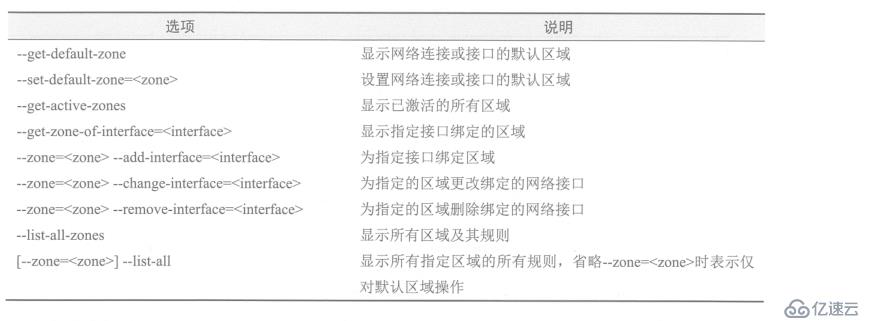
[root@localhost /]# firewall-cmd --set-default-zone=dmz           #设置默认区域为DMZ区域
[root@localhost ~]# firewall-cmd --get-default-zone                #显示当前系统中的默认区域
[root@localhost ~]# firewall-cmd --list-all                                 #显示默认区域的所有规则
[root@localhost ~]# firewall-cmd --get-zone-of-interface=ens33       #显示网络接口ens33对应区域
[root@localhost ~]# firewall-cmd --get-active-zones           #显示所有激活区域
internal
  interfaces: ens33

 #执行以下操作可将网络接口ens33对应区域更改为internal区域,并查看:
 [root@localhost ~]# firewall-cmd --zone=internal --change-interface=ens33
 The interface is under control of NetworkManager, setting zone to 'internal'.
success
[root@localhost ~]# firewall-cmd --zone=internal --list-interfaces    #查看internal区域的接口列表
ens33
[root@localhost ~]# firewall-cmd --get-zone-of-interface=ens33    #查看接口ens33对应的区域
internal
3、防火墙服务管理相关命令及示例: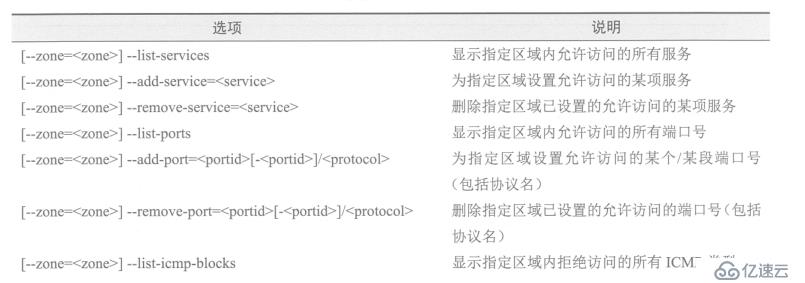
部分服务管理的示例:
为默认区域设置允许访问的服务
 [root@localhost services]# firewall-cmd --list-services          #显示默认区域内允许访问的所有服务
ssh dhcpv6-client
[root@localhost services]# firewall-cmd --add-service=http     #设置默认区域允许访问http服务
success
[root@localhost services]# firewall-cmd --add-service=https     #设置默认区域允许访问https服务
success
[root@localhost services]# firewall-cmd --list-services               #显示默认区域内允许访问的所有服务

ssh dhcpv6-client http https
为internal区域设置允许访问的服务:
[root@localhost services]# firewall-cmd --zone=internal --add-service=mysql
#设置internal区域允许访问mysql服务
success
[root@localhost services]# firewall-cmd --zone=internal --remove-service=samba-client
#设置internal区域不允许访问Samba-client服务
success
[root@localhost services]# firewall-cmd --zone=internal --list-services
#显示internal区域内允许访问的所有服务
ssh mdns dhcpv6-client mysql
端口管理:
在进行服务配置时,预定义的网络服务可以使用服务名配置,服务所涉及的端口就会自动打开。但是,对于非预定义的服务只能手动为指定的区域添加端口。示例如下:
 [root@localhost services]# firewall-cmd --zone=internal --add-port=443/tcp
 #在internal区域打开443/tcp端口
success
 [root@localhost services]# firewall-cmd --zone=internal --remove-port=443/tcp
 #在internal区域禁止443/tcp端口访问
success
以上配置都为临时配置,若想将当前配置保存为永久配置,可以使用下面命令:
 [root@localhost services]# firewall-cmd --runtime-to-permanent
success
直接配置为永久性规则,须带--permanent选项,如下:
[root@localhost /]# firewall-cmd --add-icmp-block=echo-request --permanent   #禁止ping

success
[root@localhost /]# firewall-cmd --zone=external --add-icmp-block=echo-request --permanent
#配置external区域禁止ping
success
上一篇:用shell实现一个正方形
下一篇:PG的Prometheus监控