

命名访问控制列表配置实验
admin
2023-03-04 06:42:25
0次
实验配置图及要求
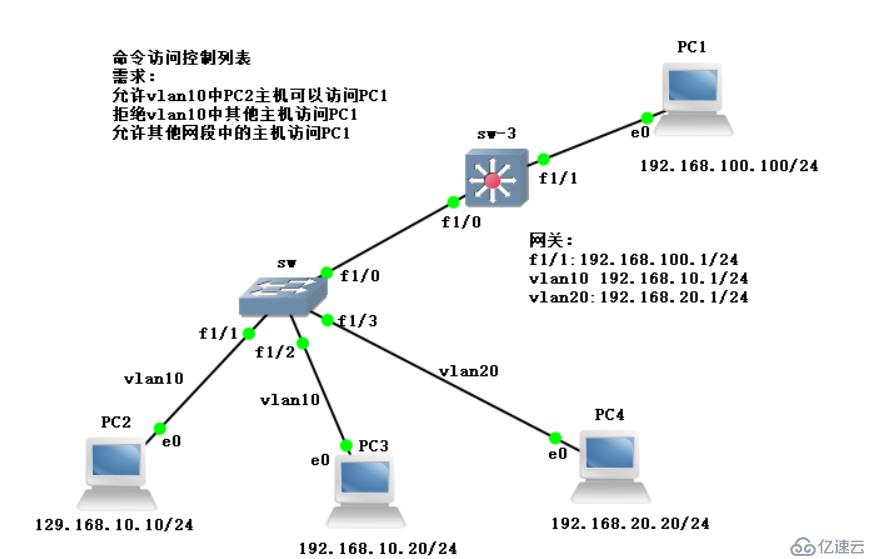
1、四台主机配置地址
PC1:
PC1> ip 192.168.100.100 192.168.100.1
Checking for duplicate address...
PC1 : 192.168.100.100 255.255.255.0 gateway 192.168.100.1

PC2:
PC2> ip 192.168.10.10 192.168.10.1
Checking for duplicate address...
PC1 : 192.168.10.10 255.255.255.0 gateway 192.168.10.1

PC3:
PC3> ip 192.168.10.20 192.168.10.1
Checking for duplicate address...
PC1 : 192.168.10.20 255.255.255.0 gateway 192.168.10.1

PC4:
PC4> ip 192.168.20.20 192.168.20.1
Checking for duplicate address...
PC1 : 192.168.20.20 255.255.255.0 gateway 192.168.20.1
2、在交换机上配置两个vlan域,f1/1和f1/2放在vlan 10中,f1/3放在vlan 20中,f1/0配置trunk链路,最后要关闭路由功能。
sw#conf t
sw(config)#vlan 10,20
sw(config-vlan)#ex
sw(config)#do show vlan-sw b
VLAN Name                             Status    Ports
---- -------------------------------- --------- -------------------------------
1    default                          active    Fa1/0, Fa1/1, Fa1/2, Fa1/3
                                                Fa1/4, Fa1/5, Fa1/6, Fa1/7
                                                Fa1/8, Fa1/9, Fa1/10, Fa1/11
                                                Fa1/12, Fa1/13, Fa1/14, Fa1/15
10   VLAN0010                         active
20   VLAN0020                         active
1002 fddi-default                     act/unsup
1003 token-ring-default               act/unsup
1004 fddinet-default                  act/unsup
1005 trnet-default                    act/unsup
sw(config)#int f1/3
sw(config-if)#sw mo acc
sw(config-if)#sw acc vlan 20
sw(config-if)#ex
sw(config)#do show vlan-sw b
VLAN Name                             Status    Ports
---- -------------------------------- --------- -------------------------------
1    default                          active    Fa1/0, Fa1/4, Fa1/5, Fa1/6
                                                Fa1/7, Fa1/8, Fa1/9, Fa1/10
                                                Fa1/11, Fa1/12, Fa1/13, Fa1/14
                                                Fa1/15
10   VLAN0010                         active    Fa1/1, Fa1/2
20   VLAN0020                         active    Fa1/3
1002 fddi-default                     act/unsup
1003 token-ring-default               act/unsup
1004 fddinet-default                  act/unsup
1005 trnet-default                    act/unsup
sw(config)#int f1/0
sw(config-if)#sw mo t
sw(config-if)#sw t en dot
sw(config-if)#ex
sw(config)#no ip routing        //关闭路由功能
3、在三层交换机f1/1端口关闭交换端口,配置网关地址,f1/0端口配置trunk链路;在vlan 10、20中放入网关地址。
sw-3#conf t
sw-3(config)#int f1/1
sw-3(config-if)#no switchport
sw-3(config-if)#ip add 192.168.100.1 255.255.255.0
sw-3(config-if)#no shut
sw-3(config-if)#do show ip int b
Interface                  IP-Address      OK? Method Status                Protocol
FastEthernet0/0            unassigned      YES unset  administratively down down
FastEthernet0/1            unassigned      YES unset  administratively down down
FastEthernet1/0            unassigned      YES unset  up                    up
FastEthernet1/1            192.168.100.1   YES manual up                    up
FastEthernet1/2            unassigned      YES unset  up                    down
FastEthernet1/3            unassigned      YES unset  up                    down
FastEthernet1/4            unassigned      YES unset  up                    down
FastEthernet1/5            unassigned      YES unset  up                    down
FastEthernet1/6            unassigned      YES unset  up                    down
FastEthernet1/7            unassigned      YES unset  up                    down
FastEthernet1/8            unassigned      YES unset  up                    down
FastEthernet1/9            unassigned      YES unset  up                    down
FastEthernet1/10           unassigned      YES unset  up                    down
FastEthernet1/11           unassigned      YES unset  up                    down
FastEthernet1/12           unassigned      YES unset  up                    down
FastEthernet1/13           unassigned      YES unset  up                    down
FastEthernet1/14           unassigned      YES unset  up                    down
FastEthernet1/15           unassigned      YES unset  up                    down
Vlan1                      unassigned      YES unset  up                    up
sw-3(config-if)#ex
sw-3(config)#vlan 10,20
sw-3(config-vlan)#int vlan 10
sw-3(config-if)#ip add 192.168.10.1 255.255.255.0
sw-3(config-if)#no shut
sw-3(config-if)#ex
sw-3(config)#int vlan 20
sw-3(config-if)#ip add 192.168.20.1 255.255.255.0
sw-3(config-if)#no shut
sw-3(config-if)#ex
sw-3(config)#int f1/0
sw-3(config-if)#sw mo t
sw-3(config-if)#sw t en dot
sw-3(config-if)#do show ip route
Codes: C - connected, S - static, R - RIP, M - mobile, B - BGP
       D - EIGRP, EX - EIGRP external, O - OSPF, IA - OSPF inter area
       N1 - OSPF NSSA external type 1, N2 - OSPF NSSA external type 2
       E1 - OSPF external type 1, E2 - OSPF external type 2
       i - IS-IS, su - IS-IS summary, L1 - IS-IS level-1, L2 - IS-IS level-2
       ia - IS-IS inter area, * - candidate default, U - per-user static route
       o - ODR, P - periodic downloaded static route

Gateway of last resort is not set

C    192.168.10.0/24 is directly connected, Vlan10
C    192.168.20.0/24 is directly connected, Vlan20
C    192.168.100.0/24 is directly connected, FastEthernet1/1
4、此时四台主机能互相ping通,即全网互通
PC2> ping 192.168.100.100
192.168.100.100 icmp_seq=1 timeout
84 bytes from 192.168.100.100 icmp_seq=2 ttl=63 time=35.971 ms
84 bytes from 192.168.100.100 icmp_seq=3 ttl=63 time=41.517 ms
84 bytes from 192.168.100.100 icmp_seq=4 ttl=63 time=31.738 ms
84 bytes from 192.168.100.100 icmp_seq=5 ttl=63 time=35.188 ms

PC2>ping 192.168.10.20
84 bytes from 192.168.10.20 icmp_seq=1 ttl=64 time=0.505 ms
84 bytes from 192.168.10.20 icmp_seq=2 ttl=64 time=0.000 ms
84 bytes from 192.168.10.20 icmp_seq=3 ttl=64 time=0.000 ms
84 bytes from 192.168.10.20 icmp_seq=4 ttl=64 time=0.000 ms
84 bytes from 192.168.10.20 icmp_seq=5 ttl=64 time=0.000 ms

PC2> ping 192.168.20.20
192.168.20.20 icmp_seq=1 timeout
84 bytes from 192.168.20.20 icmp_seq=2 ttl=63 time=31.229 ms
84 bytes from 192.168.20.20 icmp_seq=3 ttl=63 time=37.597 ms
84 bytes from 192.168.20.20 icmp_seq=4 ttl=63 time=31.007 ms
84 bytes from 192.168.20.20 icmp_seq=5 ttl=63 time=40.123 ms
5、在三层交换机上创建命名控制列表并定义其中的规则
sw-3(config)#ip access-list standard kgc
sw-3(config-std-nacl)#permit host 192.168.10.10
sw-3(config-std-nacl)#deny 192.168.10.0 0.0.0.255
sw-3(config-std-nacl)#permit any
sw-3(config-std-nacl)#ex
sw-3(config)#do show access-list
Standard IP access list kgc
    10 permit 192.168.10.10
    20 deny   192.168.10.0, wildcard bits 0.0.0.255
    30 permit any
sw-3(config)#int f1/1
sw-3(config-if)#ip access-group kgc out     //策略应用在网关
6、结果测试
vlan 10中的PC3被禁止访问PC1
PC3> ping 192.168.100.100
*192.168.10.1 icmp_seq=1 ttl=255 time=30.919 ms (ICMP type:3, code:13, Communication administratively prohibited)
*192.168.10.1 icmp_seq=2 ttl=255 time=16.133 ms (ICMP type:3, code:13, Communication administratively prohibited)
*192.168.10.1 icmp_seq=3 ttl=255 time=31.012 ms (ICMP type:3, code:13, Communication administratively prohibited)
*192.168.10.1 icmp_seq=4 ttl=255 time=22.354 ms (ICMP type:3, code:13, Communication administratively prohibited)
*192.168.10.1 icmp_seq=5 ttl=255 time=15.630 ms (ICMP type:3, code:13, Communication administratively prohibited)
vlan 10中的PC2被允许访问PC1
PC2> ping 192.168.100.100
192.168.100.100 icmp_seq=1 timeout
192.168.100.100 icmp_seq=2 timeout
84 bytes from 192.168.100.100 icmp_seq=3 ttl=63 time=35.353 ms
84 bytes from 192.168.100.100 icmp_seq=4 ttl=63 time=31.321 ms
84 bytes from 192.168.100.100 icmp_seq=5 ttl=63 time=31.239 ms
其它网段的主机(20网段)被允许访问PC1
PC4> ping 192.168.100.100
84 bytes from 192.168.100.100 icmp_seq=1 ttl=63 time=32.766 ms
84 bytes from 192.168.100.100 icmp_seq=2 ttl=63 time=31.240 ms
84 bytes from 192.168.100.100 icmp_seq=3 ttl=63 time=31.244 ms
84 bytes from 192.168.100.100 icmp_seq=4 ttl=63 time=31.329 ms
84 bytes from 192.168.100.100 icmp_seq=5 ttl=63 time=31.067 ms
实验成功,谢谢大家的鼓励和支持!
上一篇:继ELK后续获取nginx日志
下一篇:操作系统--进阶操作系统
相关内容
热门资讯
空调连续工作多久需要停机休息
空调连续工作的时间取决于多个因素,包括空调的型号、功率、使用环境和维护情况等。一般来说,空调可以连续...
空调哪个符号是除湿的
空调除湿功能通常用一个水滴形状的符号表示。不同品牌和型号的空调遥控器可能会有所差异,但一般来说,除湿...
格力空调多长时间加一次氟利昂
1、一般情况下,空调对氟利昂的使用量是非常小的,所以在空调使用了四年左右的时候再考虑加也没问题。2、...
空调用多长时间需要加氟一次
一般情况下是五年。当出现以下这几种情况时,空调才需要加氟。1、空调的室内机和室外机各有两个接口,当接...
格调生活·C标思享荟:卡萨帝在...
9月12日的郑州龙湖金融岛,夜风轻拂,灯光璀璨。“C标时刻共传奇——卡萨帝思享荟暨20周年品牌盛典郑...
品牌价值破千亿、高端份额持续领...
9月12日,“C标时刻共传奇——卡萨帝思享荟暨20周年品牌盛典郑州站”在郑州龙湖金融岛举办。2026...
空调主板坏了修800还是换新的
空调主板坏了是修还是换新,需要考虑多个因素,以下是一些建议:1. 维修成本:如果维修费用较低,比如 ...
空调开多久需要休息多长时间
问题:空调开多久需要休息多长时间回答:1、在使用空调的过程中,一般空调开7~8个小时左右需要休息2~...
中央空调多长时间清洗一次
1、一般空调开机前清洗一次即可,空调开机中间时段再清洗一次,空调关机时清洗一次,这样比较合理。2、空...
中央空调氟利昂多久加一次
看空调制热和制冷程度,很多人的观点认为氟利昂必须一年放一次,其实这个观点是错误的,理解上面有点偏差,...