

Nginx优化实战(日志分割、图片缓存、隐藏版本号)
admin
2023-02-27 18:02:05
0次
Nginx日志分割实例:
[root@nginx nginx-1.12.2]# cd /usr/local/nginx/logs/
[root@nginx logs]# ls
access.log  error.log  nginx.pid
[root@nginx logs]# date
2019年 11月 14日 星期四 13:49:11 CST
[root@nginx logs]# date -d "0 day" "+%Y%m%d"
20191114        //以字符串形式显示
[root@nginx logs]# date -d "-1 day" "+%Y%m%d"
20191113        //统计的是前一天

[root@nginx logs]# cd /opt/
[root@nginx opt]# ls
nginx-1.12.2  rh
[root@nginx opt]# touch aaa.txt
[root@nginx opt]# find /opt -name ".txt"        //按名字进行查找
/opt/aaa.txt
[root@nginx opt]# find /opt -name ".txt" | rm -rf       //后面跟删除命令可以删除吗?
[root@nginx opt]# ls
aaa.txt  nginx-1.12.2  rh       //此时无法删除
[root@nginx opt]# find /opt -name "*.txt" | xargs rm -rf    //使用传递命令
[root@nginx opt]# ls
nginx-1.12.2  rh
//以上内容为Shell脚本中的常用手法:前面一条命令的执行结果,作为后面一条命令的参数

//创建日志分割脚本
[root@nginx opt]# vim fenge.sh
#!/bin/bash
#Filename:fenge.sh
d=$(date -d "-1 day" "+%Y%m%d")
logs_path="/var/log/nginx"
pid_path="/usr/local/nginx/logs/nginx.pid"
[ -d $logs_path ] || mkdir -p $logs_path
mv /usr/local/nginx/logs/access.log ${logs_path}/test.com-access.log-$d
kill -USR1 $(cat $pid_path)
find $logs_path -mtime +30 | xargs rm -rf
//按Esc退出插入模式,输入:wq保存退出
[root@nginx opt]# chmod +x fenge.sh
[root@nginx opt]# ./fenge.sh
[root@nginx opt]# cd /var/log/
[root@nginx log]# ls
anaconda   glusterfs           rhsm                    vmware-vmusr.log
audit      grubby_prune_debug  sa                      wpa_supplicant.log
boot.log   lastlog             samba                   wtmp
btmp       libvirt             secure                  Xorg.0.log
chrony     maillog             speech-dispatcher       Xorg.0.log.old
cron       messages            spooler                 Xorg.1.log
cups       nginx               sssd                    Xorg.9.log
dmesg      ntpstats            tallylog                yum.log
dmesg.old  pluto               tuned
firewalld  ppp                 vmware-vgauthsvc.log.0
gdm        qemu-ga             vmware-vmsvc.log
[root@nginx log]# cd nginx/
[root@nginx nginx]# ls
test.com-access.log-20191113

[root@nginx nginx]# date -s 2019-11-13
2019年 11月 13日 星期三 00:00:00 CST
[root@nginx nginx]# date
2019年 11月 13日 星期三 00:00:15 CST
[root@nginx nginx]# ls
test.com-access.log-20191113  test.com-access.log-20191115
[root@nginx nginx]# cd /opt/
[root@nginx opt]# ls
fenge.sh  nginx-1.12.2  rh
[root@nginx opt]# ./fenge.sh
[root@nginx opt]# cd /var/log/nginx/
[root@nginx nginx]# ls
test.com-access.log-20191112  test.com-access.log-20191113
[root@nginx nginx]# cd /usr/local/nginx
[root@nginx nginx]# ls
client_body_temp  fastcgi_temp  logs        sbin       uwsgi_temp
conf              html          proxy_temp  scgi_temp
[root@nginx nginx]# cd logs/
[root@nginx logs]# ls
access.log  error.log  nginx.pid
//日志文件在启动时自动产生
Nginx缓存时间实例:
[root@nginx logs]# umount /aaa
[root@nginx logs]# mount.cifs //192.168.10.193/rpm /aaa
Password for root@//192.168.10.193/rpm:
[root@nginx logs]# ls /aaa/rpm
ls: 无法访问/aaa/rpm: 没有那个文件或目录
[root@nginx logs]# ls /aaa
apr-1.6.2.tar.gz error.png nginx-1.12.2.tar.gz
apr-util-1.6.0.tar.gz httpd-2.4.29.tar.bz2 php-7.1.10.tar.bz2
awstats-7.6.tar.gz lf.jpg php-7.1.20.tar.gz
cronolog-1.6.2-14.el7.x86_64.rpm mysql-5.6.26.tar.gz
Discuz_X3.4_SC_UTF8.zip mysql-boost-5.7.20.tar.gz
[root@nginx html]# vim index.html
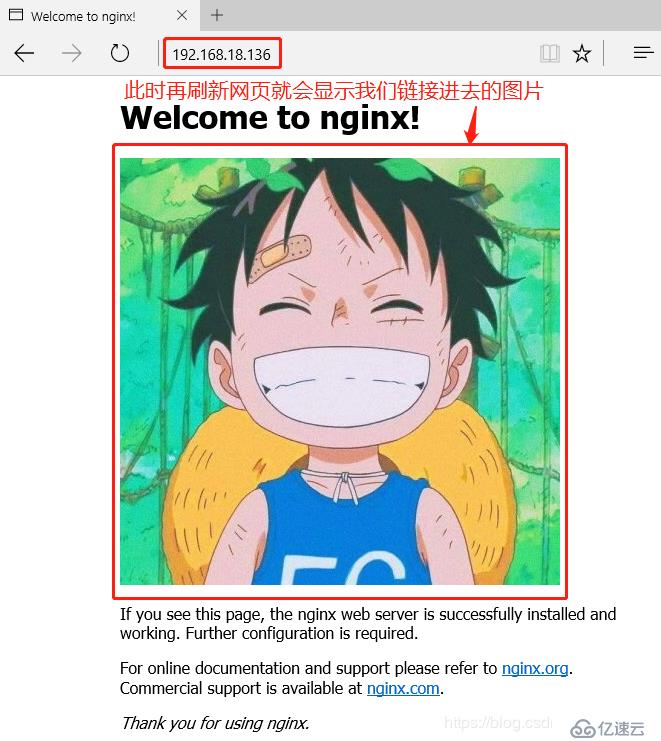
Welcome to nginx!
 //在welcome下一行插入图片行,格式如上,修改完后输入:wq保存退出
此时再刷新之前的网页就会出现我们链接进去的图片:
[root@nginx html]# vim /usr/local/nginx/conf/nginx.conf
//76行做如下修改:
location ~\.(gif|jepg|jpg|ico|bmp|png)$ {
            root html;
            expires 1d;
        }
    }

//在default_type下行插入以下内容:
http {
     include       mime.types;
     default_type  application/octet-stream;
     server_tokens on;

//在worker_connections下行插入以下内容:
events {
     worker_connections  1024;
 }
user nginx nginx;
//修改完成后按Esc退出插入模式,输入:wq保存退出
[root@nginx html]# service nginx stop
[root@nginx html]# service nginx start
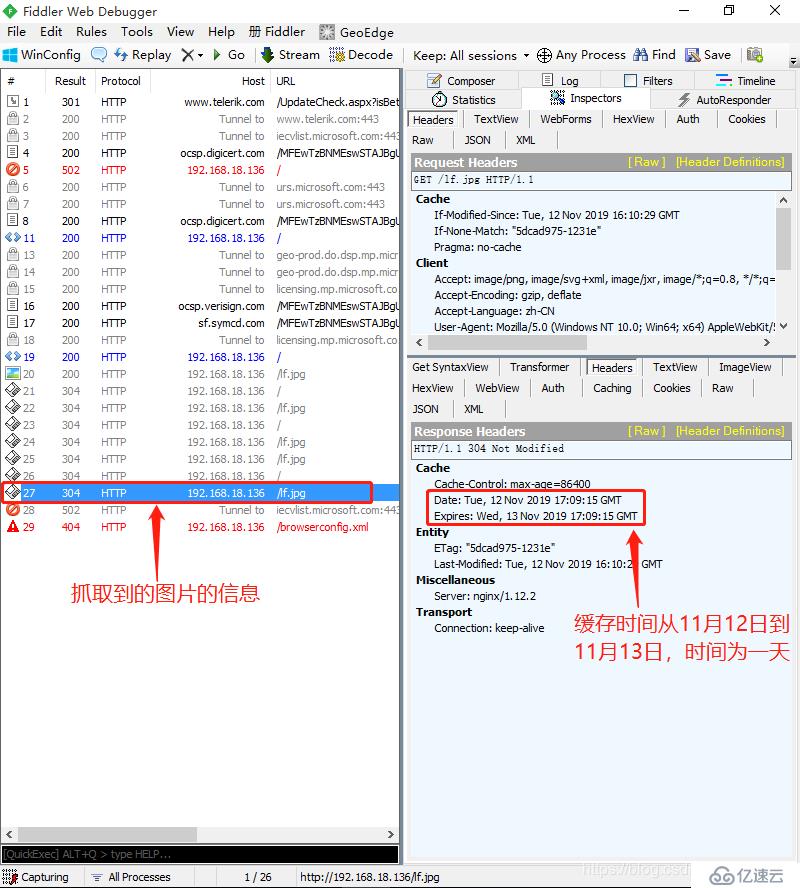
此时哦我们刷新网页,对图片进行抓包信息的查询,可以看到图片的缓存信息为:从2019年11月12日,到2019年的11月13日,缓存时间为一天
Nginx隐藏版本实例:
####方法一:隐藏版本号
[root@nginx ~]# curl -I http://192.168.18.136/
HTTP/1.1 200 OK
Server: nginx/1.12.2        //此处显示Nginx版本号
Date: Tue, 12 Nov 2019 20:59:15 GMT
Content-Type: text/html
Content-Length: 632
Last-Modified: Tue, 12 Nov 2019 16:39:13 GMT
Connection: keep-alive
ETag: "5dcae031-278"
Accept-Ranges: bytes
[root@nginx ~]# vim /usr/local/nginx/conf/nginx.conf
http {
    include       mime.types;
    default_type  application/octet-stream;
    server_tokens off;
//在default_type下一行插入以上内容,修改完成后按Esc后输入:wq保存退出
[root@nginx ~]# service nginx stop
[root@nginx ~]# service nginx start
[root@nginx ~]# curl -I http://192.168.18.136/
HTTP/1.1 200 OK
Server: nginx               //此时版本号被隐藏
Date: Tue, 12 Nov 2019 21:07:13 GMT
Content-Type: text/html
Content-Length: 632
Last-Modified: Tue, 12 Nov 2019 16:39:13 GMT
Connection: keep-alive
ETag: "5dcae031-278"
Accept-Ranges: bytes
方法二:伪造版本号
[root@nginx ~]# vim /usr/local/nginx/conf/nginx.conf
server_tokens on;       //把off改为on
//修改完成后按Esc退出插入模式,输入:wq保存退出
[root@nginx conf]# cd /opt
[root@nginx opt]# ls
fenge.sh  nginx-1.12.2  rh
[root@nginx opt]# cd nginx-1.12.2/
[root@nginx nginx-1.12.2]# ls
auto     CHANGES.ru  configure  html     Makefile  objs    src
CHANGES  conf        contrib    LICENSE  man       README
[root@nginx nginx-1.12.2]# cd src/
[root@nginx src]# ls
core  event  http  mail  misc  os  stream
[root@nginx src]# cd core/
[root@nginx core]# ls
nginx.c           ngx_cycle.h            ngx_output_chain.c    ngx_rwlock.c
nginx.h           ngx_file.c             ngx_palloc.c          ngx_rwlock.h
ngx_array.c       ngx_file.h             ngx_palloc.h          ngx_sha1.c
ngx_array.h       ngx_hash.c             ngx_parse.c           ngx_sha1.h
ngx_buf.c         ngx_hash.h             ngx_parse.h           ngx_shmtx.c
ngx_buf.h         ngx_inet.c             ngx_parse_time.c      ngx_shmtx.h
ngx_conf_file.c   ngx_inet.h             ngx_parse_time.h      ngx_slab.c
ngx_conf_file.h   ngx_list.c             ngx_proxy_protocol.c  ngx_slab.h
ngx_config.h      ngx_list.h             ngx_proxy_protocol.h  ngx_spinlock.c
ngx_connection.c  ngx_log.c              ngx_queue.c           ngx_string.c
ngx_connection.h  ngx_log.h              ngx_queue.h           ngx_string.h
ngx_core.h        ngx_md5.c              ngx_radix_tree.c      ngx_syslog.c
ngx_cpuinfo.c     ngx_md5.h              ngx_radix_tree.h      ngx_syslog.h
ngx_crc32.c       ngx_module.c           ngx_rbtree.c          ngx_thread_pool.c
ngx_crc32.h       ngx_module.h           ngx_rbtree.h          ngx_thread_pool.h
ngx_crc.h         ngx_murmurhash.c       ngx_regex.c           ngx_times.c
ngx_crypt.c       ngx_murmurhash.h       ngx_regex.h           ngx_times.h
ngx_crypt.h       ngx_open_file_cache.c  ngx_resolver.c
ngx_cycle.c       ngx_open_file_cache.h  ngx_resolver.h
//修改nginx.h内核文件,但是后期需要重新编译安装
[root@nginx core]# vim nginx.h
#define NGINX_VERSION      "1.1.5"
//修改完成后按Esc退出插入模式,输入:wq保存退出
[root@nginx core]# cd ../../
[root@nginx nginx-1.12.2]# ls
auto     CHANGES.ru  configure  html     Makefile  objs    src
CHANGES  conf        contrib    LICENSE  man       README
[root@nginx nginx-1.12.2]# ./configure \
--prefix=/usr/local/nginx \
--user=nginx \
--group=nginx \
--with-http_stub_status_module
[root@nginx nginx-1.12.2]# make && make install
[root@nginx nginx-1.12.2]# service nginx stop
[root@nginx nginx-1.12.2]# service nginx start
[root@nginx nginx-1.12.2]# curl -I http://192.168.18.136/
HTTP/1.1 200 OK
Server: nginx/1.1.5
Date: Tue, 12 Nov 2019 21:38:05 GMT
Content-Type: text/html
Content-Length: 632
Last-Modified: Tue, 12 Nov 2019 16:39:13 GMT
Connection: keep-alive
ETag: "5dcae031-278"
Accept-Ranges: bytes
//此时显示的版本号就是我们修改过的1.1.5下一篇:selinux初级管理
相关内容
热门资讯
空调连续工作多久需要停机休息
空调连续工作的时间取决于多个因素,包括空调的型号、功率、使用环境和维护情况等。一般来说,空调可以连续...
空调哪个符号是除湿的
空调除湿功能通常用一个水滴形状的符号表示。不同品牌和型号的空调遥控器可能会有所差异,但一般来说,除湿...
格力空调多长时间加一次氟利昂
1、一般情况下,空调对氟利昂的使用量是非常小的,所以在空调使用了四年左右的时候再考虑加也没问题。2、...
空调用多长时间需要加氟一次
一般情况下是五年。当出现以下这几种情况时,空调才需要加氟。1、空调的室内机和室外机各有两个接口,当接...
格调生活·C标思享荟:卡萨帝在...
9月12日的郑州龙湖金融岛,夜风轻拂,灯光璀璨。“C标时刻共传奇——卡萨帝思享荟暨20周年品牌盛典郑...
品牌价值破千亿、高端份额持续领...
9月12日,“C标时刻共传奇——卡萨帝思享荟暨20周年品牌盛典郑州站”在郑州龙湖金融岛举办。2026...
空调主板坏了修800还是换新的
空调主板坏了是修还是换新,需要考虑多个因素,以下是一些建议:1. 维修成本:如果维修费用较低,比如 ...
空调开多久需要休息多长时间
问题:空调开多久需要休息多长时间回答:1、在使用空调的过程中,一般空调开7~8个小时左右需要休息2~...
中央空调多长时间清洗一次
1、一般空调开机前清洗一次即可,空调开机中间时段再清洗一次,空调关机时清洗一次,这样比较合理。2、空...
中央空调氟利昂多久加一次
看空调制热和制冷程度,很多人的观点认为氟利昂必须一年放一次,其实这个观点是错误的,理解上面有点偏差,...