

Centos部署KVM虚拟化平台(可跟做)
admin
2023-02-26 19:21:38
0次
一、KVM概述
KVM是Kernel Virtual Machine的简写,目前Linux发行版必须在64位的系统环境才能运行KVM,同时硬件需要支持VT技术。
1、案例前置知识点
KVM自Linux2.6.20版本后就直接整合到Linux内核,它依托CPU虚拟化指令集(如Intel-VT、AMD-V)实现高性能的虚拟化支持。由于与Linux内核高度整合,因此在性能、安全性、兼容性、稳定性上都有很好的表现。
下图是一个简单的KVM虚拟化架构,在KVM环境中运行的每个虚拟化操作系统都将表现位单个独立的系统进程。因此它可以 很方便地与Linux系统中的安全模块进行整合(SELinux),可以灵活地实现资源的管理及分配。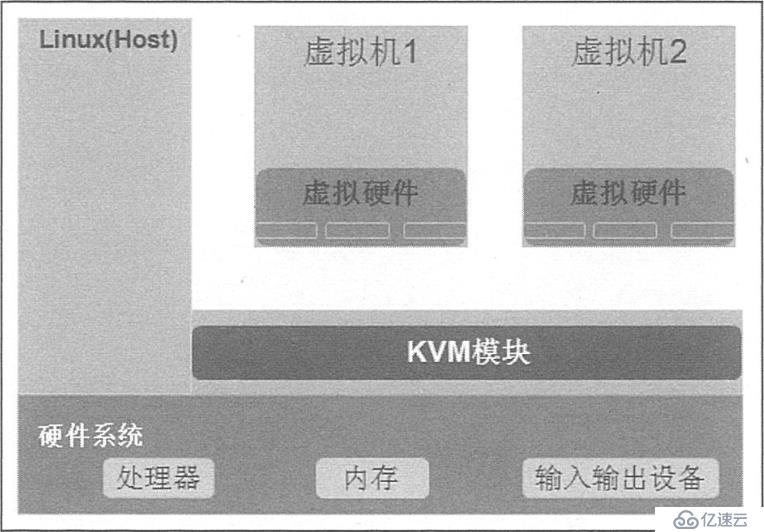
二、实施案例
1、环境需求:
- Centos操作系统3台;
- Windiws 7操作系统1台;
所需镜像和工具请访问:https://pan.baidu.com/s/1fPhMgWJAjnmgJI5w267QCA
提取码:7x2p
2、编辑虚拟机支持虚拟化
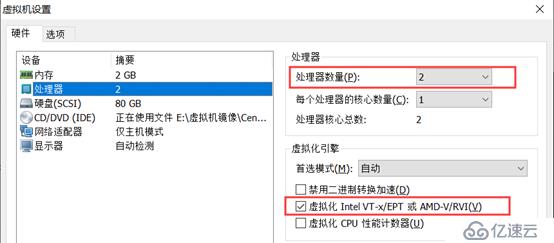
1)修改处理器为2个,勾选虚拟化引擎
2)检查CPU是否支持虚拟化
[root@centos01 ~]# cat /proc/cpuinfo | grep vmx
flags       : fpu vme de pse tsc msr pae mce cx8 apic sep mtrr pge mca cmov pat pse36 clflush dts mmx fxsr sse sse2 ss syscall nx pdpe1gb rdtscp lm constant_tsc arch_perfmon pebs bts nopl xtopology tsc_reliable nonstop_tsc aperfmperf eagerfpu pni pclmulqdq vmx ssse3 fma cx16 pcid sse4_1 sse4_2 x2apic movbe popcnt tsc_deadline_timer aes xsave avx f16c rdrand hypervisor lahf_lm abm 3dnowprefetch epb tpr_shadow vnmi ept vpid fsgsbase tsc_adjust bmi1 avx2 smep bmi2 invpcid rdseed adx smap xsaveopt dtherm ida arat pln pts hwp hwp_notify hwp_act_window hwp_epp
flags       : fpu vme de pse tsc msr pae mce cx8 apic sep mtrr pge mca cmov pat pse36 clflush dts mmx fxsr sse sse2 ss syscall nx pdpe1gb rdtscp lm constant_tsc arch_perfmon pebs bts nopl xtopology tsc_reliable nonstop_tsc aperfmperf eagerfpu pni pclmulqdq vmx ssse3 fma cx16 pcid sse4_1 sse4_2 x2apic movbe popcnt tsc_deadline_timer aes xsave avx f16c rdrand hypervisor lahf_lm abm 3dnowprefetch epb tpr_shadow vnmi ept vpid fsgsbase tsc_adjust bmi1 avx2 smep bmi2 invpcid rdseed adx smap xsaveopt dtherm ida arat pln pts hwp hwp_notify hwp_act_window hwp_epp
3、安装KVM所需软件
[root@centos01 ~]# ln -sf /lib/systemd/system/graphical.target
/etc/systemd/system/default.target

[root@centos01 ~]# rm -rf /etc/yum.repos.d/CentOS-*

[root@centos01 ~]# mount /dev/cdrom /mnt/
mount: /dev/sr0 写保护,将以只读方式挂载
[root@centos01 ~]# rpm -qa | grep qemu-kvm
qemu-kvm-1.5.3-141.el7.x86_64
qemu-kvm-common-1.5.3-141.el7.x86_64
[root@centos01 ~]# rpm -qa | grep qemu-kvm-tools
[root@centos01 ~]# yum -y install qemu-kvm-tools
[root@centos01 ~]# rpm -qa | grep qemu-kvm-tools
qemu-kvm-tools-1.5.3-141.el7.x86_64
[root@centos01 ~]# rpm -qa | grep virt-install

[root@centos01 ~]# yum -y install virt-install
[root@centos01 ~]# rpm -qa | grep virt-install
virt-install-1.4.1-7.el7.noarch
[root@centos01 ~]# rpm -qa | grep qemu-img
qemu-img-1.5.3-141.el7.x86_64
[root@centos01 ~]# rpm -qa | grep bridge-utils
bridge-utils-1.5-9.el7.x86_64
[root@centos01 ~]# rpm -qa | grep libvirt
libvirt-daemon-driver-qemu-3.2.0-14.el7.x86_64
libvirt-client-3.2.0-14.el7.x86_64
libvirt-daemon-driver-interface-3.2.0-14.el7.x86_64
libvirt-daemon-driver-storage-disk-3.2.0-14.el7.x86_64
libvirt-daemon-driver-storage-3.2.0-14.el7.x86_64
libvirt-daemon-driver-storage-core-3.2.0-14.el7.x86_64
libvirt-daemon-driver-storage-mpath-3.2.0-14.el7.x86_64
libvirt-daemon-driver-storage-iscsi-3.2.0-14.el7.x86_64
libvirt-daemon-kvm-3.2.0-14.el7.x86_64
libvirt-daemon-driver-nodedev-3.2.0-14.el7.x86_64
libvirt-gconfig-1.0.0-1.el7.x86_64
libvirt-daemon-driver-storage-rbd-3.2.0-14.el7.x86_64
libvirt-daemon-driver-storage-scsi-3.2.0-14.el7.x86_64
libvirt-libs-3.2.0-14.el7.x86_64
libvirt-daemon-driver-network-3.2.0-14.el7.x86_64
libvirt-daemon-driver-nwfilter-3.2.0-14.el7.x86_64
libvirt-glib-1.0.0-1.el7.x86_64
libvirt-daemon-driver-storage-gluster-3.2.0-14.el7.x86_64
libvirt-daemon-3.2.0-14.el7.x86_64
libvirt-daemon-config-network-3.2.0-14.el7.x86_64
libvirt-gobject-1.0.0-1.el7.x86_64
libvirt-daemon-driver-storage-logical-3.2.0-14.el7.x86_64
libvirt-python-3.2.0-3.el7.x86_64
libvirt-daemon-driver-secret-3.2.0-14.el7.x86_64
[root@centos01 ~]# rpm -qa | grep virt-manager
virt-manager-common-1.4.1-7.el7.noarch
[root@centos01 ~]# yum -y install virt-manager
[root@centos01 ~]# rpm -qa | grep virt-manager

virt-manager-1.4.1-7.el7.noarch
virt-manager-common-1.4.1-7.el7.noarch
[root@centos01 ~]# lsmod | grep kvm
kvm_intel             170086  0
kvm                   566340  1 kvm_intel
irqbypass              13503  1 kvm
[root@centos01 ~]# systemctl start libvirtd
[root@centos01 ~]# systemctl enable libvirtd
4、使用WinSCP工具导入镜像
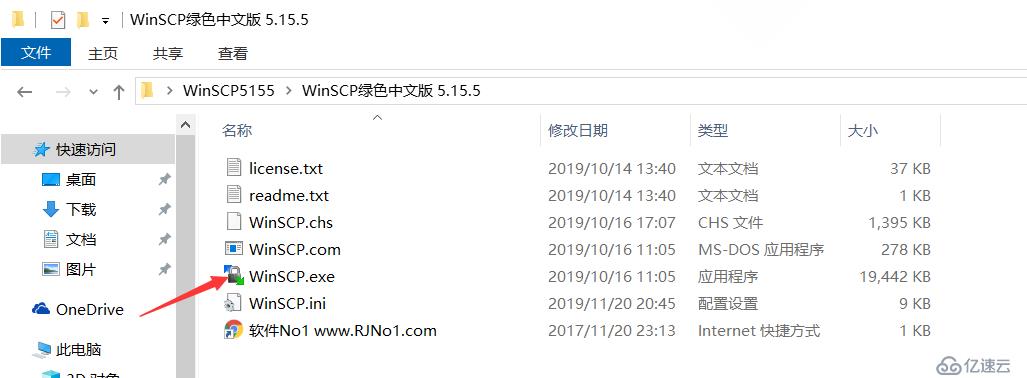
1)使用winSCP将操作系统光盘导入到虚拟化管理器中(工具请访问网盘自行提取)
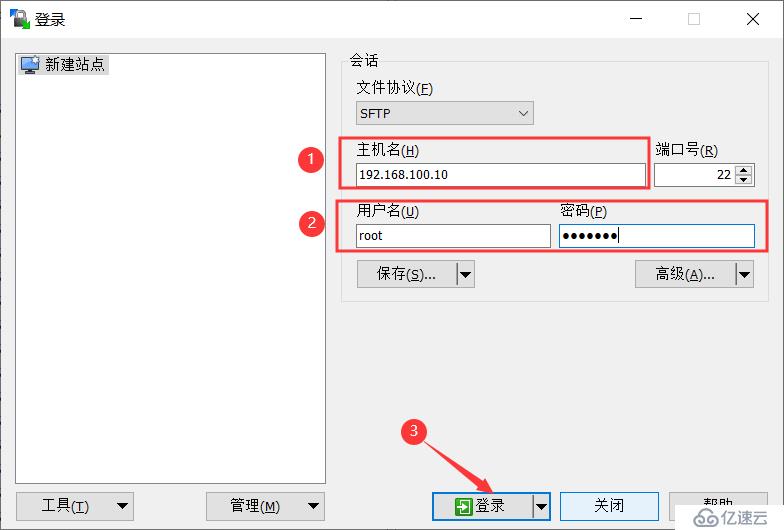
2)输入IP地址和用户名密码,登录即可
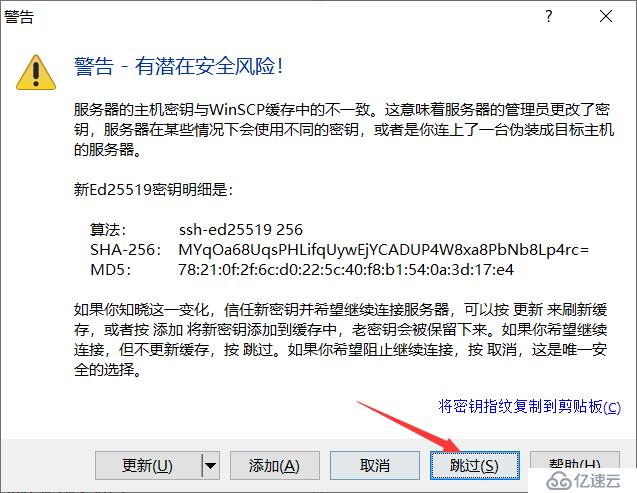
3)跳过警告即可
4)导入操作系统
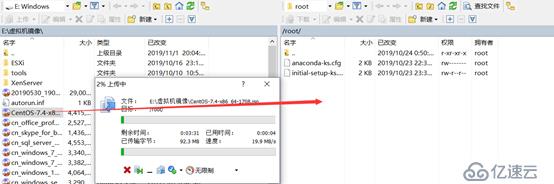
5)验证是否上传成功
[root@centos01 ~]# pwd
/root
[root@centos01 ~]# ls
anaconda-ks.cfg  CentOS-7.4-x86_64-1708.iso  initial-setup-ks.cfg
5、虚拟化管理器创建虚拟机
1)打开虚拟化管理器
[root@centos01 ~]# virt-manager
2)创建新的虚拟机

3)浏览操作系统光盘
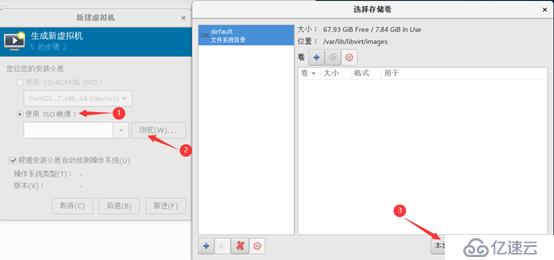
4)选择光盘
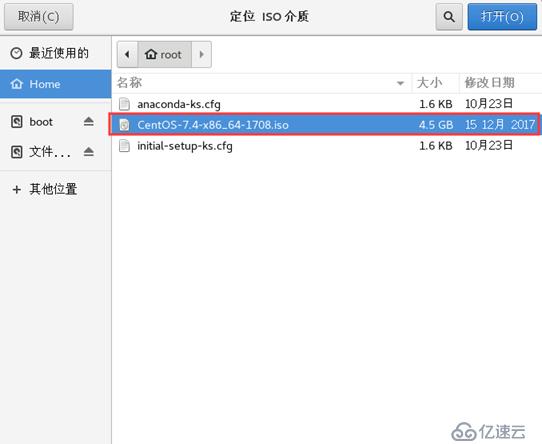
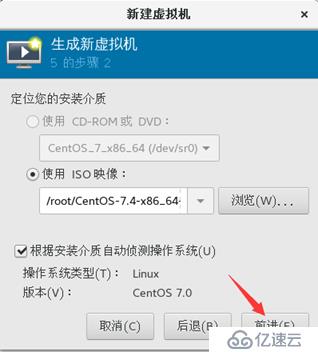
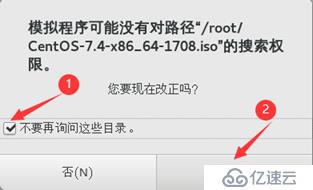
5)保持默认,单击前进即可
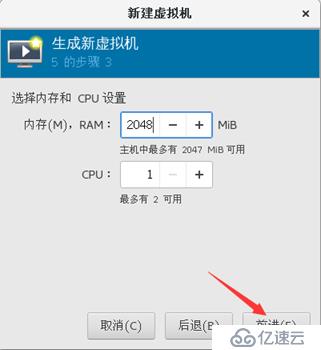
6)自定义内存大小
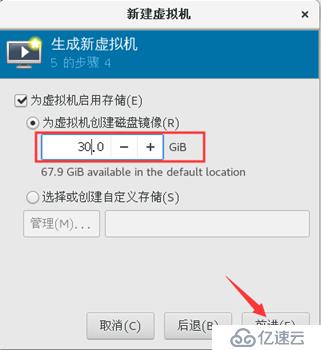
7)自定义磁盘大小
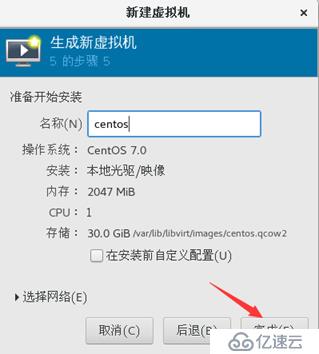
8)自定义虚拟机名称,单击完成即可
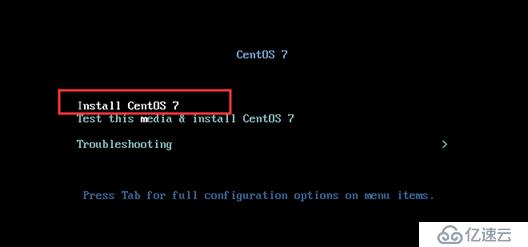
9)选择第一行,回车键开始安装
10)开始初始化配置
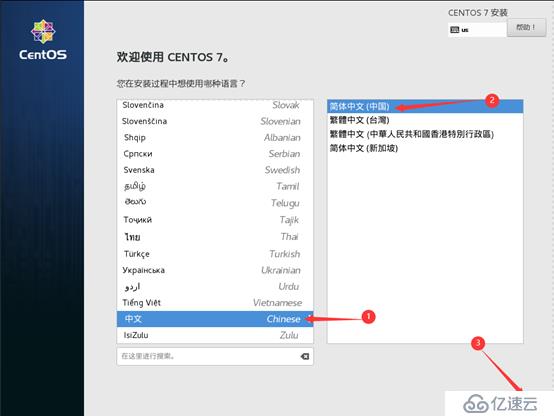
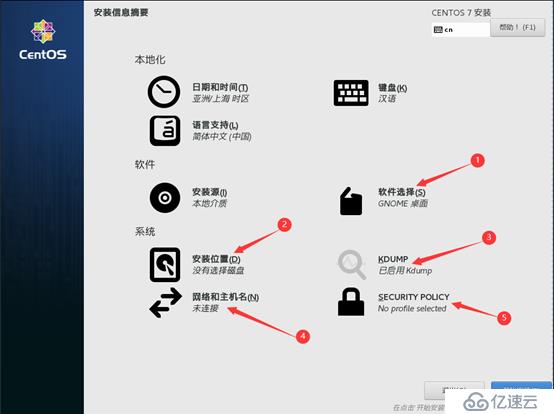
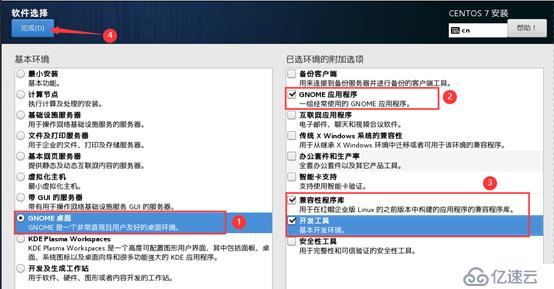

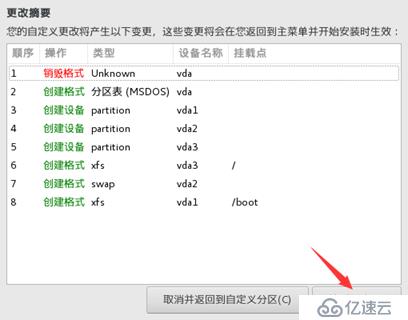
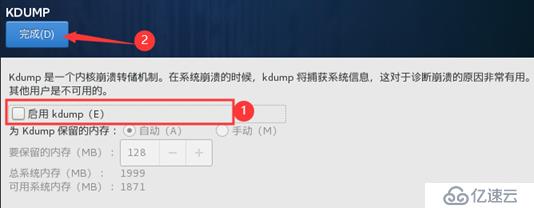
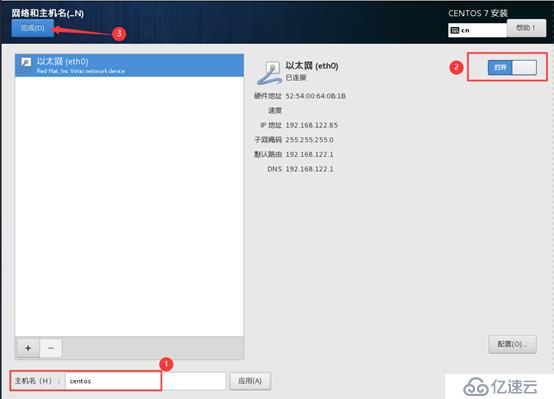
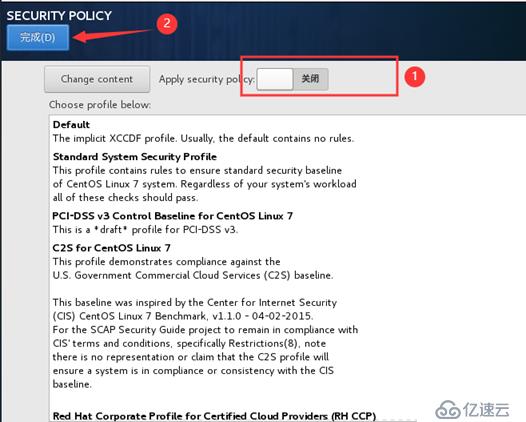
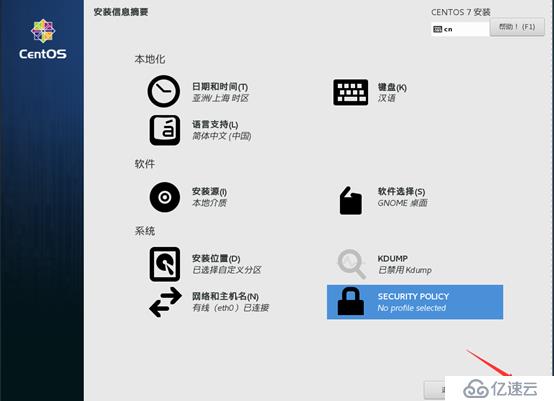
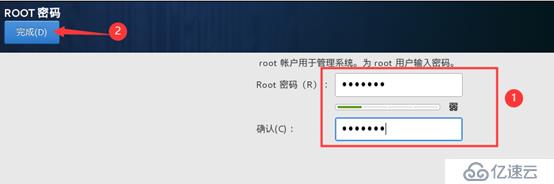
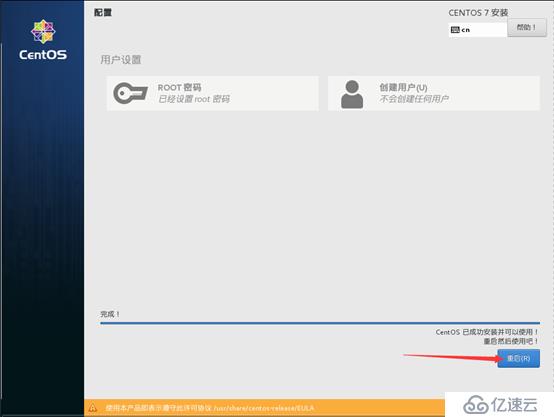
11)安装完成,重启虚拟机
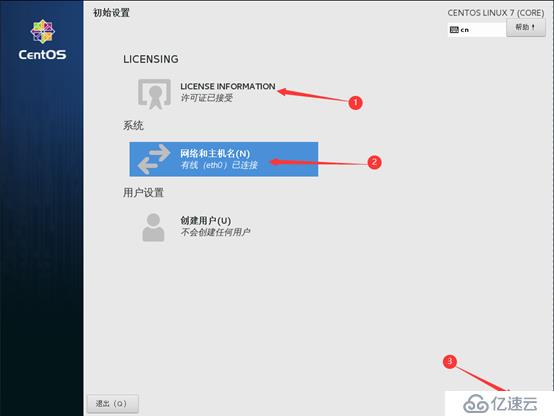
12)接受许可协议
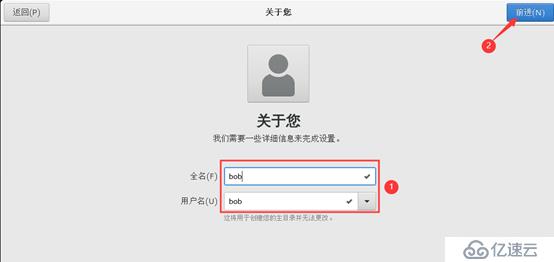
13)创建账户
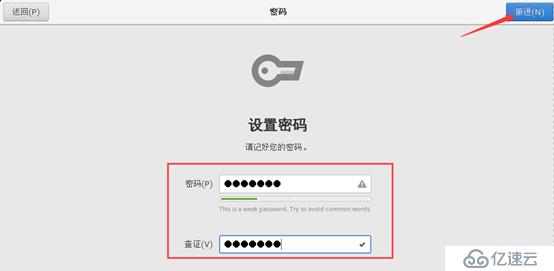
14)账户设置密码
三、虚拟化的基本管理使用
1)查看虚拟机运行状态
[root@centos01 ~]# virsh list --all
 Id    名称                         状态
----------------------------------------------------
 2     centos                         running
2)关闭虚拟机
[root@centos01 ~]# virsh shutdown centos
域 centos 被关闭
3)启动虚拟机
[root@centos01 ~]# virsh start centos
域 centos 已开始
4)设置虚拟机开机自动启动
[root@centos01 ~]# virsh autostart centos
域 centos标记为自动开始
5)强制关闭虚拟机
[root@centos01 ~]# virsh destroy centos
域 centos 被删除
1、挂起和恢复虚拟机
1)挂起虚拟机
[root@centos01 ~]# virsh suspend centos
域 centos 被挂起
2)恢复挂起的虚拟机
[root@centos01 ~]# virsh resume centos
域 centos 被重新恢复
2、备份恢复虚拟机
1)备份虚拟机
[root@centos01 ~]# virsh dumpxml centos > /etc/libvirt/qemu/centos01.xml2)删除虚拟机
[root@centos01 ~]# virsh undefine centos
域 centos 已经被取消定义
3)查看备份的虚拟机
[root@centos01 ~]# cd /etc/libvirt/qemu/
[root@centos01 qemu]# ls
autostart  centos01.xml  networks
4)恢复虚拟机
[root@centos01 qemu]# virsh define centos01.xml
定义域 centos(从 centos01.xml)
5)查看恢复虚拟机的运行状态
[root@centos01 ~]# virsh list --all
 Id    名称                         状态
----------------------------------------------------
 4     centos                         running
6)修改虚拟机配置文件的两种方法
[root@centos01 ~]# vim /etc/libvirt/qemu/centos.xml
[root@centos01 ~]# virsh edit centos
3、克隆和快照
1)克隆虚拟机
[root@centos01 ~]# virsh shutdown centos
域 centos 被关闭
[root@centos01 ~]# virt-clone -o centos -n centos02 -f /var/lib/libvirt/images/centos02.qcow2
正在分配 'centos02.qcow2'                      |  30 GB  00:11

成功克隆 'centos02'。
2)创建快照
[root@centos01 ~]# virsh snapshot-create centos
已生成域快照 1574274181
3)恢复快照
[root@centos01 ~]# virsh snapshot-revert centos 15742741814)查看快照
[root@centos01 ~]# virsh snapshot-list centos
 名称               生成时间              状态
------------------------------------------------------------
 1574274181           2019-11-21 02:23:01 +0800 shutoff
5)删除快照
[root@centos01 ~]# virsh snapshot-delete centos 1574274181
已删除域快照 1574274181

[root@centos01 ~]# virsh snapshot-list centos
 名称               生成时间              状态
------------------------------------------------------------
—————— 本文至此结束,感谢阅读 ——————
下一篇:企业级监控系列
相关内容
热门资讯
空调连续工作多久需要停机休息
空调连续工作的时间取决于多个因素,包括空调的型号、功率、使用环境和维护情况等。一般来说,空调可以连续...
空调哪个符号是除湿的
空调除湿功能通常用一个水滴形状的符号表示。不同品牌和型号的空调遥控器可能会有所差异,但一般来说,除湿...
格力空调多长时间加一次氟利昂
1、一般情况下,空调对氟利昂的使用量是非常小的,所以在空调使用了四年左右的时候再考虑加也没问题。2、...
空调用多长时间需要加氟一次
一般情况下是五年。当出现以下这几种情况时,空调才需要加氟。1、空调的室内机和室外机各有两个接口,当接...
格调生活·C标思享荟:卡萨帝在...
9月12日的郑州龙湖金融岛,夜风轻拂,灯光璀璨。“C标时刻共传奇——卡萨帝思享荟暨20周年品牌盛典郑...
品牌价值破千亿、高端份额持续领...
9月12日,“C标时刻共传奇——卡萨帝思享荟暨20周年品牌盛典郑州站”在郑州龙湖金融岛举办。2026...
空调主板坏了修800还是换新的
空调主板坏了是修还是换新,需要考虑多个因素,以下是一些建议:1. 维修成本:如果维修费用较低,比如 ...
空调开多久需要休息多长时间
问题:空调开多久需要休息多长时间回答:1、在使用空调的过程中,一般空调开7~8个小时左右需要休息2~...
中央空调多长时间清洗一次
1、一般空调开机前清洗一次即可,空调开机中间时段再清洗一次,空调关机时清洗一次,这样比较合理。2、空...
中央空调氟利昂多久加一次
看空调制热和制冷程度,很多人的观点认为氟利昂必须一年放一次,其实这个观点是错误的,理解上面有点偏差,...