

Windows10 安装kali linux子系统
admin
2023-02-23 02:40:06
0次
先出结论:不建议win 10 子系统安装kali linux, 很多***测试工具会被windows defender直接作为***文件删除。
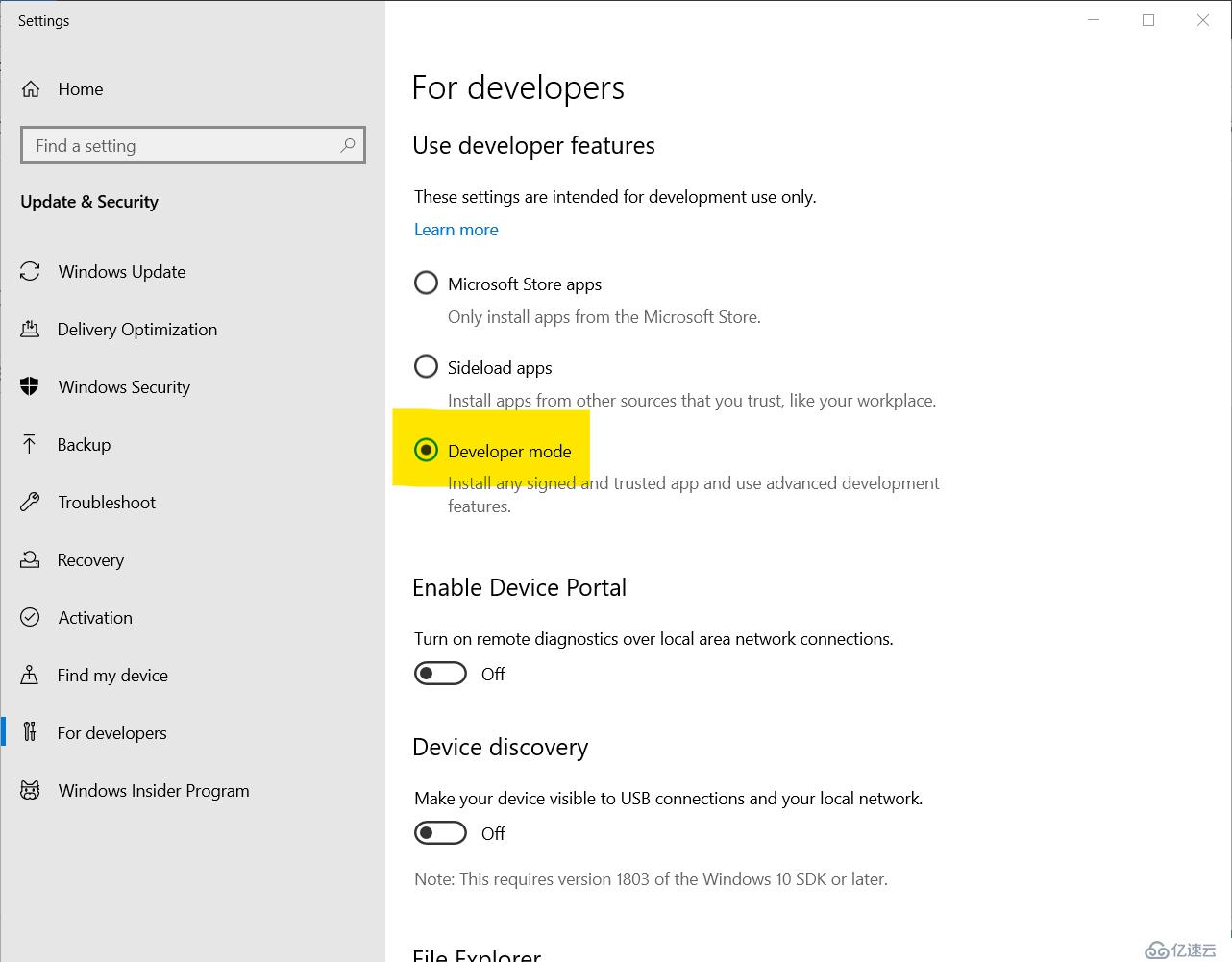
- 打开windows开发人员模式 (搜索 developer mode并选择打开)
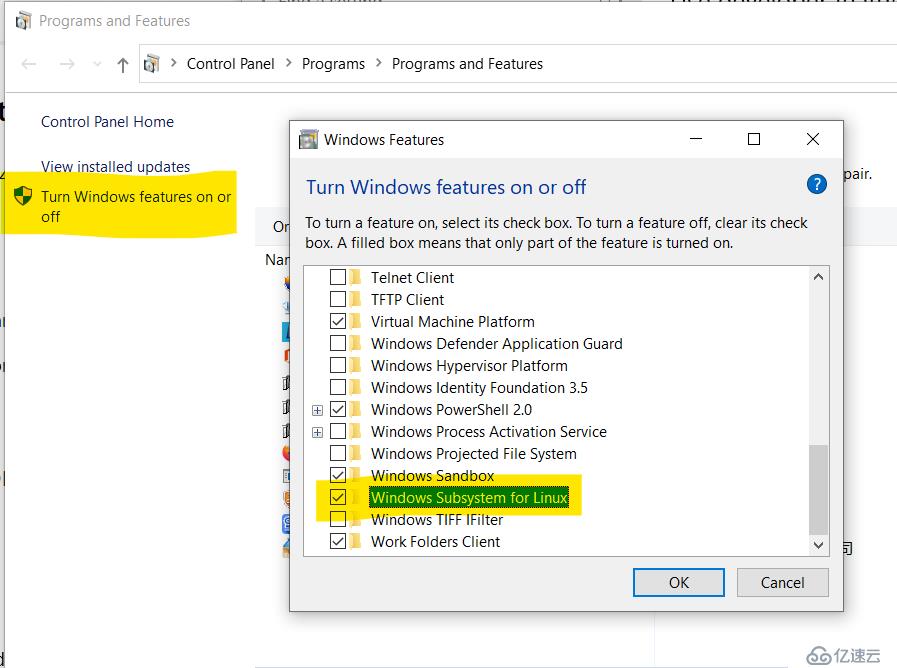
- 打开windows子系统功能,并按照要求重启
- Windows应用商店搜索kali 并安装。这是一个漫长长长长长长长长长长的等待过程……
- 安装完成后设置用户名为kali,设置密码,至此命令行kali安装完成。
-
安装并启用桌面
apt-get install xrdp
wget https://kali.sh/xfce4.sh   #下载有问题的,请参考文章末尾的内容自行创建文件
sudo sh xfce4.sh
sudo /etc/init.d/xrdp start - 编辑 /etc/xrdp/xrdp.ini ,将3389更改为3390
- 打开win10自带的远程桌面软件,输入127.0.0.1:3390,用户名和密码,停止桌面
sudo /etc/init.d/xrdp stop - 安装完整的***测试工具
1.apt-get update
2.apt-get install kali-linux-full
对于无法下载x4ce4.sh的同学,请直接创建文件,并加入下列内容:
#!/bin/bash

# A quick BASH script that installs noVNC and sets up an Xfce4 session,
# accessible through a browser on port 5901 TCP. Tested against Kali Linux Xfce4 "full" installations.
# If running this on Azure or other virtual hosting, don't foret to allow ingress TCP 5901 .

# Configure the following parameters if needed:
###############################################
resolution="1280x720x16"
display_number=1
web_vnc_port=5901
###############################################

clear
echo -e "\n[*] Setting up \e[31mKali in a Browser\e[0m, generating ~/start.sh\n"
sleep 2
cat << EOF > ~/start.sh
#!/bin/bash
clear
echo -e "\e[31m\n[*] Starting up noVNC.\e[0m"
export DISPLAY=:$display_number
Xvfb :$display_number -screen 0 $resolution &
sleep 5
# Start up Xfce is available, otherwise assume Gnome
if [ -f /etc/xdg/xfce4/xinitrc ]; then
    startxfce4 2>/dev/null &
fi
x11vnc -display :$display_number -shared -nopw -listen localhost -xkb -bg -ncache_cr -forever
websockify --web /usr/share/novnc $web_vnc_port 127.0.0.1:5900 --cert=self.pem -D
ip="\$(host -t a myip.opendns.com resolver1.opendns.com|tail -1 |cut -d" " -f4)"
echo -e "\e[31m\n[*] Kali in a Browser is set up, you can access https://\$ip:$web_vnc_port\e[0m"
echo -e "[*] Don't forget to open up incoming port TCP $web_vnc_port if you have a firewalled host.".
EOF

chmod 755 ~/start.sh
clear
echo -e "\n[+] Installing pre-requisites, enter sudo password if asked.\n"
sleep 2
sudo apt-get update
sudo apt-get -y dist-upgrade
sudo apt-get -y install novnc websockify x11vnc xvfb
sudo apt-get clean
sudo ln -s /usr/share/novnc/vnc.html /usr/share/novnc/index.html
clear

echo -e "\n[+] Generating SSL cert. Please fill in details, then run \e[31m./start.sh\e[0m\n"
sleep 2
openssl req -new -x509 -days 365 -nodes -out self.pem -keyout self.pem
上一篇:job的简单配置和简易测试
下一篇:Linux MFS分布式文件系统
相关内容
热门资讯
空调连续工作多久需要停机休息
空调连续工作的时间取决于多个因素,包括空调的型号、功率、使用环境和维护情况等。一般来说,空调可以连续...
空调哪个符号是除湿的
空调除湿功能通常用一个水滴形状的符号表示。不同品牌和型号的空调遥控器可能会有所差异,但一般来说,除湿...
格力空调多长时间加一次氟利昂
1、一般情况下,空调对氟利昂的使用量是非常小的,所以在空调使用了四年左右的时候再考虑加也没问题。2、...
空调用多长时间需要加氟一次
一般情况下是五年。当出现以下这几种情况时,空调才需要加氟。1、空调的室内机和室外机各有两个接口,当接...
格调生活·C标思享荟:卡萨帝在...
9月12日的郑州龙湖金融岛,夜风轻拂,灯光璀璨。“C标时刻共传奇——卡萨帝思享荟暨20周年品牌盛典郑...
品牌价值破千亿、高端份额持续领...
9月12日,“C标时刻共传奇——卡萨帝思享荟暨20周年品牌盛典郑州站”在郑州龙湖金融岛举办。2026...
空调主板坏了修800还是换新的
空调主板坏了是修还是换新,需要考虑多个因素,以下是一些建议:1. 维修成本:如果维修费用较低,比如 ...
空调开多久需要休息多长时间
问题:空调开多久需要休息多长时间回答:1、在使用空调的过程中,一般空调开7~8个小时左右需要休息2~...
中央空调多长时间清洗一次
1、一般空调开机前清洗一次即可,空调开机中间时段再清洗一次,空调关机时清洗一次,这样比较合理。2、空...
中央空调氟利昂多久加一次
看空调制热和制冷程度,很多人的观点认为氟利昂必须一年放一次,其实这个观点是错误的,理解上面有点偏差,...